Sarrera
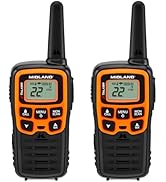
This manual provides comprehensive instructions for the setup, operation, maintenance, and troubleshooting of your Midland T10 X-TALKER Two-Way Radios. These radios offer reliable communication with 22 FRS channels and 38 privacy codes, along with NOAA Weather Alert capabilities, making them suitable for various outdoor activities and general use.
Kutxan dagoena
Your Midland T10 X-TALKER package includes the following items:
- Two (2) Midland T10 X-TALKER Two-Way Radios
- Bi (2) gerriko-klip
- One (1) Owner's Manual

Irudiaren deskribapena: Goitik behera bat view of the package contents, showing two black Midland X-TALKER radios, two black belt clips, and an owner's manual, all neatly arranged.
Ezaugarriak amaitu diraview
The Midland T10 X-TALKER radios are designed for clear and efficient communication with several key features:
- 22 FRS kanal: Provides a wide range of communication options.
- 38 CTCSS Privacy Codes: Enhances communication privacy by filtering out unwanted transmissions.
- NOAAren Eguraldi Eskaneatzea + Alerta: Automatically scans 10 weather band channels and alerts you to severe weather.
- eVOX (Easy Voice and Sound Activated Transmission): Eskurik gabe erabiltzeko aukera ematen du.
- Komunikazioa distantzia luzean: Optimized for extended range in open areas.
- Diseinu trinkoa eta arina: Erraza eramateko eta maneiatzeko.
- Argiztatutako LCD pantaila: Provides visibility in low-light conditions.

Irudiaren deskribapena: Gertu bat view of the Midland T10 X-TALKER radio, with key features labeled: Push to Talk Button, Channel Display, VOX - Hands-Free Communication, Battery Meter, Menu, Scan, Silent Operation, and WX (Weather) button.
Konfigurazioa
Bateriaren instalazioa
The Midland T10 radios are designed to operate with a rechargeable Li-ion battery (Model: BL-10C, 3.7V/1200mAh). To install the battery:
- Remove the belt clip by pinching the release tab and sliding the clip upwards.
- Ireki irratiaren atzealdean dagoen bateriaren konpartimentuaren estalkia.
- Insert the BL-10C Li-ion battery into the compartment, ensuring correct polarity.
- Replace the battery compartment cover and reattach the belt clip.
Bateria kargatzen
To charge your Midland T10 radio:
- Locate the USB-C charging port on the side of the radio, protected by a rubber flap.
- Connect the provided USB-C charging cable to the radio's charging port.
- Konektatu USB kablearen beste muturra USB elikatze-iturri bateragarri batera (adibidez, hormako egokitzailea, ordenagailuko USB ataka).
- LCD pantailan bateriaren adierazleak kargatze-egoera erakutsiko du.
Bideoaren deskribapena: A user demonstrates how to remove the belt clip, open the battery compartment, insert the rechargeable Li-ion battery, and then connect the USB-C charging cable to the radio. The video also shows the battery specifications on the battery itself.
Oinarrizko Funtzionamendua
Piztu/Itzali
To power on or off the radio, press and hold the MENU/POTENCIA button located below the display.
Bolumen kontrola
Doitu bolumena UP eta BEHERA arrow buttons. The current volume level will be displayed on the screen.
Kanalaren hautaketa
Kanal bat hautatzeko:
- Sakatu MENUA botoia behin. Kanalaren zenbakia keinuka hasiko da.
- Erabili UP or BEHERA arrow buttons to select your desired channel (1-22).
- Sakatu MENUA button again to confirm your selection, or wait a few seconds for the radio to automatically confirm.
Push-to-Talk (PTT)
Transmititzeko, sakatu eta eutsi botoiari PTT button located on the left side of the radio. Speak clearly into the microphone. Release the PTT button to receive transmissions.
Ezaugarri aurreratuak
Pribatutasun Kodeak (CTCSS)
The T10 radios feature 38 CTCSS (Continuous Tone Coded Squelch System) Privacy Codes to minimize interference from other users on the same channel. To set a privacy code:
- Sakatu MENUA botoia bi aldiz sakatu. Pribatutasun-kodearen zenbakia keinuka hasiko da.
- Erabili UP or BEHERA arrow buttons to select your desired privacy code (1-38).
- Sakatu MENUA button again to confirm, or wait for automatic confirmation.
Oharra: Bi irratiak kanal eta pribatutasun-kode berean egon behar dira komunikatzeko.
NOAA Eguraldiaren Miaketa + Alerta
Stay informed about weather conditions with the NOAA Weather Scan and Alert feature:
- Weather Scan: Eduki sakatuta WX button to activate NOAA Weather Scan. The radio will automatically scan through 10 available weather (WX) band channels and lock onto the strongest weather channel.
- Eguraldi alerta: When activated, the NOAA Weather Alert will sound an alarm indicating a risk of severe weather in your area. NOAA Weather Radio also broadcasts AMBER alerts.
eVOX (Eskurik gabeko funtzionamendua)
The eVOX feature allows you to transmit without pressing the PTT button. The radio detects your voice and automatically transmits. Refer to the owner's manual for detailed eVOX sensitivity settings.
Eremua eta Errendimendua
The Midland T10 X-TALKER radios offer varying ranges depending on terrain and obstructions:
- No Obstruction: Up to 20 miles in open areas with clear line of sight.
- Partial Obstruction: 2-5 miles in areas with some trees or light buildings.
- Oztopoak: Less than 1 mile in urban areas with heavy buildings or dense foliage.
Irudiaren deskribapena: A diagram showing three scenarios for radio range: 'No Obstruction' (up to 20 miles), 'Partial Obstruction' (2-5 miles with trees), and 'Obstructed' (less than 1 mile with city buildings). Actual distance may vary.
Bideoaren deskribapena: Produktu ofizialaren bideo emanaldiaasing the Midland X-TALKER T10 walkie-talkie, highlighting its features and ease of use for various communication needs.
Mantentzea
To ensure optimal performance and longevity of your Midland T10 radios:
- Garbiketa: Erabili biguna, damp cloth to clean the radio's exterior. Do not use harsh chemicals or abrasive cleaners.
- Bateria zaintzea: Fully charge batteries before extended storage. If storing for long periods, remove batteries.
- Biltegiratzea: Store radios in a cool, dry place away from extreme temperatures and direct sunlight.
- Uraren erresistentzia: The radios are water resistant. Avoid submerging them in water. Ensure the USB-C port cover is securely closed when not charging.
Arazoak konpontzea
If you experience issues with your Midland T10 radios, try the following:
- Potentziarik gabe: Check battery charge level. Ensure batteries are correctly installed.
- Ezin da transmititu/jaso: Verify both radios are on the same channel and privacy code. Ensure the PTT button is fully pressed when transmitting. Check for obstructions if range is limited.
- Static/Poor Audio: Move to an area with fewer obstructions. Adjust volume. Try a different channel.
- Teklatua blokeatuta: If the keypad is locked, press and hold the lock button (usually the MENU button) until the lock icon disappears from the display.
Zehaztapenak
| Elementuaren pisua | 2.7 ontza |
| Produktuaren neurriak | 2 x 1.2 x 5.5 hazbete |
| Elementuaren eredu-zenbakia | T10 |
| Bateria mota | Rechargeable Li-ion (BL-10C, 3.7V/1200mAh) |
| Kanal kopurua | 22 |
| Maiztasun barrutia | 400-512 MHz |
| Hitz egiteko tartea gehienez | 20 Miles (in optimal conditions) |
| Uraren Erresistentzia Maila | Urarekiko erresistentea |
| Fabrikatzailea | Midland |
Bermea eta Laguntza
The Midland T10 X-TALKER Two-Way Radios come with a Three Year Warranty. For warranty claims, technical support, or additional information, please refer to the contact details provided in your owner's manual or visit the official Midland webgunea.


