1. Sarrera
This manual provides detailed instructions for the VIZIO SB2920-C6 29-inch 2.0 Channel Sound Bar. This sound bar is designed to enhance your audio experience for television, music, and home theater content. It features two full-range stereo speakers and DTS audio technologies for improved sound quality. The compact and streamlined design allows for versatile placement options.
2. Zer dago kutxan
Konfigurazioarekin jarraitu aurretik, egiaztatu osagai guztiak daudela.
- VIZIO SB2920-C6 29 hazbeteko 2.0 kanaleko soinu-barra
- Urruneko Kontrola
- 2 x AAA bateria (urrutiko agintearentzat)
- Audio kable optikoa
- Digital Coaxial Cable
- Estereo RCA kableak
- Elikatze-kablea
3. Produktua amaitu daview
3.1 Aurrealdea View

1. irudia: Aurrealdea view of the VIZIO SB2920-C6 Sound Bar, showcasinbere diseinu dotore eta beltza.
3.2 Goiko paneleko kontrolak

Figure 2: Close-up of the top panel, showing buttons for Power, Input, Bluetooth Pairing, Volume Down, and Volume Up.
3.3 Atzeko panelaren konexioak

3 irudia: Atzealde osoa view of the sound bar, illustrating all available input and output ports.

Figure 4: Close-up of the rear panel showing AUX (1) and AUX (2) input ports.
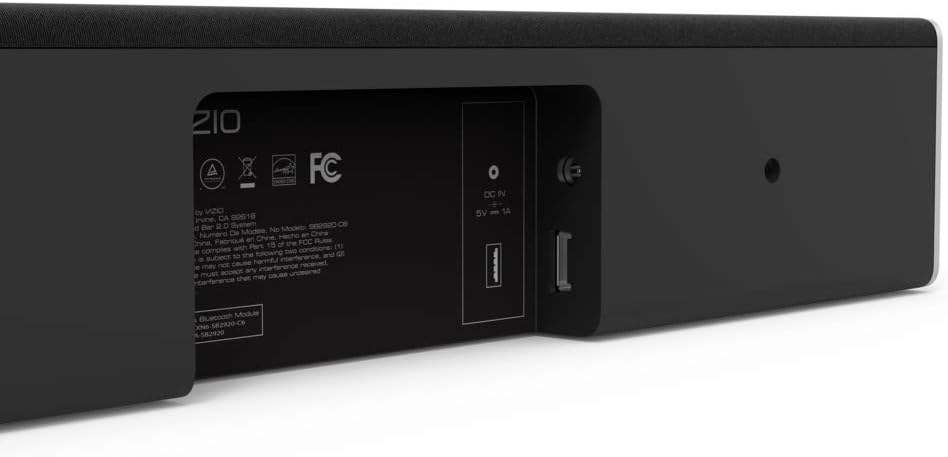
Figure 5: Close-up of the rear panel showing DIGITAL (Coaxial), OPTICAL, and SUB OUT ports.
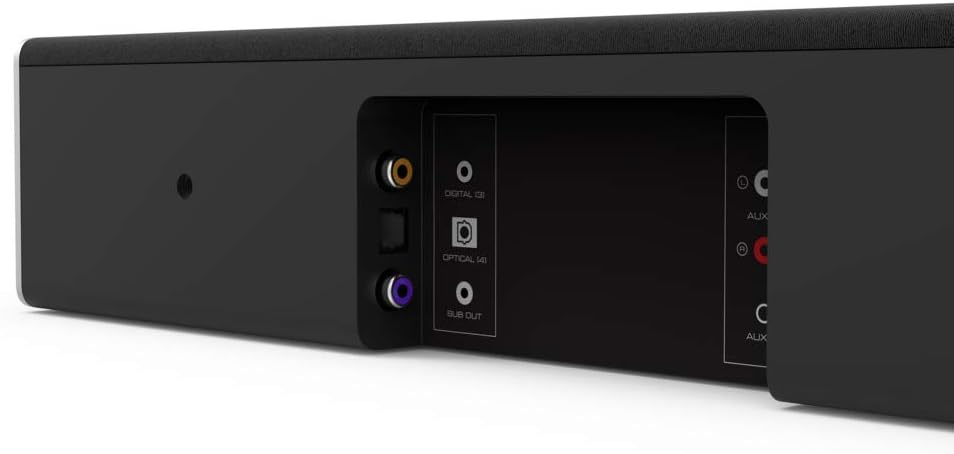
Figure 6: Close-up of the rear panel showing DC IN (power) and USB (Service Only) ports.
3.4 Neurriak

Figure 7: Diagram illustrating the dimensions of the VIZIO SB2920-C6 Sound Bar: 3 inches Depth x 29 inches Width x 3 inches Height.
4. Konfigurazioa
Follow these steps to set up your VIZIO SB2920-C6 Sound Bar.
4.1 Jartzea
- Place the sound bar on a flat surface below your TV or mount it on a wall. Ensure it is centered with your TV for optimal sound distribution.
- Keep the sound bar clear of obstructions that could block the sound.
4.2 Zure telebistara konektatzea
Aukeratu konexio metodo hauetako bat:
- Optical Cable (Recommended for best audio quality):
Connect one end of the optical cable to the OPTICAL port on the sound bar (Figure 5) and the other end to the Optical Digital Audio Out port on your TV. - Digital Coaxial Cable:
Connect one end of the digital coaxial cable to the DIGITAL port on the sound bar (Figure 5) and the other end to the Coaxial Digital Audio Out port on your TV. - RCA Stereo Cables:
Connect the red and white RCA cables to the AUX (1) ports on the sound bar (Figure 4) and the corresponding red and white Audio Out ports on your TV.
4.3 Energia-konexioa
Connect the power cable to the DC IN port on the sound bar (Figure 6) and then plug the other end into a wall outlet.
4.4 Konfigurazio bideo gida
Video 1: Official VIZIO guide on how to set up your VIZIO Sound Bar, demonstrating connection and initial configuration.
5. Funtzionamendu-argibideak
5.1 Piztu/Itzali
- Sakatu Boterea button on the sound bar (Figure 2) or the remote control to turn the unit on or off.
5.2 Bolumena doitzea
- Erabili Bolumena igo (+) eta Bolumena jaitsi (-) buttons on the sound bar (Figure 2) or the remote control to adjust the sound level.
5.3 Sarrera iturria hautatzea
- Sakatu Sarrera button on the sound bar (Figure 2) or the remote control to cycle through available input sources (Optical, Digital, AUX 1, AUX 2, Bluetooth).
5.4 Bluetooth parekatzea
- Eduki sakatuta Bluetootha button on the sound bar (Figure 2) or the remote control for 3 seconds to enter pairing mode. The LED indicators on the sound bar will flash.
- On your mobile device, search for the VIZIO sound bar in the Bluetooth settings and select it to pair.
5.5 Audio hobekuntzak
- The remote control includes buttons for Baxua, EQ, eta Treble to customize your audio experience.
- DTS technologies such as DTS Studio Sound, DTS TruVolume, and DTS TruSurround are integrated to optimize sound quality. Refer to the full user manual for detailed adjustments.
6. Mantentzea
To ensure the longevity and optimal performance of your VIZIO SB2920-C6 Sound Bar, follow these maintenance guidelines:
- Garbiketa: Use a soft, dry cloth to clean the surface of the sound bar. Avoid using liquid cleaners or abrasive materials, as they may damage the finish.
- Aireztapena: Ensure that the sound bar's vents are not blocked to prevent overheating.
- Biltegiratzea: Soinu-barra denbora luzez gordetzen baduzu, deskonektatu korrontetik eta gorde leku fresko eta lehor batean.
7. Arazoak
If you encounter issues with your sound bar, refer to the following common solutions:
| Arazoa | Irtenbide posiblea |
|---|---|
| No sound from the sound bar |
|
| Soinua eten egiten da tarteka |
|
| Bluetooth gailua ezin da parekatu |
|
| Audio kalitate eskasa |
|
8. Zehaztapenak
| Ezaugarri | Xehetasuna |
|---|---|
| Ereduaren izena | SB2920-C6 |
| Hizlari mota | Soinu barra |
| Inguruko soinu-kanalaren konfigurazioa | 2.0 |
| Konektibitate Teknologia | Bluetootha |
| Haririk gabeko Komunikazio Teknologia | Bluetootha |
| Audio irteera modua | Estereoa, Inguratzailea |
| Ezaugarri bereziak | Baxuaren indartzea, Haririk gabekoa |
| Gailu bateragarriak | Personal Computer, Phones, Smartphone, Tablet, Television |
| Kontrol-metodoa | Urrunekoa |
| Kolorea | Beltza |
| Produktuaren neurriak (L x W x H) | 3" x 29" x 3" |
| Elementuaren pisua | 4.5 kilo |
| Muntatze Mota | Hormako Muntaia |
| Beharrezko bateriak | 2 AAA (barne) |
9. Bermea eta Laguntza
The VIZIO SB2920-C6 Sound Bar typically comes with a 12-month limited warranty. For specific warranty details, registration, and technical support, please refer to the official VIZIO website or contact VIZIO customer service directly. Keep your purchase receipt for warranty claims.
Lineako laguntza: Bisitatu www.vizio.com/support
Bezeroarentzako arreta: Refer to your product packaging or the VIZIO support webuneko harremanetarako informazioa lortzeko gunea.


