1. Sarrera
Eskerrik asko erosketagatik.asing the Intex IT-11500 SUF Multimedia Speaker system. This 2.0 channel speaker system is designed to provide high-quality audio for your entertainment needs. It features multiple connectivity options including AUX, USB, SD/MMC card playback, and a digital FM radio. The system also includes a cordless microphone for added versatility and a fully functional remote control for convenient operation. Please read this manual carefully before using the product to ensure proper setup and optimal performance.
2. Paketearen edukia
Mesedez, egiaztatu paketearen edukia kutxa irekitzean. Elementuren bat falta bada edo hondatuta badago, jarri harremanetan zure saltzailearekin berehala.
- Main Speaker Unit (Subwoofer)
- Satelite bozgorailuak (2 unitate)
- Cordless Microphone
- Urruneko Kontrola
- Audio Input Cable (AUX)
- Elikatze kablea
- Erabiltzailearen eskuliburua
3. Produktuaren ezaugarriak
- 2.0 Channel multimedia speaker with Cordless MIC
- AUX audio input compatible with DVD/PC/LCD TV
- MP3 playability with USB/SD/MMC
- Digital FM playability
- Fully function smart remote control
- LED pantaila
- Frequency Response : 50Hz - 20KHz
- S/N erlazioa: ≥ 60dB
- Bereizketa: ≥ 40dB
- Bass Up/down : ±15dB
4. Konfigurazioa
4.1 Desontziratzea eta kokatzea
Carefully remove all components from the packaging. Place the main speaker unit on a stable, flat surface. Position the satellite speakers to the left and right of your listening area for optimal stereo separation. Ensure adequate ventilation around the units.
4.2 Bozgorailuak konektatzea
Connect the satellite speakers to the corresponding output jacks on the rear panel of the main speaker unit. Ensure the connections are secure.
4.3 Connecting Audio Source (AUX)
To connect an external audio device (e.g., DVD player, PC, TV), use the provided audio input cable. Insert one end into the AUX input jack on the main speaker unit and the other end into the audio output jack of your external device.
4.4 Energia-konexioa
Connect the power cord to the AC power input on the rear of the main speaker unit, then plug the other end into a standard AC 200V ~ 240V / 50Hz power outlet.
4.5 Hasierako piztea
After all connections are made, switch on the power button located on the main speaker unit. The LED display will illuminate.
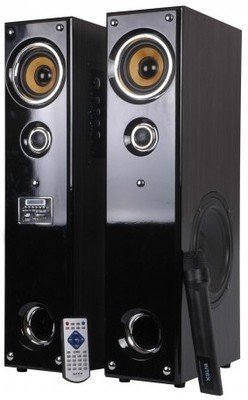
Irudia: Aurrealdea view of the Intex IT-11500 SUF Multimedia Speaker, showing the main unit with control panel and LED display, and two satellite speakers.
5. Funtzionamendu-argibideak
5.1 Piztu/Itzali
Sakatu BOTEREA unitate nagusiko edo urrutiko aginteko botoia sistema pizteko edo itzaltzeko.
5.2 Modu hautaketa
Sakatu MODUA button on the main unit or remote control to cycle through available input modes: AUX, USB, SD/MMC, and FM.
5.3 Bolumen kontrola
Doitu bolumen nagusia erabiliz BOLUMENA +/- buttons on the main unit or remote control. Bass levels can be adjusted using the BASSO +/- controls on the remote.
5.4 USB/SD/MMC Playback
Insert a USB drive or an SD/MMC card into the respective slot on the main unit. The system will automatically switch to USB/SD/MMC mode and begin playing compatible MP3 audio files. Erabili JOLASTU/PAUSTU, AURRERA, eta HURRENGOA erreprodukzioa kontrolatzeko botoiak.
5.5 FM irratiaren funtzionamendua
FM moduan, sakatu ESKANETATU button on the remote control to automatically scan and save available FM stations. Use the AURRERA eta HURRENGOA botoiak gordetako geltokietan zehar nabigatzeko.
5.6 Using the Cordless Microphone
Ensure the cordless microphone has fresh batteries. Turn on the microphone. The microphone's audio will be mixed with the main audio source. Adjust microphone volume if available on the main unit or remote.
5.7 Urruneko kontrolaren funtzioak
The remote control provides full functionality for the speaker system. Refer to the diagram on the remote for specific button functions, including power, mode, volume, track control, FM scan, and bass adjustment.
6. Mantentzea
6.1 Garbiketa
Wipe the speaker surfaces with a soft, dry cloth. Do not use abrasive cleaners, waxes, or solvents as they may damage the finish. Ensure the unit is powered off and unplugged before cleaning.
6.2 Biltegiratzea
Unitatea denbora luzez gordetzen baduzu, deskonektatu entxufetik eta gorde leku fresko eta lehor batean, eguzki-argitik eta muturreko tenperaturetatik babestuta.
6.3 Segurtasun-neurriak
- Ez jarri unitatea uraren edo gehiegizko hezetasunaren eraginpean.
- Ez ireki bozgorailua casing; ez dago erabiltzaileak konpondu dezakeen piezarik barruan.
- Bero iturrietatik eta eguzki argia zuzenean mantendu.
- Ziurtatu aireztapen egokia gehiegi berotzea saihesteko.
7. Arazoak
| Arazoa | Kausa posiblea | Irtenbidea |
|---|---|---|
| Botererik ez | Kablea ez dago konektatuta; Entxufea akastuna; Etengailua itzalita. | Check power cord connection; Try a different outlet; Ensure power switch is ON. |
| Soinurik ez | Volume too low; Incorrect input mode; Audio cable loose/faulty; Mute activated. | Increase volume; Select correct input mode (AUX, USB, FM); Reconnect audio cable; Deactivate mute. |
| Soinu distortsionatua | Volume too high; Source audio quality poor; Speaker placement. | Reduce volume; Check audio source; Adjust speaker position. |
| Urruneko kontrola ez dabil | Bateriak agortuta; urrutiko agintearen eta unitatearen arteko oztopoa; urrutiko agintearen sentsorea blokeatuta. | Replace batteries; Remove obstructions; Ensure clear line of sight to sensor. |
| FM reception poor | Seinale ahula; Antena ez dago luzatuta. | Adjust antenna position; Rescan for stations. |
8. Zehaztapenak
| Hizlari mota | Multimedia |
| Kanalaren konfigurazioa | 2.0 |
| Maiztasun Erantzuna | 50Hz - 20KHz |
| S/N erlazioa | ≥ 60 dB |
| Bereizketa | ≥ 40 dB |
| Baxua gora / behera | ± 15 dB |
| Sentikortasuna | < 500 mV |
| FM maiztasun hargailua | 88MHz eta 108MHz artean |
| Elikatze Hornidura | AC 200V ~ 240V / 50Hz |
| Konektibitate Teknologia | USBa |
| Kontrol-metodoa | Urrunekoa |
| Elementuaren pisua | 17 kg |
| Modelo zenbakia | 1112-1150-0 |
9. Bermea eta Laguntza
For warranty information, please refer to the warranty card included with your product or contact your local Intex customer service. Keep your purchase receipt as proof of purchase. For technical support or service inquiries, please visit the official Intex website or contact their customer support helpline.
Oharra: Produktua hobetzeko, zehaztapenak alda daitezke aldez aurretik abisatu gabe.


