Sarrera
This manual provides essential information for the safe and effective operation, maintenance, and troubleshooting of your DEWALT D26203-QS 900W 8mm Variable Speed Plunge Router. Please read and understand all instructions before using the tool. Keep this manual for future reference.

Figure 1: DEWALT D26203-QS 900W 8mm Variable Speed Plunge Router. This image shows the complete router unit with its yellow and grey housing, black handles, and power cord.
Segurtasun Jarraibide Orokorrak
Jarraitu beti oinarrizko segurtasun neurriak sute, deskarga elektriko eta lesio pertsonalen arriskua murrizteko tresna elektrikoak erabiltzean.
Lan Eremuko Segurtasuna
- Mantendu lan-eremua garbi eta ondo argiztatuta. Eremu nahasiak edo ilunek istripuak gonbidatzen dituzte.
- Ez erabili tresna elektrikoak atmosfera lehergarrietan, adibidez, likido sukoiak, gasak edo hautsak daudenean. Erreminta elektrikoek hautsa edo keak piztu ditzaketen txinpartak sortzen dituzte.
- Mantendu haurrak eta ingurukoak urrun, erreminta elektrikoa erabiltzen duzun bitartean. Distrakzioek kontrola galtzea eragin dezakete.
Segurtasun Elektrikoa
- Erreminten entxufeak entxufearekin bat etorri behar dira. Inoiz ez aldatu entxufea inola ere.
- Saihestu gorputzaren kontaktua lurrarekin edo lurretik loturiko gainazalekin, hala nola hodiak, erradiadoreak, sukaldeak eta hozkailuak. Deskarga elektrikoa jasateko arriskua areagotu egiten da zure gorputza lurrarekin edo lurrarekin lotuta badago.
- Ez jarri tresna elektrikoak euria edo hezetasunera. Erreminta elektriko batean sartzeak deskarga elektrikoaren arriskua areagotuko du.
- Ez erabili kableari. Ez erabili inoiz kablea tresna elektrikoa eramateko, tiratzeko edo deskonektatzeko. Mantendu kablea bero, olio, ertz zorrotz edo mugikorretatik urrun.
Segurtasun pertsonala
- Beti eraman begi-babesak. Erabili segurtasun-betaurrekoak, betaurrekoak edo aurpegi-babesa.
- Erabili entzumen-babesak tresna elektrikoak denbora luzez erabiltzean.
- Jantzi behar bezala. Ez erabili arropa solterik edo bitxirik. Mantendu ilea, arropa eta eskularruak mugitzen diren ataletatik urrun.
- Egon adi, ikusi zer egiten ari zaren eta erabili zentzua erreminta elektrikoa ustiatzean.
- Ez ezazu gainditzen. Mantendu oin eta oreka egokia uneoro.
Produktua amaituview
The DEWALT D26203-QS is a 900 Watt variable speed plunge router designed for precision routing tasks in various materials including timber, aluminum, and plastics. Its compact and lightweight design enhances user comfort and control.
Ezaugarri nagusiak:
- 900 W-ko motorra: Ematen du ample power for various routing applications.
- Variable Speed Control (16,000-27,000 rpm): Allows optimization of the router bit speed for different materials and applications.
- Full Wave Electronic Speed Control: Ensures consistent speed is maintained under load.
- Diseinu trinkoa eta arina: Enhances ease of use and reduces fatigue.
- Aluminum Motor Housing: Durable construction that can be quickly transitioned for increased versatility.
- Murgiltze-oinarria: For controlled depth routing.

Figure 2: The DEWALT D26203-QS router shown with its plunge base, highlighting the ergonomic handles and depth adjustment mechanism.
Konfigurazioa
Despaketatzea
Carefully remove the router and all accessories from the packaging. Inspect the tool for any damage that may have occurred during shipping. Ensure all components listed in the 'Included Components' section are present.
Installing a Router Bit
- Ziurtatu bideratzailea energia-iturritik deskonektatuta dagoela.
- Sakatu eta eutsi ardatzaren blokeatze-botoia ardatza biratzea saihesteko.
- Askatu pintzaren azkoina emandako giltza erabiliz.
- Insert the router bit into the collet, ensuring at least 3/4 of the shank is seated. Do not bottom out the bit.
- Estutu ondo pintzaren azkoina giltzarekin, ardatzaren blokeatzeko botoia sakatuta edukitzen duzun bitartean.

3. irudia: Gertuko planoa view illustrating the router bit securely installed in the collet, ready for operation. This image highlights the precision of the bit and collet assembly.
Adjusting Plunge Depth
- Place the router on a flat surface with the bit installed.
- Loosen the plunge lock lever.
- Lower the router until the bit touches the work surface.
- Adjust the depth stop rod to the desired depth.
- Tighten the plunge lock lever to secure the depth setting.

Figure 4: This image displays the router's depth adjustment mechanism, showing the clear base plate and the router bit positioned for a cut. The depth stop rod is visible on the side.
Funtzionamendu-argibideak
Piztu eta itzaltzea
- Connect the router to a suitable 240V power supply.
- To turn on, slide the ON/OFF switch to the 'ON' position.
- To turn off, slide the ON/OFF switch to the 'OFF' position.

Figure 5: Close-up of the router's power switch, clearly showing the 'ON' and 'OFF' positions. This switch is located on the top of the motor housing.
Adjusting Variable Speed
The router features a variable speed control dial, allowing you to match the speed to the material and bit type. Refer to the table below for general guidelines.

Figure 6: The variable speed control dial on the router, showing numerical settings for adjusting RPM. This dial is located on the top of the router for easy access.
| Materiala | Bit Diametroa | Speed Setting (Approx. RPM) |
|---|---|---|
| Egur biguna | Small (up to 12mm) | High (22,000 - 27,000) |
| Egur biguna | Large (over 12mm) | Medium (18,000 - 22,000) |
| Egur gogorra | Small (up to 12mm) | Medium-High (20,000 - 25,000) |
| Egur gogorra | Large (over 12mm) | Medium-Low (16,000 - 20,000) |
| Plastics/Aluminum | Tamaina guztiak | Low (16,000 - 18,000) |
Note: Always perform a test cut on scrap material to determine the optimal speed and feed rate for your specific application.
Routing Techniques
- Secure your workpiece firmly to prevent movement during routing.
- Always feed the router against the rotation of the bit (climb cutting is generally unsafe and should be avoided).
- Apply steady, even pressure. Do not force the router.
- For deep cuts, make multiple shallow passes instead of one deep pass to reduce strain on the tool and improve cut quality.
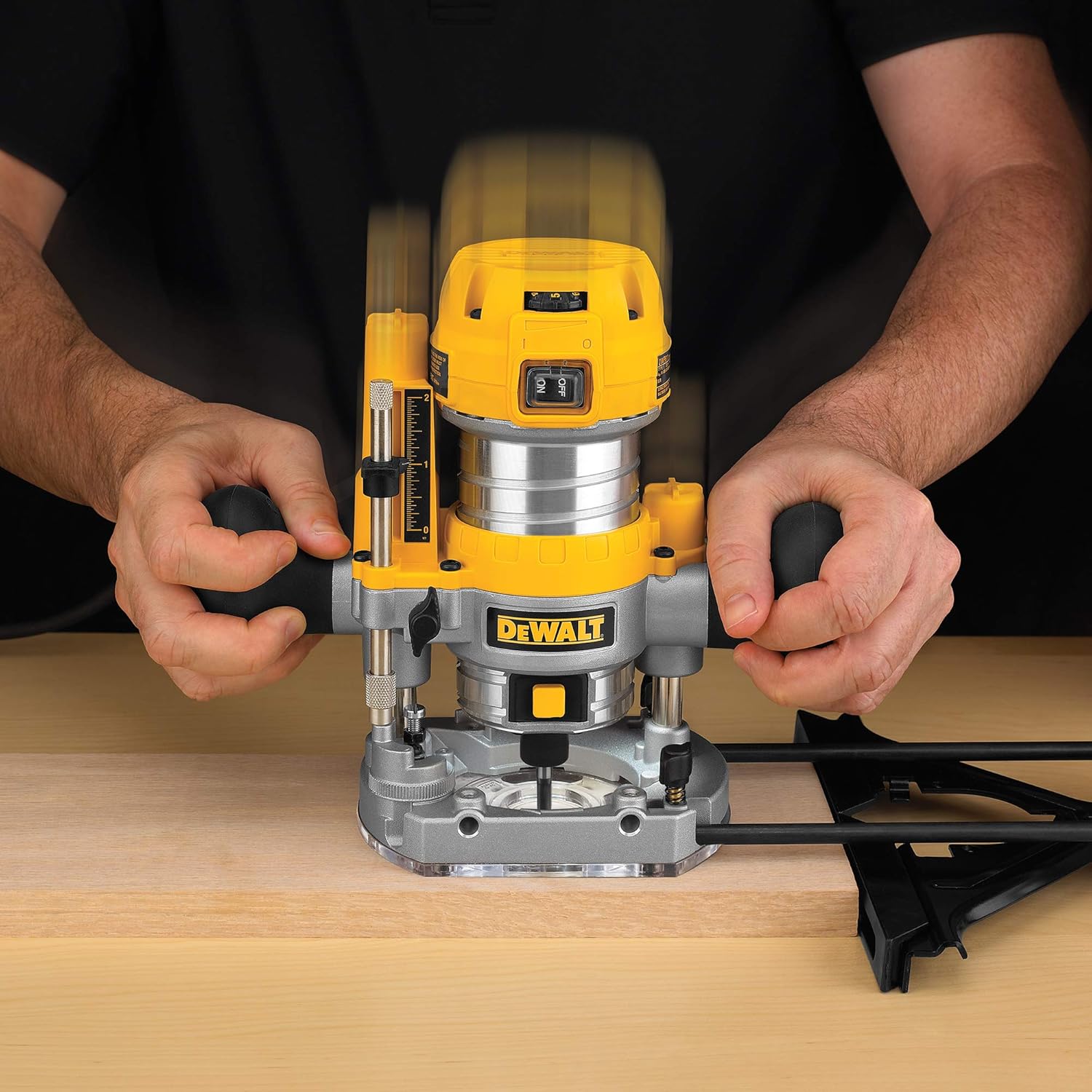
Figure 7: A user demonstrating the operation of the DEWALT plunge router on a piece of wood, showing proper hand placement and control during a routing pass.
Mantentzea
Regular maintenance ensures optimal performance and extends the life of your DEWALT router. Always unplug the tool before performing any maintenance.
Garbiketa
- After each use, clean the router thoroughly. Remove dust and debris from the motor vents using compressed air.
- Garbitu kanpoaldea iragarkiarekinamp oihal. Ez erabili produktu kimiko edo disolbatzaile gogorrak.
- Clean the collet and collet nut regularly to ensure proper bit gripping.
Ikuskapena
- Aldian-aldian egiaztatu kable elektrikoa kaltetuta dagoen. Kaltetuta badago, ordezkatu zerbitzu-teknikari kualifikatu batek.
- Egiaztatu torloju eta lotura guztiak estututa daudela.
- Ensure the plunge mechanism operates smoothly. Apply a small amount of dry lubricant if necessary.
- Inspect router bits for sharpness and damage before each use. Dull or damaged bits can cause kickback and poor cut quality.
Arazoak konpontzea
Before attempting any repairs, ensure the tool is unplugged from the power source.
| Arazoa | Kausa posiblea | Irtenbidea |
|---|---|---|
| Routerrak ez du abiarazten | Energia-iturririk ez; etengailu akastuna; kable hondatua | Check power connection and outlet; Inspect cord for damage; Contact service center if switch or cord is faulty. |
| Gehiegizko bibrazioa | Dull or unbalanced bit; Loose collet nut; Damaged bearings | Replace or sharpen bit; Tighten collet nut; Contact service center for bearing replacement. |
| Poor cut quality (burning, chipping) | Dull bit; Incorrect speed; Too fast feed rate; Wrong bit for material | Replace or sharpen bit; Adjust speed setting; Reduce feed rate; Use appropriate bit for material. |
| Router overheats | Blocked ventilation; Overloading; Prolonged use | Clean ventilation openings; Reduce load; Allow tool to cool down. |
Zehaztapenak
| Ezaugarri | Zehaztapena |
|---|---|
| Modelo zenbakia | D26203-QS |
| Potentzia Sarrera | 900 Watt |
| liburukiatage | 240 Volt |
| Karga-abiadurarik gabe | 16,000 - 27,000 bira/min |
| Pintza Tamaina | 8 mm |
| Oinarri Mota | Murgiltzea |
| Elementuaren pisua | 500 gramo |
| Produktuaren neurriak (LxWxH) | 33.7 x 31 x 18.3 cm |
| Materiala | Metala, Plastikoa |
| Dakarten osagaiak | 1 Plunge Router |
Bermea
The DEWALT D26203-QS Plunge Router comes with a 2 urteko bermea provided by the manufacturer from the date of purchase. Please retain your proof of purchase for warranty claims.
For any warranty-related issues or product feedback, please contact DEWALT customer care.
Bezeroarentzako Arreta
For assistance, technical support, or service inquiries regarding your DEWALT D26203-QS Plunge Router, please contact:
- Fabrikatzailea: DEWALT
- Bezeroarentzako Arreta Zenbakia: 1860-425-1111
- Ordutegia: Astelehenetik ostiralera, 10:00etatik 17:00etara (jaiegunak izan ezik)
- Inportatzailea: Stanley Black & Decker India Private Ltd #28, Akemps, 3rd Main, 1st Cross, Ashwini Layout Koramangala Bangalore - 560047
You can also visit the official DEWALT website for more information and service center locations.