Sarrera
This manual provides instructions for the setup, operation, maintenance, and troubleshooting of your RCA Remote Control RCR 192AA10. This remote is designed to function as a replacement for various RCA devices, ensuring seamless control of your entertainment system.
Gailu bateragarriak: RTD3131, RTD3133, RTD3136, RT2781H, RT2870R, RT2906, RT2910.
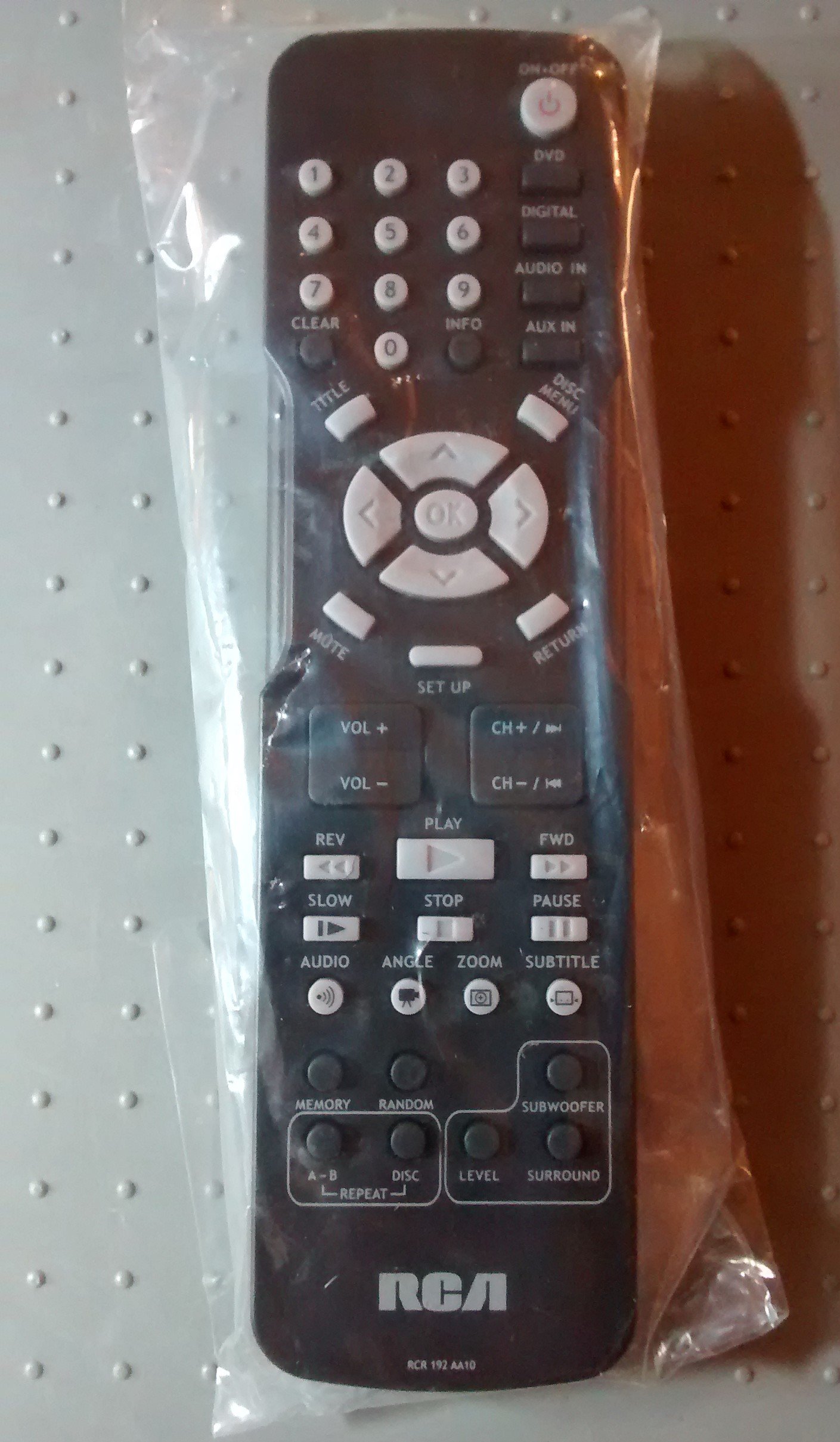
Image: The RCA Remote Control RCR 192AA10, shown sealed in its clear plastic packaging.
Konfigurazioa
1. Bateriaren instalazioa
- Kokatu bateriaren konpartimendua urrutiko agintearen atzealdean.
- Slide the battery compartment cover downwards or outwards to open.
- Sartu bi AAA pila (ez daude barne), ziurtatuz terminal positiboa (+) eta negatiboa (-) konpartimentuaren barruko markekin behar bezala lerrokatuta daudela.
- Jarri bateriaren konpartimentuaren estalkia berriro bere lekuan jarriz, ondo klik egin arte.
2. Hasierako Erabilera
This remote control is typically pre-programmed for compatible RCA devices. No additional programming steps are usually required. Simply point the remote at your device and begin operation.
Funtzionamendu-argibideak
The RCA Remote Control RCR 192AA10 features standard buttons for controlling your compatible RCA audio/video equipment. Familiarize yourself with the button layout for optimal use.
- Pizteko botoia: Gailua pizten edo itzaltzen du.
- Bolumena igo/behera: Audio irteera-maila doitzen du.
- Kanal gora/behera: Changes the television channel (if applicable).
- Mututu botoia: Audio irteera isilarazten du.
- Sarrera/Iturburu botoia: Cycles through available input sources (e.g., HDMI 1, AV, Component).
- Menuko botoia: Gailuaren pantailako menura sartzen da.
- Navigation Buttons (Arrow Keys, OK/Enter): Menuetan nabigatzeko eta aukeraketak berresteko erabiltzen da.
- Zenbaki tekla: Kanalak zuzenean sartzeko edo bestelako sarrera numerikoetarako.
For specific functions related to your device model, refer to the original device's user manual.
Mantentzea
Garbiketa
- Garbitu urrutiko agintea zapi leun eta lehor batekin.
- Zikinkeria egoskorrentzat, arin dampGarbitu zapi bat urarekin edo garbitzaile leun eta ez-urratzaile batekin. Saihestu gehiegizko hezetasuna.
- Do not use harsh chemicals, solvents, or abrasive cleaning pads, as these can damage the remote's surface or internal components.
Bateria ordezkatzea
Replace batteries when the remote's performance degrades or it stops responding. Always replace both batteries at the same time with new AAA batteries. Do not mix old and new batteries or different types of batteries.
Biltegiratzea
Gorde urrutiko agintea leku fresko eta lehor batean, eguzki-argitik eta muturreko tenperaturetatik babestuta. Denbora luzez gordetzen baduzu, kendu pilak isuriak saihesteko.
Arazoak konpontzea
| Arazoa | Kausa posiblea | Irtenbidea |
|---|---|---|
| Urrunekoa ez dabil | Bateriak hilda edo gaizki instalatuta. | Ordeztu bateriak berriekin, polaritate zuzena ziurtatuz (+/-). |
| Urrunekoek ez dute erantzuten | Obstruction between remote and device; remote too far from device. | Ensure a clear line of sight to the device's IR receiver. Move closer to the device. |
| Specific buttons not functioning | Button stuck or dirty; device incompatibility for that function. | Clean the remote. Verify the function is supported by your specific device model. |
If issues persist after attempting these solutions, consult the user manual for your specific RCA device or contact RCA customer support.
Zehaztapenak
- Marka: RCA
- Eredua: RCR 192AA10
- Konektibitate Teknologia: Infragorriak
- Kolorea: Beltza
- Ezaugarri berezia: Diseinu ergonomikoa
- Produktuaren neurriak: 7.7 x 6.2 x 1.2 hazbete (gutxi gorabehera)
- Elementuaren pisua: 3.19 ontza (gutxi gorabehera)
- Energia iturria: 2 x AAA bateria (ez daude barne)
- Lehen eskuragarri dagoen data: 30ko martxoaren 2015a
Bermea eta Laguntza
For information regarding warranty coverage or technical support, please refer to the documentation provided with your original RCA device or visit the official RCA website. Specific warranty terms may vary based on the retailer and purchase date.