Produktua amaituview
This instruction manual provides essential information for the installation, operation, and maintenance of your A-Tech 8GB (2 x 4GB) DIMM DDR3 NON-ECC PC3-10600 1333MHz RAM Memory Kit. This memory kit is specifically designed to enhance the performance of compatible HP-Compaq Pavilion P6 Series desktop computers by providing additional system memory.

Image: Two A-Tech 4GB DDR3 RAM modules, showing the green PCB and white label with product information.
Segurtasun Informazioa
OHARRA: This product was designed for specific HP-Compaq Pavilion P6 Series models. Using this memory kit with other systems may result in incompatibility or improper function. Always ensure your system is powered off and unplugged before handling internal components. Discharge any static electricity by touching a grounded metal object before installation to prevent damage to the memory modules or your computer's components.
Bateragarritasuna
This A-Tech 8GB (2 x 4GB) DDR3 NON-ECC PC3-10600 1333MHz RAM Memory Kit is specifically designed for the following HP-Compaq Pavilion P6 Series models:
- p6-2125eb, p6-2125eo, p6-2126el, p6-2126s, p6-2127c, p6-2128, p6-2129la
- p6-2130ea, p6-2130eb, p6-2130el, p6-2130eo, p6-2130in, p6-2130jp, p6-2130kr
- p6-2131eg, p6-2131el, p6-2133la, p6-2133w, p6-2134eg, p6-2134el
- p6-2135ea, p6-2135la, p6-2136, p6-2136el, p6-2137el, p6-2137ez, p6-2138el
- p6-2140ea, p6-2140eb, p6-2140ef, p6-2140el, p6-2140eo, p6-2140ez, p6-2140jp, p6-2141eo
This memory is DIMM (Desktop) type and is not compatible with SODIMM (Laptop) systems. Always ensure you select the correct form factor for your computer.
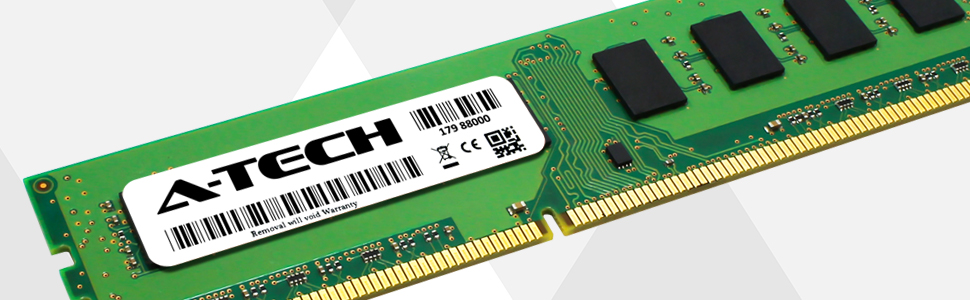
Image: A visual comparison showing a larger DIMM module (for desktops) and a smaller SODIMM module (for laptops), illustrating the difference in physical size.
Konfigurazioa eta Instalazioa
Installing RAM is a straightforward process, but requires careful handling. Always refer to your computer's specific service manual for detailed instructions on accessing and installing memory modules, as procedures may vary slightly between models.
- Prestaketa: Power off your computer completely and unplug all cables (power, monitor, peripherals).
- Sarbidea: Open your computer case to access the motherboard and RAM slots. Consult your computer's manual for instructions on how to safely open the case.
- Deskarga estatikoa: Before touching any internal components, touch a grounded metal object (e.g., the metal frame of your computer case) to discharge any static electricity from your body.
- Locate Slots: Identify the DIMM memory slots on your motherboard. Your computer may have two or four slots.
- Moduluak instalatu: Gently align the notch on the A-Tech RAM module with the key in the memory slot. Press down firmly and evenly on both ends of the module until the retaining clips on the sides snap into place, securing the module.
- Egiaztatu: Ensure both modules are fully seated and the clips are locked.
- Berriz muntatu: Itxi ordenagailuaren kaxa eta berriro konektatu kable guztiak.
- Piztu: Power on your computer. The system should automatically detect the new memory. You can verify the installed RAM in your operating system's system information.

Irudia: Gertutik view of an A-Tech DIMM RAM module, highlighting the gold contacts and product label.
Funtzionamendu Printzipioak eta Abantailak
Random Access Memory (RAM) serves as your computer's short-term data storage, allowing for quick access to information by the CPU. Upgrading your system's RAM capacity with this A-Tech kit provides several benefits:
- Improved Multitasking: Run more applications simultaneously without slowdowns.
- Faster Loading Times: Applications and files load more quickly.
- Enhanced Responsiveness: Experience a smoother and more fluid computing experience.
- Better Performance for Demanding Tasks: Ideal for activities like video editing, gaming, and complex data processing.

Image: A graphic titled "BOOST PERFORMANCE" showing a computer tower and a sports car, symbolizing increased speed and responsiveness with an A-Tech memory upgrade.

Image: A desktop computer setup displaying the Windows operating system desktop.

Image: A desktop computer setup featuring vibrant, colorful lighting, often associated with gaming PCs.

Image: A desktop computer setup displaying video editing software on the screen, indicating suitability for creative tasks.
Mantentzea
RAM modules generally require minimal maintenance. To ensure longevity and optimal performance:
- Mantendu garbi: Periodically clean the interior of your computer case to prevent dust buildup, which can impede airflow and lead to overheating. Use compressed air to gently remove dust from around the RAM modules and slots.
- Kontuz maneiatu: When handling RAM, always hold it by the edges to avoid touching the gold contacts or the chips, as oils and static electricity can cause damage.
- Ingurune egokia: Ensure your computer operates in a well-ventilated area to maintain optimal temperatures.
Arazoak konpontzea
If you encounter issues after installing your A-Tech RAM, consider the following troubleshooting steps:
- No Display/Beep Codes: If your computer does not display anything or emits a series of beeps after installation, it may indicate that the RAM is not properly seated. Power off, unplug, and re-seat the memory modules firmly into their slots.
- Sistemaren ezegonkortasuna/matxurak: If your system becomes unstable or crashes frequently, ensure the RAM is compatible with your motherboard and CPU. Double-check that the modules are correctly installed.
- Incorrect RAM Detected: If your operating system reports less RAM than installed, ensure all modules are properly seated. Sometimes, a BIOS update for your motherboard may be required to fully recognize new memory.
- Test Modules Individually: If you have multiple modules, try installing them one at a time to identify if a specific module is faulty.
Zehaztapenak
| Ezaugarri | Xehetasuna |
|---|---|
| Memoria Tamaina | 8 GBko kit (2 x 4 GB) |
| Memoria Mota | DIMM DDR3 NON-ECC |
| Abiadura | PC3-10600 (1333MHz) |
| Forma-faktorea | DIMM (mahaigaina) |
| Modelo zenbakia | AM069791 |
| Produktuaren neurriak | 6.7 x 3.6 x 0.4 hazbete |
| Elementuaren pisua | 1.8 ontza |
| Fabrikatzailea | A-Tech |
| Eskuragarri dagoen lehen data | 6ko apirilaren 2015a |
Bermea eta Laguntza
A-Tech stands behind the quality of its products. This A-Tech memory kit comes with a Bizi osorako bermea, zure inbertsioaren lasaitasuna bermatuz.
For technical support, warranty claims, or further assistance, please visit the official A-Tech website or contact their customer service. You can find more information and support resources at: atechmemory.com

Image: The A-Tech company logo, featuring the brand name.


