1. Sarrera
This manual provides instructions for the Amcrest ProHD 720P 4-Channel Video Security System (Model: AMDV7204M-2B2D-W). This system features a 4-channel 720p Tribrid DVR with a pre-installed 1 TB HDD, accompanied by four 720p (1.0MP) cameras. It offers easy smartphone and web-browser access, VGA and HDMI output, and backup to external storage via USB. The system utilizes HDCVI technology for reliable HD video transmission without loss or delay, supporting both analog and IP cameras. A monitor or television is recommended for the initial setup.
2. Paketearen edukia
Verify that all components are present in your package. If any items are missing or damaged, please contact Amcrest support.
- 1 x 4-Channel 720p Tribrid DVR with 1TB HDD
- 2 x 720p (1.0MP) IP67 Bullet Cameras
- 2 x 720p (1.0MP) IP67 Dome Cameras
- Power Adapters for DVR and Cameras
- Video/Power Cables
- USB sagua
- Muntatzeko Hardwarea
- Hasierako gida azkarra
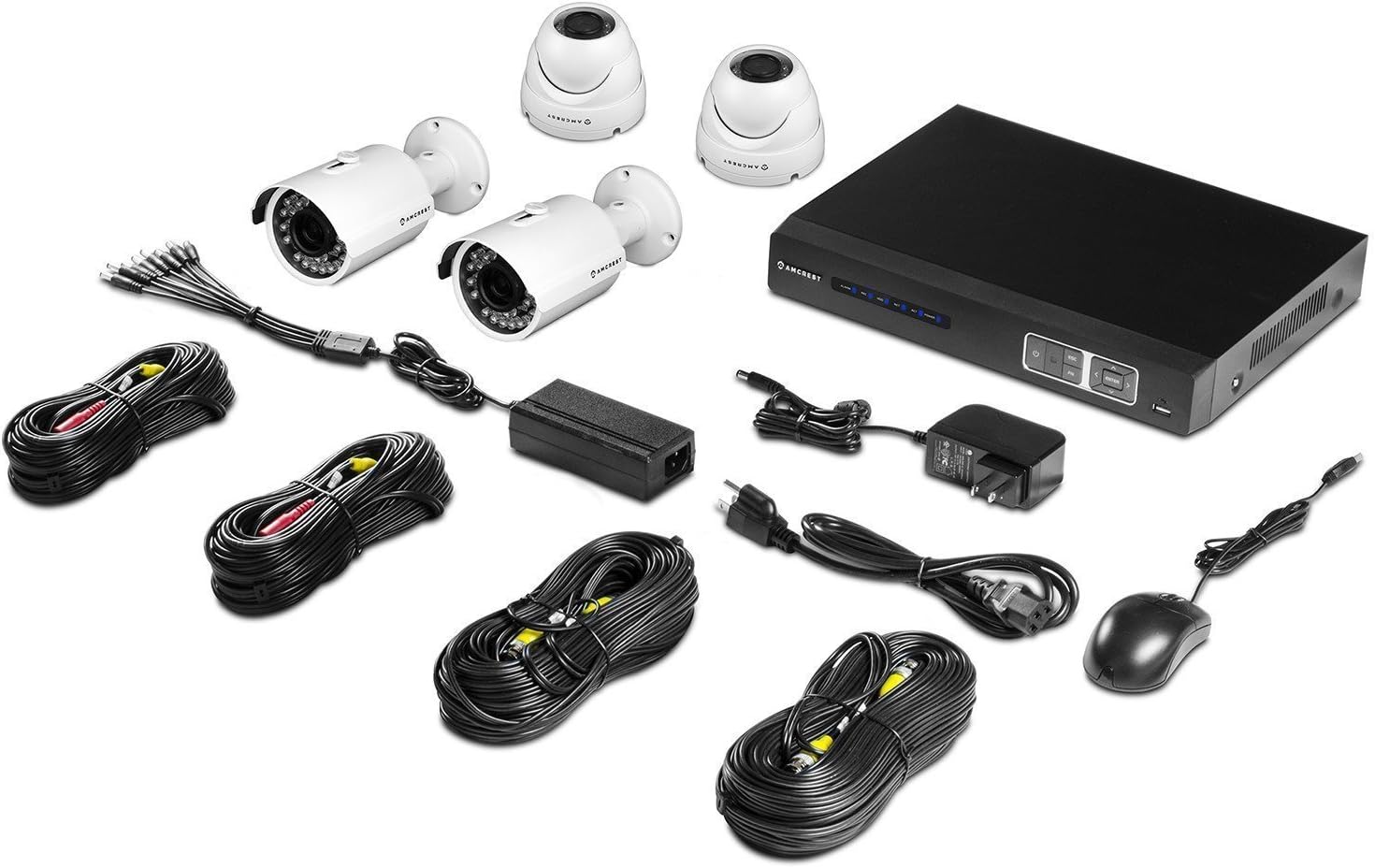
Irudia: Amaituview of the Amcrest ProHD 720P 4-Channel Video Security System components, including the DVR, bullet cameras, dome cameras, cables, and accessories.
3. Produktuaren ezaugarriak
- HD Over Analog (HDCVI) Technology: Delivers crisp 1280x720p (1280TVL) resolution over existing coaxial infrastructure.
- Bereizmen handiko kamerak: Includes 4 x HD 1.0MP IP67 heavy-duty metal bullet and dome cameras.
- Zabala ViewAngelua: 3.6mm lens provides a 75-degree viewangelua.
- Gaueko ikuspegia: Powerful IR-LEDs enable clear night vision capabilities.
- Urrunekoa Viewesan: Sar zaitez zuzenean viewing and playback on standard web browsers (PC/MAC) and iOS/Android devices via the "Amcrest View" app.
- Plug & Play konfigurazioa: Simplified installation and access.
- Secure Closed-Circuit System: The DVR acts as a single access point for all cameras, enhancing security.
- Pre-installed 1 TB HDD: Records approximately 360 hours on all 4 channels in 720p @ 30fps using motion detection or scheduled recording.
- USB babeskopia: Feature for convenient data transfer and storage.
- Eguraldiaren diseinua: IP67 rated cameras suitable for indoor/outdoor use.


Irudia: Examples of the Amcrest ProHD 720P bullet camera (left) and dome camera (right) included in the system.
4. Konfigurazioa eta instalazioa
4.1 Initial Setup Recommendations
For the initial setup and configuration of your DVR, it is recommended to connect it to a monitor or television using either the VGA or HDMI output. This allows for direct interaction with the DVR's interface.
4.2 DVR konexioak
The DVR unit features various ports for connecting cameras, a monitor, network, and power. Refer to the diagrams below for proper connection.

Irudia: Aurrealdea eta atzekoa views of the Amcrest ProHD DVR, showing control buttons and various connection ports.

Irudia: Detailed diagram illustrating the various ports on the back of the Amcrest ProHD DVR and their corresponding connections, including VGA, HDMI, Ethernet, USB, Audio In/Out, and Video Input for cameras.
- Elikadura egokitzailea: Connect the provided power adapter to the DC12V input.
- Video Input (Cameras): Connect the BNC connectors from your cameras to the Video In ports (1-4).
- Monitorearen konexioa: Connect a monitor via the VGA port (PC Monitor) or HDMI port (HD TV).
- Sare-konexioa: Connect an Ethernet cable from your router to the Ethernet port for network access.
- USB sagua: Connect the USB mouse to one of the USB ports for navigation.
- Audio sarrera/irteera: If using external audio devices, connect them to the Audio In/Out ports.
4.3 Kameraren instalazioa
Mount the IP67 weatherproof bullet and dome cameras in desired indoor or outdoor locations. Ensure the cameras are positioned to cover the intended surveillance areas. Connect the camera's video and power cables to the corresponding inputs on the DVR.
5. Funtzionamendu-argibideak
5.1 Remote Access via Amcrest View Aplikazioa
Amcrest View app allows you to access live viewzure telefonotik edo tabletetik erreproduzitzea eta erreproduzitzea.
- Deskargatu "Amcrest" View" app from the App Store (iOS) or Google Play Store (Android).
- Open the app and follow the on-screen instructions to add your DVR system.
- Scan the QR Code displayed on your DVR to instantly access live viewerreproduzitzea eta erreproduzitzea.

Irudia: Screenshots of the Amcrest View app interface on various mobile devices, demonstrating remote live viewing of security camera feeds.
5.2 Grabaketa eta erreprodukzioa
The DVR comes with a pre-installed 1 TB hard drive capable of recording 360 hours of footage across all 4 channels at 720p @ 30fps.
- Grabaketa moduak: Configure the DVR for continuous recording, scheduled recording, or motion detection recording through the DVR's on-screen menu.
- Erreprodukzioa: Sartu grabatutako footage directly from the DVR interface or remotely via the Amcrest View aplikazioa edo web arakatzailea.
- USB babeskopia: Use the USB backup feature to transfer recorded video files to an external storage device.
6. Mantentzea
To ensure optimal performance and longevity of your security system, consider the following maintenance tips:
- Kamera lenteak: Aldian-aldian garbitu kameraren lenteak zapi leun eta lehor batekinamp zapi bat hautsa, zikinkeria edo ur orbanak kentzeko, estaldura izan dezaketenak view.
- Kable konexioak: Ensure all cable connections to the DVR and cameras are secure and free from corrosion.
- DVR aireztapena: Keep the DVR unit in a well-ventilated area to prevent overheating. Avoid blocking ventilation openings.
- Software eguneraketak: Check the Amcrest website periodically for firmware updates for your DVR to ensure the latest features and security enhancements.
7. Arazoak
If you encounter issues with your Amcrest security system, refer to the following common troubleshooting steps:
- Bideo seinalerik ez:
- Check all camera and DVR power connections.
- Ensure video cables are securely connected to the correct input ports on the DVR.
- Verify the monitor is correctly connected and set to the correct input source (VGA/HDMI).
- Urruneko sarbidearen arazoak:
- Ensure the DVR is connected to your network via an Ethernet cable and has internet access.
- Egiaztatu zure telefonoak edo tabletak Interneteko konexio egonkorra duela.
- Confirm the "Amcrest View" app is updated to the latest version.
- Check DVR network settings and port forwarding if necessary (refer to advanced network setup in the full manual or Amcrest support).
- Grabaketa arazoak:
- Egiaztatu DVRaren disko gogorraren egoera behar bezala funtzionatzen duela eta leku librea duela ziurtatzeko.
- Verify recording schedules and motion detection settings are configured as desired.
- Irudiaren kalitate eskasa:
- Kamera-lenteak garbitu.
- Ensure cameras are properly focused (if adjustable).
- Check cable integrity for any damage or interference.
For more detailed troubleshooting or persistent issues, please contact Amcrest Customer Support.
8. Zehaztapenak
Detailed technical specifications for the Amcrest ProHD 720P 4-Channel Video Security System.

Irudia: Technical specifications sheet for the Amcrest ProHD 720P 4-Channel Video Security System, detailing DVR, bullet camera, and dome camera specifications.
8.1 DVR Specifications (Model: AMDV7204M-2B2D-W)
- Bideoaren sarrera: 4 kanal BNC
- Bideo irteera: 1 HDMI, 1 VGA
- Audio sarrera/irteera: 1 kanal RCA
- Pantailaren bereizmena: Gehienez 1920x1080
- Grabaketa Ebazpena: 720P (1280x720) @ 30fps per channel
- Disko gogorra: 1TB SATA (Pre-installed)
- Sare Interfazea: RJ45 (10/100M)
- USB interfazea: 2 x USB 2.0
- Elikatze-iturria: DC12V
- Neurriak: 16 x 10 x 16 inches (Product Dimensions, likely package size)
- Pisua: 0.01 ounces (Item Weight, likely incorrect or package weight)
- Funtzionamendu-tenperatura: 14 °F ~ 131 °F (-10 °C ~ 55 °C)
8.2 Camera Specifications (Bullet & Dome)
- Irudi-sentsorea: 1/2.9" Megapixel CMOS
- Ebazpena: 1.0 Megapixel (720P)
- Lentea: 3.6mm lente finkoa
- ViewAngelua: 75 gradu
- Gaueko ikuspegia: IR LEDs, up to 65ft (20m)
- Eguraldiaren aurkako balorazioa: IP67
- Elikatze-iturria: DC12V
- Funtzionamendu-tenperatura: -22 ° F ~ 140 ° F (-30 ° C ~ 60 ° C)
9. Bermea eta Laguntza
Amcrestek eskaintzen du Urtebeteko bermea AEBetan for this product. For technical support, warranty claims, or additional information, please visit the official Amcrest webwebgunean edo jarri harremanetan bere bezeroarentzako zerbitzuarekin.
Amcrest Webgunea: www.amcrest.com
Amcrest Technologies LLC
3692 Westchase Drive, Houston TX 77042


