1. Sarrera
The Microsoft Surface 3 is a versatile 10.8-inch tablet designed for productivity and portability. Running on Windows 10 and powered by an Intel Atom processor, it offers a full PC experience in a compact form factor. This manual provides essential information for setting up, operating, maintaining, and troubleshooting your device.

Image: Microsoft Surface 3 Tablet with an attached red Type Cover keyboard and a silver Surface Pen. The screen displays a colorful image with digital annotations, demonstrating its versatility.
2. Zer dago kutxan
Upon unboxing your Microsoft Surface 3, verify that all standard components are present:
- Microsoft Surface 3 Tablet
- Power Supply Unit (Charger)
- Hasiera Azkarreko Gida (barne badago)
Oharra: The Surface Pen and Type Cover keyboard are optional accessories and are typically sold separately. Ensure you have these if your purchase included them.
3. Gailua amaitu daview
Familiarize yourself with the physical features and ports of your Surface 3 tablet.
3.1 Ataka eta botoiak
- USB 3.0 ataka: Kanpoko unitateak, saguak edo teklatuak bezalako USB gailuak konektatzeko.
- Mikro USB kargatzeko ataka: Gailua kargatzeko erabiltzen da.
- Mini DisplayPort: Kanpoko pantailetara edo proiektoreetara konektatzeko.
- Aurikularrak Jack: Audio irteera entzungailuetara edo kanpoko bozgorailuetara bidaltzeko.
- MicroSD txartelaren zirrikitua: For expanding storage with a microSDXC card.
- Bolumen-botoiak: To adjust audio levels.
- Pizteko botoia: Gailua pizteko/itzaltzeko edo lo moduan jartzeko.
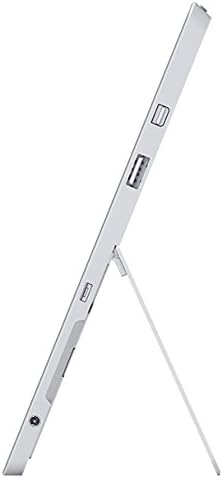
Irudia: Albokoa view of the Microsoft Surface 3, illustrating the various ports including USB, Mini DisplayPort, and the kickstand in an open position.

Irudia: Gertuko planoa view of the microSD card slot on the Microsoft Surface 3, with a microSD card partially inserted, demonstrating storage expansion capability.
3.2 Kamera
- Atzeko kamera: 8 MP for capturing photos and videos.
- Aurrealdeko kamera: 3.5 MP for video calls and selfies.
4. Konfigurazioa
4.1 Hasierako karga
Before first use, connect the Surface 3 to the power supply using the Micro USB charging port and allow it to charge fully. The battery indicator on the screen will show charging status.
4.2 Piztea eta Windows konfiguratzea
- Eduki sakatuta Pizteko botoia until the Microsoft logo appears on the screen.
- Follow the on-screen prompts to complete the Windows 10 setup process. This includes selecting your language, connecting to a Wi-Fi network, and creating or signing in with a Microsoft account.
- Utzi sistemari errendimendu eta segurtasun optimoa lortzeko zain dauden eguneratzeak deskargatzen eta instalatzen.
4.3 Attaching Optional Accessories
- Azal mota: Align the Type Cover with the magnetic connector at the bottom edge of the Surface 3 until it clicks into place.
- Surface boligrafoa: The Surface Pen can be magnetically attached to the side of the Surface 3 for storage. For initial pairing, follow the instructions provided with the pen or in Windows settings.
5. Funtzionamendua
5.1 Nabigazioa
- Ukipen-pantaila: Use gestures like tap, swipe, pinch-to-zoom for navigation.
- Surface boligrafoa: Use the pen for precise input, drawing, writing, and annotating.
- Mota-azala (aukerakoa): Provides a traditional keyboard and trackpad experience.

Image: Microsoft Surface 3 in use with a Type Cover keyboard and Surface Pen, displaying a Windows 10 interface with various applications.
5.2 Windows 10-ren ezaugarriak
- Hasiera menua: Sartu aplikazioetara, ezarpenetara eta energia-aukeretara.
- Ekintza Zentroa: Swipe from the right edge of the screen to access quick settings and notifications.
- Zeregin View: View open applications and virtual desktops.
- Tablet modua: Switch to Tablet Mode for a touch-optimized interface.
5.3 Wi-Fira konektatzea
- Ireki Ekintza Zentroa by swiping from the right edge of the screen or clicking the icon in the taskbar.
- Sakatu Wi-Fi ikonoa.
- Hautatu nahi duzun sarea zerrendatik eta idatzi pasahitza eskatzen bazaizu.
6. Mantentzea
6.1 Garbiketa
- Erabili lipurrik gabeko zapi leun bat dampened with water or a screen cleaner specifically designed for electronics to clean the screen.
- Saihestu produktu kimiko gogorrak, material urratzaileak edo gehiegizko hezetasuna.
- Clean the device exterior with a soft, dry cloth.
6.2 Software eguneraketak
Egiaztatu eta instalatu aldizka Windows eguneraketak zure gailuak azken segurtasun-adabakiak eta errendimendu-hobekuntzak dituela ziurtatzeko. Joan honera Ezarpenak > Eguneratzea eta segurtasuna > Windows eguneratzea.
6.3 Bateria zaintzea
- Saihestu tenperatura muturrekoak, bateriaren iraupena murriztu baitezakete.
- For optimal battery longevity, avoid consistently draining the battery to 0% or keeping it at 100% for extended periods.
- The Surface 3 has an average battery life of up to 8 hours under typical usage conditions.
7. Arazoak
7.1 Gailua ez da pizten
- Ziurtatu gailua kargatuta dagoela. Konektatu korronte-iturria eta itxaron minutu batzuk berriro pizten saiatu aurretik.
- Perform a force restart by holding the Pizteko botoia for 10-15 seconds, then release and press it again briefly.
7.2 Wi-Fi konexio arazoak
- Toggle Wi-Fi off and on in the Action Center.
- Restart your Surface 3 and your Wi-Fi router.
- Ensure you are within range of the Wi-Fi network and have the correct password.
7.3 Errendimendu motela
- Itxi atzeko planoan exekutatzen ari diren beharrezkoak ez diren aplikazioak.
- Begiratu eta instalatu zain dauden Windows eguneratzeak.
- Ziurtatu biltegiratze leku libre nahikoa duzula.
8. Zehaztapenak
| Ezaugarri | Xehetasuna |
|---|---|
| Modelo zenbakia | 7G6-00014 |
| Bistaratzeko tamaina | 10.8 hazbete |
| Pantailaren bereizmena | 1920x1280 pixel |
| Prozesadorea | Intel Atom x7-Z8700 (2.4 GHz) |
| RAM | 4 GB |
| Biltegiratzea | 128 GB SSD |
| Sistema eragilea | Windows 10 |
| Koprozesadore grafikoa | Quad-core Intel Atom x7-Z8700 processor |
| Haririk gabeko mota | 802.11ac Wi-Fia, Bluetooth 4.0 |
| USB atakak | 1x USB 2.0, 1x USB 3.0 |
| Bateriaren batez besteko iraupena | 8 ordu |
| Elementuaren pisua | 1.37 kilo |
| Produktuaren neurriak | 14.02 x 8.64 x 1.58 hazbete |
| Atzekoa Webkamaren ebazpena | 8 MP |
| Aurrealdea Webkamaren ebazpena | 3.5 MP |
9. Bermea eta Laguntza
Your Microsoft Surface 3 Tablet is covered by a limited manufacturer's warranty. For detailed warranty information, including terms and conditions, please refer to the documentation provided with your purchase or visit the official Microsoft support webgunea.
For technical assistance, software updates, and additional resources, please visit the official Microsoft Support website or contact their customer service. Keep your device's serial number (located on the back of the tablet or in Windows settings) readily available when seeking support.