1. Hasteko
1.1 Paketearen edukia
Verify that all items are present in your Ultimate Ears Boom 2 package:
- Ultimate Ears Boom 2 Bluetooth Speaker
- Mikro-USB kargatzeko kablea
- Energia egokitzailea (eskualdearen arabera alda daiteke)
1.2 Zure bozgorailua kargatzea
Before initial use, fully charge your Ultimate Ears Boom 2 speaker. Connect the micro-USB cable to the charging port on the speaker and the other end to the power adapter, then plug into a wall outlet. The LED indicator will show charging status.

The Ultimate Ears Boom 2 speaker, ready for charging.
1.3 Bluetooth parekatzea
Bozgorailua Bluetooth gaitutako gailu batera konektatzeko:
- Press and hold the Power button on the top of the speaker until you hear a tone and the LED flashes white.
- Zure gailu mugikorrean, joan Bluetooth ezarpenetara.
- Select 'UE Boom 2' from the list of available devices.
- Once connected, you will hear a confirmation tone from the speaker.

Goiena view of the speaker, highlighting the power and Bluetooth pairing buttons.
1.4 Ultimate Ears App
For enhanced control and additional features, download the Ultimate Ears app from your device's app store (iOS 9.0 or later required for Apple devices, Android compatible). The app allows for remote power control, equalizer adjustments, and PartyUp mode.
2. Speaker Operation
2.1 Piztu/Itzali
Press the Power button located on the top of the speaker to turn it on or off. A distinct sound will indicate the power status.
2.2 Bolumen kontrola
Adjust the volume using the large '+' and '-' buttons located on the side of the speaker. You can also control the volume from your connected Bluetooth device.
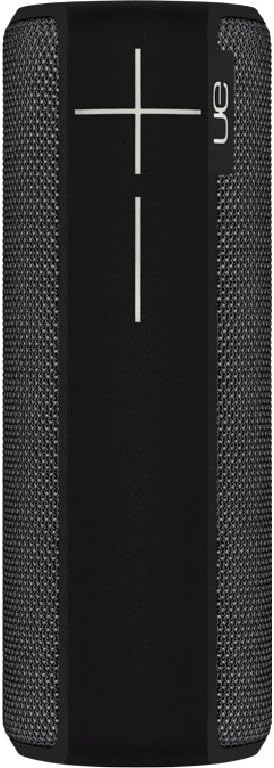
Aldea view of the speaker, featuring the prominent volume control buttons.
2.3 Music Control (Tap Gestures)
The Boom 2 features tap controls for music playback:
- Ukitu bakarra: Tap the top of the speaker once to play or pause the current track.
- Sakatu birritan: Tap the top of the speaker twice to skip to the next track.
2.4 Bateriaren egoera
To check the battery level, press both the '+' and '-' volume buttons simultaneously. The speaker will announce the remaining battery percentage.
2.5 Waterproof and Durability Features
The Ultimate Ears Boom 2 is designed to be waterproof (IPX7 rated) and shockproof. It can be immersed in water up to 1 meter for 30 minutes. Ensure the charging port cover is securely closed before exposing the speaker to water.

The speaker's waterproof design allows for use in various environments.

The Ultimate Ears Boom 2 demonstrating its water resistance.
2.6 PartyUp Mode (Connecting Multiple Speakers)
Use the Ultimate Ears app to connect multiple Boom speakers together for a more expansive sound experience. Follow the instructions within the app to activate PartyUp mode.
3. Zainketa eta Mantentzea
3.1 Garbiketa jarraibideak
Bozgorailua garbitzeko, erabili zapi leun eta lehorra.amp oihal. Saihestu produktu kimiko gogorrak edo garbitzaile urratzaileak erabiltzea, hauek bozgorailuen akabera edo zigilu iragazgaitzak kaltetu baitezakete. Ziurtatu kargatzeko ataka lehor dagoela kargatu aurretik.
3.2 Bateriaren iraupena
To maximize battery life, avoid fully discharging the speaker frequently. Charge the speaker regularly, and if storing for an extended period, ensure it has at least a 50% charge.
3.3 Biltegiratzea
Store the speaker in a cool, dry place away from direct sunlight and extreme temperatures. Ensure the charging port cover is closed to prevent dust and debris from entering.
4. Arazoak konpontzeko gida
4.1 Potentziarik gabe
- Ensure the speaker is charged. Connect it to the power adapter and allow it to charge for at least 15 minutes before attempting to power on.
- Press and hold the Power button firmly for a few seconds.
4.2 Bluetooth konexio arazoak
- Ensure the speaker is in pairing mode (flashing white LED).
- Turn off and on Bluetooth on your mobile device.
- Forget 'UE Boom 2' from your device's Bluetooth list and attempt to re-pair.
- Move the speaker closer to your device; the maximum range is approximately 33 meters (100 feet).
4.3 Soinurik ez edo bolumen baxua
- Igo bolumena bai bozgorailuan bai konektatutako gailuan.
- Ziurtatu bozgorailua behar bezala konektatuta dagoela Bluetooth bidez.
- Check if the audio source on your device is playing correctly.
4.4 Sound Distortion
- Lower the volume on both the speaker and your connected device.
- Ziurtatu audioa file edo streaming-aren kalitatea ez da baxua.
- Urrundu interferentzia iturri potentzialetatik (adibidez, Wi-Fi bideratzaileak, beste Bluetooth gailuak).
4.5 Aplikazioen konexio arazoak
- Ensure your mobile device's operating system meets the app's requirements (iOS 9.0+).
- Restart the app or reinstall it.
- Ensure the speaker's firmware is up to date via the app.
5. Zehaztapen Teknikoak
| Ezaugarri | Zehaztapena |
|---|---|
| Ereduaren izena | Boom 2 |
| Modelo zenbakia | 984-000557 |
| ASIN | B0141208EA |
| Konektibitate Teknologia | Bluetootha, USBa |
| Haririk gabeko Komunikazio Teknologia | Bluetootha |
| Gailu bateragarriak | Computers, Smartphones (Android, iOS) |
| Bateriaren iraupena | Gehienez 15 ordu |
| Iragazgaitzaren balorazioa | IPX7 (gehienez metro 1 30 minutuz) |
| Gehienezko irismena | 33 metro (100 oin) |
| Bozgorailuaren irteera potentzia | 25 Watt |
| Produktuaren neurriak | 6.7D x 6.7W x 18H cm (approx. 15 x 5 x 5 cm; 0.54 grams) |
| Audio irteera modua | Inguratu |
| Energia iturria | Bateriaren funtzionamendua (litio-polimeroko bateria bat barne) |
6. Bermea eta bezeroarentzako laguntza
6.1 Berme mugatua
The Ultimate Ears Boom 2 comes with a Limited Warranty. For specific details regarding warranty coverage, terms, and conditions, please refer to the warranty documentation included with your product or visit the official Ultimate Ears webgunea.
6.2 Bezeroarentzako laguntza
If you encounter any issues not covered in this manual or require further assistance, please contact Ultimate Ears customer support through their official website. For return policies or issues related to your purchase, consult the retailer's (e.g., Amazon.it) help pages.


