Sarrera
The ASTRO Gaming A40 TR Headset and MixAmp Pro TR are designed to provide a high-fidelity audio experience for gaming on PlayStation 4 and PC. The A40 TR headset offers user customization, allowing transformation from an open-back to a closed-back noise-canceling headset with optional Mod Kits. The MixAmp Pro TR features all-digital components for clear, interference-free audio and voice communication, with customizable settings via the ASTRO Command Center software.

Image: The ASTRO Gaming A40 TR Headset and MixAmp Pro TR, showcasing both components together. The headset is black with gold accents, and the MixAmp is a compact black unit with control dials.
Paketearen edukia
Egiaztatu behean zerrendatutako elementu guztiak zure produktuaren ontzian daudela:
- ASTRO A40 TR Headset
- ASTRO MixAmp Pro TR
- A40 TR Inline Mute Cable (2.0m)
- TOSlink Optical Cable (3.0m)
- Micro-USB Cable (3.0m)
- Digital Daisy Chain Cable (0.5m)
- Swappable Microphone
Konfigurazioa
PlayStation 4ra (PS4) konektatzea
- Konektatu TOSlink Optical Cable from the MixAmp Pro TR's OPTICAL port to the PS4's Optical Out port.
- Konektatu Mikro-USB kablea from the MixAmp Pro TR's USB port to an available USB port on the PS4.
- Konektatu A40 TR Inline Mute Cable from your A40 TR Headset to the headset port on the front of the MixAmp Pro TR.
- Zure PS4an, joan honera: Settings > Sound and Screen > Audio Output Settings.
- Ezarri Irteera portu nagusia to Irteera digitala (optikoa).
- Hautatu Dolby Digital (Bitstream) for the audio format.
- Joan zaitez Ezarpenak> Gailuak> Audio gailuak.
- Ezarri Sarrera gailua to USB Headset (ASTRO MixAmp Pro TR).
- Ezarri Irteerako gailua to USB Headset (ASTRO MixAmp Pro TR).
- Egokitu Bolumen-kontrola (Aurikularrak) gehienez.
- Ezarri Aurikularretarako irteera to Txat Audioa or Audio guztiak as preferred.
PCra konektatzen
- Konektatu Mikro-USB kablea from the MixAmp Pro TR's USB port to an available USB port on your PC.
- Konektatu A40 TR Inline Mute Cable from your A40 TR Headset to the headset port on the front of the MixAmp Pro TR.
- On your PC, ensure the MixAmp Pro TR is selected as the default playback and recording device in your sound settings.
- Deskargatu eta instalatu ASTRO Command Center software from the official ASTRO Gaming website to customize settings, update firmware, and manage EQ presets.
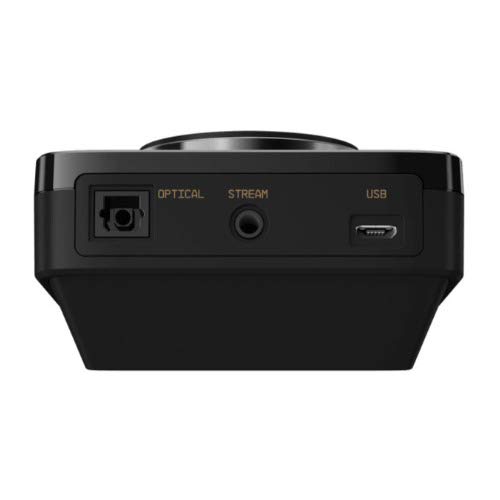
Irudia: Atzealdea view of the ASTRO MixAmp Pro TR, highlighting the Optical, USB, AUX, and Stream ports for various connections.
Operating the MixAmp Pro TR
NahasketaAmp Pro TR provides intuitive controls for managing your audio experience:
- Master Volume Dial: The large dial on the left controls the overall volume of your headset. Rotate clockwise to increase volume, counter-clockwise to decrease.
- Game/Voice Balance Dial: The smaller dial on the right allows you to adjust the balance between game audio and voice chat.
- Rotate towards "GAME" to prioritize game audio.
- Rotate towards "VOICE" to prioritize voice chat.
- EQ Presets Button: Located in the center, this button cycles through four customizable equalizer presets. The active preset is indicated by the illuminated icon (star, headphone, etc.). These presets can be configured using the ASTRO Command Center software.
- Dolby Button: Activates or deactivates Dolby Surround Sound. When active, the Dolby logo will illuminate.
- Mikrofonoa isilarazteko botoia: Located on the A40 TR Inline Mute Cable, this switch mutes or unmutes your microphone. When muted, the MixAmp's volume dials will typically glow red.
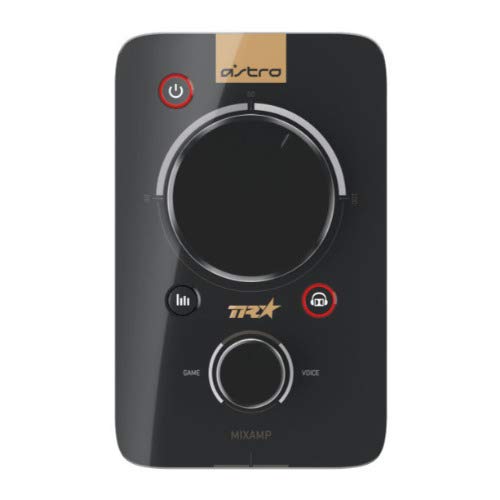
Irudia: Goian view of the ASTRO MixAmp Pro TR, showing the large master volume dial, the smaller game/voice balance dial, and the EQ preset buttons.
Mantentzea
- Garbiketa: Use a soft, dry cloth to clean the headset and MixAmp. Avoid abrasive cleaners or solvents.
- Biltegiratzea: Store the headset and MixAmp leku fresko eta lehor batean eguzki-argitik eta muturreko tenperaturatik urrun.
- Kableen zainketa: Handle cables gently to prevent damage. Avoid sharp bends or excessive pulling.
- Belarrietarako kuxinak: Periodically check ear cushions for wear and tear. Replacement cushions are available from ASTRO Gaming.
Arazoak konpontzea
If you encounter issues with your ASTRO Gaming A40 TR Headset or MixAmp Pro TR, try the following solutions:
| Arazoa | Irtenbidea |
|---|---|
| Ez dago audiorik entzungailuetatik. |
|
| Mikrofonoa ez dabil. |
|
| Audioaren kalitatea distortsionatua edo eskasa. |
|
For more detailed troubleshooting, please refer to the official ASTRO Gaming support resources.
Zehaztapenak
- Modelo zenbakia: 939-001511
- Maiztasun-erantzuna: 20 - 20,000 Hz
- Inpedantzia nominala: 48 ohmio
- Buruko presioa: 2.6N
- Produktuaren neurriak: 9.06 x 13.87 x 4.33 hazbete
- Elementuaren pisua: 1.06 kilo
- Konektibitatea: Optikoa, USBa
- Bateragarritasuna: PlayStation 4, PC
Bermea eta Laguntza
For detailed warranty information and product support, please visit the official ASTRO Gaming webgunea edo emandako dokumentazioa kontsultatu:
Ensure you register your product on the ASTRO Gaming website for the latest updates and support.


