1. Sarrera
This manual provides essential instructions for the safe and efficient use of your Epson LQ-310 24-Pin Narrow Carriage Impact Printer. Please read this manual thoroughly before operating the printer and keep it for future reference.
The Epson LQ-310 is a compact and reliable dot matrix printer designed for fast and efficient printing of various documents, including multi-part forms, invoices, and reports. It features versatile connectivity options including USB, Serial, and Parallel ports.
2. Segurtasun informazioa
Observe the following safety precautions to ensure safe operation and to prevent damage to the printer or injury to yourself.
- Jarri beti inprimagailua gainazal egonkor eta lau batean.
- Do not block or cover the ventilation slots on the printer.
- Erabili inprimagailuarekin batera datorren elikatze-kablea soilik.
- Do not expose the printer to water, moisture, or excessive heat.
- Deskonektatu inprimagailua korronte-hartunetik garbitu edo mantentze-lanak egin aurretik.
- Mantendu haurren eskura.
3. Paketearen edukia
Egiaztatu elementu guztiak paketean daudela:
- Epson LQ-310 Printer Unit
- Elikatze-kablea
- Zinta kartutxoa
- Erabiltzailearen eskuliburua (dokumentu hau)
- Driver CD (may vary by region)
4. Konfigurazioa
4.1 Desontziratzea eta kokatzea
- Kendu inprimagailua ontzitik.
- Kendu babes-zinta eta ontziratzeko material guztiak.
- Place the printer on a flat, stable surface with adequate ventilation.
4.2 Elikatze-kablea konektatzea
Konektatu elikatze-kablea inprimagailura eta gero lurrera konektatutako entxufe elektriko batera.
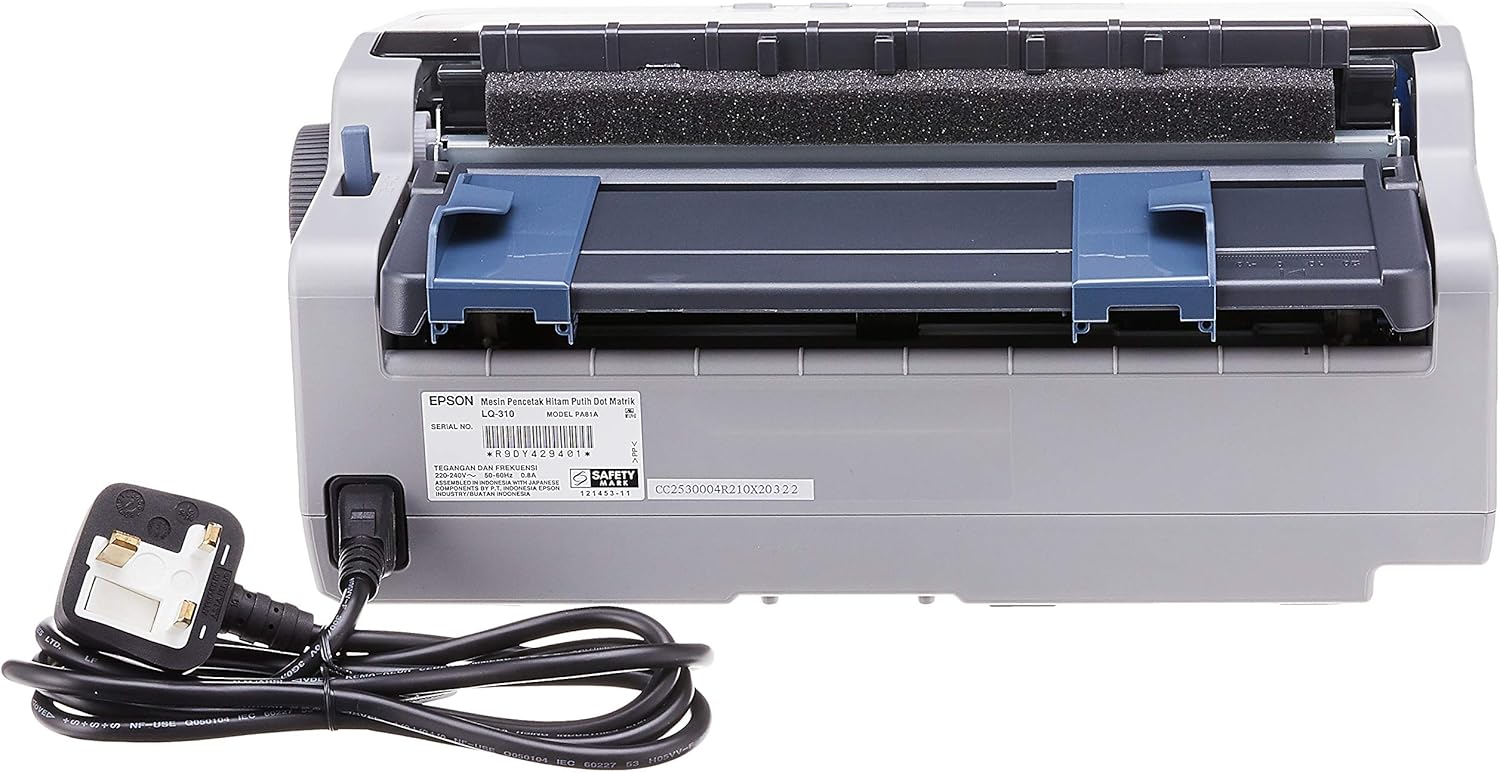
4.2.1. irudia: Atzekoa view of the Epson LQ-310 printer, highlighting the power input and various data ports (USB, Serial, Parallel) for connection to a computer.
4.3 Ordenagailu batera konektatzea
The LQ-310 supports USB, Serial, and Parallel connections. Choose the appropriate cable for your computer and connect it to the corresponding port on the printer.
- USB konexioa: Use a standard USB A-B cable.
- Serie-konexioa: Use a serial cable (RS-232C).
- Konexio paraleloa: Use a parallel cable (Centronics).
4.4 Zinta-kartutxoa instalatzea
- Ziurtatu inprimagailua itzalita dagoela.
- Ireki inprimagailuaren estalkia.
- Unpack the new ribbon cartridge.
- Align the ribbon cartridge with the guides inside the printer and press down firmly until it clicks into place.
- Turn the ribbon feed knob on the cartridge to ensure the ribbon is taut and not twisted.
- Itxi inprimagailuaren estalkia.

4.4.1. irudia: The ribbon cartridge for the Epson LQ-310 printer, which needs to be installed correctly for printing.
4.5 Papera kargatzea
The LQ-310 can handle various paper types, including continuous forms and single sheets.
- Forma jarraituetarako: Place the forms on the tractor feed mechanism at the rear of the printer. Adjust the tractor guides to match the paper width and engage the pins.
- Orri bakarrerako: Insert a single sheet into the front paper slot, ensuring it is straight.
4.6 Gidariaren instalazioa
After connecting the printer, install the necessary drivers on your computer. You can typically find these on the included CD or download them from the official Epson support webgunea.
5. Funtzionamendu-argibideak
5.1 Kontrol-panela amaituview
The control panel on the front of the printer allows you to manage basic functions.

5.1.1. irudia: Aurrealdea view of the Epson LQ-310 printer, showing the control panel with buttons for Tear Off, LF/FF, Load/Eject, Paper Out, Pause, Lock, Font, Item, Micro Adjust, and Set.
- Pizteko botoia: Inprimagailua pizten edo itzaltzen du.
- Paper Out Indicator: Lights up when the printer is out of paper.
- Eten botoia: Inprimatzea aldi baterako gelditzen du. Sakatu berriro jarraitzeko.
- LF/FF (Line Feed/Form Feed) Button: Advances paper by one line or one page.
- Load/Eject Button: Loads a single sheet of paper or ejects the current sheet.
- Tear Off Button: Advances continuous paper to the tear-off position.
- Font Button: Selects different fonts.
- Item/Set Buttons: Used for menu navigation and setting options.
5.2 Oinarrizko inprimaketa
- Ziurtatu inprimagailua piztuta dagoela eta ordenagailura konektatuta dagoela.
- Load paper according to the instructions in Section 4.5.
- Ireki inprimatu nahi duzun dokumentua ordenagailuan.
- Select the Epson LQ-310 as your printer in the print dialog.
- Adjust print settings (e.g., paper size, print quality) as needed.
- Egin klik 'Inprimatu' aukeran.
6. Mantentzea
6.1 Zinta-kartutxoaren ordezkapena
Replace the ribbon cartridge when print quality deteriorates or the ribbon is visibly worn.
- Itzali inprimagailua eta deskonektatu korronte-kablea.
- Ireki inprimagailuaren estalkia.
- Kontu handiz kendu zinta-kartutxo zaharra altxatuz.
- Install a new ribbon cartridge as described in Section 4.4.
- Close the printer cover and reconnect the power.
6.2 Inprimagailua garbitzea
Regular cleaning helps maintain printer performance.
- Itzali inprimagailua eta deskonektatu korronte-kablea.
- Garbitu inprimagailuaren kanpoaldea oihal leun eta lehor batekinamp oihal. Ez erabili garbitzaile edo disolbatzaile urratzailerik.
- Gently clean the print head area with a soft, lint-free cloth if necessary, being careful not to touch the pins.
- Kendu paper-bideko hautsa edo hondakinak.
7. Arazoak
This section addresses common issues you might encounter with your LQ-310 printer.
7.1 Printer Does Not Turn On
- Ziurtatu kablea ondo konektatuta dagoela inprimagailura eta funtzionatzen duen entxufe elektriko batera.
- Egiaztatu entxufea funtzionatzen duen beste gailu bat konektatuz.
7.2 "Paper Out" Indicator is On
- Load paper correctly as described in Section 4.5.
- Ensure the paper sensor is not obstructed.
7.3 Inprimatze-irteerarik ez
- Verify the printer is powered on and connected to the computer.
- Check if the correct printer driver is installed and selected in your application.
- Ensure the ribbon cartridge is installed correctly and has ink.
- Check the printer's status on your computer; clear any pending print jobs.
7.4 Inprimatze-kalitate eskasa
- The ribbon cartridge may be old or running out of ink. Replace it if necessary.
- Ensure the paper type is suitable for impact printing.
- Clean the print head area if there is visible debris.
8. Zehaztapenak
| Ezaugarri | Zehaztapena |
|---|---|
| Inprimatzeko Teknologia | 24-Pin Narrow Carriage Impact Dot Matrix |
| Inprimatzeko abiadura | Up to 347 / 416 cps (10 / 12 cpi) |
| Konektibitatea | 1 Full-Speed USB 2.0, Serial Port, Parallel Port |
| Inprimagailuaren irteera | Colour (Ink Color: Black) |
| Ebazpena | 240 x 170 dpi (Max Print Resolution Black and White: 240 dpi) |
| Elementuaren pisua | 4.1 kilogramo |
| Produktuaren neurriak (L x W x H) | 27.5D x 36.2W x 15.4H zentimetro |
| Gehienezko euskarriaren tamaina | Gutuna/A4 |
| Inprimatutako euskarriak | Papera (normala) |
| Ereduaren izena | LQ 310 |
| Modelo zenbakia | LQ-310 |
9. Bermea eta Laguntza
The Epson LQ-310 printer comes with a limited warranty. For detailed warranty information, please refer to the warranty card included with your product or visit the official Epson webgunea.
For technical support, driver downloads, or further assistance, please visit the Epson support website or contact your local Epson customer service center. Have your printer model number (LQ-310) and serial number ready when contacting support.


