Sarrera
This manual provides instructions for the HAVIT HV-KB366L RGB Backlit Mechanical Gaming Keyboard. This keyboard features blue mechanical switches, full anti-ghosting, and customizable RGB backlighting, designed for reliable performance.
Konfigurazio Argibideak
Teklatua konektatzea
- Bilatu erabilgarri dagoen USB ataka zure ordenagailuan.
- Connect the USB cable from the HAVIT HV-KB366L keyboard to the USB port on your computer.
- Teklatua plug-and-play da eta zure sistema eragileak automatikoki ezagutu beharko luke.
Sistemaren bateragarritasuna
- Compatible with Windows 10 and other Windows operating systems.
- Mac OS supports 6-key rollover only.
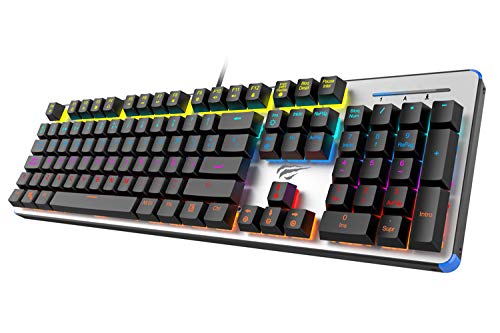
Figure 1: HAVIT HV-KB366L RGB Backlit Mechanical Gaming Keyboard. An overhead view teklatuaren, erakutsiasing its full layout with RGB lighting on the keys and a white frame.
Funtzionamendu-argibideak
Etengailu mekanikoak
The keyboard is equipped with blue mechanical switches, providing tactile feedback and an audible click with each keystroke. This design is intended for precise input during typing and gaming.
Anti-Ghosting Feature
The full key anti-ghosting mechanism ensures that all key presses are registered accurately, even when multiple keys are pressed simultaneously. This feature is beneficial for fast-paced gaming.
Atzeko argiaren doikuntza
- To change the backlight color or mode, press the Fn tekla aldi berean Atzeko argia key. Repeated presses will cycle through available modes and colors.
- Marquee Mode: In 7-color backlit mode (non-breathing), press the Atzeko argia key once to activate marquee mode. Press the Atzeko argia key again to deactivate marquee mode and return to 7-color backlit mode.
- Distira maila: The backlight offers 4 levels of brightness adjustment.
- Arnasketa-maiztasuna: The breathing effect has 10 adjustable levels.
Mantentzea
Teklatua garbitzea
- Deskonektatu teklatua ordenagailutik garbitu aurretik.
- Erabili zapi leun eta lehor bat teklatuaren gainazala garbitzeko.
- Teklen arteko hautsa eta hondakinak lortzeko, erabili aire konprimatua.
- Saihestu produktu kimiko gogorrak edo material urratzaileak erabiltzea, hauek akabera edo teklak kaltetu baitezakete.
Iraunkortasuna
The keyboard features an aluminum top housing with a sanded finish and a metal base, contributing to its overall durability and stable performance.
Arazoak konpontzea
Teklatuak ez du erantzuten
- Ziurtatu USB kablea ondo konektatuta dagoela bai teklatura bai ordenagailura.
- Saiatu teklatua ordenagailuko beste USB ataka batera konektatzen.
- Probatu teklatua beste ordenagailu batean arazoa teklatuan edo ordenagailuaren USB atakan den zehazteko.
Atzeko argia ez dabil edo ez dabil ondo
- Egiaztatu teklatua behar bezala konektatuta dagoela eta energia jasotzen duela.
- Sakatu Fn + Backlit key to cycle through backlight modes and ensure it is not turned off or set to a very low brightness.
- Refer to the "Backlight Adjustment" section for detailed instructions on changing modes and brightness.
Zehaztapenak
| Marka | HAVIT |
| Modelo zenbakia | HV-KB366L |
| Fabrikatzailea | HAVIT |
| Produktuaren neurriak | 50.5 x 17.6 x 6 zentimetro |
| Elementuaren pisua | 1.33 kg |
| Konektibitate Teknologia | Kablez (USB) |
| Teklatuaren deskribapena | Joko Teklatu Mekanikoa |
| Ezaugarri Berezia | RGB Backlit, Anti-Ghosting |
| Hardware Plataforma | Ordenagailu eramangarria, ordenagailua |
| Sistema eragilea | Windows 10 (and compatible), Mac OS (6-key rollover) |
| liburukiatage | 5 Volt |
| Dakarten osagaiak | USB kablea |
Bermea eta laguntza
Bermearen informazioa
Specific warranty details for the HAVIT HV-KB366L keyboard are not provided in the product data. Please refer to the product packaging or contact HAVIT directly for warranty terms and conditions.
Bezeroarentzako Arreta
For technical assistance, troubleshooting, or further inquiries, please contact HAVIT customer support through their official webwebgunea edo zure erosketarekin emandako harremanetarako informazioa.


