1. Sarrera
Eskerrik asko erosketagatik.asing the Gotech GTV-7-TFT 7-inch Portable Color TFT LCD TV. This manual provides essential information for the safe and efficient operation of your device. Please read it thoroughly before use and retain it for future reference.
2. Segurtasun-argibide garrantzitsuak
- Ez jarri unitatea euripean edo hezetasunean, suteak edo deskarga elektrikoak saihesteko.
- Ez ireki c-a.asing. Konponketa guztiak langile kualifikatuen esku utzi.
- Saihestu unitatea bero-iturrien ondoan edo eguzki-argiaren eraginpean jartzea.
- Ziurtatu aireztapen egokia unitatearen inguruan.
- Erabili zehaztutako energia-egokitzailea soilik.
- Mantendu unitatea eremu magnetiko indartsuetatik urrun.
- Garbitu unitatea zapi leun eta lehor batekin. Ez erabili garbitzaile likidorik.
3. Paketearen edukia
Egiaztatu elementu guztiak paketean daudela:
- Gotech GTV-7-TFT Portable TV Unit
- Urruneko Kontrola
- AC/DC egokigailua
- Car Cord (Car Holder not explicitly listed as included, but mentioned as a feature)
- Antena Jack
- AV Kable
- Kendu daitekeen standa

Image 3.1: The retail box for the Gotech GTV-7-TFT Portable TV, showing the product, remote control, and included accessories.
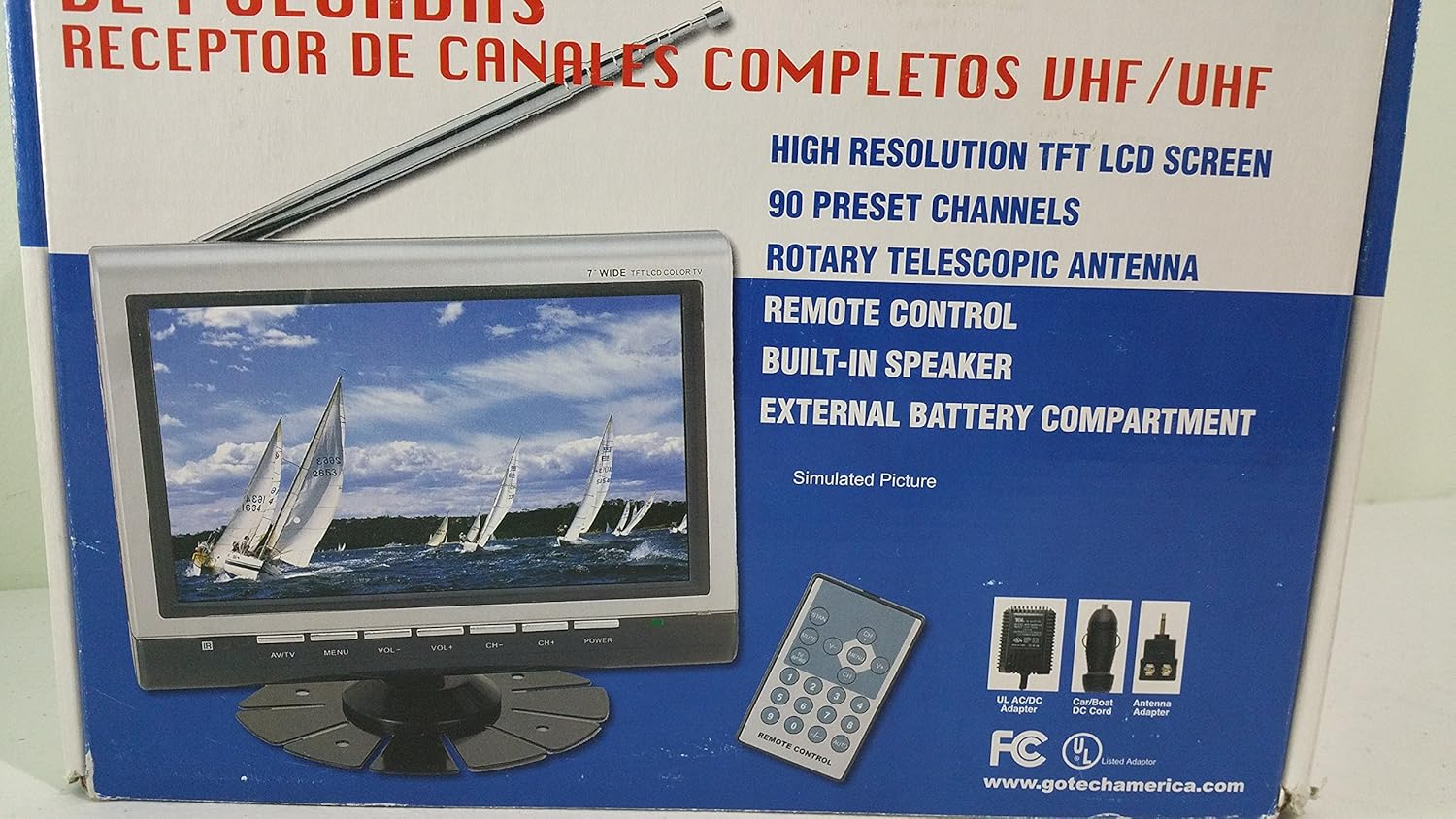
3.2 irudia: Hurbildutako bat view of the Gotech GTV-7-TFT TV screen and the remote control, as depicted on the product packaging.
4. Produktua amaitu daview
4.1 Ezaugarri nagusiak
- 7-inch High Resolution TFT LCD Screen
- Full Channel VHF/UHF Receiver
- 90 Aurrez ezarritako kanalak
- Digital Up/Down Tuning
- Auto Channel Programming
- Antena Teleskopiko Birakaria
- On-Screen Display (OSD) for Picture and Volume Adjustment
- Bozgorailu integratua
- External Battery Compartment (requires 10x AA batteries, not included)
- Remote Control with Button Cell
- New Detachable Stand with Battery

Image 4.1: Side panel of the Gotech GTV-7-TFT packaging, detailing the product's main features.
5. Konfigurazioa
5.1 Powering the TV
The GTV-7-TFT can be powered in several ways:
- AC/DC egokitzailea: Connect the provided AC/DC adapter to the TV's power input and then to a standard wall outlet.
- Car Cord: For in-vehicle use, connect the car cord to the TV's power input and then to your vehicle's 12V power outlet.
- Kanpoko bateriak: Open the external battery compartment and insert 10x AA size batteries (UM3) according to the polarity indicators. Ensure the batteries are fresh and correctly oriented.
5.2 Antena konektatzea
Extend the rotary telescopic antenna for optimal signal reception. For improved reception, you may connect an external antenna to the antenna jack using the provided antenna jack adapter.
5.3 Connecting External Devices (AV Input)
To connect external devices such as a DVD player or gaming console, use the provided AV cable. Connect one end to the TV's AV input port and the other end to the AV output ports of your external device. Select the AV input source on the TV to view konektatutako gailuko edukia.
6. Funtzionamendua
6.1 Piztu/Itzali
Sakatu BOTEREA button on the TV unit or the remote control to turn the TV on or off.
6.2 Channel Tuning
- Auto Channel Programming: It is recommended to perform an auto channel scan upon first use or when moving to a new location. Access the menu, navigate to the channel setup, and select 'Auto Scan' or 'Auto Program'. The TV will search and store available channels.
- Digital Up/Down Tuning: Erabili CH+ eta CH- buttons on the TV or remote control to navigate through the preset channels.
6.3 Volume and Picture Adjustment
Erabili VOL+ eta Boluntario buttons on the TV or remote control to adjust the volume. Picture settings (brightness, contrast, color) can be adjusted via the on-screen display (OSD) menu. Press the MENUA button to access these options.
6.4 Urruneko kontrola
The remote control allows convenient operation from a distance. Ensure the button cell battery is correctly inserted. Point the remote control directly at the TV's infrared sensor.
7. Mantentzea
7.1 Garbiketa
Wipe the TV screen and casing with a soft, dry, lint-free cloth. Do not use abrasive cleaners, waxes, or solvents as they may damage the finish or screen.
7.2 Biltegiratzea
If the TV will not be used for an extended period, remove the external batteries to prevent leakage. Store the unit in a cool, dry place away from direct sunlight and extreme temperatures.
8. Arazoak
| Arazoa | Kausa posiblea | Irtenbidea |
|---|---|---|
| Botererik ez | Power adapter not connected; Batteries depleted or incorrectly inserted. | Check power connections; Replace or correctly insert batteries. |
| Ez dago irudi/soinurik | Incorrect input source; Antenna not connected or extended; No channels scanned. | Select correct input (TV/AV); Extend antenna or connect external one; Perform auto channel scan. |
| Harrera eskasa | Weak signal; Antenna position. | Adjust antenna position; Try an external antenna; Check for local signal strength. |
| Urruneko kontrola ez dabil | Battery depleted; Obstruction between remote and TV. | Replace remote control battery; Remove any obstructions. |
9. Zehaztapenak
| Ezaugarri | Xehetasuna |
|---|---|
| Modelo zenbakia | gtv-7-tft |
| Pantailaren tamaina | 7 hazbete (17.8 cm) |
| Bistaratzeko mota | TFT LCD koloretako pantaila |
| Sintonizatzaile mota | Full Channel VHF/UHF Receiver |
| Aurrez ezarritako kanalak | 90 |
| Audio irteera mota | Bozgorailu integratua |
| Kontrol-metodoa | Urruneko Kontrola |
| Gailu bateragarriak | Telebista, Hizlaria |
| Energia iturria | AC/DC Adapter, Car Cord, External Battery Compartment (10x AA batteries, not included) |
10. Bermea eta Laguntza
Specific warranty information and customer support details are not provided within this manual. Please refer to the product packaging or contact your retailer for warranty claims and technical assistance.