Sarrera
The Sony LCSEBE Body Case is designed to provide protection for your Sony Alpha A6000 camera. This case is crafted to fit precisely, offering enhanced grip and safeguarding the camera body from minor impacts and scratches, all while ensuring full access to essential camera functions and ports.
Setup: Attaching the Body Case
Prestatu zure kamera: Ensure your Sony Alpha A6000 camera is powered off before attaching the body case.
Lerrokatu kasua: Carefully align the body case with the bottom and sides of your camera. The case is designed for a snug fit.

Image: A hand demonstrates attaching the body case to the camera, highlighting the precise fit around the camera's contours.
Secure with Tripod Screw: Locate the tripod screw on the bottom of the body case. Insert this screw into the camera's tripod mount and turn clockwise until securely fastened. Do not overtighten.

Image: The underside of the body case, featuring the metal screw designed to secure the case to the camera's tripod socket.
Egokitzapena egiaztatu: Once attached, ensure the case is firmly in place and does not obstruct any camera controls or the lens mount.

Image: The camera with the body case attached, viewed from the front, illustrating the protective coverage.
Operating the Camera with the Case
The LCSEBE body case is designed to allow full functionality of your camera without removal.
Monitor Tilting: The case does not impede the tilting mechanism of the camera's LCD monitor, allowing for flexible viewangeluak.
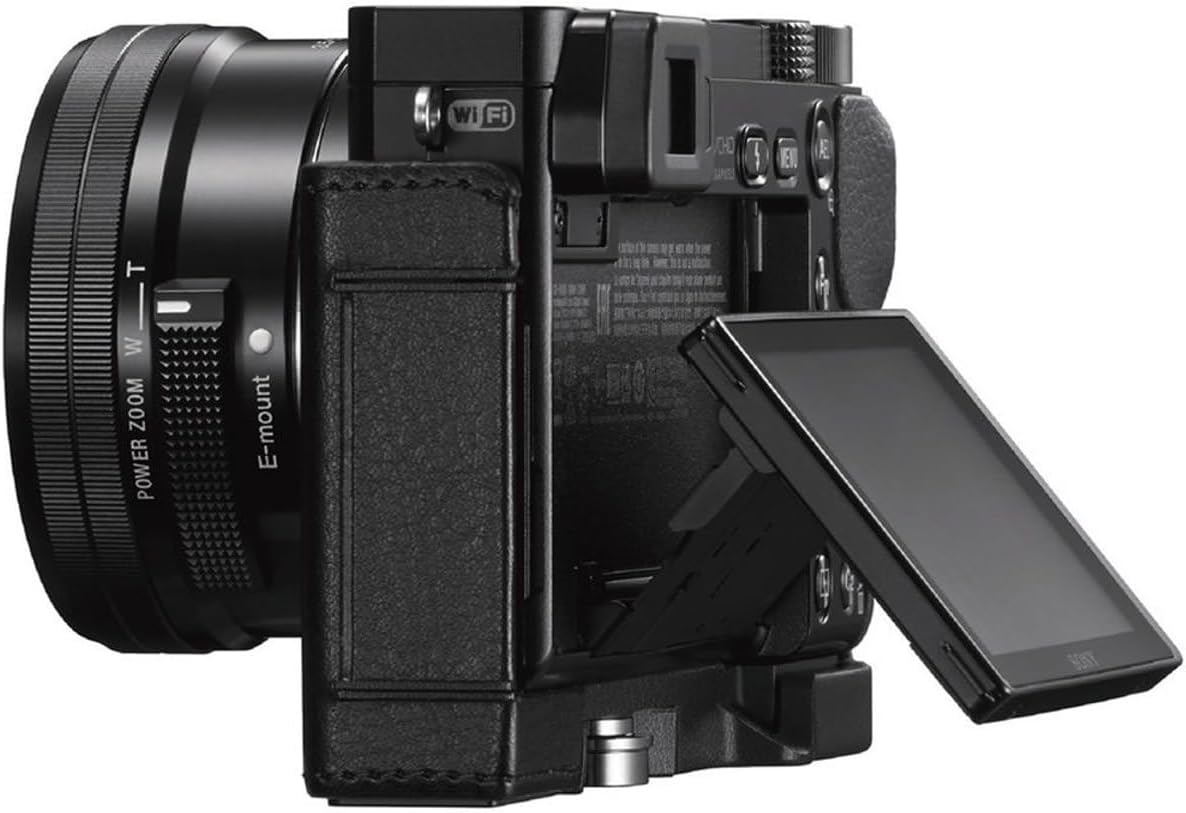
Image: The camera with the case, demonstrating the ability to tilt the monitor for various shooting perspectives.
Kable konexioak: Access to the camera's USB and HDMI ports is maintained, allowing for charging, data transfer, or external display connections while the case is on.

Image: A USB cable connected to the camera, illustrating port accessibility with the case attached.
Battery and Memory Card Access: The case features a dedicated opening for convenient access to the battery and memory card compartment without needing to remove the entire case.

Image: The battery and memory card slot are visible and accessible through a hinged flap on the case's bottom.
Tripodearen muntaketa: The integrated screw on the bottom of the case also features a threaded hole, allowing the camera to be mounted directly onto a tripod while the case is attached.
Mantentzea
To ensure the longevity and appearance of your Sony LCSEBE body case, follow these maintenance guidelines:
- Garbiketa: Wipe the case regularly with a soft, dry cloth to remove dust and fingerprints. For stubborn marks, lightly dampen the cloth with water and gently clean the affected area. Avoid using harsh chemicals or abrasive cleaners.
- Biltegiratzea: When not in use, store the case in a cool, dry place away from direct sunlight and extreme temperatures to prevent material degradation.
- Saihestu hezetasuna: While the case offers some protection, it is not waterproof. Avoid prolonged exposure to moisture. If the case gets wet, dry it thoroughly with a soft cloth.
Arazoak konpontzea
- Difficulty Removing SD Card: Due to the design of the access flap and the camera's compartment, removing the SD card can sometimes be challenging. Use a thin, non-metallic tool (like a plastic pick) if necessary to gently assist in card removal. Ensure the camera is powered off before attempting to remove the card.
- Kasua solte sentitzen da: If the case feels loose, ensure the tripod screw on the bottom is fully tightened. Periodically check the tightness of this screw, especially after frequent use or tripod mounting.
- Obstruction of Controls: If any camera controls or buttons feel obstructed, re-check the alignment of the case. The case is designed for a precise fit; improper alignment can cause interference.
Zehaztapenak
| Produktuaren neurriak | 5.1 x 2.44 x 5.75 hazbete |
| Elementuaren pisua | 4.5 ontza |
| Elementuaren eredu-zenbakia | LCSEBE/B |
| Fabrikatzailea | Sony |
| Eskuragarri dagoen lehen data | 4ko abenduaren 2015a |
Bermearen informazioa
This product includes a warranty card. Please refer to the warranty card provided in the packaging for detailed information regarding warranty coverage, terms, and conditions. Retain your proof of purchase for warranty claims.
Laguntza
For further assistance, product inquiries, or technical support, please visit the official Sony support website or contact Sony customer service. Contact details can typically be found on the warranty card or the manufacturer's webgunea.


