1. Sarrera
The Aduro Amplify LED Wireless Speaker, model BSP15, is a portable audio device designed for wireless music playback and hands-free calling. It features integrated LED lighting with multiple settings to enhance the audio experience. This manual provides instructions for the proper setup, operation, and maintenance of your speaker.
Zer dago Kutxan:
- Aduro Amplify LED Wireless Speaker (BSP15)
- Kargatzeko kablea
2. Segurtasun informazioa
- Do not expose the speaker to water or moisture. This product is not water-resistant.
- Avoid extreme temperatures. Do not place near heat sources or in direct sunlight for extended periods.
- Do not attempt to disassemble or modify the speaker. This may void the warranty and cause damage.
- Erabili emandako kargatzeko kablea edo baliokide ziurtatu bat soilik.
- Mantendu haurren eskura.
3. Produktuaren ezaugarriak
- Haririk gabeko konektagarritasuna: Connects to smartphones, tablets, and other Bluetooth-enabled devices.
- Easy-Touch Pairing: Simplifies the process of connecting to your device.
- Mikrofono integratua: Allows for hands-free phone calls.
- Kalitate handiko soinu irteera: Delivers clear and loud audio.
- Multiple LED Settings: Offers various light modes to complement your audio experience.
4. Kontrolakview
The Aduro Amplify speaker features intuitive controls located on the top panel for easy access to functions.
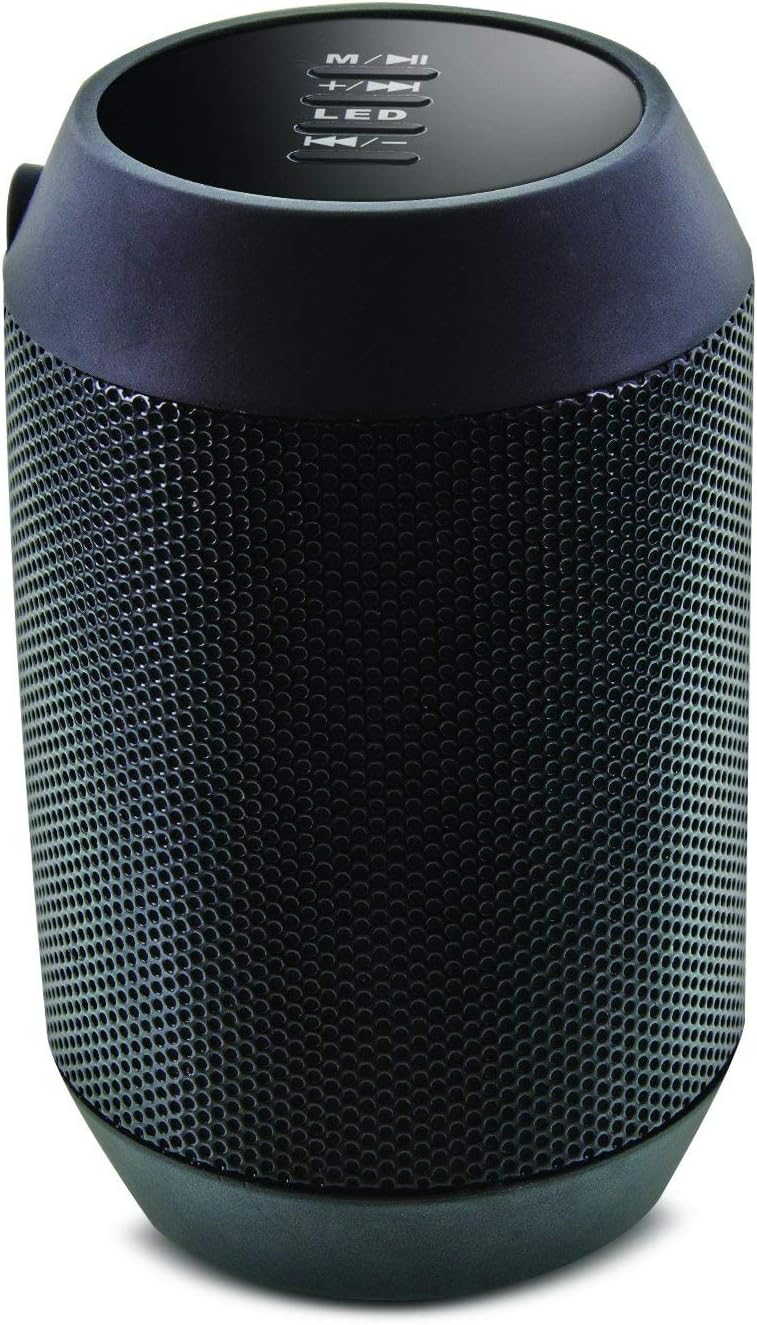
Irudia: Goian view of the Aduro Amplify speaker, highlighting the control panel. From top to bottom, buttons include: M/▶█ (Mode/Play/Pause), +/▶▶ (Volume Up/Next Track), LED (LED Mode Control), ◀◀/- (Volume Down/Previous Track).
- M/▶█ Button: Press to switch between modes (e.g., Bluetooth, AUX). Press and hold to power on/off. Short press to Play/Pause music.
- +/▶▶ Button: Short press to increase volume. Press and hold to skip to the next track.
- LED botoia: Sakatu LED argi modu desberdinen artean txandakatzeko.
- ◀◀/- Button: Short press to decrease volume. Press and hold to go to the previous track.
5. Konfiguratzeko argibideak
5.1 Bozgorailua kargatzea
Before first use, fully charge the speaker. Connect the provided charging cable to the speaker's charging port and the other end to a USB power source (e.g., computer USB port, USB wall adapter). The LED indicator will show charging status and turn off or change color when fully charged.
5.2 Piztu/Itzaltzea
- Pizteko: Eduki sakatuta M/▶█ button for approximately 3 seconds until you hear an audible prompt or see the LED indicator light up.
- Itzaltzeko: Eduki sakatuta M/▶█ button for approximately 3 seconds until you hear an audible prompt or the LED indicator turns off.
5.3 Bluetooth parekatzea
Bozgorailua Bluetooth gaitutako gailu batera konektatzeko:
- Ensure the speaker is powered on and in Bluetooth pairing mode. The LED indicator will typically flash rapidly, indicating it is ready to pair.
- On your smartphone, tablet, or other device, navigate to the Bluetooth settings.
- Gaitu Bluetootha eta bilatu eskuragarri dauden gailuak.
- Select "Aduro BSP15" (or similar name) from the list of found devices.
- Once paired, the speaker will emit an audible confirmation, and the LED indicator will typically stop flashing and remain solid.
- Bozgorailuak automatikoki saiatuko da azken parekatutako gailura berriro konektatzen pizten denean.
5.4 Wired Connection (AUX)
For devices without Bluetooth, you can use a 3.5mm audio cable (not included) to connect to the speaker's AUX input port. Once connected, the speaker should automatically switch to AUX mode. If not, press the M/▶█ button to cycle to AUX mode.
6. Funtzionamendu-argibideak
6.1 Audioa erreproduzitzea
- Erreproduzitu/Pausatu: Sakatu laburra M/▶█ botoia.
- Bolumena igo: Sakatu laburra +/▶▶ botoia.
- Bolumena jaitsi: Sakatu laburra ◀◀/- botoia.
- Hurrengo ibilbidea: Eduki sakatuta +/▶▶ botoia.
- Aurreko pista: Eduki sakatuta ◀◀/- botoia.
6.2 Eskurik gabeko deiak
When connected via Bluetooth, the speaker's built-in microphone allows for hands-free calling.
- Erantzun deia: Sakatu laburra M/▶█ button when an incoming call rings.
- Amaitu deia: Sakatu laburra M/▶█ botoian deian zehar.
- Deia baztertu: Eduki sakatuta M/▶█ button when an incoming call rings.
6.3 LED Light Settings
Sakatu LED button to cycle through the available light modes. The speaker offers various visual effects, including pulsating lights that react to music.
7. Mantentzea
7.1 Garbiketa
Garbitu bozgorailua oihal leun eta lehor batekin. Ez erabili garbitzaile urratzailerik, alkoholik edo bestelako disolbatzaile kimikorik, gainazala kaltetu baitezakete.
7.2 Biltegiratzea
Denbora luzez erabiltzen ez baduzu, gorde bozgorailua leku fresko eta lehor batean, eguzki-argitik eta muturreko tenperaturetatik babestuta. Gomendagarria da bateria aldian-aldian kargatzea, bere iraupena mantentzeko.
8. Arazoak
- Speaker will not power on:
Ziurtatu bateria kargatuta dagoela. Konektatu kargatzeko kablea eta saiatu berriro minutu batzuk igaro ondoren. - Ezin da Bluetooth gailuarekin parekatu:
Ensure the speaker is in pairing mode (LED flashing). Make sure Bluetooth is enabled on your device and it is within range (typically 10 meters/30 feet). Turn both devices off and on again, then try pairing. Ensure no other devices are currently connected to the speaker. - Soinurik ez edo bolumen baxua:
Check the volume levels on both the speaker and your connected device. Ensure the speaker is correctly paired or the AUX cable is fully inserted. If using AUX, ensure the correct mode is selected. - LED argiak ez dute funtzionatzen:
Press the LED button to cycle through modes. If still unresponsive, power cycle the speaker.
9. Zehaztapenak

Irudia: Albokoa view of the Aduro Amplify LED Wireless Speaker, showing its cylindrical design and speaker grille.
| Ereduaren izena | BSP15 |
| Elementuaren eredu-zenbakia | LU4-01-BSP15 |
| Marka | Aduro |
| Materiala | Plastikoa |
| Hizlari mota | Subwoofer |
| Ezaugarri bereziak | Built-in Microphone, Portable |
| Konektibitate Teknologia | Haririk gabeko (Bluetooth) |
| Haririk gabeko komunikazioa | Bluetootha |
| Audio irteera modua | Estereoa |
| Bozgorailuaren irteera-potentzia maximoa | 5 Watt |
| Kontrol-metodoa | Ukitu |
| Produktuaren neurriak | 6" L x 3.8" W x 3.5" H |
| Elementuaren pisua | 6.7 ontza |
| Uraren Erresistentzia Maila | Ez Urarekiko Erresistentea |
| Energia iturria | Hari elektrikoa (kargatzeko) |
10. Bermea eta Laguntza
10.1 Berme mugatua
This Aduro product is covered by a limited warranty against defects in materials and workmanship under normal use. The duration and terms of the warranty may vary. Please refer to the warranty card included with your purchase or contact Aduro customer support for specific details.
10.2 Bezeroarentzako laguntza
For technical assistance, warranty claims, or product inquiries, please contact Aduro customer support. Contact information can typically be found on the manufacturer's official webgunean edo produktuaren ontzian.
Manufacturer: Aduro


