1. Produktua amaitu daview
The STANLEY SurgeQuad AC and USB Wall Tap, Model 33202, is designed to expand a standard 2-outlet, 3-prong grounded wall outlet into a versatile power station. It provides four grounded AC outlets and two USB charging ports, along with surge protection for connected devices.
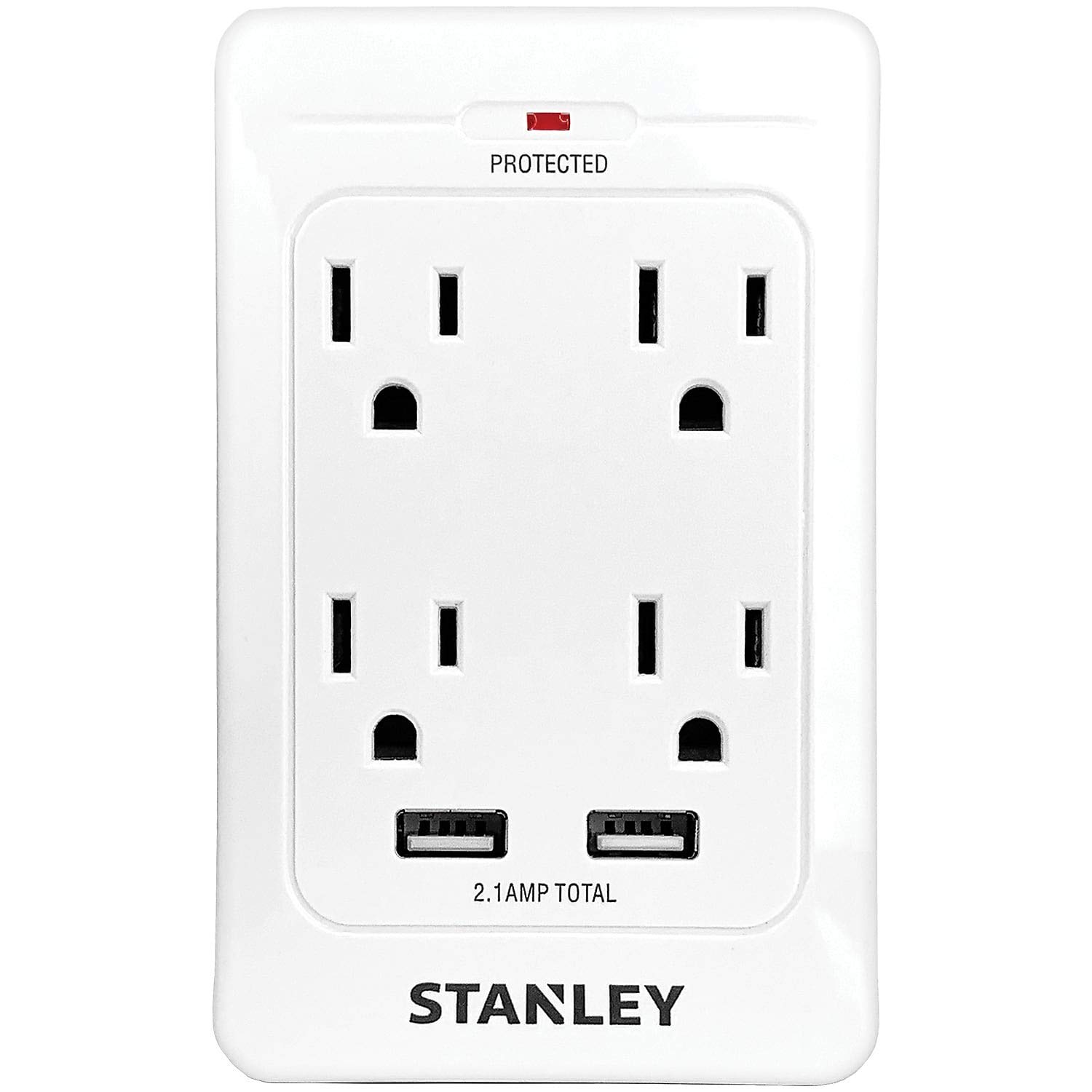
1. irudia: Aurrealdea view of the STANLEY SurgeQuad AC and USB Wall Tap, highlighting its multiple outlets and ports.
Ezaugarri nagusiak:
- Converts a standard grounded wall outlet into 4 grounded AC outlets.
- Includes 2 USB charging ports (2.1 amps shared output).
- Provides 1,080 Joules of surge protection.
- Features a surge-protection LED indicator.
- Rated for 125-volt AC, 60 Hz, 15 amps, and 1,875 watts.
2. Segurtasun informazioa
- Deskarga elektrikoaren arriskua: Do not open the device. No user-serviceable parts inside.
- Barruko erabilera soilik: This product is intended for indoor use in dry locations only. Do not expose to moisture or wet conditions.
- Lurreratze egokia: Ensure the wall outlet is properly grounded before plugging in the SurgeQuad.
- Gainkarga babesa: Do not exceed the electrical ratings of the SurgeQuad (15 Amps, 1875 Watts). Overloading can cause damage or fire.
- Haurrak eta maskotak: Mantendu haurren eta maskoten eskura.
- Ekipamendu medikoa: Not for use with life support or other medical equipment.
- Ikuskapena: Inspect the product for any damage before each use. Do not use if damaged.
3. Konfigurazioa
- Identify Outlet: Locate a standard 2-outlet, 3-prong grounded wall outlet.
- Konektatu: Align the prongs of the STANLEY SurgeQuad with the wall outlet and firmly push it into place. Ensure it is securely seated.
- Verify Surge Protection: Once plugged in, the surge-protection LED indicator on the unit should illuminate, confirming that the surge protection feature is active.
The SurgeQuad is designed to plug directly into an existing duplex outlet. No additional wiring or tools are required for installation.
4. Funtzionamendu-argibideak
Korronte alternoko entxufeak erabiltzea:
- Plug your electronic devices into any of the four grounded AC outlets on the SurgeQuad.
- Ensure that the total power draw of all connected devices does not exceed 1875 watts (15 amps at 125 volts).
USB kargatzeko atakak erabiltzea:
- Connect your USB-powered devices (e.g., smartphones, tablets) to the two USB charging ports using appropriate USB cables.
- The two USB ports share a total output of 2.1 amps. If charging multiple devices, the current will be distributed between them.
The surge protection feature continuously monitors the power supply to protect connected devices from voltage puntak.
5. Mantentzea
- Garbiketa: Disconnect the SurgeQuad from the wall outlet before cleaning. Wipe the exterior with a soft, dry cloth. Do not use liquid cleaners or abrasive materials.
- Ikuskapena: Periodically inspect the unit for any signs of damage, such as cracks in the casing or loose connections. If damage is observed, discontinue use.
- Erabiltzaileak ez du zerbitzurik gabeko piezarik: The SurgeQuad contains no user-serviceable parts. Do not attempt to open or repair the unit.
6. Arazoak
Surge-Protection LED Not Lit:
- Egiaztatu potentzia: Ensure the SurgeQuad is firmly plugged into a live, grounded wall outlet.
- Surge Protection Expired: If the LED does not light up after confirming power, it may indicate that the surge protection components have absorbed a significant surge and are no longer providing protection. In this case, the unit should be replaced. The AC outlets may still provide power, but without surge protection.
Devices Not Receiving Power/Charging:
- Egiaztatu konexioak: Ensure all device plugs and USB cables are securely connected to the SurgeQuad.
- Egiaztatu hormako entxufea: Probatu hormako entxufea beste gailu batekin korrontea ematen duela baieztatzeko.
- Gainkarga: Disconnect some devices to check if the unit is overloaded. The total wattage for AC outlets should not exceed 1875W. For USB, ensure the combined draw does not exceed 2.1A.
- Gailuaren funtzionaltasuna: Test the device directly in a known working wall outlet or USB charger to rule out a device malfunction.
7. Zehaztapenak
| Modelo zenbakia | 33202 |
| liburukiatage | 125 Volt AC |
| Maiztasuna | 60 Hz |
| Amparoa | 15 Amps |
| Wattage | 1875 Watt |
| Surge Babesa | 1,080 Joule |
| USB irteera | 2.1 Amps (shared) |
| Produktuaren neurriak | 9 x 6 x 1.8 hazbete |
| Elementuaren pisua | 6.4 ontza |
| Kolorea | Zuria |
| Tapoi formatua | B mota |
8. Bermearen informazioa
This STANLEY SurgeQuad AC and USB Wall Tap, Model 33202, comes with a Hiru Urteko Berme Mugatua from the date of purchase. This warranty covers defects in materials and workmanship under normal use. It does not cover damage resulting from misuse, abuse, accidents, unauthorized repairs, or modifications.
For warranty claims or further details, please refer to the warranty documentation included with your purchase or contact STANLEY customer support.
9. Laguntza
If you have any questions, require technical assistance, or need to report an issue with your STANLEY SurgeQuad, please contact STANLEY customer support. Contact information can typically be found on the product packaging or the official STANLEY webgunea.
Please have your product model number (33202) and purchase information ready when contacting support.


