
Produktua amaituview
This manual provides essential information for the proper use and maintenance of your Mars Replacement Controller for the Original Xbox system. This controller is designed to offer a familiar gaming experience, serving as a direct replacement for your existing or worn Original Xbox controllers. It features a classic layout with ten buttons, a D-pad, and two joysticks, built for durability and extended gameplay sessions.
Konfigurazio Argibideak
Follow these steps to connect your new controller to your Original Xbox console:
- Locate Controller Port: Identify an available controller port on the front of your Original Xbox console. The Original Xbox typically has four controller ports.
- Konektatu kontrolagailua: Align the proprietary connector of the Mars Replacement Controller with the chosen port on the console. Gently push the connector firmly into the port until it clicks into place.
- Kontsola piztea: Turn on your Original Xbox console. The controller should be automatically recognized by the system.
- Proba funtzionaltasuna: Once the console is on, test all buttons, joysticks, and the D-pad to ensure proper functionality before starting a game.
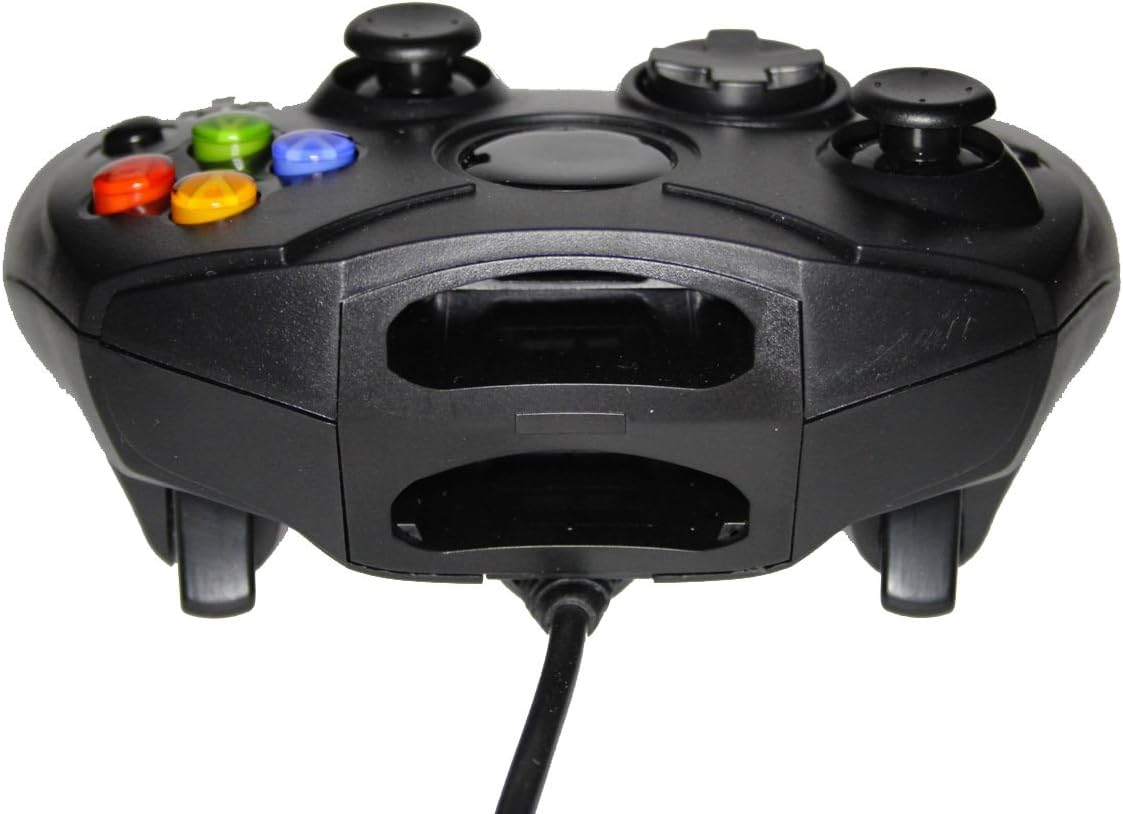
1. irudia: Aurrealdea view of the controller, highlighting the proprietary Xbox connector and memory card slots.
Zure kontrolagailua erabiltzea
The Mars Replacement Controller features the standard button layout for the Original Xbox, providing intuitive control for your games.

2. irudia: Goikoa view of the controller, displaying the button layout.
Botoiaren funtzioak:
- A, B, X, Y botoiak: Primary action buttons, typically used for jumping, attacking, interacting, or confirming selections.
- D-Pad (Norabide-pada): Used for precise directional input, menu navigation, or specific in-game actions.
- Ezkerreko eta eskuineko analogikoen makilak: Provide 360-degree movement and camera control. Pressing them down often activates additional functions (L3/R3).
- Black and White Buttons: Auxiliary action buttons, often used for secondary actions or specific game mechanics.
- Hasi botoia: Typically used to pause games, access in-game menus, or confirm selections.
- Atzera botoia: Often used to access maps, inventories, or return to previous menus.
- Left and Right Triggers: Analog triggers on the underside of the controller, commonly used for acceleration, braking, or firing weapons.
Specific button assignments may vary depending on the game. Refer to your game's instruction manual for detailed control schemes.
Zainketa eta Mantentzea
To ensure the longevity and optimal performance of your Mars Replacement Controller, follow these care guidelines:
- Garbiketa: Erabili zapi leun eta lehor bat kontrolatzailea aldizka garbitzeko. Zikinkeria egoskorra bada, garbitu pixka bat.ampen the cloth with water or a mild, non-abrasive cleaner. Avoid excessive moisture, especially near buttons and ports.
- Biltegiratzea: Store the controller in a clean, dry place away from direct sunlight, extreme temperatures, and excessive dust. Avoid wrapping the cable too tightly around the controller to prevent damage.
- Manipulazioa: Do not drop the controller or subject it to strong impacts. Avoid pulling the cable forcefully when disconnecting it from the console; always grasp the connector itself.
- Likidoaren esposizioa: Keep the controller away from liquids. Spills can cause internal damage and void any potential warranty.
Arazoak konpontzea
Kontrolatzailearekin arazoak badituzu, jo ezazu honako arazo eta irtenbide ohikoenei:
| Arazoa | Irtenbide posiblea |
|---|---|
| Kontrolatzaileak ez du erantzuten. |
|
| Buttons or joysticks are unresponsive or sticky. |
|
| Kontrolatzailea tarteka deskonektatzen da. |
|
Irtenbide hauek probatu ondoren arazoa konpontzen ez bada, jarri harremanetan bezeroarentzako arreta-zerbitzuarekin.
Zehaztapen Teknikoak
| Ezaugarri | Xehetasuna |
|---|---|
| Produktuaren neurriak | 7 x 5.6 x 2.4 hazbete |
| Elementuaren pisua | 3.99 ontza |
| Gailu bateragarriak | Original Xbox Console |
| Kontrolagailu mota | Gamepad |
| Konektibitatea | Wired (Proprietary Xbox Connector) |
| Kolorea | Beltza |
| Fabrikatzailea | Mars Devices |
Bermearen informazioa
This Mars Replacement Controller is covered by a manufacturer's warranty. For specific details regarding warranty duration, coverage, and claims procedures, please refer to the official Mars Devices webwebgunera edo jarri harremanetan bezeroarentzako arreta-zerbitzura zuzenean. Gorde erosketaren frogagiria bermea balioztatzeko.
Bezeroarentzako Arreta
For further assistance, technical support, or inquiries regarding your Mars Replacement Controller, please contact Mars Devices customer support. Contact information can typically be found on the product packaging or the official Mars Devices webgunea.
Sareko baliabideak: Mars Devices Store on Amazon


