Sarrera
This manual provides instructions for the installation, operation, maintenance, and troubleshooting of the EDUP EP-N1528 300Mbps Wireless USB Adapter. This device is designed to provide high-speed wireless internet access to any USB-compatible computer, utilizing 802.11n/g/b wireless standards.
Konfigurazioa
1. Paketearen edukia
- EDUP EP-N1528 Wireless USB Adapter
- Driver CD (may vary by package)
- Erabiltzailearen eskuliburua (dokumentu hau)
2. Gidariaren instalazioa
Before connecting the adapter to your computer, it is recommended to install the necessary drivers. Insert the provided driver CD into your computer's CD-ROM drive and follow the on-screen instructions. If a CD is not provided or your computer lacks a CD-ROM drive, download the latest drivers from the official EDUP support webgunea.
3. Konexio fisikoa
Once the drivers are installed, or if your operating system supports plug-and-play for this device, proceed with the physical connection:
- Bilatu zure ordenagailuan USB 2.0 ataka libre bat.
- Carefully insert the EDUP EP-N1528 Wireless USB Adapter into the USB port. Ensure it is fully seated.
- The operating system should detect the new hardware and complete the installation process. A notification may appear indicating that the device is ready for use.
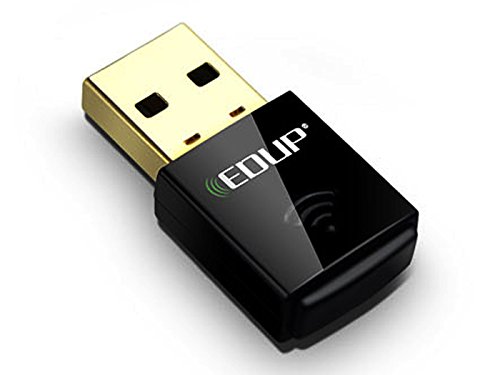
Image of the EDUP EP-N1528 Wireless USB Adapter, showing its compact design and USB connector.
Funtzionamendua
1. Connecting to a Wireless Network
After successful installation, you can connect to a wireless network:
- Locate the wireless network icon in your computer's system tray (usually in the bottom-right corner for Windows, or top-right for macOS/Linux).
- Egin klik ikonoan view available wireless networks.
- Select your desired network (SSID) from the list.
- Eskatzen bazaizu, idatzi sareko segurtasun-gakoa (pasahitza) eta egin klik 'Konektatu' aukeran.
- Once connected, the icon will indicate a successful connection, and you can access the internet.
2. Supported Modes
The EDUP EP-N1528 adapter supports both Ad Hoc eta Azpiegiturak modes. Infrastructure mode is used for connecting to a wireless router or access point, while Ad Hoc mode allows direct communication between wireless devices without a central access point.
3. WiFi Protected Setup (WPS)
The adapter supports WPS for simplified and secure wireless network setup. If your router also supports WPS, you can establish a secure connection by pressing the WPS button on both the adapter (if available, or through software utility) and the router.
Mantentzea
1. Gidarien eguneraketak
Periodically check the EDUP official website for updated drivers. Keeping your drivers current can improve performance, stability, and security.
2. Zaintza orokorra
- Mantendu egokitzailea garbi eta hautsik gabe. Erabili zapi leun eta lehor bat garbitzeko.
- Saihestu egokitzailea muturreko tenperaturen, hezetasunaren edo eguzki-argiaren eraginpean jartzea.
- Do not attempt to disassemble or modify the adapter, as this will void the warranty.
Arazoak konpontzea
1. No Wireless Connection
- Egiaztatu konexio fisikoa: Ensure the adapter is securely plugged into a USB port. Try a different USB port.
- Gidariaren instalazioa: Verify that the drivers are correctly installed. Check Device Manager (Windows) or System Information (macOS/Linux) to see if the adapter is recognized without errors. Reinstall drivers if necessary.
- Wireless Network Availability: Ensure your wireless router is powered on and broadcasting a signal. Check if other devices can connect to the network.
- Sarearen ezarpenak: Confirm that your network name (SSID) and password are correct.
2. Konexio-abiadura motela
- Seinalearen indarra: Move closer to your wireless router or access point to improve signal strength. Obstacles like walls and furniture can degrade signal quality.
- Interferentzia: Other electronic devices (e.g., microwaves, cordless phones) operating on the 2.4 GHz band can cause interference. Try changing your router's Wi-Fi channel.
- Gidarien eguneraketak: Ziurtatu azken kontrolatzaileak instalatuta dituzula.
- Sare-pilaketak: If many devices are using the network simultaneously, speed may decrease.
3. Egokitzailea ez da ezagutzen
- Berrabiarazi ordenagailua: Berrabiarazte soil batek askotan konpondu ditzake aitortze arazoak.
- USB ataka: Test the adapter in a different USB port. Ensure the USB port is functional.
- Gidariaren berrinstalazioa: Desinstalatu dauden kontrolatzaileak eta egin berriro instalazio garbi bat.
Zehaztapenak
| Marka | EDUP |
| Eredua | EP-N1528 |
| Datuen transferentzia-tasa | Gehienez 300 Mbps |
| Haririk gabeko estandarrak | IEEE 802.11n, 802.11g, 802.11b, 802.11e |
| Interfazea | USB 2.0 (backward compatible with USB 1.1, 1.2) |
| Maiztasun Banda | 2.400 GHz ISM |
| Modulazio Metodoa | QPSK / BPSK / 16-QAM / 64-QAM |
| Haririk gabeko segurtasuna | 64-bit/128-bit WEP, TKIP, AES, WPA, WPS |
| Distantzia eragilea | Up to 91.4m (indoors), Up to 274.3m (open space) |
| Sistema eragilearen euskarria | Windows 2000, XP, Vista, Linux, Mac OS X |
| Gailu bateragarriak | Ordenagailua |
Bermea eta Laguntza
For warranty information and technical support, please refer to the documentation included with your purchase or visit the official EDUP webgunea. Gorde erosketaren egiaztagiria bermearen erreklamazioetarako.


