1. Sarrera
The AULA F2010 Unicorn Backlit Mechanical Gaming Keyboard is designed for an enhanced gaming and typing experience. It features a durable construction, multi-color LED illumination, and responsive mechanical switches. This manual provides detailed instructions for setting up, operating, and maintaining your keyboard.
2. Paketearen edukia
- AULA F2010 Jokoetarako Teklatu Mekanikoa
- Erabiltzailearen eskuliburua
- Keycap tiratzailea
3. Konfigurazio gida
3.1 Sistemaren eskakizunak
- Operating System: Windows Vista / 7 / 8 / 10 / Mac OS
- USB ataka eskuragarria
3.2 Teklatua konektatzea
- Bilatu erabilgarri dagoen USB ataka zure ordenagailuan.
- Plug the USB connector of the AULA F2010 keyboard into the USB port.
- The keyboard will automatically install the necessary drivers. This may take a few moments.
- Instalazioa amaitutakoan, teklatuaren atzeko argiztapena piztuko da, erabiltzeko prest dagoela adieraziz.
4. Funtzionamendu-argibideak
4.1 Atzeko argiztapenaren kontrola
The AULA F2010 features multi-color LED backlighting with adjustable brightness and various lighting effects.
- Distira doitzea: Sakatu FN + PGUP distira handitzeko. Sakatu FN + PGDN distira gutxitzeko.
- Argiztapen moduak aldatzea: Sakatu FN + INS to cycle through different lighting effects (e.g., strobe, glow, pulse).
- Argiztapena pertsonalizatzea: Erabili FN + HOME to enter custom lighting mode. Specific keys can be lit according to user preference.
- Adjusting Effect Speed: Erabili FN + Left Arrow or FN + Right Arrow to adjust the speed of dynamic lighting effects.
4.2 Anti-Ghosting and Key Rollover
The keyboard features 100% Anti-Ghosting with 104 Key Roll-over on USB, ensuring that every key press is registered accurately, even during rapid, simultaneous inputs common in gaming.
4.3 Lo modua
To conserve energy, the keyboard will enter sleep mode and turn off all LEDs after 10 minutes of inactivity. Press any key to resume the LED backlight and normal operation.
4.4 Multimedia lasterbide-teklak
The keyboard includes user-friendly shortcut function keys that can be activated in conjunction with the FN key for quick access to multimedia controls and other functions.
5. Produktuaren ezaugarriak
- Diseinu dotorea: Minimalist styled mechanical gaming keyboard with 6-color backlighting.
- Eraikuntza iraunkorra: Features a brushed aluminum chassis for rugged, lifelong durability.
- Advanced Keycaps: AULA Armor Technology with highly durable Double-shot injection molding keycaps, suitable for all gaming circumstances.
- Ingurumenarekiko erresistentzia: Water resistant, dust-proof, and static-free design.
- Etengailu mekanikoak: Equipped with Blue mechanical switches for a tactile and audible typing experience.

Irudia: Goitik behera view of the AULA F2010 keyboard, showcasing its full layout and vibrant multi-color backlighting.

Irudia: Angelua view of the AULA F2010 keyboard, displaying the multi-color LED backlighting across the keys.
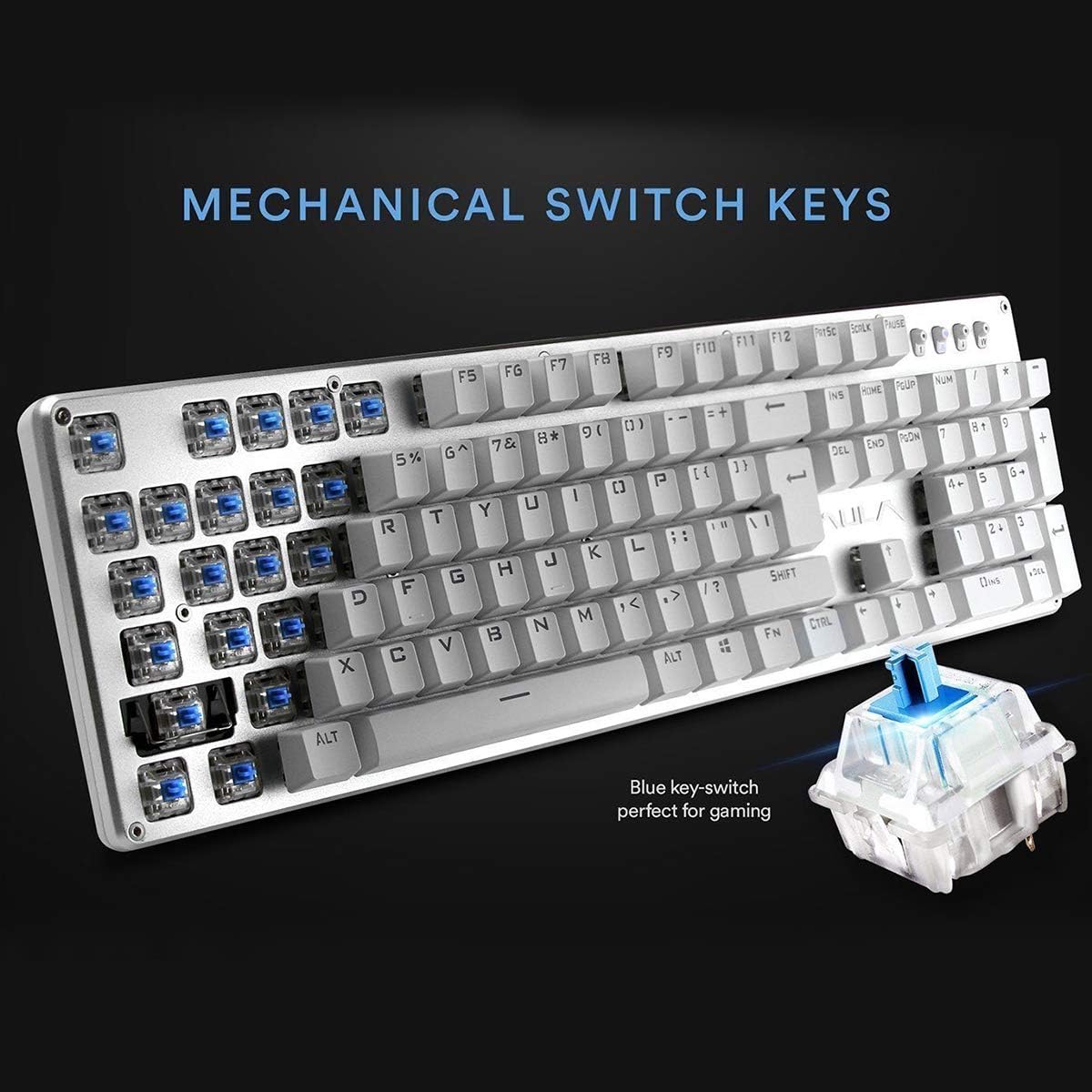
Irudia: Gertutik view highlighting the mechanical blue switches, which provide tactile feedback and a distinct click sound.
6. Mantentzea eta Zainketa
Mantentze egokiak zure AULA F2010 teklatuaren iraupena eta errendimendu optimoa bermatzen ditu.
- Garbiketa: Regularly clean the keyboard with a soft, dry cloth. For deeper cleaning, use a keycap puller to remove keycaps and clean dust and debris with compressed air or a small brush.
- Isuri likidoak: Due to its water-resistant design, minor spills may not cause damage. However, it is recommended to immediately unplug the keyboard, dry it thoroughly, and allow it to air dry completely before reconnecting.
- Biltegiratzea: Gorde teklatua leku fresko eta lehor batean, eguzki-argitik eta muturreko tenperaturetatik babestuta.
7. Arazoak
Teklatuarekin arazoak badituzu, jo ezazu ohiko irtenbide hauetara:
- Teklatuak ez du erantzuten:
- Ziurtatu USB kablea ondo konektatuta dagoela bai teklatuan bai ordenagailuan.
- Saiatu teklatua beste USB ataka batera konektatzen.
- Berrabiarazi ordenagailua.
- Check if the keyboard is in sleep mode (press any key to wake it).
- Atzeko argiztapena ez dabil:
- Ensure the brightness is not set to the lowest level (use FN + PGUP to increase).
- Verify that the keyboard is not in sleep mode.
- Keys Not Registering or Doubling:
- Clean around and under the affected keycaps for any debris.
- If the issue persists, it may indicate a switch malfunction. Contact customer support if the product is under warranty.
8. Zehaztapenak
| Ezaugarri | Xehetasuna |
|---|---|
| Marka | AULA |
| Modelo zenbakia | F2010 |
| Konektibitate Teknologia | Kablez (USB) |
| Gako kopurua | 104 |
| Gako Aldaketa Mota | Mekanikoa (etengailu urdina) |
| Atzeko argiztapena | Multi-color LED (RGB) with adjustable brightness and modes |
| Ghostingaren aurkakoa | 100% Anti-Ghosting with 104 Key Roll-over |
| Materiala | Brushed Aluminum Chassis, Double-shot Injection Molding Keycaps |
| Sistema eragileen bateragarritasuna | Windows Vista / 7 / 8 / 10 / Mac OS |
| Elementuaren pisua | 2.87 lb (1.3 kg) |
| Produktuaren neurriak (L x W x H) | 17.2 x 5.1 x 0.83 hazbete (43.7 x 13 x 2.1 cm) |
| Ezaugarri bereziak | Water Resistant, Dust-proof, Static-free, Sleep Mode |
9. Bermea eta Laguntza
For warranty information, technical support, or service inquiries, please refer to the warranty card included with your product or visit the official AULA webgunea. Gorde erosketa-agiria erosketaren frogagiri gisa berme-erreklamazioetarako.


