1. Produktua amaitu daview
This manual provides instructions for the A-Tech 32GB (4x8GB) ECC Registered DIMM (RDIMM) memory kit, designed for specific Apple Mac Pro models. This memory kit enhances system performance by providing additional RAM capacity and speed.
The kit consists of four 8GB DDR3 1333MHz PC3-10600R modules, featuring ECC (Error-Correcting Code) and a 2Rx4 dual rank configuration, operating at 1.5V.

Image 1.1: A-Tech 32GB (4x8GB) ECC RDIMM Memory Kit, showing two retail packages, each containing two 8GB modules.
2. Konfigurazioa eta instalazioa
2.1 Bateragarritasun-egiaztapena
This memory kit is specifically designed for the Apple Mac Pro Mid 2010 and Mid 2012 models (Model Identifier: MacPro5,1). It supports 4-Core, 6-Core, 8-Core, and 12-Core configurations. Verify your Mac Pro model and CPU processor before installation.
- Compatible Mac Pro Models: Mid 2010 & Mid 2012 (MacPro5,1)
- Compatible Intel Xeon CPU Processors: 4-Core 2.4GHz E5620, 4-Core 2.8GHz W3530, 4-Core 3.2GHz W3565, 6-Core 2.4GHz E5645, 6-Core 2.66GHz X5650, 6-Core 2.93GHz X5670, 6-Core 3.06GHz X5675, 6-Core 3.33GHz W3680.
- Oharra: Mac Pro systems with E5620, W3530, W3565, or W3680 CPU Processors will operate memory at 1066MHz (PC3-8500).
- Garrantzitsua: This ECC RDIMM memory is NOT compatible with MacBooks, MacBook Pros, iMacs, or Mac Minis, which require non-ECC SODIMM memory.
- Memoria mota: Mac Pro Mid 2010 & Mid 2012 (MacPro5,1) supports both ECC UDIMMs (Unbuffered) and ECC RDIMMs (Registered). These two types cannot be mixed. Mixing them will result in a memory error upon system startup.
2.2 Instalazio-urratsak
- Deskargatu: Shut down your Mac Pro completely and disconnect all power cables.
- Lurreratzea: Ground yourself to prevent electrostatic discharge (ESD) by touching a metal part of the computer chassis before handling memory modules.
- Sarbide Memoriaren Zirrikituak: Open your Mac Pro case according to Apple's official service guide for your specific model to access the memory slots.
- Kendu dauden moduluak (hala badagokio): If replacing existing memory, carefully unclip and remove the old modules.
- Modulu berriak instalatu: Align the A-Tech memory module with the slot, ensuring the notch on the module matches the key in the slot. Press down firmly and evenly on both ends of the module until the clips snap into place.
- Egiaztatu instalazioa: Ensure all modules are securely seated.
- Itxi zorroa eta piztu: Close the Mac Pro case, reconnect power, and power on the system.
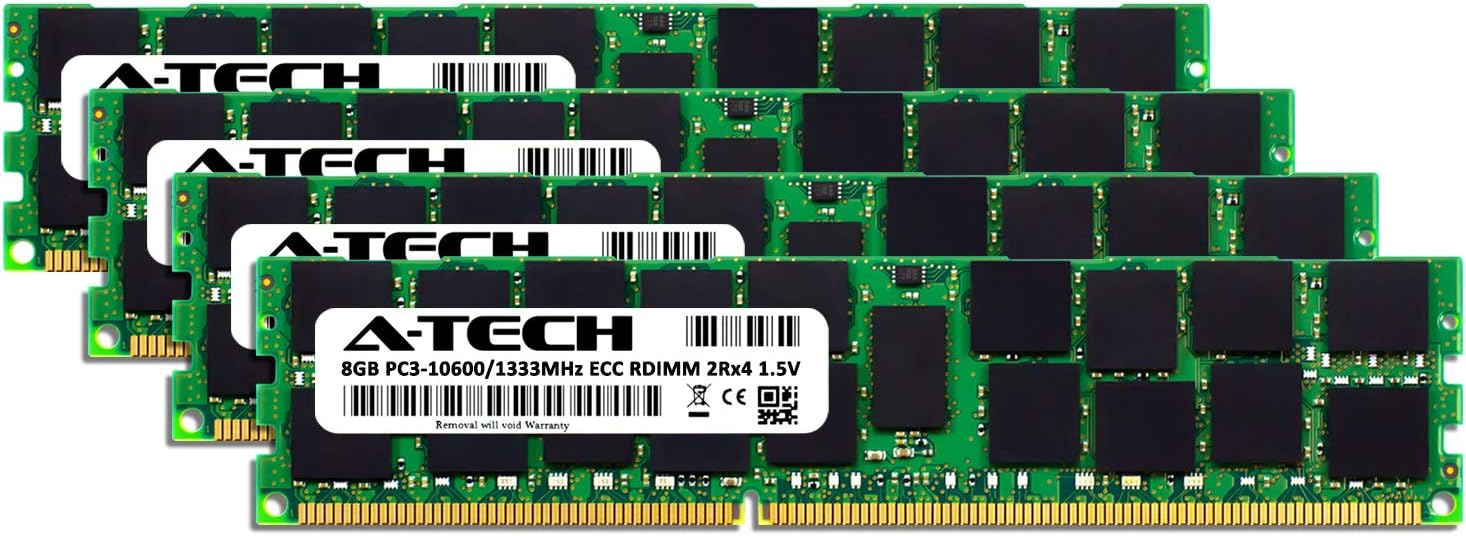
2.1 irudia: Gertuko planoa view of an individual A-Tech 8GB ECC RDIMM module, showing the label and components.

Image 2.2: An A-Tech memory module positioned in front of a Mac Pro tower, illustrating the product's intended use.
3. Funtzionamendu-informazioa
Once installed, the A-Tech memory modules will be automatically detected by your Mac Pro system. The operating system will utilize the increased memory capacity to improve multitasking, application performance, and overall system responsiveness.
The memory will operate at its rated speed of 1333MHz (PC3-10600R) unless your specific CPU configuration (E5620, W3530, W3565, or W3680) limits it to 1066MHz (PC3-8500).
4. Mantentzea
A-Tech memory modules are designed for long-term reliability and generally require no routine maintenance. To ensure optimal performance and longevity:
- Keep your computer's interior clean and free of dust to prevent overheating.
- Avoid exposing memory modules to extreme temperatures or humidity.
- Handle modules by their edges to prevent damage to the gold contacts or components.
5. Arazoak
5.1 Ohiko arazoak eta irtenbideak
- System does not boot or emits beep codes: This often indicates a memory detection issue. Ensure modules are fully seated in their slots. Verify compatibility with your specific Mac Pro model and ensure no mixing of ECC UDIMM and ECC RDIMM types.
- Incorrect memory speed reported: As noted in the compatibility section, certain CPU configurations will cause the memory to operate at 1066MHz instead of 1333MHz. This is normal behavior for those specific processors.
- Sistemaren ezegonkortasuna edo matxurak: Re-seat the memory modules. If issues persist, test modules individually if possible to identify a potentially faulty module.
5.2 Compatible Systems Reference
Refer to the table below for detailed compatibility information regarding Mac Pro models and their memory configurations.
Image 5.1: Table detailing compatible Mac Pro systems, model IDs, order numbers, model years, official max memory, and actual max memory with corresponding slots.
6. Zehaztapenak
| Ezaugarri | Zehaztapena |
|---|---|
| Edukiera | 32GB (4x 8GB Modules) |
| Memoria Mota | DDR3 SDRAM |
| Abiadura | 1333MHz (PC3-10600R) |
| ECC mota | ECC Registered (RDIMM) |
| Sailkapena | 2Rx4 (Dual Rank x4) |
| liburukiatage | 1.5V |
| Forma-faktorea | 240-Pin DIMM |
| Elementuaren eredu-zenbakia | AMZUS4-0000206 |
| Produktuaren neurriak | 6.8 x 4 x 1.5 hazbete |
| Elementuaren pisua | 0.352 ontza |
7. Bermea eta Laguntza
This A-Tech memory kit is backed by A-Tech's Lifetime Warranty. For technical assistance or warranty claims, please contact A-Tech's United States-based technical support team.
For more information or to explore other A-Tech products, visit the A-Tech Store.


