1. Sarrera
This manual provides essential information for the safe and efficient operation, installation, and maintenance of your Daitsu ADDH10 Digital Dehumidifier. Please read these instructions thoroughly before using the appliance and retain them for future reference.
The Daitsu ADDH10 is designed to reduce humidity levels in indoor environments, helping to prevent mold, mildew, and other moisture-related issues. It features a digital display and automatic functions for user convenience.
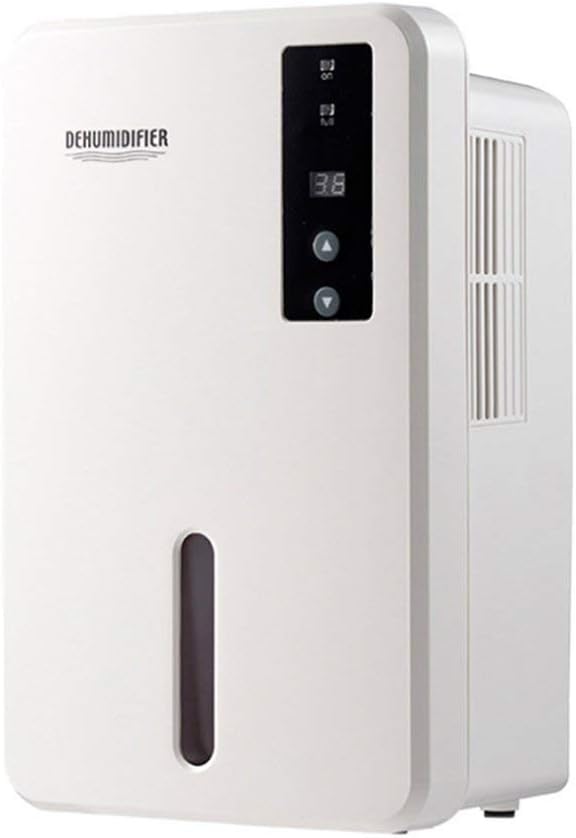
1.1. irudia: Aurrealdea view of the Daitsu ADDH10 Digital Dehumidifier, showing the control panel and water tank window.
2. Segurtasun informazioa
Beti jarraitu oinarrizko segurtasun neurriak tresna elektrikoak erabiltzean, sute, deskarga elektriko eta lesio arriskua murrizteko.
- Read all instructions before using the dehumidifier.
- Ziurtatu elikadura hornidura bolumenarekin bat datorrelatagbalorazio-etiketan zehazten da.
- Ez erabili hezetasun-kentzailea kablea edo entxufea hondatuta badago.
- Mantendu tresna bero-iturrietatik, eguzki-argitik eta material sukoietatik urrun.
- Do not block the air inlet or outlet. Ensure adequate air circulation around the unit.
- Jarri beti hezetasun-kentzailea gainazal egonkor eta mailakatu batean.
- Deskonektatu unitatea garbiketa, mantentze-lanak egin aurretik edo denbora luzez erabiltzen ez denean.
- Tresna hau ez da gaitasun fisiko, sentsorial edo mental murriztua duten edo esperientzia eta ezagutza falta duten pertsonek (haurrak barne) erabiltzeko, baldin eta haien segurtasunaz arduratzen den pertsona batek gailuaren erabilerari buruz gainbegiratu edo jarraibiderik eman ez badu.

Image 2.1: Illustration of the dehumidifier's double security protection, including automatic shut-off when the water tank is full and over-temperature protection (auto-stop if heat sink exceeds 80°C).
3. Produktuaren osagaiak eta ezaugarriak
Familiarize yourself with the main parts of your dehumidifier:
- Kontrol-panela: Pantaila digitala eta funtzionamendurako botoiak.
- Aireko sarrera: Aire hezea unitatera sartzen den lekua.
- Aire irteera: Aire lehorra kanporatzen den tokira.
- Ur depositua: Collects condensed water. Features a transparent window to monitor water level.
- Water Tank Handle/Lid: For easy removal and emptying.

Image 3.1: Diagram showing the key components: Air outlet, Control panel, Air inlet, and the 1.5L water tank capacity.
The dehumidifier has a 1.5-liter water tank capacity and features automatic shut-off when the tank is full, indicated by a float sensor. It also includes over-temperature protection.
4. Konfigurazioa eta instalazioa
4.1 Paketatzea
- Kontu handiz atera hezetasun-kentzailea bere paketetik.
- Kendu ontziratzeko material, zinta eta babes-film guztiak.
- Egiaztatu unitatea kalterik dagoen. Kaltetuta badago, ez erabili eta jarri harremanetan zure saltzailearekin.
4.2 Jartzea
- Place the dehumidifier on a firm, level surface that can support its weight when the water tank is full.
- Ensure there is at least 20 cm (8 inches) of space around the air inlet and outlet for proper air circulation.
- Avoid placing the unit near walls, furniture, or curtains that could obstruct airflow.
- Do not place the unit in direct sunlight or near heat-generating appliances.
- For optimal performance, operate the dehumidifier in an enclosed area. Close all doors and windows in the room.
4.3 Energia-konexioa
- Ensure your hands are dry before plugging in the unit.
- Entxufatu korronte-kablea behar bezala lurreko hartune elektriko batean.
5. Funtzionamendu-argibideak
5.1 Kontrol-panela amaituview
The control panel features a digital display and control buttons:
- Bistaratze digitala: Shows current humidity level or settings.
- Pizteko botoia: Unitatea pizten edo itzaltzen du.
- Gora / Behera botoiak: Adjust desired humidity level or other settings.

Image 5.1: Various angles of the dehumidifier, highlighting the digital control panel with up/down buttons and the transparent water tank.
5.2 Oinarrizko funtzionamendua
- Aktibatu: Press the Power button to turn on the dehumidifier. The digital display will light up, showing the current room humidity.
- Ezarri nahi den hezetasuna: Use the Up and Down buttons to set your desired humidity level. The unit will operate until the room humidity reaches the set level, then cycle on and off to maintain it.
- Itzali: Press the Power button again to turn off the dehumidifier.
5.3 Ur depositua hustea
When the water tank is full, the dehumidifier will automatically stop operating, and an indicator light (if available) may illuminate. The unit will not resume operation until the tank is emptied and reinserted correctly.
- Astiro-astiro atera ur-depositua unitatearen aurrealdetik.
- Kontu handiz eraman depositua konketa edo hustubide batera.
- Remove the tank lid (if applicable) and pour out the collected water.
- Replace the lid securely and slide the empty water tank back into the dehumidifier until it clicks into place.
- The unit will resume operation automatically if the power is on and the desired humidity level has not been reached.

Image 5.2: The transparent water tank, designed for easy removal and emptying.
6. Mantentzea
Mantentze-lan erregularrak errendimendu optimoa bermatzen du eta zure deshezegailuaren bizitza luzatzen du. Deskonektatu beti unitatea edozein mantentze-lan egin aurretik.
6.1 Ur depositua garbitzea
- Clean the water tank regularly (e.g., every few weeks) to prevent mold and bacteria growth.
- Remove the water tank as described in Section 5.3.
- Wash the tank with mild detergent and warm water. Rinse thoroughly.
- Lehortu depositua guztiz unitatean berriro sartu aurretik.
6.2 Kanpoaldea garbitzea
- Garbitu dehezegailuaren kanpoaldea leun batekin, damp oihal.
- Do not use abrasive cleaners, solvents, or harsh chemicals, as these can damage the surface.
- Ziurtatu barneko osagaietan urik ez sartzen dela.
6.3 Biltegiratzea
- If storing the dehumidifier for an extended period, ensure the water tank is empty and clean.
- Garbitu unitatearen kanpoaldea.
- Gorde unitatea zutik leku fresko eta lehor batean, eguzki-argitik eta muturreko tenperaturetatik babestuta.
7. Arazoak
Bezeroarentzako arreta-zerbitzura deitu aurretik, jo ezazu arazo ohikoenei buruzko gida honetara:
| Arazoa | Kausa posiblea | Irtenbidea |
|---|---|---|
| Hezetasun-kengailuak ez du pizten. | Ez dago elikadura hornidurarik. Kable elektrikoa ez dago ondo konektatuta. |
Egiaztatu korronte-hartunea funtzionatzen ari den. Ziurtatu elikatze-kablea ondo konektatuta dagoela unitatean eta hormako entxufean. |
| Unitatea martxan dago, baina ez du urik biltzen. | Gelako hezetasuna dagoeneko baxua da. Tenperatura baxuegia da. Aire-fluxua blokeatuta dago. |
Check the current humidity level on the display. If it's below your set point, the unit will not collect water. Hezetasun-kentzaileak ez dira hain eraginkorrak ingurune oso hotzetan. Ziurtatu airearen sarrera eta irteera ez daudela oztopatzen. |
| Unit stops operating and indicator light is on. | Ur depositua beteta dago. Ur-depositua ez dago behar bezala sartuta. |
Hustu ur depositua. Reinsert the water tank correctly until it clicks into place. |
| Ezohiko zarata funtzionamenduan. | Unitatea ez dago gainazal mailakatu batean. Barne osagaien arazoa. |
Ziurtatu unitatea gainazal egonkor eta berdinean dagoela. Zarata jarraitzen badu, utzi erabiltzeari eta jarri harremanetan bezeroarentzako arreta-zerbitzuarekin. |
8. Zehaztapenak
| Ezaugarri | Zehaztapena |
|---|---|
| Marka | Daitsu |
| Modelo zenbakia | ADDH10 (Technical Model: bb_S0403263) |
| Kolorea | Zuria |
| Elementuaren pisua | 10 kilogramo |
| Produktuaren neurriak (gutxi gorabehera) | 286 mm (Altuera) x 180 mm (Zabalera) x 134 mm (Sakonera) |
| Ur deposituaren edukiera | 1.5 litro |
| Funtzionamendu modua | Automatikoa |
| Dakarten osagaiak | Deshezegailua |
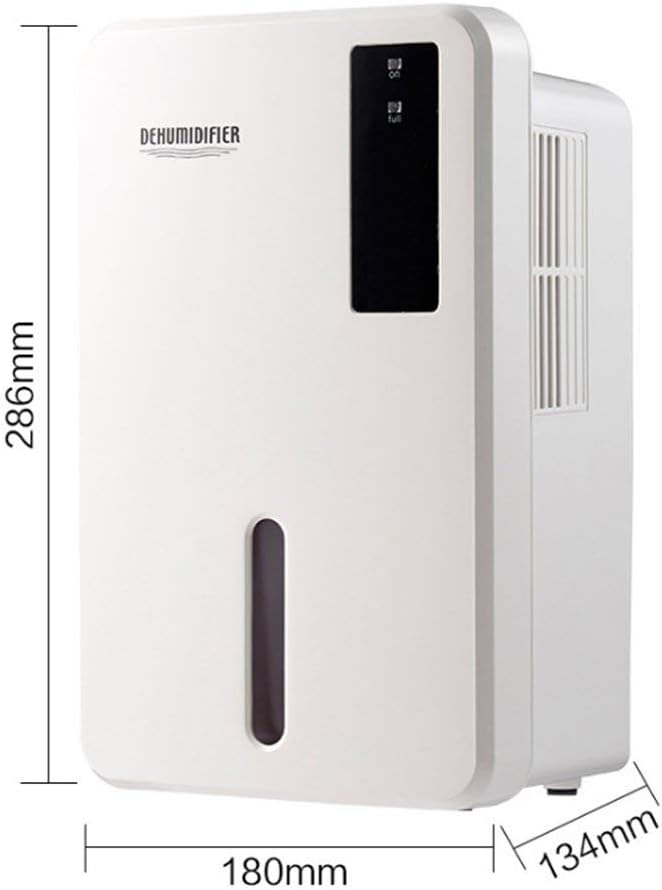
Image 8.1: Diagram illustrating the dimensions of the dehumidifier: 286mm height, 180mm width, and 134mm depth.
9. Bermea eta Laguntza
For warranty information, please refer to the documentation included with your product packaging or visit the official Daitsu webgunea. Bermearen baldintzak eta zehaztapenak eskualdearen eta saltzailearen arabera alda daitezke.
If you encounter issues not covered in the troubleshooting section or require further assistance, please contact your retailer or the manufacturer's customer support. Have your model number (ADDH10) and purchase details ready when contacting support.