1. Sarrera
The GAMDIAS Hermes GKB3000 is a mechanical gaming keyboard designed for enhanced durability and performance. It features GAMDIAS Certified Blue Switches with a 50 million actuation lifecycle, a 7-color spectrum backlight with 14 lighting effects, and various functional keys for an optimized gaming and typing experience. This manual provides instructions for setting up, operating, and maintaining your keyboard.
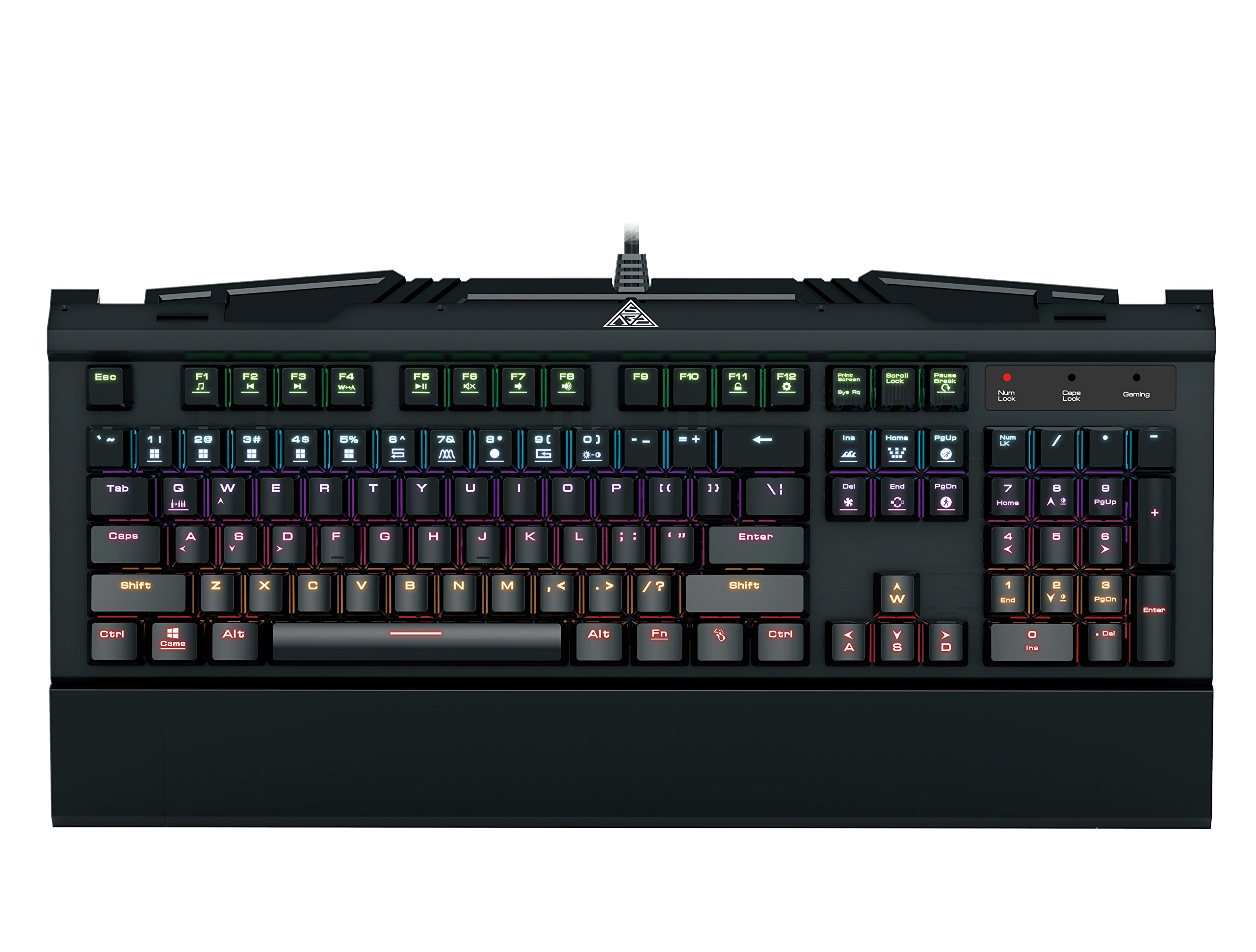
Image 1.1: The GAMDIAS Hermes GKB3000 Mechanical Gaming Keyboard. This image displays the full keyboard with its key layout and design, highlighting its compact yet robust build.
2. Paketearen edukia
Mesedez, egiaztatu paketearen edukia kutxa irekitzean, elementu guztiak bertan daudela eta kalterik gabe daudela ziurtatzeko.
- GAMDIAS Hermes GKB3000 Mechanical Gaming Keyboard
- Erabiltzailearen eskuliburua (dokumentu hau)
3. Konfigurazioa
Follow these steps to set up your GAMDIAS Hermes GKB3000 keyboard:
- Deskonprimitu teklatua: Kontu handiz atera teklatua bere paketetik.
- Konektatu ordenagailura: Plug the USB-A connector of the keyboard cable into an available USB port on your computer.
- Gidariaren instalazioa: The keyboard is plug-and-play. Your operating system (e.g., Windows) will automatically detect and install the necessary drivers. No additional software installation is typically required for basic functionality.
- Lekua: Place the keyboard on a stable, flat surface for comfortable use.
4. Funtzionamendu-argibideak
4.1. Argi-efektuak
The Hermes GKB3000 features a 7-color spectrum backlight with 14 sets of lighting effects. These include 9 preset effects and 5 customizable patterns.
- Aldaketa efektuak: Use the dedicated function keys (often combined with the Fn key) to cycle through the preset lighting effects. Refer to the keyboard's keycap legends for specific combinations.
- Customizing Effects: The keyboard supports 5 customizable lighting patterns. Instructions for programming these patterns are typically found in the full software suite available for download from the GAMDIAS webgunea, hala badagokio.
- Distira doitzea: Adjust backlight brightness using designated function key combinations.
4.2. Multimedia Control Keys
Access multimedia functions quickly using the dedicated multimedia control keys, often activated by holding the Fn key in combination with the F-keys (F1-F12).
- Bolumen kontrola: Increase, decrease, or mute audio.
- Multimedia erreprodukzioa: Play/pause, stop, previous track, next track.
- Beste funtzio batzuk: May include opening default browser, email client, or calculator.
4.3. Special Gaming Functions
- WASD-Arrow Key Swap: This feature allows you to swap the functionality of the WASD keys with the arrow keys. This is useful for certain games or user preferences. Activate this function using a specific Fn key combination (e.g., Fn + W).
- Consecutive Attack Mode: This mode enhances rapid key input for gaming. Refer to the keyboard's specific documentation or GAMDIAS software for activation and configuration details.
- Teklatuaren blokeoa: Temporarily disable the keyboard input to prevent accidental presses. Activate using a Fn tekla-konbinazioa.
- Windows Key Disable: Prevent accidental presses of the Windows key during gaming, which can minimize your game. Activate using a Fn key combination (e.g., Fn + Win key).
- N-teklaren birjartzea: The GKB3000 supports N-key rollover, meaning multiple keys can be pressed simultaneously without ghosting or missed inputs. This ensures accurate and responsive commands during intense gaming sessions.
5. Mantentzea
Mantentze egokiak zure teklatuaren iraupena eta errendimendu optimoa bermatzen ditu.
- Garbiketa:
- Deskonektatu teklatua ordenagailutik garbitu aurretik.
- Erabili lipurrik gabeko zapi leun bat dampUrarekin edo garbiketa-soluzio leun batekin garbitu gainazala garbitzeko.
- Teklen arteko hautsa eta hondakinak lortzeko, erabili aire konprimatua.
- Saihestu produktu kimiko gogorrak, garbitzaile urratzaileak edo disolbatzaileak erabiltzea.
- Biltegiratzea: Gorde teklatua leku fresko eta lehor batean, eguzki-argitik eta muturreko tenperaturetatik babestuta, denbora luzez erabiltzen ez duzunean.
- Manipulazioa: Avoid dropping the keyboard or exposing it to excessive force, as this can damage the mechanical switches or internal components.
6. Arazoak
If you encounter issues with your GAMDIAS Hermes GKB3000 keyboard, refer to the following common solutions:
| Arazoa | Irtenbide posiblea |
|---|---|
| Teklatuak ez du erantzuten. |
|
| Backlight is not working or is dim. |
|
| Giltza batzuk ez dirabiltzen. |
|
| WASD keys are acting as arrow keys. |
|
If the problem persists after trying these solutions, please contact GAMDIAS customer support for further assistance.
7. Zehaztapenak
The following are the technical specifications for the GAMDIAS Hermes GKB3000 Mechanical Gaming Keyboard:
| Ezaugarri | Xehetasuna |
|---|---|
| Marka | GAMDIAS |
| Modelo zenbakia | GKB3000 |
| Aldatu mota | GAMDIAS Certified Mechanical Blue Switches |
| Actuation Lifecycle | 50 milioi tekla sakatzea |
| Atzeko argiztapena | 7-Color Spectrum, 14 Lighting Effects (9 preset, 5 customizable) |
| Ghostingaren aurkakoa | N-teklaren birjartzea |
| Konektibitatea | USB-A |
| Sistema eragilea | Leihoak |
| Elementuaren pisua | 2.42 libra (gutxi gorabehera 1.1 kg) |
| Produktuaren neurriak (LxWxH) | 18.8 x 10.5 x 2 hazbete (gutxi gorabehera 47.75 x 26.67 x 5.08 cm) |
| Materiala | Plastic with Elegant Metal Plate Design |
8. Bermea eta Laguntza
GAMDIAS products are manufactured to the highest quality standards. For information regarding warranty coverage, terms, and conditions, please refer to the warranty card included with your product or visit the official GAMDIAS webgunea.
For technical support, troubleshooting assistance, or any product-related inquiries, please contact GAMDIAS customer support through their official webgunea edo zure produktuaren ontzian emandako harremanetarako informazioa.
GAMDIAS Ofiziala Webgunea: www.gamdias.com


