Sarrera
This manual provides comprehensive instructions for the safe and proper installation, operation, and maintenance of your Vogel's MA4000 Flat Screen Wall Mount. Please read all instructions carefully before installation and retain this manual for future reference.
The Vogel's MA4000 is designed to securely mount flat screen televisions ranging from 40 to 80 inches (102-203 cm) with a maximum weight capacity of 80 kg (176 lbs). It features a slim profile and a tilt function to optimize viewangeluak aldatu eta distira murriztu.
Segurtasun Informazioa
OHARRA:
- Ziurtatu muntatzeko gainazalak euskarriaren eta telebistaren pisu konbinatua segurtasunez eutsi dezakeela.
- Always use appropriate tools and follow all installation steps precisely.
- Ez gainditu 80 kg-ko (176 lb) gehienezko pisu-ahalmena.
- Verify VESA compatibility with your television before installation.
- Instalazioaren edozein atalen inguruan ziur ez bazaude, kontsultatu profesional kualifikatu bati.
Paketearen edukia
Before beginning installation, please verify that all components are present and undamaged. Refer to the included parts list in your product packaging for a complete inventory.

Irudiaren deskribapena: Buru bat view of the Vogel's MA4000 Flat Screen Wall Mount, showing the main wall plate and the two vertical TV brackets. The mount is black and designed for flat panel televisions.
The image above displays the primary components of the Vogel's MA4000 wall mount: the wall plate and the two TV interface bars. Additional hardware such as screws, washers, and spacers are included in the retail package.
Zehaztapenak
| Modelo zenbakia | MA4000 (8554000) |
| Marka | Vogel's |
| Muntatze Mota | Flat, Tilting |
| Materiala | Altzairu herdoilgaitza |
| Kolorea | Beltza |
| Telebistako tamaina bateragarriak | 40 - 80 hazbete (102 - 203 cm) |
| Gehienezko pisu-gaitasuna | 80 kg (176 lb) |
| VESA bateragarritasuna | Min 100x100 mm, Max 600x400 mm |
| Inklinazio angelu maximoa | 12 gradu |
| Harresiaren Distantzia | Gutxi gorabehera 30 mm (1.2 hazbete) |
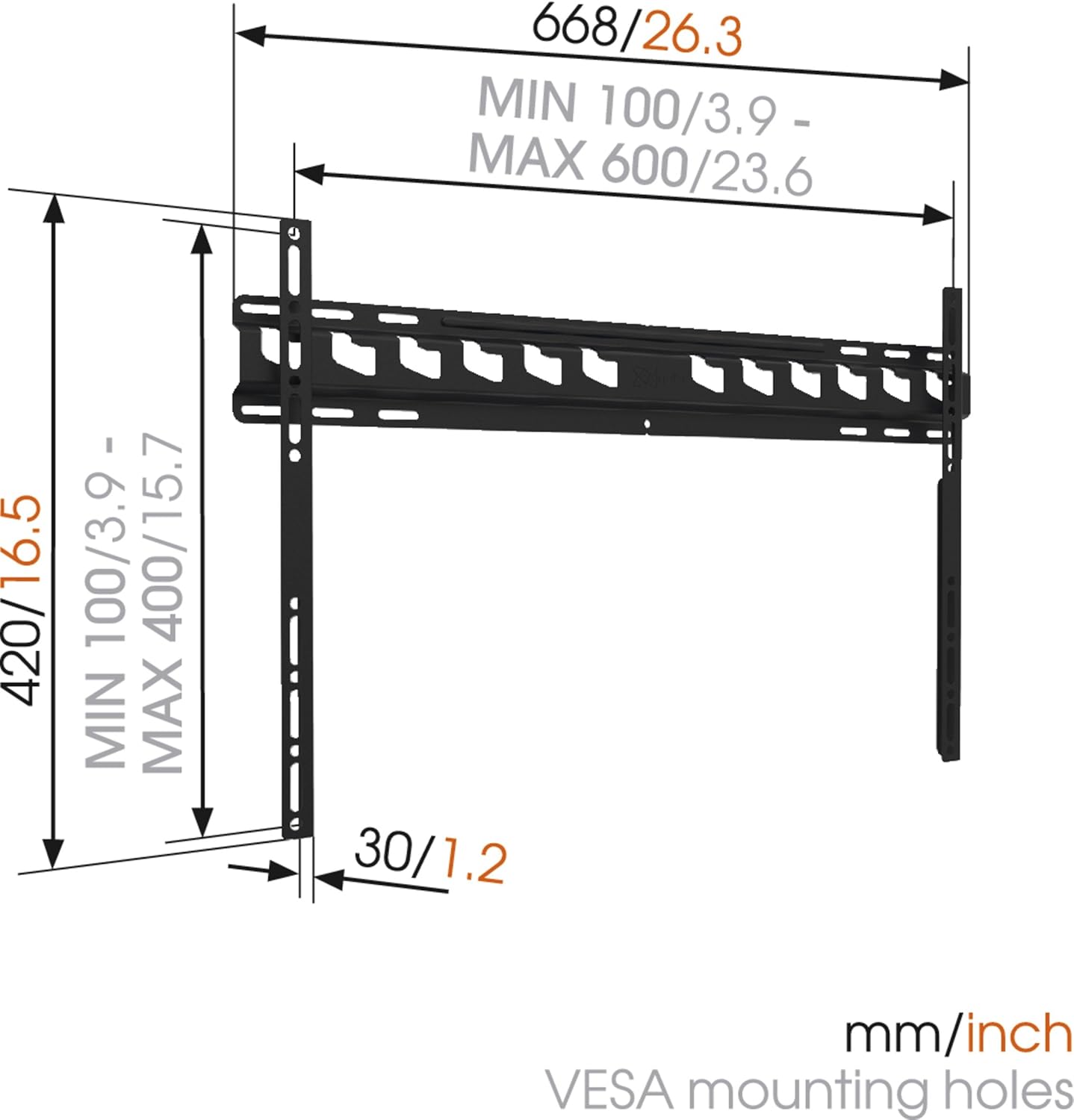
Irudiaren deskribapena: A technical diagram illustrating the dimensions of the Vogel's MA4000 wall mount. It shows the overall width (668mm / 26.3 inches), height (420mm / 16.5 inches), and the minimum and maximum VESA mounting hole patterns (100-600mm horizontally, 100-400mm vertically). The distance from the wall is indicated as 30mm (1.2 inches).
Konfigurazioa eta Instalazioa
This section outlines the general steps for installing your Vogel's MA4000 wall mount. Always refer to the detailed graphical instructions included with your product for specific drilling templates and hardware usage.
Beharrezko tresnak (ez daude barne):
- Zulagailua
- Drill bits appropriate for your wall type (wood, concrete, brick, etc.)
- Stud finder (for wood stud walls)
- Maila
- Arkatza
- Neurtzeko zinta
- Bihurkin edo giltza
Instalazio urratsak:
- Zehaztu muntaketa kokalekua: Choose a suitable location on your wall, ensuring it is structurally sound and free from electrical wires or plumbing. Use a stud finder if mounting to wood studs.
- Markatu zuloak: Hold the wall plate against the wall at the desired height and use a level to ensure it is straight. Mark the drilling holes with a pencil.
- Zulatzeko zuloak: Drill pilot holes according to the marked positions and your wall type. Insert wall anchors if required.
- Hormako plaka erantsi: Secure the wall plate to the wall using the provided screws and washers. Ensure it is firmly attached and level.
- Telebistako euskarriak telebistara lotzea: Attach the two vertical TV interface bars to the back of your television using the appropriate screws, washers, and spacers from the hardware kit. Ensure the brackets are centered and securely fastened to the VESA mounting points.
- Telebista hormako plakan muntatzea: Carefully lift the television and hook the TV brackets onto the wall plate. Ensure both brackets are properly seated.
- Telebista segurua: Engage the safety locking mechanism (if applicable) to prevent the TV from accidentally dislodging from the wall plate.

Irudiaren deskribapena: Alboko profesional batfile view of a flat screen television mounted flush against a white wall, demonstrating the slim design and minimal wall distance achieved with the Vogel's MA4000 wall mount. The mount itself is barely visible behind the television.
Operating Instructions (Tilting Function)
The Vogel's MA4000 wall mount allows for a slight tilt to optimize your viewesperientzia hobetzea eta distira murriztea.
- Inklinazioa doitzea: Gently push or pull the bottom edge of the television to achieve the desired tilt angle. The mount supports a maximum tilt of 12 degrees.
- Securing Tilt: Some models may have a locking mechanism for the tilt. Refer to your product's specific instructions for details on securing the tilt position if available.
Mantentzea
The Vogel's MA4000 wall mount requires minimal maintenance to ensure long-term performance and safety.
- Ohiko ikuskapena: Aldian-aldian egiaztatu torloju eta konexio guztiak ondo estututa daudela ziurtatzeko. Beharrezkoa bada, berriro estutu.
- Garbiketa: Garbitu euskarria zapi leun eta lehor batekin. Saihestu garbitzaile edo disolbatzaile urratzaileak, akabera kaltetu dezaketenak.
- Pisu muga: Ez gainditu inoiz 80 kg-ko (176 lb) gehienezko pisu-ahalmena.
Arazoak konpontzea
| Arazoa | Kausa posiblea | Irtenbidea |
|---|---|---|
| TV is not level after mounting. | Wall plate was not installed level. | Remove TV, adjust wall plate, and remount. Ensure a level is used during installation. |
| Telebista ezegonkorra iruditzen da euskarrian. | Screws are loose; TV not properly seated; safety lock not engaged. | Ensure all screws are tightened. Verify TV brackets are fully engaged with the wall plate. Engage safety lock. Do not exceed weight capacity. |
| Cannot achieve desired tilt angle. | Obstruction; maximum tilt angle reached. | Check for cables or other obstructions. The mount has a maximum tilt of 12 degrees. |
Bermea eta Laguntza
For warranty information and customer support, please refer to the documentation included with your product or visit the official Vogel's webgunea. Gorde erosketaren egiaztagiria bermearen erreklamazioetarako.
Vogel's Official Webgunea: www.vogels.com


