1. Sarrera
Intermec PM43 gama ertaineko etiketa-inprimagailu industriala da, errendimendu fidagarria eta erabiltzeko erraztasuna lortzeko diseinatua. Inprimagailu honek inprimaketa termiko zuzena eta transferentzia termiko bidezkoa onartzen ditu, eta horrek etiketatze-aplikazio askotarako moldakorra bihurtzen du. Erabiltzaileentzako interfazea du, ukipen-pantaila koloretsuarekin edo ikono unibertsalekin eskuragarri, funtzionamendua errazteko eta prestakuntza-beharrak murrizteko. Eskuliburu honek PM43 inprimagailua konfiguratzeko, erabiltzeko, mantentzeko eta arazoak konpontzeko informazio garrantzitsua eskaintzen du.

1. irudia: Aurrealdea view Intermec PM43 inprimagailuarena, kontrol-panela eta euskarriaren irteera-zirrikitua erakusten dituena.
2. Konfigurazioa
2.1 Desontziratzea eta kokatzea
Kontu handiz atera inprimagailua bere paketetik. Ziurtatu ontziratzeko material guztiak kendu dituzula. Jarri inprimagailua gainazal egonkor eta lau batean, inguruan aireztapenerako eta ataka eta euskarri kargatzeko guneetarako sarbidea izateko behar adina lekurekin.
2.2 Potentzia konektatzea
- Ziurtatu inprimagailuaren etengailua OFF (O) posizioan dagoela.
- Konektatu elikatze-kablea inprimagailuaren korronte alternoko sarrerara.
- Entxufatu korronte-kablearen beste muturra lurreko hartune elektriko batean.
2.3 Ostalari-sistema batera konektatzea
PM43 inprimagailuak USB eta Ethernet konexioak onartzen ditu.
- USB konexioa: Konektatu USB kable bat inprimagailuaren USB atakatik ordenagailuko USB ataka libre batera.
- Ethernet konexioa: Konektatu Ethernet kable bat inprimagailuaren Ethernet atakatik zure sareko bideratzailera edo etengailura.

2. irudia: PM43 inprimagailuaren atzeko panela, elikatze-sarrera, etengailua, USB atakak eta Ethernet ataka erakusten dituena.
2.4 Euskarriak kargatzea
PM43 inprimagailuak hainbat euskarri mota erabil ditzake, etiketak barne, tags, eta euskarri jarraitua. Transferentzia termiko bidezko inprimaketarako, zinta bat ere beharrezkoa da.
- Ireki inprimagailuaren euskarriaren estalkia.
- Jarri etiketa-erroilua euskarriaren hornidura-ardatzean, etiketak erroiluaren behealdetik sartzen direla ziurtatuz.
- Pasa euskarria gidetatik eta inprimatze-buruaren multzoaren azpitik.
- Transferentzia termikoa erabiltzen baduzu, kargatu zinta zintaren hornidura-ardatzean eta hariztatu barne-diagramen arabera.
- Itxi hedabidearen azala.

3. irudia: Barnekoa view PM43 inprimagailuaren irudia, euskarria eta zinta kargatzeko mekanismoak nabarmenduz.
3. Funtzionamendu-argibideak
3.1 Piztu/Itzaltzea
- Pizteko, jarri atzeko paneleko etengailua ON (I) posiziora. Inprimagailuak autoproba bat egingo du.
- Itzaltzeko, jarri etengailua OFF (O) posizioan.
3.2 Oinarrizko inprimaketa
Inprimagailua konektatuta eta euskarria kargatuta dagoenean, inprimatze-lanak bidali ditzakezu zure ostalari-sistematik. Ziurtatu inprimagailu-kontrolatzaile egokiak instalatuta daudela zure ordenagailuan.
- Ireki inprimatu nahi duzun dokumentua edo aplikazioa.
- Hautatu Intermec PM43 inprimagailua inprimatzeko elkarrizketa-koadrotik.
- Egokitu inprimatze-ezarpenak (adibidez, etiketaren tamaina, inprimatze-dentsitatea) behar den moduan.
- Hasi inprimatze-lana.
3.3 Erabiltzaile interfazea erabiltzea
PM43ak ukipen-pantaila koloretsua edo ikono unibertsalen interfazea ditu kontrol eta konfigurazio zuzenerako. Nabigatu menuetan zehar euskarriaren kalibrazioa, sarearen konfigurazioa eta inprimagailuaren egoera bezalako ezarpenak doitzeko.
4. Mantentzea
4.1 Inprimatzeko burua garbitzea
Inprimatze-burua aldizka garbitzea ezinbestekoa da inprimatze-kalitatea mantentzeko eta inprimatze-buruaren bizitza luzatzeko. Erabili oihal lihorik gabekoa edo isopropil alkohola duen inprimatze-burua garbitzeko boligrafoa.
- Itzali inprimagailua eta deskonektatu kablea.
- Ireki multimedia-azala.
- Garbitu inprimatze-buruaren elementua astiro-astiro erdialdetik kanporantz.
- Utzi inprimatzeko burua guztiz lehortzen estalkia itxi eta inprimagailua piztu aurretik.
4.2 Euskarriak eta zinta ordezkatzea
Ordeztu euskarri-erroiluak eta transferentzia termikoko zintak agortzen diren heinean. Ikusi 2.4 atala kargatzeko argibideak lortzeko. Ziurtatu beti euskarri eta zinta mota egokiak erabiltzen direla errendimendu optimoa lortzeko.
5. Arazoak
Atal honek zure PM43 inprimagailuarekin izan ditzakezun arazo ohikoenei buruzko informazioa ematen du.
5.1 Inprimatze-kalitate eskasa
- Inprimaketa desagertzen edo osatu gabea: Garbitu inprimatze-burua (ikusi 4.1 atala). Ziurtatu zinta (transferentzia termikoa bada) behar bezala kargatuta dagoela eta ez dela agortuta. Doitu inprimatze-dentsitatearen ezarpenak.
- Inprimaketa zikinduta: Egiaztatu euskarri mota bateragarria dela. Ziurtatu inprimatze-buruaren presioa behar bezala ezarrita dagoela.
5.2 Euskarri-tratamenduak
- Itzali inprimagailua.
- Ireki euskarriaren estalkia eta kontu handiz kendu trabatuta dagoen edozein euskarri.
- Ziurtatu euskarria behar bezala kargatuta dagoela eta gidak behar bezala doituta daudela.
- Itxi estalkia eta piztu.
5.3 Konexio arazoak
- Inprimagailua ez da detektatu: Egiaztatu kable konexio guztiak (USB/Ethernet). Berrabiarazi inprimagailua eta sistema nagusia. Egiaztatu kontrolatzailearen instalazioa.
- Sareko arazoak: Berretsi sareko kablea konektatuta dagoela. Egiaztatu sareko ezarpenak inprimagailuan eta ostalari-sisteman.
6. Zehaztapenak
Hurrengo taulan Intermec PM43 inprimagailuaren zehaztapen tekniko nagusiak azaltzen dira.
| Ezaugarri | Zehaztapena |
|---|---|
| Ereduaren izena | PM43 |
| Inprimatzeko Teknologia | Zuzeneko Termikoa / Transferentzia Termikoa |
| Inprimatu kolorea | Monokromoa (Beltza) |
| Inprimatze-abiadura maximoa | 12 hazbete segundoko |
| Inprimatze-bereizmen maximoa | 203 ppp |
| Euskarri motak onartzen dira | Marka Beltza, Etiketa Jarraitua, Tolestura Zabalekoa, Hutsuneak, Etiketa, Lined-Digital Etiketa, Linerless, Koska, Roll Elikadura, Tag |
| Gehienezko euskarriaren tamaina | 4 x 6 hazbete |
| Konektibitatea | USBa, Ethernet |
| Memoria | 128 MB |
| Kontrol-metodoa | Ukipen-pantaila edo ikono unibertsalen interfazea |
| Produktuaren neurriak | 25 x 18 x 16 hazbete |
| Elementuaren pisua | 1 libra |
| Energia iturria | AC hornidura |
| Hizkuntzaren emulazioa | DSim, hatz-marka, IPL, XML |
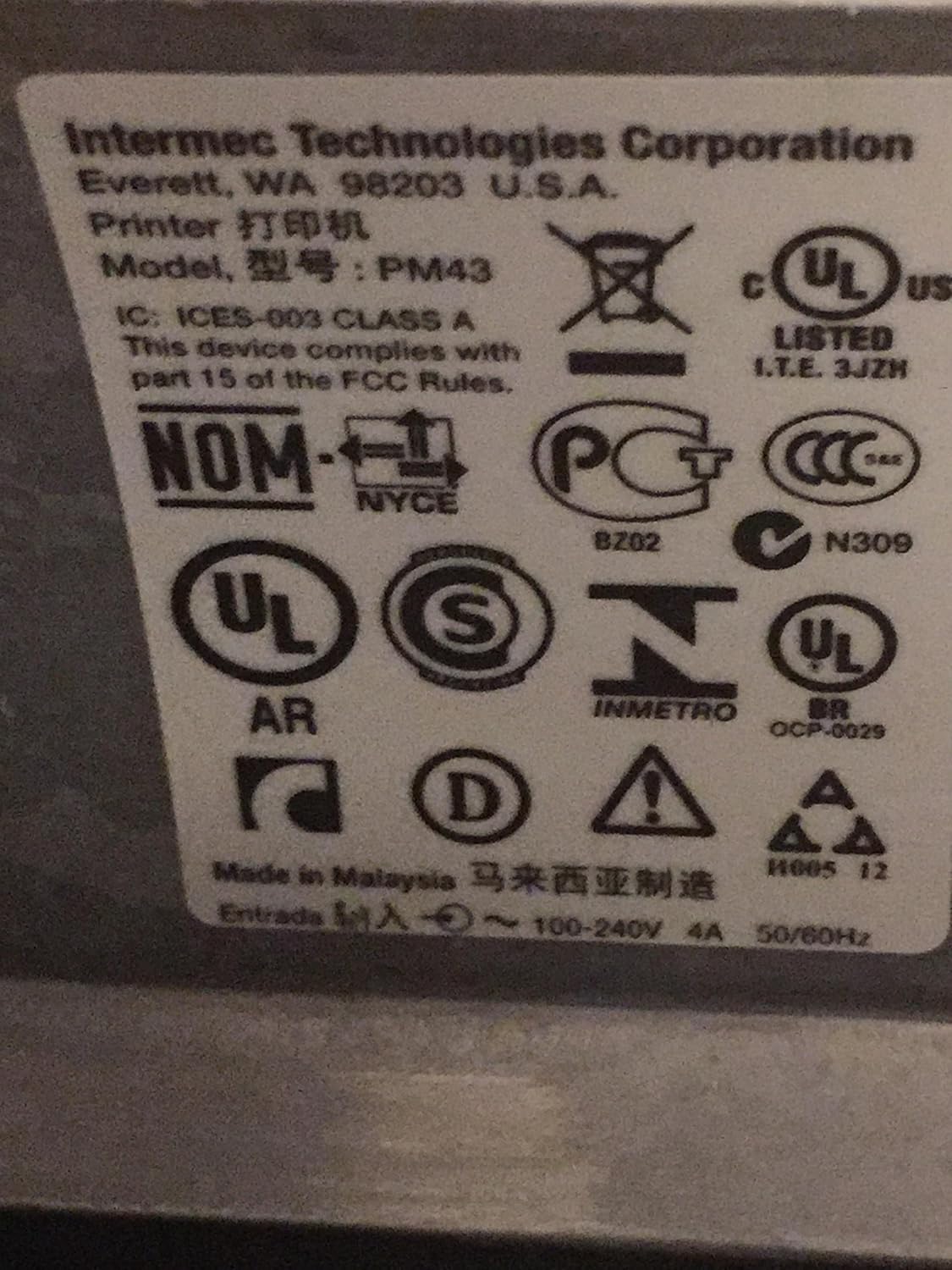
4. irudia: Intermec PM43 inprimagailuan aurkitutako araudi eta betetze etiketak.
7. Bermearen informazioa
Intermec PM43 inprimagailuak berme mugatu bat du. Baldintza eta zehaztapen zehatzak ikusteko, kontsultatu zure produktuarekin batera datorren bermearen dokumentazioa edo bisitatu Intermec-en laguntza ofiziala. webgunea.
8. Laguntza
Laguntza gehiago, euskarri teknikoa edo azken kontrolatzaileak eta firmwarea deskargatzeko, bisitatu Intermec-en euskarri ofiziala. webwebgunea edo jarri harremanetan zure Intermec saltzaile baimenduarekin. Ziurtatu inprimagailuaren modelo zenbakia (PM43A01000000201) eta serie zenbakia eskura dituzula laguntza bilatzerakoan.


