1. Sarrera
This user manual provides comprehensive instructions for the safe and efficient operation of the Showtec Compact Par 7 Q4 7 x 3W RGBW LED Floor PAR Spot. Please read this manual thoroughly before installation, operation, or maintenance to ensure proper use and to prevent damage to the unit or injury to personnel.
The Showtec Compact Par 7 Q4 is a compact RGBW PAR can designed for various lighting applications, offering versatile color mixing and robust performance.
2. Segurtasun-argibideak
Beti jarraitu segurtasun neurri hauek deskarga elektriko, sute edo lesio arriskua murrizteko:
- Ziurtatu elikadura hornidura boltage bat dator liburuarekintage unitatean zehaztuta.
- Konektatu beti unitatea lurrera konektatutako entxufe batera.
- Ez erabili unitatea elikatze-kablea hondatuta badago.
- Deskonektatu sare elektrikotik garbitu edo mantendu aurretik.
- Ez jarri unitatea euri edo hezetasunera.
- Mantendu aireztapen egokia unitatearen inguruan gehiegi berotzea saihesteko.
- Saihestu argi-iturriarekiko begien esposizio zuzena.
- Unitate hau barrualdean erabiltzeko bakarrik da.
3. Produktua amaitu daview
The Showtec Compact Par 7 Q4 features seven 3W RGBW LEDs, providing a wide spectrum of colors. Its compact design makes it suitable for floor standing or truss mounting.

3.1. irudia: Aurrealdea view of the Showtec Compact Par 7 Q4 with red light output, showcasing its seven powerful RGBW LEDs.

Figure 3.2: The PAR spot emitting a bright white light, demonstrating its full spectrum capabilities.

Figure 3.3: The PAR spot displaying a vibrant blue light, highlighting its color mixing versatility.

3.4. irudia: hurbileko planoa view of the LED array when the unit is off, showing the individual lenses.
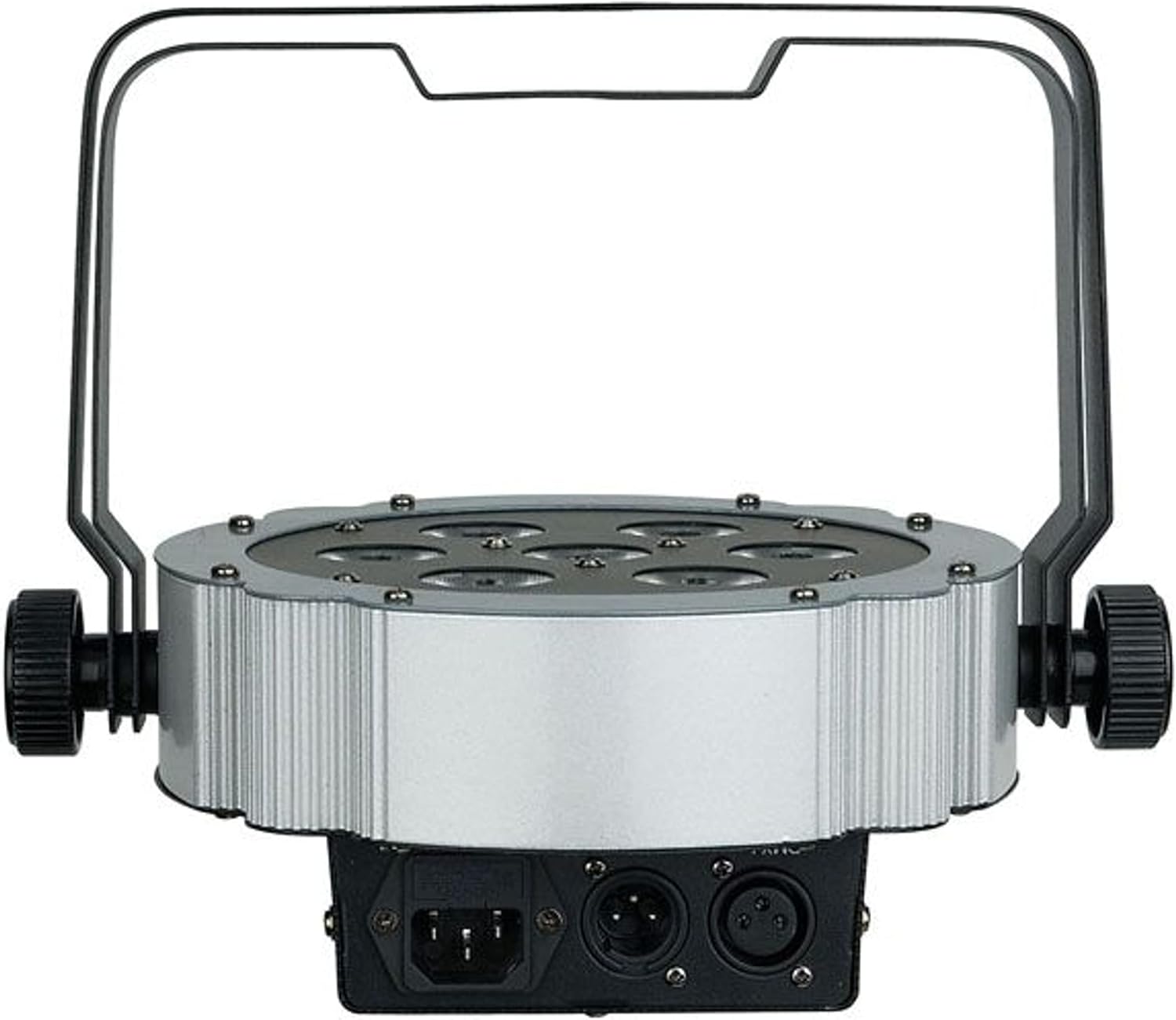
3.5. Irudia: Atzealdea view of the unit, showing the power input and DMX connections (XLR 3-pin).

3.6. irudia: Angeludun view of the PAR spot, demonstrating the adjustable mounting bracket for floor or truss applications.
4. Konfigurazioa
4.1 Paketatzea
Carefully unpack the unit and check for any damage during transit. Retain the packaging material for future transport or storage.
4.2 Muntaketa
The Compact Par 7 Q4 can be used as a floor spot or mounted to a truss using the integrated bracket. Ensure the mounting surface or truss can support the weight of the fixture. Use appropriate clamps and safety cables when mounting overhead.
4.3 Energia-konexioa
Connect the power cable to the unit's power input and then to a grounded electrical outlet. Verify that the local voltage unitatearen eskakizunekin bat dator (240 Volt).
4.4 DMX konexioa (aukerakoa)
For DMX control, connect a DMX cable from your DMX controller to the DMX IN port of the fixture. If connecting multiple units, daisy-chain them by connecting the DMX OUT of the first unit to the DMX IN of the next.
5. Funtzionamendua
5.1 Kontrol-panela
The unit features a digital display and control buttons (Menu, Up, Down, Enter) on the rear for setting modes and DMX addresses.
5.2 Funtzionamendu moduak
The Showtec Compact Par 7 Q4 typically offers several operating modes:
- DMX modua: Allows control via an external DMX controller. Set the DMX address using the control panel.
- Modu automatikoa: Pre-programmed light shows that run automatically.
- Soinu aktiboaren modua: The light reacts to sound via a built-in microphone.
- Maisu/Esklabo modua: Link multiple units where one acts as the master and others as slaves, synchronizing their operation.
- Kolore modu estatikoa: Select and display a single static color.
5.3 DMX kanalen taula
Refer to the specific DMX channel chart in the full product manual for detailed information on controlling each function via DMX. Common channels include Dimmer, Red, Green, Blue, White, Strobe, and Program selection.
6. Mantentzea
6.1 Garbiketa
Regular cleaning of the lenses and housing is recommended to maintain optimal light output and extend the unit's lifespan. Use a soft, lint-free cloth and a mild glass cleaner. Do not use abrasive materials.
6.2 Fusiblearen ordezkapena
If the unit does not power on, check the fuse located near the power input. Replace it with a fuse of the same type and rating only.
6.3 Biltegiratzea
When not in use, store the unit in its original packaging or a suitable flight case in a dry, dust-free environment.
7. Arazoak
| Arazoa | Kausa posiblea | Irtenbidea |
|---|---|---|
| Unitatea ez da pizten | No power supply; Blown fuse; Damaged power cable | Check power connection; Replace fuse; Replace cable |
| Ez dago DMX kontrolarik | Incorrect DMX address; Faulty DMX cable; DMX controller issue | Verify DMX address; Check/replace DMX cable; Test controller |
| Lights flicker or behave erratically | Poor DMX signal; Overheating; Internal fault | Check DMX connections; Ensure proper ventilation; Contact support |
| Koloreak okerrak dira | Incorrect DMX channel values; Internal calibration issue | Adjust DMX values; Perform factory reset if available; Contact support |
8. Zehaztapenak
| Ezaugarri | Xehetasuna |
|---|---|
| Marka | Showtec |
| Eredua | Q4 |
| Erreferentzia Zenbakia | LIG0013729-000 |
| Argi iturria | 7 x 3W RGBW LED |
| Boterea | 3 watt (LED bakoitzeko) |
| liburukiatage | 240 Volt |
| Energia iturria | Kable elektrikoa |
| Neurriak (L x W x H) | 31.5 x 31 x 15.5 cm |
| Pisua | 2.73 kilogramo |
| ASIN | B01F04U758 |
9. Bermea eta Laguntza
Information regarding specific warranty terms and conditions for the Showtec Compact Par 7 Q4 is not available in the provided product details. Please refer to the retailer or manufacturer's official webgunea bermearen informazio eguneratuena lortzeko.
For technical support, service, or spare parts inquiries, please contact your authorized Showtec dealer or the manufacturer directly. Always provide the model number (Q4) and reference number (LIG0013729-000) when seeking support.


