1. Sarrera
This manual provides essential information for setting up, operating, maintaining, and troubleshooting your Toshiba Satellite S55 laptop. Please read this manual thoroughly to ensure proper use and to maximize the performance and longevity of your device.
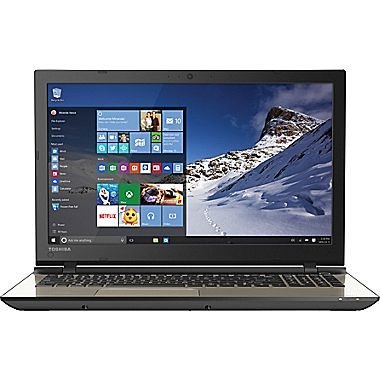
Figure 1.1: Toshiba Satellite S55 Laptop. This image shows the laptop in a closed position, highlighting its sleek design and silver finish.
2. Paketearen edukia
Egiaztatu elementu guztiak paketean daudela:
- Toshiba Satellite S55 Laptop
- AC egokitzailea eta korronte kablea
- Dokumentazioa (Hasierako Gida Azkarra, Bermearen Informazioa)
The laptop includes built-in Harman/Kardon speakers, a backlit keyboard, DVD-SuperMulti drive, MultiMediaCard, SD Memory Card, SDHC Memory Card, SDXC Memory Card slots, and an HDMI port.
3. Konfigurazioa
3.1 AC egokitzailea konektatzea
- Konektatu korronte-egokitzailea ordenagailu eramangarriaren alboko elikatze-konektorera.
- Entxufatu korronte-kablea hormako entxufe batera.
- Allow the battery to charge fully before initial use.
3.2 Hasierako piztea
- Ireki ordenagailu eramangarriaren estalkia.
- Press the power button located above the keyboard on the right side.
- Follow the on-screen instructions to complete the Windows 10 setup process. This includes setting up your user account, network connection, and basic preferences.
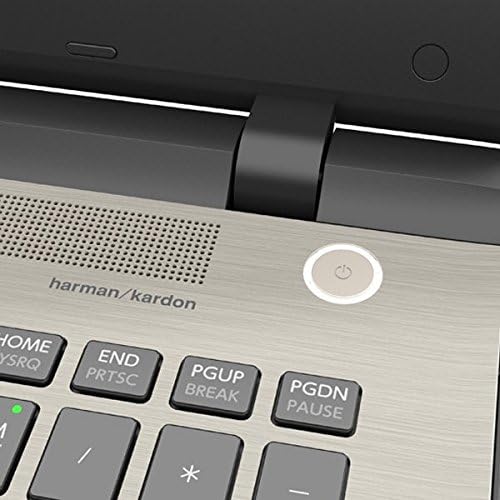
Figure 3.1: Power Button Location. This image provides a close-up view of the power button, located on the top right of the keyboard deck, next to the Harman/Kardon speaker grille.
4. Zure ordenagailu eramangarria erabiltzea
4.1 Teklatua eta ukipen-panela
The Toshiba Satellite S55 features a frameless TruType LED backlit keyboard with a 10-keypad for comfortable typing in various lighting conditions. The click pad pointing device supports multi-touch gestures for intuitive navigation.
- Atzeko argiztatutako teklatua: Use the dedicated function keys to toggle the keyboard backlight on or off.
- Multi-touch Gestures: Refer to Windows 10 settings for customizing touchpad gestures such as scrolling, zooming, and switching applications.
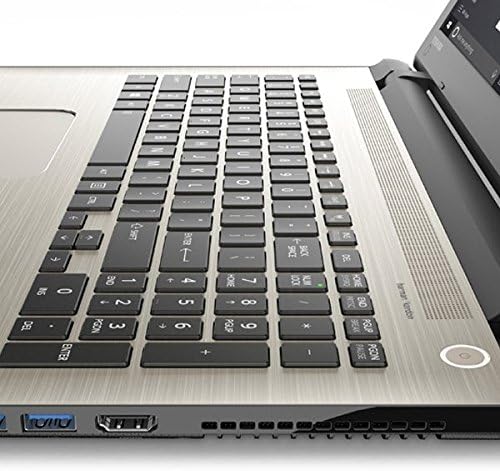
Figure 4.1: Keyboard and Touchpad. This image provides a detailed view of the backlit keyboard, 10-keypad, and the multi-touch click pad.
4.2 Unitate Optikoa
The laptop includes a DVD-SuperMulti drive (+/-R double layer) supporting up to 11 formats. To open the drive tray, press the eject button located on the drive itself or use the eject function within Windows Explorer.
4.3 Portuak eta Konexioa
The Satellite S55 offers various ports for connecting external devices:
- USB 3.0 portuak: Three USB 3.0 ports are available, with one supporting USB Sleep and Charge for powering devices even when the laptop is off or in sleep mode.
- HDMI ataka: Connect to external displays or TVs with 4K Ultra HD output capability.
- LAN (RJ-45) Port: For wired network connections (10/100/1000 Ethernet).
- Entzungailuen/mikrofonoaren sarrera: A shared port for audio output and input.
- Memoria txartelen irakurgailua: Supports MultiMediaCard, SD Memory Card, SDHC Memory Card, and SDXC Memory Card.
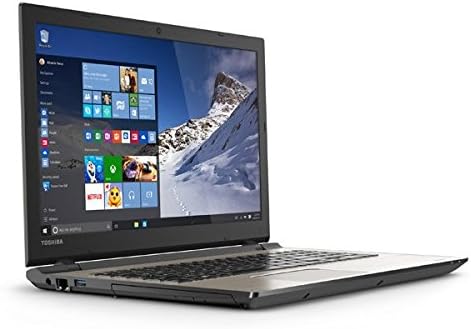
Figure 4.2: Left Side Ports. This image displays the left side of the laptop, showing the power input, LAN port, HDMI port, and USB 3.0 ports.
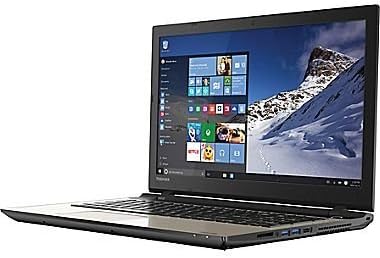
Figure 4.3: Right Side Ports and Optical Drive. This image shows the right side of the laptop, featuring the DVD-SuperMulti drive, additional USB ports, and the headphone/microphone jack.
4.4 Haririk gabeko komunikazioa
The laptop supports Intel Dual Band Wireless-N 7265 2x2 AC (802.11AC) for high-speed Wi-Fi connectivity and Bluetooth (4.1) for connecting wireless peripherals.
- Wi-Fi: Connect to available wireless networks through the Windows 10 network settings.
- Bluetootha: Pair Bluetooth devices such as headphones, mice, or keyboards via Windows 10 Bluetooth settings.
4.5 Webkamera eta audioa
An HD webcam with TruTalk dual microphones is integrated for video conferencing and voice commands. The laptop features harman/kardon stereo speakers with DTS Sound™ for enhanced audio experience.
5. Mantentzea
5.1 Bateria zaintzea
The Lithium Ion (45Wh, 4-Cell) battery is not user-replaceable. To prolong battery life (up to 6 hours), avoid extreme temperatures and fully discharge and recharge the battery periodically. For optimal performance, keep the laptop connected to the AC adapter when possible.
5.2 Garbiketa
- Erabili zapi leun eta lihorik gabeko bat pantaila eta kanpoko gainazalak garbitzeko.
- Saihestu produktu kimiko gogorrak edo garbitzaile urratzaileak erabiltzea.
- Gently clean keyboard keys and touchpad with a slightly damp oihal.
5.3 Software eguneraketak
Regularly check for and install Windows updates and Toshiba driver updates to ensure system stability, security, and optimal performance.
6. Arazoak
6.1 Energia arazoak
- Ordenagailu eramangarria ez da pizten: Ensure the AC adapter is securely connected and the power outlet is functional. Check if the battery has sufficient charge.
- Bateria ez da kargatzen: Verify the AC adapter and power cord are not damaged. Try a different power outlet.
6.2 Bistaratzeko arazoak
- Pantaila hutsa: Connect an external monitor to check if the issue is with the laptop's display. Adjust brightness settings.
- Incorrect resolution: Adjust display settings in Windows 10 to the recommended 1366x768 resolution.
6.3 Sarearen konexioa
- Ezin da wifira konektatu: Ensure Wi-Fi is enabled in Windows settings. Restart your router and the laptop. Verify network password.
- No internet access: Check your internet service provider's status. Ensure your router is functioning correctly.
7. Zehaztapenak
| Ezaugarri | Xehetasuna |
|---|---|
| Eredua | S55 |
| Sistema eragilea | Windows 10 Home 64 biteko |
| Prozesadorea | Intel Core i7-5500U Dual-Core (2.0GHz up to 2.9GHz) |
| RAM | 12GB DDR3L 1600MHz |
| Disko gogorra | 1TB (5400rpm) HDD |
| Bistaratzea | 15.6" TruBrite LED Backlit (1366x768 HD) |
| Grafikoak | Mobile Intel HD 6000 Graphics |
| Unitate optikoa | DVD-SuperMulti drive |
| Haririk gabekoa | Intel Dual Band Wireless-N 7265 2x2 AC (802.11AC), Bluetooth 4.1 |
| LAN | 10/100/1000 Ethernet |
| USB atakak | 3 x USB 3.0 (1 with USB Sleep and Charge) |
| HDMI | Yes, with 4K Ultra HD output capability |
| Audioa | harman/kardon stereo speakers, DTS Sound™ |
| Webkamara | HD webcam with TruTalk dual microphones |
| Bateria | Lithium Ion (45Wh, 4-Cell), up to 6 hours |
| Pisua | 4.85 lb (2.2 kg) |
| Neurriak (LxWxH) | 14 x 1 x 12 hazbete |
| Kolorea | Brushed Aluminum Finish (Silver) |
8. Bermea eta Laguntza
For warranty information, please refer to the documentation included with your product. For technical support, driver downloads, or service inquiries, please visit the official Toshiba support webwebgunean edo jarri harremanetan bere bezeroarentzako arreta zerbitzuarekin.
Baliabide gehigarriak eta harremanetarako informazioa aurki ditzakezu hemen: Toshiba denda Amazonen.


