Sarrera
Eskerrik asko erosketagatik.asing the Havit HV-MS991GT Wireless Mouse. This manual provides essential information for setting up, operating, maintaining, and troubleshooting your device. Please read it carefully before use to ensure optimal performance and longevity of your mouse.
Konfigurazio Argibideak
- Sagua deskonprimitu: Kontu handiz atera sagua eta USB hargailua paketetik.
- Instalatu bateriak:
Locate the battery compartment on the underside of the mouse. Open the cover and insert one AA battery (not included), ensuring correct polarity (+/-). Close the battery compartment cover.
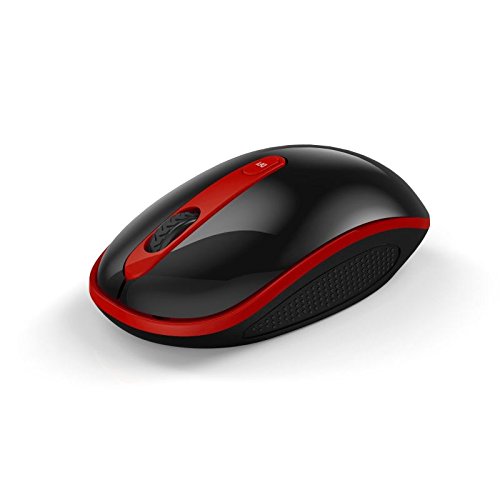
Image: The Havit HV-MS991GT Wireless Mouse, featuring a black body with red accents and a scroll wheel. This image illustrates the overall design of the mouse.
- Konektatu USB hargailua: Plug the mini USB receiver into an available USB port on your computer. The system will automatically detect and install the necessary drivers.
- Piztu sagua: Locate the power switch on the underside of the mouse and slide it to the "ON" position. The mouse is now ready for use.
Funtzionamendu-argibideak
The Havit HV-MS991GT Wireless Mouse is designed for intuitive use with standard mouse functions.
- Oinarrizko funtzioak:
- Ezkerreko klik: Lehen mailako hautaketa eta aktibazioa.
- Egin klik eskuineko botoiarekin: Testuinguru-menuetara sartzen da.
- Korritzeko gurpila: Dokumentuak korritzen ditu eta web orrialdeak bertikalki. Gurpilak erdiko klik egiteko botoia ere balio du.
- DPI doikuntza: This mouse features adjustable DPI settings (1000-1600 DPI) for varying cursor speeds and precision. A dedicated DPI button, usually located near the scroll wheel, allows you to cycle through these settings. Press the button to switch between DPI levels.
- Haririk gabeko irismena: The advanced 2.4GHz wireless technology provides an effective working distance of up to 15 meters (approximately 49 feet) from the USB receiver.
- Sistemaren bateragarritasuna: This mouse is compatible with Windows 2000, Windows XP, Windows Vista, Windows 7, and Windows 8 operating systems.
Mantentzea
- Garbiketa: To clean the mouse, gently wipe its surface with a soft, dry cloth. For stubborn dirt, slightly dampen the cloth with water. Avoid using harsh chemicals or abrasive cleaners, as these can damage the mouse's finish.
- Bateria ordezkatzea: When the mouse performance degrades or it stops responding, it is likely time to replace the battery. Follow the battery installation steps in the "Setup Instructions" section.
- Lo automatikoko funtzioa: The mouse features a built-in auto sleep function to conserve battery life. If the mouse is inactive for a period, it will enter a low-power sleep mode. To wake it up, simply move the mouse or click any button.
- Hartzailearen biltegiratzea: The mini USB receiver can be stored inside the mouse's battery compartment when not in use, making it convenient for travel and preventing loss.
Arazoak konpontzea
| Arazoa | Irtenbidea |
|---|---|
| Saguak ez du erantzuten. |
|
| Kurtsorearen mugimendua irregularra edo motela da. |
|
| Wireless connection is unstable. |
|
Zehaztapenak
| Ezaugarri | Xehetasuna |
|---|---|
| Marka | Havit |
| Modelo zenbakia | HV-MS991GT |
| Konektibitate Teknologia | 2.4 GHz Wireless |
| DPI ezarpenak | 1000-1600 DPI |
| Botoi kopurua | 4 |
| Gako Bizitza | 1,000,000 aldiz |
| Wireless Range | Gehienez 15 metro |
| Sistema eragilearen euskarria | Windows 2000/XP/Vista/7/8 |
| Bateriaren batez besteko iraupena | 12 Hilabete |
| Pilak barne | No (Requires 1x AA battery) |
| Elementuaren pisua | 120 g |
| Paketearen neurriak | 16.2 x 10.8 x 6 cm |
Bermea eta Laguntza
Specific warranty information for the Havit HV-MS991GT Wireless Mouse is not provided in this manual. Please refer to the product packaging or the manufacturer's official website for details regarding warranty coverage and customer support contact information.