1. Sarrera
This manual provides comprehensive instructions for the operation and maintenance of your MIDAS DM16 16 Input Analogue Live and Studio Mixer. The DM16 is designed for both live performance and studio recording environments, featuring award-winning MIDAS microphone preamplifiers and robust construction.
Please read this manual thoroughly before operating the device to ensure proper usage and to maximize its lifespan.
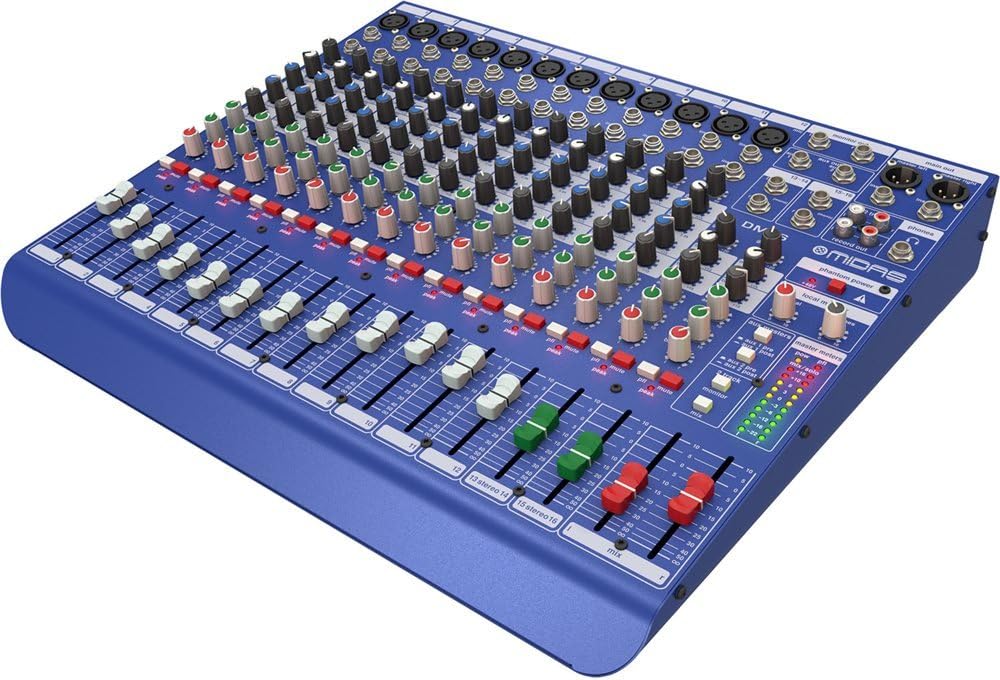
1.1 irudia: Aurrealdeko angelua view of the MIDAS DM16 mixer.
2. Konfigurazioa
2.1 Desontziratzea eta ikuskatzea
Upon receiving your MIDAS DM16, carefully unpack the unit and inspect it for any signs of damage that may have occurred during transit. Retain the original packaging materials for future transport or storage.
Kutxan sartuta:
- MIDAS DM16 16 sarrerako zuzeneko eta estudioko nahasgailu analogikoa
- Elikatze kablea
- Erabiltzailearen eskuliburua (dokumentu hau)
2.2 Energia-konexioa
The DM16 operates on a standard AC power supply. Connect the provided power cord to the AC inlet on the rear panel of the mixer and then to a suitable power outlet. Ensure the power switch is in the 'Off' position before connecting to power.
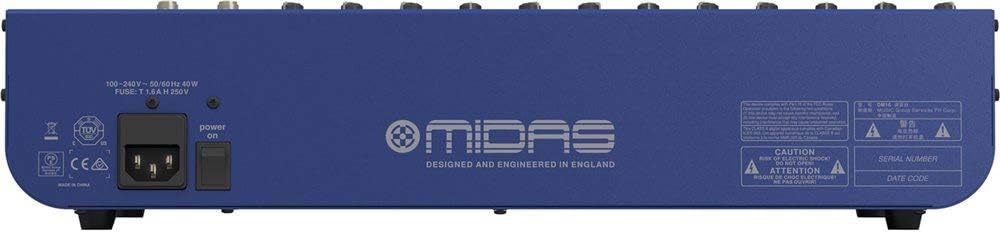
Figure 2.1: Rear panel of the MIDAS DM16 showing power input and warnings.
2.3 Sarrera eta irteerako konexioak
The DM16 features a variety of input and output options for connecting microphones, instruments, and other audio devices.
- Mikrofonoaren sarrerak: 12 mono input channels with XLR connectors for microphones. These channels feature MIDAS microphone preampigogailuak.
- Lineako sarrerak: 2 electronically-balanced stereo line input channels on 1/4" TRS connectors for instruments or line-level devices.
- Irteera nagusiak: Connect to your main PA system or recording interface.
- Aux Sends: For monitor mixes or effects sends.
- Aurikularretarako irteera: For monitoring audio.
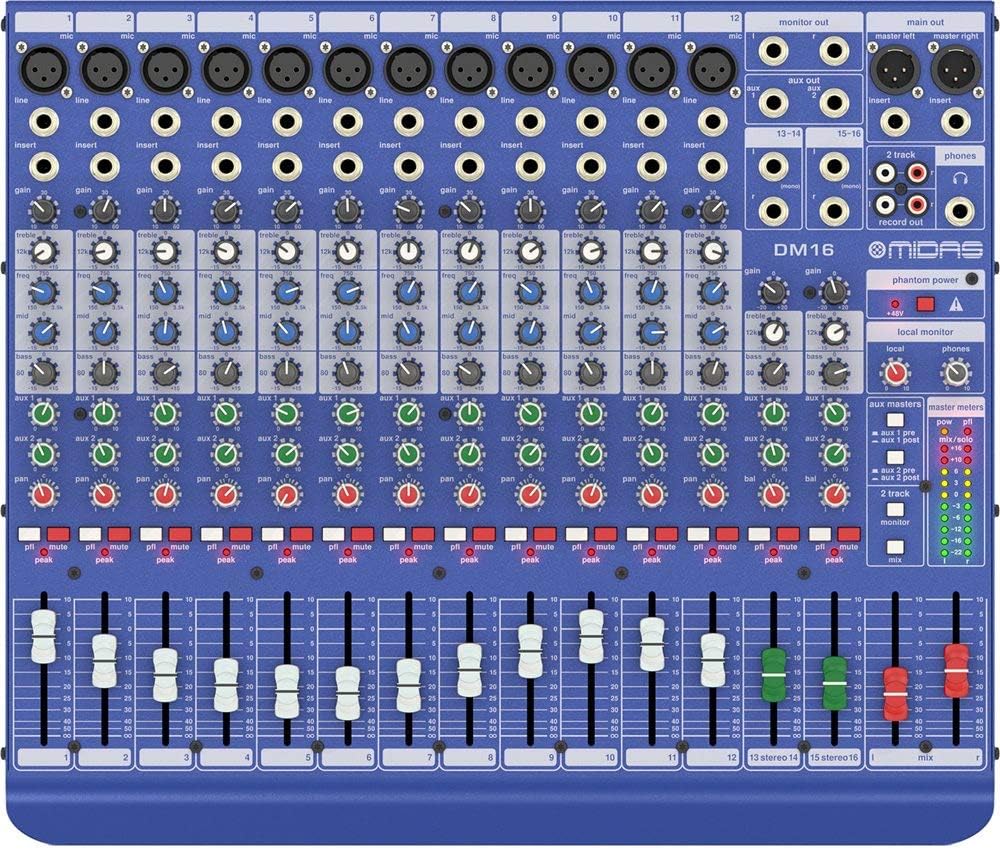
2.2. irudia: Goikoa view of the MIDAS DM16 showing all input/output connections and controls.
3. Funtzionamendu-argibideak
3.1 Kanalen kontrolak
Each mono input channel on the DM16 features the following controls:
- IRABAZIA: Adjusts the input sensitivity for the microphone preampbiziagoa.
- EQ: A 3-band equalizer with a swept mid-band for precise tone shaping.

3.1. irudia: Xehetasuna view of the 3-band EQ section on a mono channel.
- AUX 1/2: Controls the level sent to the auxiliary outputs. These can be switched pre/post fader.

Figure 3.2: Aux masters section with pre/post fader switching.
- PAN: Adjusts the stereo position of the channel.
- MUTU: Silences the channel.
- PEAK LED: Indicates when the input signal is clipping.
- FADER: Kanaleko nahasketa nagusirako irteera-maila kontrolatzen du.

Figure 3.3: Channel faders for precise level control.
3.2 Potentzia fantasma
The DM16 provides +48V phantom power for condenser microphones. This is a global switch, meaning it applies to all microphone inputs simultaneously. Ensure all connections are made before activating phantom power to prevent damage to non-phantom powered devices.

Figure 3.4: Phantom power switch.
3.3 Jarraipena
Use the headphone output and monitor controls to listen to the main mix or specific auxiliary sends. The monitor section includes controls for local monitor and phones output levels.

Figure 3.5: Monitor and headphone controls.
4. Mantentzea
Proper maintenance ensures the longevity and optimal performance of your MIDAS DM16 mixer.
- Garbiketa: Erabili zapi leun eta lehor bat nahasgailuaren kanpoaldea garbitzeko. Saihestu garbitzaile edo disolbatzaile urratzaileak, akabera edo kontrolak kaltetu ditzaketenak.
- Hautsaren babesa: Mantendu nahasgailua estalita erabiltzen ez duzunean hautsa pilatzea saihesteko, batez ere fader eta botoien inguruan.
- Aireztapena: Ziurtatu aireztapen egokia unitatearen inguruan gehiegi berotzea saihesteko. Ez blokeatu aireztapen-irekidurak.
- Biltegiratzea: Store the mixer in a cool, dry environment away from direct sunlight and extreme temperatures.
5. Arazoak
This section addresses common issues you might encounter with your DM16 mixer.
- Potentziarik gabe:
- Egiaztatu elikatze-kablea ondo konektatuta dagoen nahasgailura eta entxufera.
- Egiaztatu korronte-hartunea funtzionala dela.
- Ensure the power switch on the rear panel is in the 'On' position.
- Soinu-irteerarik ez:
- Egiaztatu sarrera eta irteerako kableen konexio guztiak.
- Ensure channel faders and the main mix fader are raised.
- Verify that the MUTE buttons on active channels are not engaged.
- Check the gain settings for each channel.
- Confirm that your connected speakers or monitoring system are powered on and functioning correctly.
- Soinu distortsionatua:
- Reduce the GAIN setting on the input channel if the PEAK LED is frequently illuminating.
- Lower the output level of the connected source device.
- Kable akastunak egiaztatu.
- Burrunba edo zarata:
- Ziurtatu kable guztiak behar bezala babestuta daudela eta egoera onean daudela.
- Check for ground loops; try connecting all audio equipment to the same power strip.
- Mantendu audio kableak korronte-kableetatik urrun.
Hemen azaltzen ez diren arazorik baduzu, jo ezazu laguntza atalera.
6. Zehaztapenak
| Ezaugarri | Xehetasuna |
|---|---|
| Produktu Mota | Zuzeneko eta estudioko nahasgailu analogikoa |
| Sarrerako kanalak | 16 (12 mono, 2 estereo) |
| Mikrofonoa Preampigogailuak | Award-winning MIDAS preampigogailuak |
| EQ on Mono Channels | 3-band with swept mid band |
| Aux bidaltzen du | 2 (with pre/post fader switching) |
| Energia iturria | Kable elektrikoa |
| Elementuaren pisua | 11.02 libra (5.0 kg) |
| Produktuaren neurriak (L x W x H) | 17.24 x 14.57 x 3.74 hazbete (438 x 370 x 95 mm) |
| Jatorrizko Herrialdea | Txina |
| Modelo zenbakia | DM16 |
| Konektibitate Teknologia | Laguntzailea |
7. Bermea eta Laguntza
7.1 Bermearen informazioa
Your MIDAS DM16 mixer is covered by a limited warranty against defects in materials and workmanship. Please refer to the warranty card included with your product or visit the official MIDAS webwebgunean bermearen baldintza zehatzak ikusteko.
Oharra: The warranty may not cover damage caused by improper use, unauthorized modifications, or natural disasters.
7.2 Bezeroarentzako laguntza
For technical assistance, troubleshooting, or service inquiries, please contact MIDAS customer support through their official webgunea edo zure produktuaren dokumentazioan emandako harremanetarako informazioa.
Sareko baliabideak:
- Official MIDAS Webgunea: www.midasconsoles.com
- Product Support Page: (Specific link if available, otherwise general webgunea)
When contacting support, please have your product model number (DM16) and serial number ready.


