1. Sarrera
This manual provides comprehensive instructions for the installation, operation, and maintenance of the ComMax DR-4UM 4-Button Audio Intercom Lobby Panel. The DR-4UM is designed for use in 4-apartment buildings, facilitating audio communication between visitors at the lobby panel and residents within their apartments.
The DR-4UM functions as a key component of a wired intercom system, requiring integration with compatible ComMax interphone series units, such as the DP-SS (sold separately), and a DC12V power supply (ComMax RF-1A, sold separately).
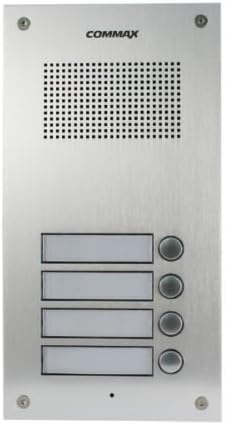
Figure 1: ComMax DR-4UM 4-Button Audio Intercom Lobby Panel (Front View)
2. Paketearen edukia
Please verify that all items listed below are present in your package. If any items are missing or damaged, contact your supplier immediately.
- ComMax DR-4UM 4-Button Lobby Panel x1
- 4-pin Connector x2
- Erabiltzailearen eskuliburua x1
Oharra: Additional accessories such as wiring cables, indoor handsets (e.g., DP-SS), power supply (e.g., RF-1A), and electric door strikes are not included and must be purchased separately.
3. Segurtasun informazioa
Irakurri arretaz argibide guztiak instalazioa eta erabilera aurretik. Gorde eskuliburu hau etorkizunean erreferentzia gisa.
- Ziurtatu energia-iturria deskonektatuta dagoela edozein instalazio edo mantentze-lan egin aurretik.
- Only use the specified DC12V, 1Amp power supply (ComMax RF-1A or equivalent).
- Installation should be performed by qualified personnel to prevent electric shock or product damage.
- Do not expose the unit to excessive moisture, rain, or extreme temperatures.
- Avoid placing the unit near strong electromagnetic fields.
4. Konfigurazioa eta instalazioa
4.1. Bateragarritasuna
The DR-4UM lobby panel is designed to be compatible with ComMax interphone series, such as the DP-SS indoor handsets. Ensure all components of your intercom system are compatible before installation.
4.2. Muntaketa
The DR-4UM is a flush-mounted unit. Select a suitable location at the building entrance, ensuring it is protected from direct weather exposure if possible, and at an appropriate height for visitors.

Figure 2: Installation Dimensions (Measurements in mm)
Refer to Figure 2 for precise dimensions and mounting hole locations. Prepare the wall opening according to these measurements for a flush fit.
4.3. Kableatuen Diagrama
The DR-4UM requires a DC12V, 500mA power source (e.g., ComMax RF-1A). The wiring involves a common 3-wire connection plus individual wires for each apartment.

Figure 3: Wiring Diagram for DR-nUM (DR-4UM) with DP-SS and RF-1A
Follow the wiring diagram in Figure 3 carefully. Connect the lobby panel to the indoor handsets (DP-SS) and the power supply (RF-1A). Ensure all connections are secure and correctly polarized. Incorrect wiring can damage the unit or prevent proper operation.
- Potentzia-konexioa: Connect the DC12V power supply to the designated terminals (CN3 in the diagram).
- Interphone Connection: Connect the 4-pin connectors from the DR-4UM to the DP-SS indoor units. The diagram shows common wires (1, 2, 3) and individual apartment wires (L1 for each DP-SS).
- Electric Door Strike (Optional): If an electric door strike is used, connect it as shown in the diagram, ensuring it has its own power source.
5. Funtzionamendu-argibideak
The ComMax DR-4UM lobby panel provides simple and direct audio communication.
5.1. Calling an Apartment
- A visitor approaches the lobby panel.
- The visitor identifies the desired apartment number.
- The visitor presses the corresponding call button on the DR-4UM panel.
- An audible signal will sound at the indoor handset (DP-SS) in the selected apartment.
5.2. Bi norabideko komunikazioa
- Once the resident answers the call from their indoor handset, two-way audio communication is established.
- The visitor can speak into the microphone on the lobby panel.
- The resident can speak into their indoor handset.
- Communication will cease when either party hangs up their handset or after a predetermined time-out period.
6. Mantentzea
Regular maintenance ensures the longevity and optimal performance of your ComMax DR-4UM lobby panel.
- Garbiketa: Wipe the panel surface with a soft, damp oihal. Ez erabili garbitzaile urratzailerik, disolbatzailerik edo produktu kimiko gogorrik, hauek akabera kaltetu baitezakete.
- Ikuskapena: Periodically check for any loose connections or visible damage to the panel.
- Ingurumena babestea: While the panel is designed for outdoor use, protecting it from direct, prolonged exposure to extreme weather conditions (heavy rain, direct sunlight, snow) can extend its lifespan.
7. Arazoak
If you encounter issues with your DR-4UM lobby panel, refer to the following common problems and solutions.
| Arazoa | Kausa posiblea | Irtenbidea |
|---|---|---|
| No audio when calling an apartment. |
|
|
| Call button does not respond. |
|
|
| Audioaren kalitate eskasa (estatikoa, bolumen baxua). |
|
|
If the problem persists after attempting these solutions, please contact ComMax technical support.
8. Zehaztapenak
Technical specifications for the ComMax DR-4UM 4-Button Audio Intercom Lobby Panel.

Figure 4: ComMax DR-4UM Technical Specifications
| Ezaugarri | Xehetasuna |
|---|---|
| Eredua | DR-4UM |
| Energia iturria | 12V korronte zuzena, 1Amp (ComMax RF-1A recommended, sold separately) |
| Kableatua | Common 3 wires + Individual 1 wire per apartment |
| Komunikazio mota | 2 bideko audioa |
| Mendi mota | Hura-muntatutakoa |
| Funtzionamendu-tenperatura | -10 ° C ~ 50 ° C (14 ° F ~ 122 ° F) |
| Neurriak (W x H x D) | 142 mm x 250 mm x 50 mm (5.59 x 9.84 x 1.97 hazbete) |
| Materiala | Aluminioa |
| Kolorea | Zilarrezkoa |
| Elementuaren pisua | 907.18 gramo (2 libra) |
| Gailu bateragarriak | ComMax interphone series (e.g., DP-SS) |
| Konektibitate Teknologia | Kableatua |
| Kontrol-metodoa | Ahotsa |
| UPC | 730957987658 |
8.1. Communication Distance vs. Cable Diameter
| Kablearen diametroa (mm) | Max. Distance (m) |
|---|---|
| Ø0.5 | 30 m |
| Ø0.65 | 50 m |
| Ø0.8 | 70 m |
| Ø1 | 100 m |
9. Bermea eta Laguntza
For warranty information, please refer to the warranty card included with your product or contact your local ComMax distributor.
For technical support, installation assistance, or troubleshooting beyond the scope of this manual, please contact ComMax customer service or visit the official ComMax weblaguntza baliabideen gunea.


