Sarrera
This manual provides essential instructions for the installation, operation, and maintenance of your Yale YMG40 Digital Door Lock. Please read this manual thoroughly before installation and use to ensure proper function and security.
Paketearen edukia
Instalazioa hasi aurretik, egiaztatu osagai guztiak daudela:
- Yale YMG40 Digital Door Lock (Front and Back Body)
- Mortise Lock Muntaketa
- 2 giltza mekaniko
- Instalazioko hardwarea (torlojuak, kolpe-plaka, etab.)
- Erabiltzailearen eskuliburua (dokumentu hau)
Ezaugarri nagusiak
- Push-Pull heldulekua: Designed for convenient operation; push to enter, pull to exit.
- Sarbide metodo anitzak: Biometric fingerprint recognition, PIN code entry, and mechanical key override.
- Optional Connectivity: Compatible with Z-Wave and Bluetooth modules for smart home integration (modules sold separately).
- Ahots-gida: Provides audio prompts for setup and operation.
- Safe Handle Mechanism: Enhances security by preventing unauthorized entry.
- Blokeo automatikoa: Configurable to automatically lock the door after closing.
- Larrialdietarako sarbidea: Low battery warning and external power terminal for emergency situations.
Konfigurazioa eta Instalazioa
Professional installation is recommended for optimal performance and security. Ensure your door meets the following specifications:
- Atearen lodiera: 40-75mm (wooden doors).
- Ate mota: Suitable for both inswing and outswing doors.
Hasierako urratsak:
- Atea prestatu: Ensure the door is properly prepped according to the provided template (if applicable) for the mortise lock and lock body.
- Instalatu horma-sarraila: Insert the mortise lock into the door edge and secure it.
- Install Lock Bodies: Mount the front and back lock bodies, ensuring cables are correctly routed and connected.
- Sartu bateriak: Install the required batteries into the back body.
- Hasierako Programazioa: Follow the voice guide prompts to set up the master PIN code.
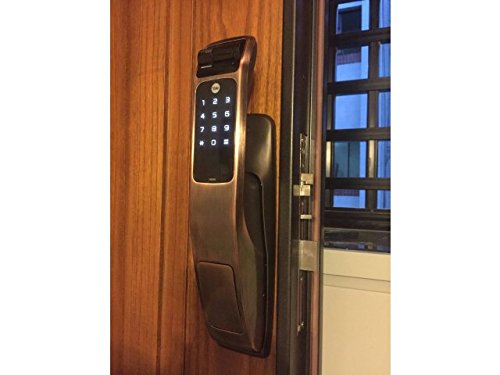
Image: Yale YMG40 Digital Door Lock installed on a wooden door, showing the sleek design and integration.
Funtzionamendu-argibideak
1. Accessing the Door
a. Fingerprint Access
The lock supports up to 20 different fingerprints. To unlock using a fingerprint:
- Jarri erregistratutako hatza hatz-marken eskanerran.
- The lock will verify the fingerprint and unlock.
- Use the push-pull handle to open the door.
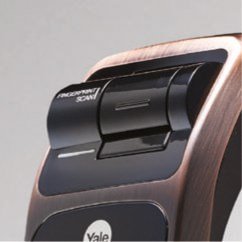
Irudia: Xehetasun zehatza view of the fingerprint scan area on the Yale YMG40 lock.
b. PIN Code Access
The lock supports up to 30 different user codes. To unlock using a PIN code:
- Ukitu teklatua aktibatzeko.
- Enter your registered PIN code followed by the '*' or '#' button (refer to specific model instructions for exact key).
- The lock will verify the code and unlock.
- Use the push-pull handle to open the door.

Irudia: Aurrealdea view of the Yale YMG40 Digital Door Lock, showcasing the illuminated keypad and push-pull handle.
c. Mechanical Key Override
In case of emergency or battery failure, the lock can be opened using the provided mechanical keys.
- Locate the mechanical key slot, typically hidden under a cover on the front body.
- Insert one of the 2 giltza mekaniko and turn to unlock.
- Use the push-pull handle to open the door.

Irudia: Gertutik view of the mechanical key override cylinder on the Yale YMG40 lock.
d. Push-Pull Handle Operation
The ergonomic push-pull handle simplifies door opening:
- Kanpotik: After successful authentication (fingerprint, PIN, or key), simply bultza the handle down to open the door.
- Barrutik: Besterik gabe tira the handle down to open the door.
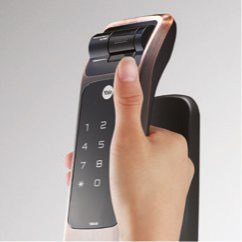
Image: A hand demonstrating the push-pull action of the Yale YMG40 door handle.
2. Blokeo automatikoa
The YMG40 can be configured to automatically lock the door after it closes. Refer to the full programming guide for instructions on enabling or disabling this feature.
3. Optional Accessories (Z-Wave & Bluetooth)
The Yale YMG40 is compatible with optional Z-Wave and Bluetooth modules, allowing integration with smart home systems and remote control capabilities. These modules are sold separately. Consult the specific module's instructions for pairing and setup.
A remote control accessory is also available, utilizing wireless floating ID technology with a range of up to 50 meters.
Mantentzea
- Bateria ordezkatzea: The lock will provide a low battery warning. Replace all batteries promptly when this warning appears to ensure continuous operation.
- Garbiketa: Clean the lock's exterior with a soft, dry cloth. Avoid abrasive cleaners or solvents that could damage the finish or electronic components.
- Hatz-marka sentsorea: Keep the fingerprint sensor clean and free of debris for accurate readings.
- Giltza mekanikoa: Store the mechanical keys in a safe, accessible location outside the property for emergency use.
Arazoak konpontzea
- Blokeoak ez du erantzuten: Check battery levels. If batteries are depleted, use the mechanical key or connect a 9V battery to the emergency power terminal (if available on your model) to provide temporary power.
- Hatz-marka ez da ezagutzen: Ziurtatu hatza garbi eta lehor dagoela. Saiatu hatz-marka berriro erregistratzen arazoak jarraitzen badute.
- PIN kodea ez dabil: Verify the correct PIN is being entered. Ensure the keypad is active before entering the code.
- Door Not Locking/Unlocking Properly: Check for any obstructions in the door frame or latch mechanism. Ensure the lock is properly aligned with the strike plate.
- Ahots-gidaren arazoak: Ensure the volume is set appropriately.
For persistent issues, consult the full product manual or contact Yale customer support.
Zehaztapenak
| Ezaugarri | Xehetasuna |
|---|---|
| Eredua | YMG40 |
| Blokeo mota | Mortise Lock, Biometric |
| Sarbide-metodoak | Fingerprint, PIN Code, Mechanical Key |
| Hatz-marken edukiera | Up to 20 different fingerprints |
| Erabiltzaile Kodearen Edukiera | Up to 30 different user codes |
| Giltza mekanikoak | 2 Keys included |
| Front Body Dimensions (D x W x H) | 67.6 mm x 76 mm x 359.1 mm |
| Back Body Dimensions (D x W x H) | 65.2 mm x 76 mm x 359.1 mm |
| Atearen Lodiera | 40-75mm (Wooden Doors) |
| Materiala | Altzairu herdoilgaitza |
| Connectivity (Optional) | Z-Wave, Bluetooth |
| Elementuaren pisua | 1 kg |
Laguntza eta Bermea
For technical assistance, warranty information, or service requests, please contact Yale customer support. Refer to your product packaging or the official Yale webzure eskualdeko harremanetarako xehetasunak lortzeko.
Note: Installation charges may be extra and are typically not covered under product warranty.


