1. Sarrera
The Discover D712 Dual Speaker Wired Office Headset is designed for professional use, offering clear audio for calling environments. This headset is compatible with a wide range of corded desk phones, including models from Avaya, Polycom, Cisco, Shoretel, Yealink, and Mitel. It features a comfortable over-ear design with faux leather ear cushions and a lightweight build, making it suitable for extended wear in office settings. This manual provides comprehensive instructions for setting up, operating, maintaining, and troubleshooting your D712 headset.
2. Zer dago kutxan
Upon unboxing your Discover D712 headset, please verify that all components listed below are present:
- Discover D712 Dual Speaker Wired Office Headset
- Belarri-kuxinak (aurrez instalatuta edo bereizita)

Figure 2.1: The Discover D712 Dual Speaker Wired Office Headset, showing the headset itself and a diagram illustrating the quick disconnect feature.
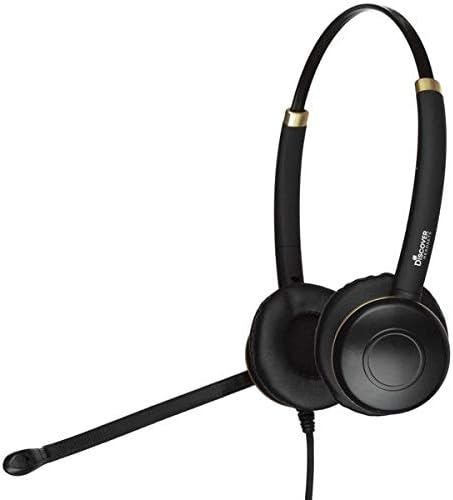
2.2. irudia: Alde bat view of the Discover D712 headset, highlighting its dual speakers and microphone boom.
3. Konfiguratzeko argibideak
The Discover D712 headset requires a compatible direct connect cable to function with your specific desk phone. This cable is sold separately and is essential for connectivity. Please ensure you have the correct cable for your phone model before proceeding.
3.1 Entzungailuak konektatzea
- Identify the Quick Disconnect (QD) Cable: The D712 headset features a Quick Disconnect (QD) end, which allows you to easily detach the headset from the direct connect cable without disconnecting the cable from the phone.
- Connect the Direct Connect Cable: Plug the appropriate direct connect cable (sold separately) into the headset port on your desk phone. Refer to your phone's manual for the exact location of the headset port.
- Attach the Headset to the QD Cable: Align the Quick Disconnect end of your D712 headset with the Quick Disconnect end of the direct connect cable. Push them firmly together until you hear or feel a click, indicating a secure connection.
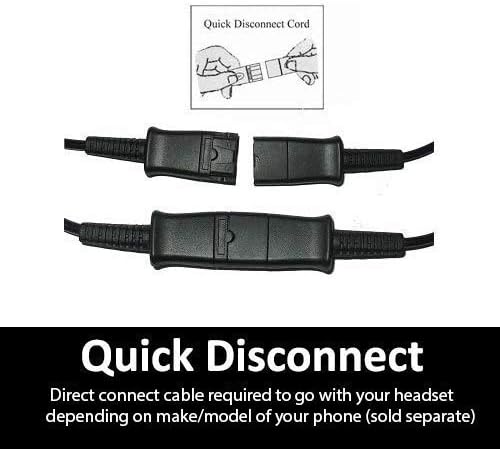
3.1. irudia: Zehaztutako irudia view of the Quick Disconnect (QD) cable connection, showing how the two parts snap together.

Figure 3.2: An individual wearing the Discover D712 headset, demonstrating its typical use in an office environment.
3.2 Erosotasunerako doikuntza
- Buruko bandaren doikuntza: Extend or retract the headband to fit comfortably over your head. The headset should feel secure without being too tight.
- Mikrofonoaren kokapena: Position the microphone boom approximately two fingers' width from the corner of your mouth. This ensures optimal voice pickup and clarity. The microphone boom is flexible and can be adjusted.
- Ear Cushion Placement: Ensure the ear cushions fully cover your ears for the best audio experience and comfort.
4. Entzungailuak erabiltzea
Once connected, the Discover D712 headset is ready for use with your desk phone. The primary controls for calls (answer/end, volume, mute) are typically managed directly on your desk phone or via the inline controls on your direct connect cable (if equipped).
4.1 Deiak egitea eta jasotzea
- Dei bat egiteko: Lift the handset or press the headset button on your desk phone, then dial the desired number.
- Dei bat jasotzeko: Press the headset button on your desk phone or lift the handset when the phone rings.
- Dei bat amaitzeko: Press the headset button again or replace the handset.
4.2 Volume Control and Mute
Volume adjustments and muting the microphone are typically handled by the controls on your desk phone or the inline controls on your specific direct connect cable. Consult your direct connect cable's instructions or your phone's manual for details on these functions.

Figure 4.1: An individual using the Discover D712 headset, illustrating its comfortable fit and professional appearance during a call.
5. Mantentzea eta Zainketa
Proper care and maintenance will extend the lifespan of your Discover D712 headset and ensure optimal performance.
5.1 Garbiketa jarraibideak
- Belarrietarako kuxinak: The faux leather ear cushions can be gently wiped with a soft, damp cloth. Avoid using harsh chemicals or abrasive cleaners. Ensure they are completely dry before use.
- Entzungailuen gorputza: Wipe the headset body and microphone boom with a dry or slightly damp, soft cloth. Do not immerse the headset in water or any cleaning solutions.
- Mikrofonoa Haizea: If your microphone has a foam windscreen, it can be carefully removed and cleaned with mild soap and water, then air-dried completely before reattaching.
5.2 Biltegiratzea
When not in use, store your headset in a clean, dry place, away from extreme temperatures and direct sunlight. Avoid tangling the cable to prevent damage.
6. Arazoak
If you encounter issues with your Discover D712 headset, please refer to the following common problems and solutions:
| Arazoa | Kausa posiblea | Irtenbidea |
|---|---|---|
| No sound from headset / Cannot hear caller |
|
|
| Microphone not working / Caller cannot hear me |
|
|
| Headset is uncomfortable |
|
|
If the issue persists after trying these solutions, please contact Discover customer support for further assistance.
7. Zehaztapenak
Below are the technical specifications for the Discover D712 Dual Speaker Wired Office Headset:
| Ezaugarri | Xehetasuna |
|---|---|
| Ereduaren izena | D712 |
| Konektibitate Teknologia | Kableatua |
| Aurikularretarako Jack | 3.5 mm Jack (Note: Requires specific direct connect cable for desk phones) |
| Dakarten osagaiak | Headset, Ear Cushions |
| Materiala | Faux Leather (Ear Cushions) |
| Produkturako erabilera espezifikoak | Office/Professional Use |
| Produkturako gomendatutako erabilerak | Deitzen |
| Gailu bateragarriak | Desk Phones (with compatible direct connect cable) |
| Kontrol mota | Touch Control (via compatible direct connect cable or phone) |
| Kable Ezaugarri | Retractable (referring to the Quick Disconnect feature) |
| Uraren Erresistentzia Maila | Ez Urarekiko Erresistentea |
| Estiloa | Modernoa |
| Entzungailuaren forma | Belarrian |
| Ezaugarri Berezia | Arinak |
| Produktuaren neurriak | 6 x 6 x 4 hazbete |
| Elementuaren pisua | 6.9 ontza |
| Fabrikatzailea | Ezagutu |
| Kolorea | Beltza |
| Zarata Kontrola | Zarata aktiboaren ezeztapena (mikrofonoarentzat) |
8. Bermea eta Laguntza
For warranty information, technical support, or further assistance with your Discover D712 headset, please contact Discover customer service or visit their official webgunea.
- Lineako laguntza: Bisitatu Discover Store on Amazon produktuari buruzko informazioa eta laguntza-baliabideak lortzeko.
- Itzultzeko politika: This product typically has a 30-day return policy from the date of purchase. Please refer to the retailer's return policy for specific terms and conditions.


