1. Sarrera
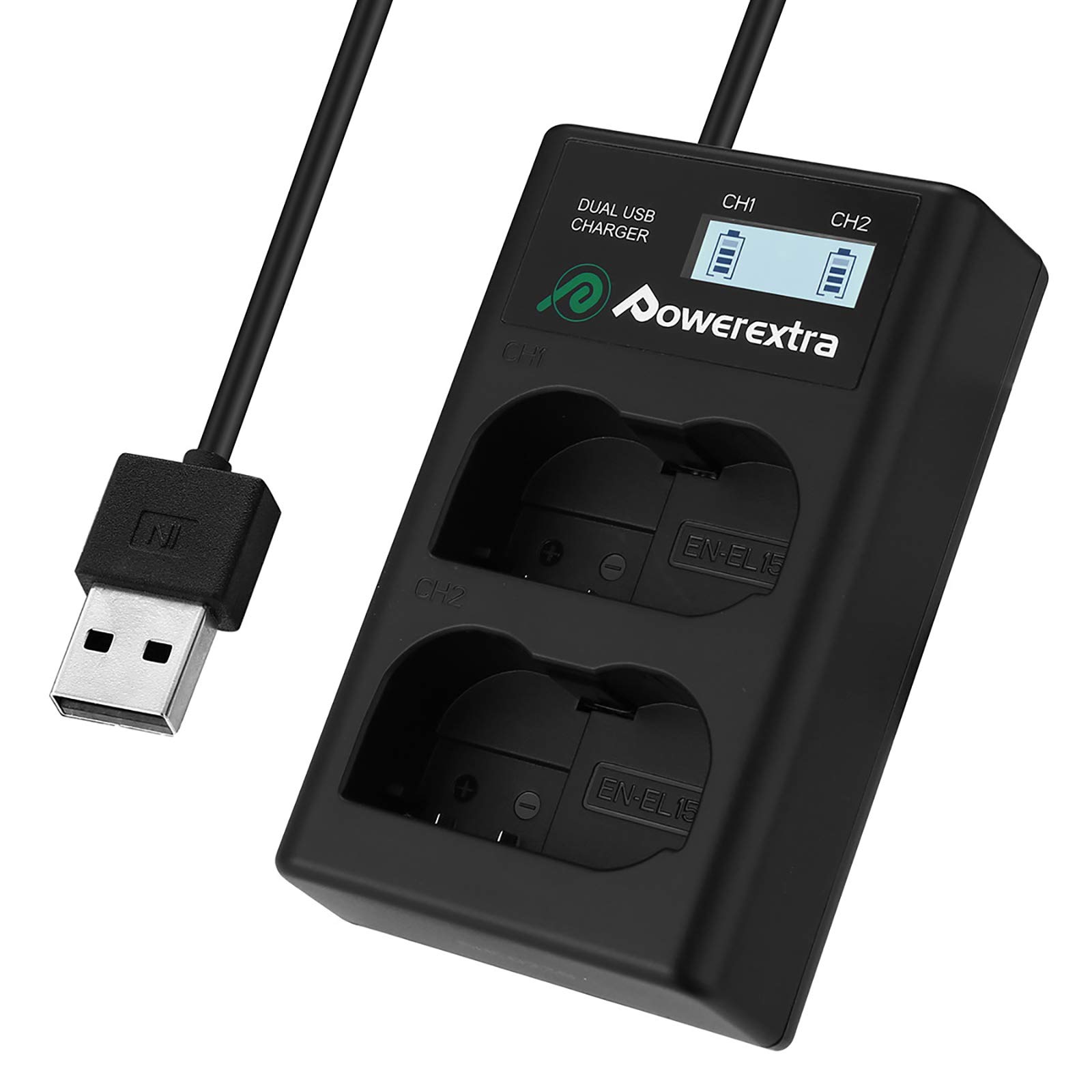
Thank you for choosing the Powerextra Dual USB Battery Charger MH 25. This manual provides essential information for the safe and efficient operation of your charger. This device is designed to charge two Nikon EN-EL15 batteries simultaneously via a convenient USB connection, compatible with various Nikon D-series cameras including D7100, D750, D7000, D7200, D810, D610, D800, D850, D600, D800e, and D810a, 1v1 Cameras.
2. Produktuaren ezaugarriak
- Kargatze bikoitzeko gaitasuna: Charges two batteries simultaneously.
- Pantaila LCD adimenduna: Clearly shows the charging status and capacity for each battery (CH1 and CH2).
- Versatile USB Input: Input: 5V 2A. Can be powered by any USB device such as a desktop computer, laptop, power bank, or USB wall adapter.
- Integrated USB Cable: Features a foldable USB cable on the backside for portability and convenience.
- Mikro USB sarrera ataka: An additional micro USB port allows for charging with an external cable if desired.
- Babes anitzeko sistema: Gehiegizko bolumena barnetage, over-current, short-circuit, and over-charge protection for safe and reliable charging.
- Diseinu trinkoa eta eramangarria: Easy to carry for travel or outdoor use.
3. Konfigurazioa
The Powerextra Dual USB Battery Charger is designed for ease of use. Follow these steps to set up your charger:
- Unfold the USB Cable: Locate the integrated USB cable on the backside of the charger. Gently unfold it from its storage slot.
- Konektatu energia iturrira: Plug the USB-A connector into a compatible USB power source (e.g., computer USB port, USB wall adapter, power bank). The charger's LCD display will illuminate.
- (Optional) Use Micro USB Input: If you prefer to use an external micro USB cable, plug it into the micro USB input port on the side of the charger and connect the other end to a USB power source.


4. Funtzionamendu-argibideak
Once the charger is connected to a power source, you can begin charging your batteries:
- Sartu bateriak: Carefully insert one or two Nikon EN-EL15 batteries into the charging slots (CH1 and CH2). Ensure the battery contacts align correctly with the charger's pins. The batteries should fit snugly and securely.
- Kontrolatu karga-egoera: The smart LCD display will show the individual charging status for each battery. Battery icons will animate to indicate active charging. The display will show the current charge level.
- Karga osoa adieraztea: When a battery is fully charged, its corresponding battery icon on the LCD display will show a full, static charge (no animation).
- Kendu bateriak: Once charging is complete, carefully remove the batteries from the slots. Disconnect the charger from the power source when not in use.


5. Segurtasun informazioa
Please read and adhere to the following safety guidelines to prevent fire, moisture damage, electric shock, and ensure safe operation:
- Do not disassemble the unit. Disassembly voids warranty and can lead to electric shock.
- Do not expose the charger to rain or moisture. Use in dry locations only.
- Saihestu kargagailua erortzea edo kolpe gogorren eraginpean jartzea.
- Do not use the charger with damaged batteries or if the charger itself is damaged.
- Mantendu haurren eskura.
- Ziurtatu behar bezalako aireztapena kargatzen ari den bitartean. Ez estali kargagailua.
- Only charge compatible batteries (Nikon EN-EL15 series).
- Disconnect the charger from the power source when not in use or during cleaning.

6. Zehaztapenak
| Ezaugarri | Xehetasuna |
|---|---|
| Modelo zenbakia | MH 25 |
| Sarrera | 5V 2A |
| Irteera | 8.4V 800mA |
| Bateriaren bateragarritasuna | Nikon EN-EL15, MH-25, MH-25a |
| Kamera bateragarriak | Nikon D7100, D750, D7000, D7200, D810, D610, D800, D850, D600, D800e, D810a, 1v1 |
| Bateriaren zelulen konposizioa | Litio ioia |
| Elementuaren pisua | 3.2 ontza |
| Paketearen neurriak | 4.69 x 3.39 x 0.98 hazbete |
| Fabrikatzailea | Powerextra |
7. Arazoak
- Kargagailua ez da pizten: Ensure the USB cable is securely connected to both the charger and a working USB power source. Try a different USB port or power adapter.
- Bateria ez da kargatzen: Verify that the battery is correctly inserted into the charging slot with contacts aligned. Ensure the battery is compatible with the charger. Try charging a different battery to isolate the issue.
- Karga motela: Ensure your USB power source provides sufficient current (recommended 5V 2A). Charging from a low-power USB port (e.g., some older computer ports) may result in slower charging times.
- LCD pantailaren arazoak: If the display is not showing correct information, try disconnecting and reconnecting the charger. If the issue persists, contact customer support.
8. Mantentzea
To ensure the longevity and optimal performance of your Powerextra Dual USB Battery Charger, follow these maintenance tips:
- Garbiketa: Use a soft, dry cloth to clean the exterior of the charger. Do not use liquid cleaners or solvents. Ensure the charging contacts are free of dust and debris.
- Biltegiratzea: Store the charger in a cool, dry place away from direct sunlight and extreme temperatures. When storing, fold the integrated USB cable neatly into its slot.
- Manipulazioa: Handle the charger with care to avoid physical damage.

9. Bermea eta Laguntza
Powerextra stands behind the quality of its products. If you encounter any issues or have questions regarding your charger, please refer to the contact information below:
- Posta elektronikoa: service@powerextra.com
- Webgunea: www.powerextra.com
If you are satisfied with your product, consider sharing a positive review. If you have any defects or quality problems, please contact customer service for assistance. They will arrange for replacement or refund if applicable.