1. Sarrera
This manual provides essential information for setting up, operating, maintaining, and troubleshooting your Microsoft Surface Pro Model 1796. The Surface Pro is a versatile 2-in-1 device designed to function as both a high-performance laptop and a portable tablet. Please read these instructions carefully to ensure optimal use and longevity of your device.
2. Produktua amaitu daview
The Microsoft Surface Pro Model 1796 features a 12.3-inch PixelSense multi-touch display, an Intel Core i5 processor, 4GB of RAM, and a 128GB SSD. It operates on Windows 10 Pro, offering a full desktop experience in a portable form factor. The device supports a detachable keyboard (Surface Pro Signature Type Cover) and a digital pen (Surface Pen), both sold separately, to enhance its functionality.

Figure 2.1: Microsoft Surface Pro in tablet mode, displaying the lock screen.
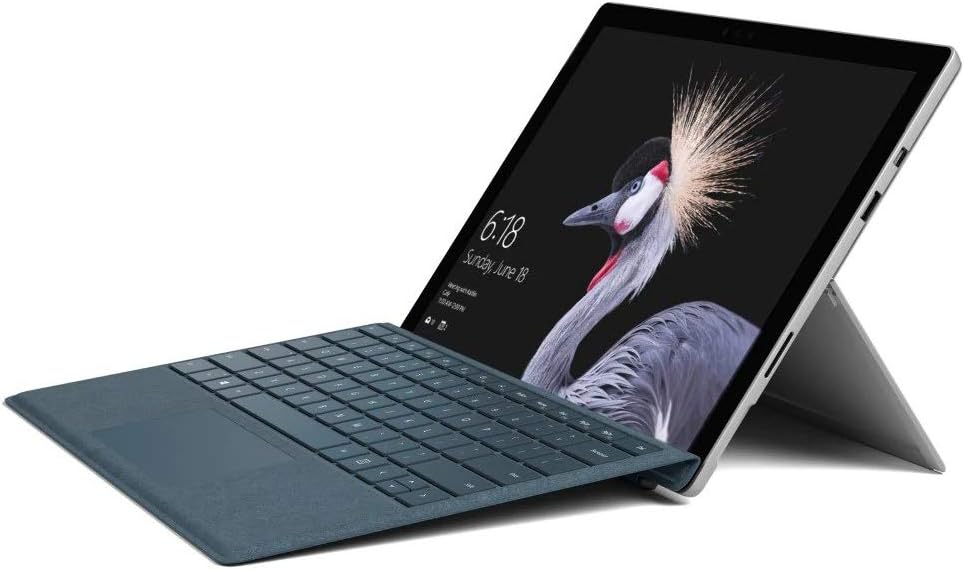
Figure 2.2: Microsoft Surface Pro with Signature Type Cover attached, configured as a laptop.

Figure 2.3: Microsoft Surface Pro tablet and detached Signature Type Cover.
3. Konfigurazioa
3.1 Hasierako piztea
- Connect the power supply to the Surface Pro and a power outlet.
- Sakatu gailuaren goiko ertzean dagoen pizteko botoia.
- Jarraitu pantailan agertzen diren argibideei Windows 10 Pro-ren hasierako konfigurazioa osatzeko, hizkuntza hautatzea, sareko konexioa eta erabiltzaile kontua sortzea barne.
3.2 Osagarriak konektatzea
- Surface Pro Signature Type Cover: Align the Type Cover with the magnetic connector along the bottom edge of the Surface Pro until it clicks into place.
- Surface boligrafoa: The Surface Pen connects via Bluetooth. Go to Ezarpenak > Gailuak > Bluetooth eta beste gailuak to pair the pen.
3.3 Gailua kargatzea
Use the provided power adapter to charge your Surface Pro. The charging port is located on the right side of the device. A full charge provides approximately 13 hours of typical device usage.
4. Funtzionamendu-argibideak
4.1 Oinarrizko nabigazioa
- Ukitu: Use multi-touch gestures on the PixelSense display for navigation, zooming, and scrolling.
- Azal mota: Utilize the keyboard and trackpad for traditional laptop input.
- Surface boligrafoa: Write, draw, and annotate directly on the screen.
4.2 Windows 10 Pro-ren ezaugarriak
Your Surface Pro comes with Windows 10 Pro, offering features such as:
- Windows Kaixo: For fast, secure, password-free sign-in using facial recognition.
- Cortana: Your personal digital assistant.
- Microsoft Edge: Lehenetsia web arakatzailea.
- Tablet modua: Automatically or manually switch to a touch-optimized interface when the Type Cover is detached.
4.3 Pantailaren ezarpenak
The 12.3-inch PixelSense display has a resolution of 2736 x 1824 pixels. You can adjust display settings such as brightness, resolution, and scaling through Ezarpenak > Sistema > Pantaila.
5. Mantentzea
5.1 Gailua garbitzea
- Erabili lipurrik gabeko zapi leun bat dampened with water or an approved screen cleaner to clean the display.
- For the device body, use a soft, dry cloth. Avoid harsh chemicals or abrasive materials.
5.2 Software eguneraketak
Regularly check for and install Windows updates to ensure your device has the latest security patches and features. Go to Ezarpenak > Eguneratzea eta segurtasuna > Windows eguneratzea.
5.3 Bateria zaintzea
- Saihestu tenperatura muturrekoak, bateriaren iraupena murriztu baitezakete.
- Bateriaren osasun optimoa lortzeko, saihestu bateria etengabe erabat deskargatzea edo denbora luzez % 100eko kargarekin mantentzea.
6. Arazoak
6.1 Gai arruntak
- Gailua ez da pizten: Ensure the device is charged. Try holding the power button for 10-15 seconds to perform a force restart.
- Pantailak ez du erantzuten: Restart the device. If the issue persists, check for driver updates.
- Errendimendu arazoak: Close unnecessary applications, check for Windows updates, or run a disk cleanup.
6.2 Laguntzarekin harremanetan jartzea
For more complex issues or technical assistance, please visit the official Microsoft Support website or contact their customer service. Have your device's model number (FJU-00001) and serial number ready.
7. Zehaztapenak
| Ezaugarri | Zehaztapena |
|---|---|
| Ereduaren izena | FJU-00001 |
| Bistaratzeko tamaina | 12.3 hazbete |
| Pantailaren bereizmena | 2736 x 1824 pixel |
| Prozesadorea | Intel Core i5 (2.6 GHz) |
| RAM | 4 GB DDR3 |
| Biltegiratzea | 128 GB SSD |
| Koprozesadore grafikoa | Intel HD Graphics 620 |
| Sistema eragilea | Windows 10 Pro |
| Haririk gabeko mota | 802.11b, 802.11g, 802.11n |
| Bateriaren batez besteko iraupena | 13 ordu |
| Elementuaren pisua | 1.7 kilo |
| Produktuaren neurriak | 11.5 x 0.33 x 7.93 hazbete |
| Atzekoa Webkamaren ebazpena | 5 MP |
8. Bermea eta Laguntza
Your Microsoft Surface Pro Model 1796 is covered by a limited hardware warranty provided by Microsoft. For detailed warranty terms and conditions, please refer to the documentation included with your purchase or visit the official Microsoft support webgunea. Gorde erosketaren egiaztagiria bermearen erreklamazioetarako.
Laguntza teknikoa, gidarien deskargak eta zerbitzu-informazioa lortzeko, bisitatu support.microsoft.com. You may need to provide your device's serial number and model information.


