1. Konfigurazioa
1.1 Bateriaren instalazioa
The Insignia NS-RC03A-13 remote control requires two AAA batteries for operation. Follow these steps to install them:
- Kokatu bateriaren konpartimentuaren estalkia urrutiko agintearen atzealdean.
- Irristatu estalkia beherantz edo sakatu giltza irekitzeko.
- Sartu bi AAA pila, ziurtatu terminal positiboa (+) eta negatiboa (-) konpartimentuaren barruko markekin behar bezala lerrokatuta daudela.
- Irristatu bateriaren konpartimentuaren estalkia berriro bere lekuan klik egin arte.
Irudia: Atzealdea view of the Insignia NS-RC03A-13 remote control, showing the battery compartment open with two AAA batteries inserted. The remote is black with gray buttons.
2. Funtzionamendu-argibideak
This section details the primary functions and usage of your Insignia NS-RC03A-13 remote control.
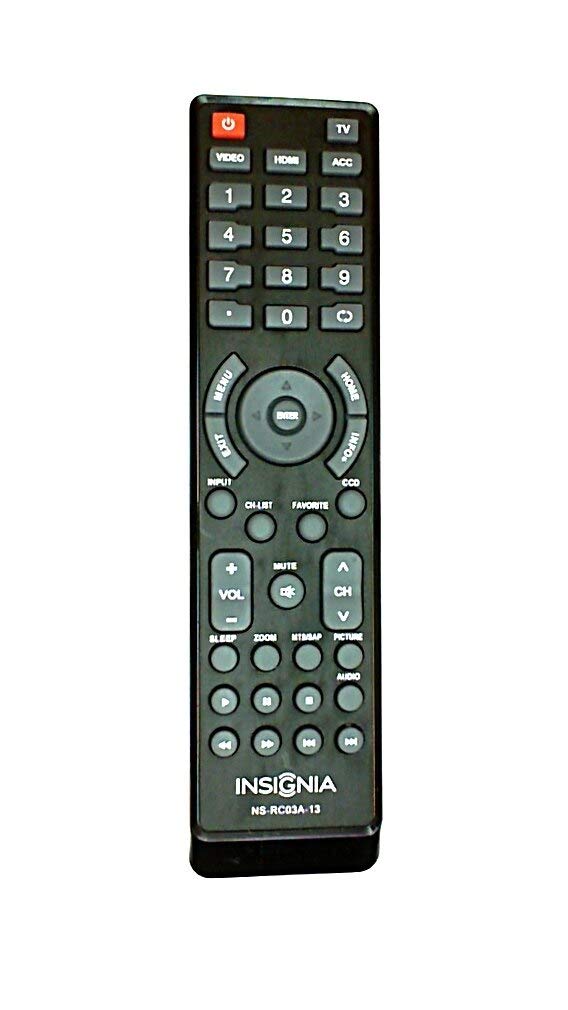
Irudia: Aurrealdea view of the Insignia NS-RC03A-13 remote control, displaying all buttons and their labels. The remote is black with gray buttons and white text.
2.1 Piztu/Itzali
Sakatu BOTEREA button (usually located at the top left) to turn your television on or off.
2.2 Sarrera hautatzea
To switch between different video sources (e.g., HDMI 1, HDMI 2, Video), press the SARRERA button. Continue pressing to cycle through available inputs until your desired source is selected.
2.3 Channel and Volume Control
- Bolumena: Erabili VOL+ eta BOLUMENA - buttons to increase or decrease the audio volume.
- Ezkutatu: Sakatu MUTU button to instantly silence the television audio. Press it again to restore sound.
- Kanalak: Erabili CH + eta CH - buttons to navigate through television channels.
- Zenbaki tekla: Directly enter channel numbers using the numeric keypad (0-9).
2.4 Menu Nabigazioa
Use the directional arrow buttons (Up, Down, Left, Right) around the SARTU button to navigate through on-screen menus. Press SARTU to confirm a selection. The MENUA button typically opens the main menu, and EXIT ixten du.
3. Mantentzea
Proper care ensures the longevity and optimal performance of your remote control.
- Garbiketa: Wipe the remote control with a soft, dry cloth. Avoid using liquid cleaners, abrasive materials, or chemical solvents, as these can damage the surface or internal components.
- Bateria ordezkatzea: Replace batteries when the remote's responsiveness decreases. Always replace both batteries at the same time with new ones of the same type (AAA).
- Biltegiratzea: Gorde urrutiko agintea leku lehor batean, eguzki-argitik, tenperatura altuetatik eta hezetasun handitik babestuta.
- Saihestu tantoak: Babestu urrutiko agintea kolpe fisikoetatik, erorketek barneko zirkuituak kaltetu baititzakete.
4. Arazoak
Urrutiko agintearekin arazoak badituzu, saiatu honako irtenbide hauekin:
- Urrunekoek ez dute erantzuten:
- Egiaztatu bateriak behar bezala sartuta dauden polaritate egokiarekin.
- Ordeztu bateria zaharrak AAA bateria berriekin.
- Ensure there are no obstructions between the remote control and the TV's infrared (IR) receiver.
- Point the remote directly at the TV's IR receiver.
- Botoi espezifikoak ez dira funtzionatzen:
- Clean around the unresponsive buttons with a soft, slightly damp cloth to remove any debris or stickiness.
- If cleaning does not resolve the issue, the button mechanism may be faulty, and the remote might require replacement.
- TV not responding to input changes:
- Ensure the remote is correctly paired or compatible with your Insignia TV model.
- Saiatu sakatzen SARRERA button multiple times to cycle through all available sources.
5. Zehaztapenak
| Modelo zenbakia | NS-RC03A-13 |
| Marka | INtsignia |
| Gailu bateragarriak | Telebista |
| Onartutako gailuen gehienezko kopurua | 1 |
| Beharrezko bateriak | 2 AAA bateria |
| Kolorea | Beltza |
| Ezaugarri Berezia | Ergonomia |
| Elementuaren pisua | 2.39 ontza |
| Paketearen neurriak | 7 x 2 x 1 hazbete |
6. Bermea eta Laguntza
For detailed warranty information, product registration, or technical support, please visit the official Insignia webwebgunera edo jarri harremanetan bezeroarentzako arreta-zerbitzuarekin. Gorde erosketa-agiria erosketaren frogagiri gisa, berme-erreklamazioetarako.
Lineako laguntza: www.insigniaproducts.com
Oharra: Berme-baldintza espezifikoak eskualdearen eta saltzailearen arabera alda daitezke.


