1. Produktua amaitu daview
The 7artisans 25mm F1.8 APS-C Manual Focus Fixed Lens is a compact and lightweight prime lens designed for Fujifilm X-mount cameras. It features a bright F1.8 maximum aperture, making it suitable for low-light photography and creating images with shallow depth of field. The lens construction includes 7 elements in 5 groups, ensuring optical quality. Its all-aluminum body and copper core contribute to its durability and portability.
Ezaugarri nagusiak:
- Diseinu optikoa: 7 elements in 5 groups.
- Irekiera: F/1.8 to F16, with 12 diaphragm blades for smooth bokeh.
- Eraikuntza: Durable aluminum body with a copper core.
- Tamaina trinkoa: Lightweight at approximately 143g (0.31oz).
- Bateragarritasuna: Specifically designed for Fujifilm APS-C X-mount cameras. Not suitable for full-frame cameras unless used in APS-C mode.
2. Paketearen edukia
Mesedez, egiaztatu paketearen edukia jasotzean elementu guztiak daudela ziurtatzeko:
- 7artisans 25mm F1.8 APS-C Manual Focus Fixed Lens
- Aurrealdeko lentearen kapela
- Atzeko lentilen txanoa
- Erabiltzailearen eskuliburua (dokumentu hau)
3. Piezen identifikazioa
Familiarize yourself with the different parts of your 7artisans 25mm F1.8 lens:
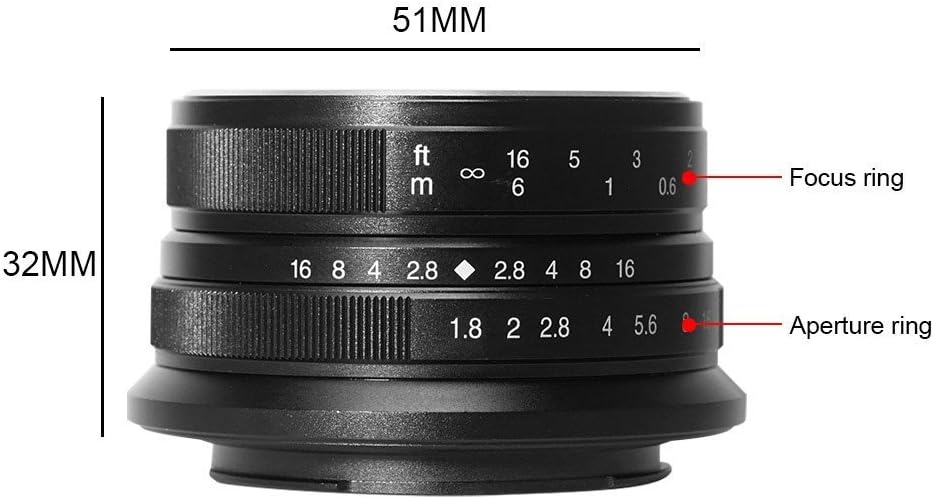
3.1. irudia: Aldea view of the 7artisans 25mm F1.8 lens, highlighting the focus ring (top) and aperture ring (bottom) with their respective markings for distance (feet/meters) and f-stops (F1.8 to F16).
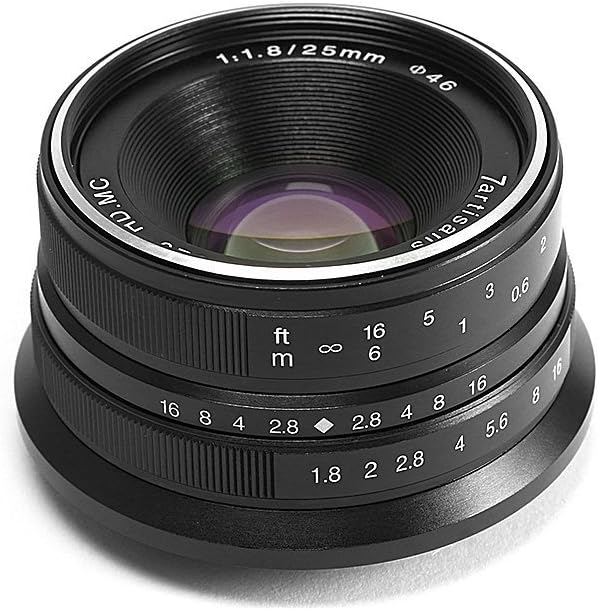
3.2. irudia: Aurrealdea view of the 7artisans 25mm F1.8 lens, showing the front element, filter thread (Φ46), and lens markings including '7artisans', '1:1.8/25mm', and 'HD.MC'.
4. Konfigurazioa
4.1 Lentea muntatzea
- Ziurtatu kamera itzalita dagoela.
- Remove the rear lens cap from the 7artisans 25mm F1.8 lens and the body cap from your camera.
- Align the red dot on the lens with the corresponding red dot on your camera's lens mount.
- Sartu lentea kameraren euskarrian astiro eta biratu erlojuaren orratzen noranzkoan klik egin arte. Ez behartu lentea.
- Replace the front lens cap when not in use to protect the front element.

4.1. irudia: The 7artisans 25mm F1.8 lens correctly mounted on a Fujifilm X-mount camera body.
4.2 Full-Frame Camera Usage
This lens is designed for APS-C sensors. If you are using a full-frame camera, it is essential to change your camera's settings to APS-C mode (also known as crop mode) to avoid vignetting and ensure optimal image quality. Refer to your camera's instruction manual for specific steps on how to activate APS-C mode.
5. Funtzionamendu-argibideak
The 7artisans 25mm F1.8 is a fully manual lens, requiring manual adjustment of both focus and aperture.
5.1 Eskuzko fokua
- To adjust focus, rotate the focus ring (the ring closer to the camera body) until your subject appears sharp in the viewfinder or on the LCD screen.
- Many modern mirrorless cameras offer focus peaking and magnification features to assist with precise manual focusing. It is highly recommended to enable these features for best results.
- The focus distance scale (in feet and meters) on the lens can be used for zone focusing or pre-focusing.
5.2 Irekiduraren doikuntza
- The aperture ring (the outer ring) allows you to control the amount of light entering the lens and the depth of field.
- Rotate the aperture ring to select your desired f-stop, ranging from F1.8 (widest aperture) to F16 (narrowest aperture).
- The lens features 12 diaphragm blades, which contribute to a smooth and pleasing bokeh (background blur) at wider apertures.

5.1. irudia: Illustration of the 12-blade aperture design, which helps create smooth out-of-focus areas.
5.3 Esposizio ezarpenak
Since this is a manual lens, you will need to set your camera to Manual (M) mode or Aperture Priority (A) mode. In Aperture Priority mode, you set the aperture on the lens, and the camera will automatically select the appropriate shutter speed. In Manual mode, you control both aperture and shutter speed, and ISO.
6. Mantentzea
Proper care and maintenance will extend the life and performance of your lens.
- Lentea garbitzea: Use a soft, lint-free microfiber cloth specifically designed for optics to clean the lens elements. For stubborn smudges, use a small amount of lens cleaning fluid applied to the cloth, not directly to the lens. Use a blower brush to remove dust particles before wiping.
- Biltegiratzea: Store the lens in a dry, cool place away from direct sunlight and extreme temperatures. Always attach both front and rear lens caps when the lens is not in use. Consider using a desiccant pack in humid environments to prevent mold growth.
- Manipulazioa: Avoid dropping or subjecting the lens to strong impacts. When changing lenses, do so in a clean environment to prevent dust from entering the camera body or settling on the lens elements.
7. Arazoak
If you encounter issues with your lens, refer to the following common solutions:
| Arazoa | Kausa posiblea | Irtenbidea |
|---|---|---|
| Image appears dark or overexposed. | Incorrect aperture or shutter speed settings. | Adjust the aperture ring on the lens and/or the shutter speed/ISO on your camera to achieve proper exposure. |
| Irudiak lausoak edo fokutik kanpo daude. | Manual focus not set correctly. | Ensure the focus ring is adjusted precisely for your subject. Utilize focus peaking and magnification features on your camera. |
| Dark corners (vignetting) on images. | Using the lens on a full-frame camera without APS-C mode. | Switch your full-frame camera to APS-C (crop) mode. This lens is designed for APS-C sensors. |
| Lentea ez dago ondo lotuta kamerara. | Incorrect alignment or debris on mount. | Ensure the red dots on the lens and camera body are aligned. Check for any obstructions on the lens or camera mount. |
8. Zehaztapenak
Detailed technical specifications for the 7artisans 25mm F1.8 lens:
| Ezaugarri | Xehetasuna |
|---|---|
| Marka | 7artisauak |
| Modelo zenbakia | 25mm F1.8 for Fuji |
| Fokua | 25 mm |
| Lente mota | Wide Angle, Fixed Prime |
| Gehieneko irekiera | F/1.8 |
| Gutxieneko irekiera | F/16 |
| Diafragma Palak | 12 |
| Diseinu Optikoa | 7 elementu 5 taldetan |
| Muntaketa bateragarriak | Fujifilm X-mount (APS-C) |
| Elementuaren pisua | 5.1 ontza (gutxi gorabehera 143 g) |
| Paketearen neurriak | 5.47 x 4.61 x 3.23 hazbete |
| ASIN | B073F81XWF |
| Eskuragarri dagoen lehen data | 28ko ekainaren 2017a |
9. Produktuaren bideo ofiziala
Watch the official product video for a visual guide on the 7artisans 25mm F1.8 lens:
9.1. bideoa: Ofiziala amaitu daview of the 7artisans 25mm F1.8 Manual Focus Prime Fixed Lens for Fujifilm cameras, demonstrating its features and usage.
10. Bermea eta Laguntza
For warranty information, technical support, or service inquiries, please contact 7artisans customer service through their official webwebgunean edo produktua erosi diozun saltzailean. Gorde erosketaren egiaztagiria berme-erreklamazioetarako.