1. Sarrera
This manual provides detailed instructions for the setup, operation, and maintenance of your Xerox VersaLink C505/X Color Laser Multifunction Printer. The C505/X is designed for efficient performance in fast-paced work environments, offering print, copy, scan, and fax functionalities.
Key features include a customizable 7-inch color touchscreen for intuitive control, mobile and cloud connectivity, and robust security measures.
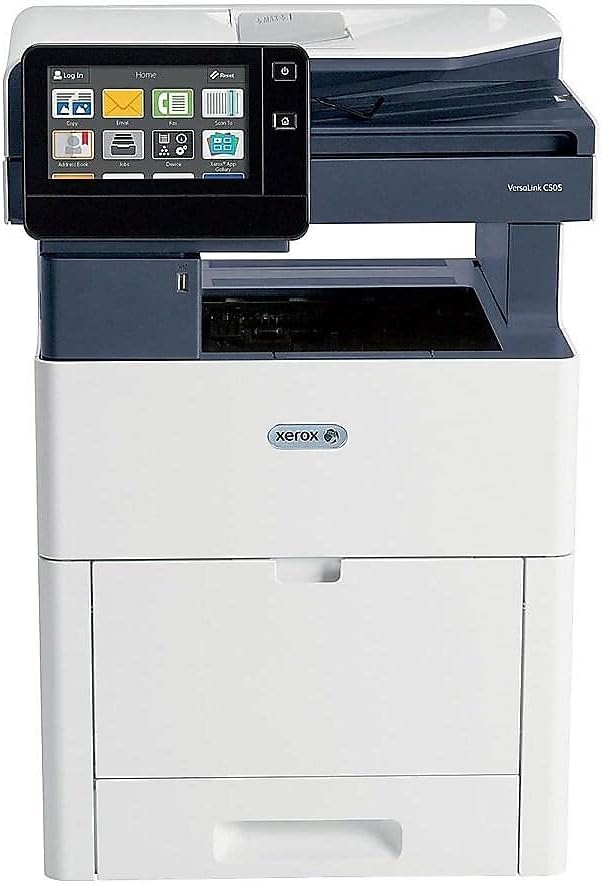
1. irudia: Aurrealdea view of the Xerox VersaLink C505/X Multifunction Printer.
2. Konfigurazioa
2.1 Desontziratzea eta hasierako ikuskapena
Carefully remove the printer from its packaging. Verify that all components listed below are present and undamaged:
- Xerox VersaLink C505 Color MFP
- Starter capacity toner cartridges (one each of cyan, magenta, yellow: 2,400 capacity; black: 5,000 capacity)
- Software eta dokumentazio CDa
- Instalazio Gida
- Quick User Guides
- Elikatze kablea
2.2 Energia-konexioa
- Jarri inprimagailua gainazal egonkor eta mailakatu batean.
- Connect the provided power cord to the printer's power input and then to a grounded electrical outlet.
- Do not power on the device until all other connections are made.
2.3 Toner kartutxoaren instalazioa
Install the starter toner cartridges into their respective slots. Refer to the Quick User Guides for specific instructions on opening the toner access panel and inserting cartridges.

Figure 2: Toner cartridge access panel open, showing toner installation.
2.4 Sare eta USB konexioa
The printer supports both Ethernet and USB connectivity.
- Ethernet: Konektatu Ethernet kable bat inprimagailuaren Ethernet atakatik zure sareko bideratzailera edo etengailura.
- USBa: Konektatu USB kable bat inprimagailuaren USB atakatik ordenagailura.
2.5 Software-instalazioa
Insert the provided software and documentation CD into your computer's CD/DVD drive. Follow the on-screen instructions to install the necessary drivers and utilities. Alternatively, visit the official Xerox support webazken gidarientzako gunea.
3. Inprimagailuaren funtzionamendua
3.1 Ukipen-pantailaren interfazea
The 7-inch color touchscreen provides access to all printer functions. Navigate through menus by tapping and swiping, similar to a smartphone. The home screen displays icons for various functions such as Print, Copy, Scan, and Fax.

Figure 3: Close-up of the 7-inch color touchscreen control panel.
3.2 Inprimaketa
Dokumentuak inprimatzeko:
- Ziurtatu inprimagailua zure ordenagailura edo sarera konektatuta dagoela.
- Open the document on your computer and select the print option.
- Choose the Xerox VersaLink C505/X from the list of available printers.
- Adjust print settings (e.g., color/monochrome, duplex printing, paper size) as needed. The printer supports up to 43 ppm color and 45 ppm monochrome, with automatic duplexing.
- Confirm the print job.
3.3 Kopiatzea
Kopiak egiteko:
- Place the original document on the scanner glass or in the automatic document feeder (ADF).
- On the touchscreen, tap the "Copy" icon.
- Select desired settings such as number of copies, color/black and white, and two-sided copying. The maximum copy speed is 45 ppm (black & white) with resolutions up to 1200 x 2400 dpi.
- Sakatu "Hasi" botoia.
3.4 Eskaneatzea
To scan documents:
- Jarri dokumentua eskaneraren beiraren gainean edo ADFn.
- On the touchscreen, tap the "Scan" icon.
- Choose the scan destination (e.g., email, network folder, USB drive) and adjust scan settings.
- Sakatu "Hasi" botoia.
3.5 Faxa bidaltzea
To send a fax:
- Jarri dokumentua eskaneraren beiraren gainean edo ADFn.
- On the touchscreen, tap the "Fax" icon.
- Sartu hartzailearen fax zenbakia.
- Doitu beharrezko fax ezarpenak.
- Sakatu "Hasi" botoia.
3.6 Mugikorrerako eta hodeiko konexioa
The VersaLink C505/X offers out-of-the-box connectivity to cloud services like Google Drive, Microsoft OneDrive, and DropBox. Additional options are available through the Xerox App Gallery, allowing for flexible workflow integration.
4. Mantentzea
4.1 Toner kartutxoaren ordezkapena
When a toner cartridge is low or empty, the printer's display will indicate which cartridge needs replacement. Always use genuine Xerox toner cartridges for optimal performance and print quality.
- Ireki inprimagailuaren aurrealdeko sarbide-panela.
- Kontu handiz atera toner kartutxo hutsa zuzen tiratuz.
- Deskonprimitu toner kartutxo berria eta astindu astiro tonerra banatzeko.
- Sartu kartutxo berria dagokion zirrikituan klik egin arte.
- Itxi aurrealdeko sarbide-panela.
4.2 Garbiketa
Garbiketa erregularrak inprimatze-kalitatea mantentzen laguntzen du eta inprimagailuaren bizitza luzatzen du.
- Kanpoaldea: Garbitu kanpoko gainazalak leun batekin, damp, litxarrik gabeko oihala.
- Eskanerraren beira: Use a soft cloth moistened with glass cleaner to clean the scanner glass. Ensure no residue remains.
- Barne osagaiak: Refer to the detailed user manual on the software and documentation CD for instructions on cleaning internal components, such as the print heads or rollers, if necessary.
5. Arazoak
This section addresses common issues you might encounter with your Xerox VersaLink C505/X. For more complex problems, consult the full user manual or contact support.
5.1 Paper-jazarpenak
If a paper jam occurs, the touchscreen will display an error message indicating the location of the jam. Follow the on-screen instructions to clear the jammed paper. Always pull paper in the direction of the paper path to avoid tearing.
5.2 Inprimatze-kalitatearen arazoak
If printouts show streaks, faded areas, or incorrect colors:
- Egiaztatu toner mailak eta ordezkatu kartutxo baxuak.
- Ziurtatu inprimatze-lanerako paper egokia erabiltzen ari zarela.
- Perform a print quality diagnostic from the printer's control panel.
- Clean the print heads or other internal components as instructed in the detailed manual.
5.3 Konexio arazoak
Inprimagailuak ez badu zure ordenagailuarekin edo sarearekin komunikatzen:
- Verify that all cables (power, USB, Ethernet) are securely connected.
- Berrabiarazi inprimagailua eta ordenagailua/routerra.
- Check network settings on the printer's touchscreen.
- Ensure the correct printer drivers are installed on your computer.
6. Zehaztapenak
| Ezaugarri | Xehetasuna |
|---|---|
| Ereduaren izena | Xerox C505/X VersaLink |
| Funtzioak | Inprimatu, kopiatu, eskaneatu, faxa |
| Inprimatzeko Teknologia | Kolore Laser |
| Inprimatzeko abiadura maximoa (monokromoa) | 45 ppm |
| Inprimatzeko abiadura maximoa (koloretan) | 43 ppm |
| Inprimatzeko gehienezko bereizmena (zuri-beltzean) | 2400 ppp |
| Inprimatzeko gehienezko bereizmena (koloretan) | 1200 x 2400 ppp |
| Duplex Inprimaketa | Automatikoa |
| Eskaner mota | Dokumentua |
| Gehienezko kopia-abiadura (zuri-beltzean) | 45 ppm |
| Gehienezko kopia-bereizmena (koloretan) | Gehienez 1200 x 2400 dpi |
| Kontrol-metodoa | App, Touch (7-inch display) |
| Konektibitatea | USBa, Ethernet |
| Gehienezko sarrera-orriaren edukiera | 3250 fitxa |
| Erretilu estandarrak | 2 (550 Sheet Tray, 150 Sheet Multi Purpose Tray) |
| Onartutako euskarrien neurriak | Letter (8.5 x 11 inches), Legal (8.5 x 14 inches) |
| Tinta mota | Toner (Black, Cyan, Magenta, Yellow) |
| Memoria Biltegiratzeko Ahalmena | 4096 MB |
| Produktuaren neurriak | 26" L x 23" W x 31" H |
| Elementuaren pisua | 77.2 kilo |
| Wattage | 600 watt |
7. Bermea eta Laguntza
7.1 Produktuaren bermea
The Xerox VersaLink C505/X Color Laser MFP comes with a standard one-year full warranty from the date of purchase. This warranty covers defects in materials and workmanship under normal use. For detailed terms and conditions, please refer to the warranty documentation included with your product or visit the official Xerox webgunea.
7.2 Bezeroarentzako laguntza
For technical assistance, troubleshooting, or service requests, please contact Xerox customer support. Support contact information can be found on the Xerox webgunean edo inprimagailuarekin batera emandako dokumentazioan.
Sareko baliabideak: Bisitatu Xerox-en laguntza ofiziala website for FAQs, driver downloads, and additional user guides.


