1. Sarrera
This user manual provides detailed instructions for the installation, configuration, and operation of your Mercusys 300Mbps Wireless N Router, Model MW305R. This device is designed to provide high-speed wireless connectivity for your home or small office network. Please read this manual thoroughly before using the product to ensure proper setup and optimal performance.
2. Segurtasun informazioa
Produktuari kalterik edo zuri edo besteei lesiorik ez eragiteko, jarraitu segurtasun neurri hauek:
- Ez jarri gailua uraren edo hezetasun gehiegizkoaren eraginpean.
- Ez saiatu gailua zeuk desmuntatzen edo konpontzen. Mantendu mantentze-lan guztiak langile kualifikatuen esku.
- Erabili gailuarekin hornitutako korronte-egokigailua soilik.
- Ziurtatu routerraren inguruan aireztapen egokia dagoela gehiegi berotzea saihesteko.
- Mantendu gailua bero-iturrietatik eta eguzki-argitik urrun.
3. Paketearen edukia
Egiaztatu elementu guztiak zure paketean daudela:
- Mercusys 300Mbps Wireless N Router (MW305R)
- Elikatze-moldagailua
- Ethernet kablea
- Instalazio azkarraren gida
4. Produktua amaitu daview
Familiarize yourself with the physical features of your router.
4.1 Aurrealdea View

4.1. irudia: Aurrealdea view of the MW305R router, showing the Mercusys logo and a single status LED indicator in the center.
4.2 Atzeko panela
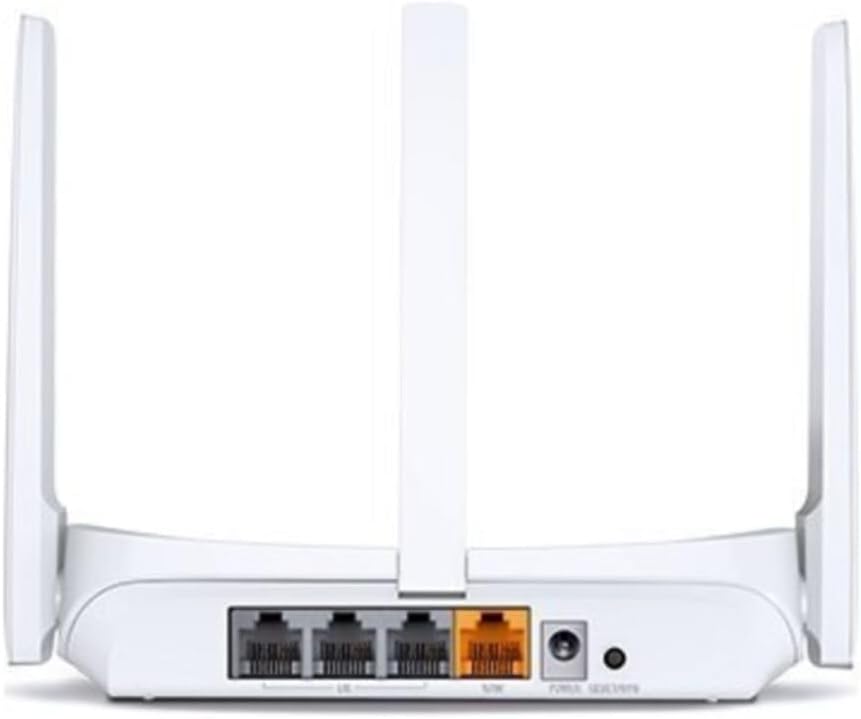
4.2. Irudia: Atzealdea view of the MW305R router, displaying the WAN port (yellow), three LAN ports (grey), power input, and reset button.
4.3 LED adierazleak
- Sistema LED: Routerraren funtzionamendu-egoera adierazten du.
- Solid Green: Router is operating normally.
- Flashing Green: Router is starting up or performing an action.
- Off: Router is powered off.
5. Konfigurazioa
5.1 Hardware konexioa
- Itzali: Deskonektatu modema eta bideratzailea (hala badagokio).
- Konektatu WAN ataka: Connect one end of the Ethernet cable to the WAN (yellow) port on your MW305R router and the other end to your modem's Ethernet port.
- Connect LAN Port (Optional): For wired devices, connect an Ethernet cable from a LAN (grey) port on the router to your computer or other network device.
- Piztu: Connect the power adapter to the router's power input and plug it into a power outlet. Power on your modem, then power on the router. Wait for the System LED to turn solid green.
5.2 Hasierako konfigurazioa
To configure your router, you can use a wired or wireless connection.
- Routerrera konektatu:
- Sare: Ensure your computer is connected to a LAN port on the router.
- Haririk gabekoa: Connect your wireless device to the router's default Wi-Fi network. The default SSID (network name) and password are printed on the label at the bottom of the router.
- Sarbidea Web Kudeaketa orria: Ireki a web arakatzailea eta idatzi mwlogin.net or 192.168.1.1 helbide-barran sartu eta Sartu sakatu.
- Sortu saioa hasteko pasahitza: The first time you access the page, you will be prompted to create a login password. Set a strong password and click Has gaitezen.
- Jarraitu konfigurazio azkarra: The Quick Setup wizard will guide you through the basic internet and wireless settings. Select your connection type (e.g., Dynamic IP, Static IP, PPPoE) and configure your Wi-Fi network name (SSID) and password.
- Gorde ezarpenak: After completing the wizard, save your settings. Your router should now be connected to the internet.
6. Routerraren funtzionamendua
6.1 Gailuak konektatzea
Behin bideratzailea konfiguratuta dagoenean, zure gailuak konekta ditzakezu:
- Haririk gabeko gailuak: Bilatu your Wi-Fi network name (SSID) on your smartphone, tablet, or laptop, and enter the Wi-Fi password you configured during setup.
- Kable bidezko gailuak: Connect an Ethernet cable from your device to any of the available LAN ports on the router.
6.2 Ezarpen aurreratuak
Sartu web kudeaketa orria (mwlogin.net) to configure advanced features:
- Sarea: Configure WAN settings, LAN IP, DHCP server.
- Haririk gabekoa: Change Wi-Fi name/password, enable guest network, set up MAC filtering.
- Gurasoen kontrolak: Kudeatu Interneteko sarbidea gailu espezifikoetarako.
- Banda-zabaleraren kontrola: Allocate bandwidth to different devices.
- Segurtasuna: Configure firewall settings, port forwarding, DMZ.
- Sistemaren tresnak: Update firmware, backup/restore configuration, change login password, reboot.
7. Mantentzea
7.1 Firmware eguneratzea
Regularly updating the router's firmware can improve performance, add new features, and fix bugs. Visit the official Mercusys website to download the latest firmware for your MW305R model. Navigate to Sistemaren tresnak > Firmwarearen eguneraketa gainean web management page to perform the update.
7.2 Fabrika berrezarri
If the router is not functioning correctly or you forget the login password, you can perform a factory reset. This will revert all settings to their default values.
- 1. metodoa (Hardware botoia): With the router powered on, press and hold the Reset button on the rear panel for approximately 5-8 seconds until the System LED flashes rapidly. Release the button and wait for the router to restart.
- 2. metodoa (Web Management Page): Hasi saioa web management page, navigate to System Tools > Factory Defaults, eta egin klik Berreskuratu.
8. Arazoak
Atal honek aurki ditzakezun arazo ohikoenei heltzen die.
- Ezin da sartu web kudeaketa orria:
- Ensure your device is correctly connected to the router.
- Egiaztatu hori mwlogin.net or 192.168.1.1 nabigatzailean behar bezala idatzita dago.
- Garbitu arakatzailearen cachea eta cookieak, edo saiatu beste arakatzaile bat erabiltzen.
- Disable any VPN or proxy software.
- No Internet access:
- Check if the WAN port LED is lit. If not, ensure the Ethernet cable from the modem is securely connected.
- Berrabiarazi modema eta bideratzailea.
- Verify your internet connection type and settings in the router's web kudeaketa orria.
- Contact your Internet Service Provider (ISP) to confirm your service status.
- Weak Wi-Fi signal or frequent disconnections:
- Mugitu bideratzailea kokapen zentral batera, oztopoetatik eta interferentzia iturrietatik urrun (adibidez, telefono haririk gabekoak, mikrouhin-labeak).
- Doitu bideratzailearen antenak seinale optimoa lortzeko.
- Reduce the number of connected devices or upgrade your internet plan if bandwidth is an issue.
- Consider updating the router's firmware.
9. Zehaztapenak
| Ezaugarri | Deskribapena |
|---|---|
| Ereduaren izena | MW305R |
| Haririk gabeko estandarra | IEEE 802.11n, IEEE 802.11g, IEEE 802.11b |
| Maiztasun Banda | 2.4 GHz |
| Haririk gabeko Abiadura | 300 Mbps |
| Antenak | 3 Fixed Omni-Directional Antennas |
| Interfazeak | 3 × 10/100Mbps LAN Ports, 1 × 10/100Mbps WAN Port |
| Botoiak | Berrezarri botoia |
| Elikatze Hornidura | 5VDC/0.6A |
| Neurriak (W x D x H) | 4.49 x 3.7 x 1.02 hazbete (114 x 94 x 26 mm) |
| Funtzionamendu-tenperatura | 0°C~40°C (32°F~104°F) |
| Biltegiratze Tenperatura | -40°C~70°C (-40°F~158°F) |
| Funtzionamenduaren hezetasuna | % 10 ~ % 90 ez-kondentsatzen |
| Biltegiratze Hezetasuna | % 5 ~ % 90 ez-kondentsatzen |
10. Bermea eta Laguntza
Mercusys products come with a limited warranty. For detailed warranty information, technical support, and frequently asked questions, please visit the official Mercusys webwebgunera edo jarri harremanetan bezeroarentzako arreta-zerbitzura. Gorde erosketa-agiria berme-erreklamazioetarako.
Webgunea: www.mercusys.com


