
Eurom Alutherm 2000 Wi-Fi
Eurom Alutherm 2000 Wi-Fi Convection Heater User Manual
Model: Alutherm 2000 Wi-Fi (EUM360776)
1. Sarrera
Thank you for choosing the Eurom Alutherm 2000 Wi-Fi convection heater. This manual provides essential information for the safe and efficient operation, installation, and maintenance of your new heater. Please read these instructions carefully before use and keep them for future reference.
The Eurom Alutherm 2000 Wi-Fi is an elegant convection heater designed to integrate seamlessly into any interior. With a power output of 2000 W, it is capable of heating spaces between 49-65 m³, making it suitable for living rooms, bedrooms, or offices. This heater can be wall-mounted for continuous heating and features a built-in thermostat to maintain your desired temperature. Control is made convenient through the free Eurom Smart app, which also allows for connecting multiple heaters.
2. Segurtasun-argibideak
Beti jarraitu segurtasun neurri hauek sute, deskarga elektriko edo lesio arriskua murrizteko:
- Irakurri argibide guztiak berogailu hau erabili aurretik.
- Ez erabili berogailu hau bainu, dutxa edo igerileku baten ondoan.
- Do not cover the heater. Covering the heater can lead to overheating and fire.
- Mantendu material sukoiak, hala nola altzariak, gortinak eta beste elementu erregai batzuk, berogailuaren aurrealdetik eta alboetatik gutxienez metro 1era (3 oin).
- Ziurtatu liburukiatagEtiketa elektrikoan adierazitako e-ak zure sareko bolumenari dagokiotage.
- Ez erabili berogailurik kablea edo entxufea hondatuta badago, edo berogailua gaizki funtzionatzen badu, erori edo edozein modutan kaltetu bada.
- Tresna hau ez da gaitasun fisiko, sentsorial edo mental murriztua duten edo esperientzia eta ezagutza falta duten pertsonek (haurrak barne) erabiltzeko, baldin eta haien segurtasunaz arduratzen den pertsona batek gailuaren erabilerari buruz gainbegiratu edo jarraibiderik eman ez badu.
- Haurrak gainbegiratu behar dira aparatuarekin jolasten ez dutela ziurtatzeko.
3. Produktua amaitu daview
The Eurom Alutherm 2000 Wi-Fi heater features a sleek design and intuitive controls. Below are key components and their descriptions.


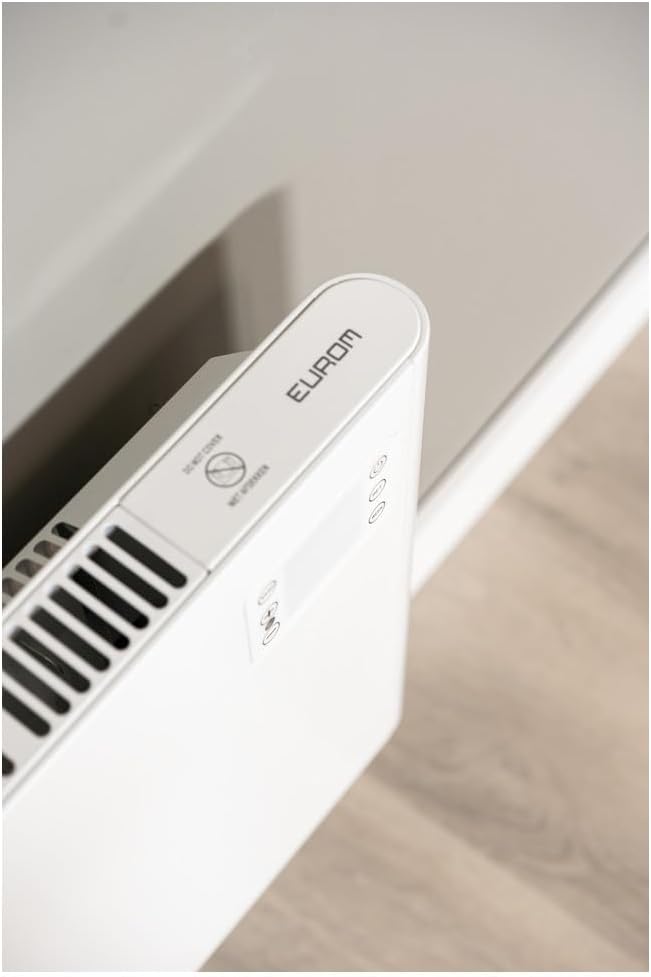

4. Konfigurazioa eta instalazioa
The Eurom Alutherm 2000 Wi-Fi heater offers flexible installation options: wall-mounted or freestanding.
4.1 Horman muntatzea
For permanent heating, the unit can be securely mounted to a wall. Refer to the included mounting template and hardware for precise installation. Ensure the heater is installed at a safe distance from flammable materials and that there is adequate clearance for air circulation.

4.2 Askea jartzea
If you prefer a portable solution, attach the provided feet to the base of the heater. Place the heater on a stable, level surface, ensuring it is not obstructed and has sufficient space around it for proper operation.

4.3 Energia-konexioa
Once installed, plug the heater into a suitable electrical outlet. Ensure the main power switch (Figure 3.4) is in the 'OFF' position before plugging in. After plugging in, switch the main power switch to 'ON'.
5. Funtzionamendu-argibideak
The Alutherm 2000 Wi-Fi can be operated via its integrated control panel, the remote control, or the Eurom Smart app.
5.1 Kontrol panelaren funtzionamendua
The control panel (Figure 3.6) allows direct adjustment of settings:
- Pizteko botoia: Berogailua piztu edo itzaltzen du.
- Modu botoia: Cycles through different operating modes (e.g., Comfort, ECO, Anti-frost).
- SET botoia: Hautaketak berresten ditu edo ezarpenen menuetara sartzen da.
- Tenperatura doikuntza (+/-): Nahi den tenperatura igotzen edo jaisten du.
- ASTEKO botoia: Accesses weekly programming settings.
5.2 Urruneko kontrolaren funtzionamendua
The remote control (Figure 3.5) provides convenient access to all heater functions from a distance. Its buttons mirror the functions available on the control panel.
5.3 Eurom Smart App Control (Wi-Fi)
For advanced control and scheduling, download the free Eurom Smart app. This app allows you to:
- Turn the heater on/off remotely.
- Set and adjust the desired temperature.
- Program weekly heating schedules.
- Connect and manage multiple Eurom Wi-Fi heaters.
Follow the in-app instructions for pairing your heater with the app and connecting to your home Wi-Fi network.
6. Mantentzea
Mantentze-lan erregularrak berogailuaren errendimendu optimoa eta iraupen luzea bermatzen ditu.
- Garbiketa: Deskonektatu beti berogailua eta utzi guztiz hozten garbitu aurretik. Erabili oihal leun eta lehorra.amp kanpoko gainazalak garbitzeko zapi bat. Ez erabili garbitzaile edo disolbatzaile urratzailerik.
- Biltegiratzea: Berogailua denbora luzez gordetzen baduzu, ziurtatu garbi eta lehor dagoela. Gorde leku fresko eta lehor batean, hobe jatorrizko ontzian.
- Ikuskapena: Periodically check the power cord and plug for any signs of damage. If damage is found, do not use the heater and contact qualified service personnel.
7. Arazoak
If you encounter issues with your Eurom Alutherm 2000 Wi-Fi heater, refer to the following common problems and solutions:
| Arazoa | Kausa posiblea | Irtenbidea |
|---|---|---|
| Berogailua ez da pizten. | No power supply; Main power switch off; Overheat protection activated. | Check power outlet and plug; Ensure main power switch (Figure 3.4) is ON; Unplug, allow to cool for 30 minutes, then restart. |
| Heater not heating to desired temperature. | Temperature setting too low; Room size exceeds heater capacity; Obstruction of air vents. | Increase temperature setting; Ensure heater is appropriate for room size; Clear any obstructions from air vents. |
| Wi-Fi konexio arazoak. | Weak Wi-Fi signal; Incorrect app pairing; Router issues. | Ensure heater is within Wi-Fi range; Re-pair the heater with the Eurom Smart app; Restart your Wi-Fi router. |
| Heater overheats or runs continuously. | Thermostat malfunction; Air vents blocked; Software glitch. | Ensure vents are clear and heater is not covered; If issue persists, unplug and contact support. (Note: A user review mentioned potential overheating issues if the management module gets stuck. Always monitor the heater.) |
| Heater does not restart automatically after power outage. | Diseinuaren muga. | This model may require manual restart after a power interruption. |
If the problem persists after attempting these solutions, please contact Eurom customer support.
8. Zehaztapenak
| Ezaugarri | Zehaztapena |
|---|---|
| Marka | Eurom |
| Modelo zenbakia | EUM360776 |
| Kolorea | Zuria |
| Produktuaren neurriak (L x W x H) | 101 x 46 x 12 cm |
| Pisua | 6 kilogramo |
| Energia Eraginkortasun Klasea | B |
| Ezaugarri bereziak | Wi-Fi Compatible, Electronic Thermostat |
| Forma-faktorea | Dorrea |
| Barruan/Kanpoan erabilera | Barruan |
| Energia iturria | Kable elektrikoa |
| Berotze metodoa | konbekzioa |
| Muntatze Mota | Hormako Muntaia |
9. Bermea eta Laguntza
For warranty information, please refer to the documentation provided with your purchase or visit the official Eurom website. If you require technical assistance, spare parts, or have any questions regarding your Eurom Alutherm 2000 Wi-Fi heater, please contact Eurom customer support directly. Contact details can typically be found on the product packaging or the manufacturer's webgunea.
Ask a question about this manual
Ask about setup, troubleshooting, compatibility, parts, safety, or missing instructions. Manuals+ will review the question and use this page’s manual context to help answer it.