Sarrera
The Pure Siesta S6 is a sophisticated DAB/DAB+ and FM alarm clock radio designed to enhance your bedside experience. It features a large, ultra-clear CrystalVue display, impressive audio quality via Bluetooth, and a convenient USB port for charging your devices. This manual provides comprehensive instructions for setting up, operating, and maintaining your Siesta S6.
Ezaugarri nagusiak
- Haririk gabeko audio erreprodukzioa: Use Siesta S6 as a wireless speaker to stream audio content from your smartphone, laptop, or tablet via Bluetooth.
- CrystalVue+ Display: Large, ultra-clear display for optimal readability, with adaptive brightness.
- Siesta Timer: Program a short nap with a single button press.
- Integrated USB Power Port: Keep your phone, tablet, or other devices fully charged by connecting them to the built-in USB port.
- DAB/DAB+ and FM Radio: Access a wide range of digital and analog radio stations.
- Alarma anitz: Set up to three independent alarms with customizable days, sources (tone, last station, preset), and volume.
Konfigurazio Gida
Follow these steps to set up your Pure Siesta S6 for the first time.
- Deskonprimitu gailua: Carefully remove the Siesta S6 from its packaging.
- Konektatu energia: Insert the supplied mains adapter into the DC IN port on the back of the unit. Plug the adapter into a wall outlet.
- Kokatu antena: Uncoil the wire antenna fully for optimal DAB/DAB+ and FM reception. Position it away from other electronic devices.
- Hasierako eskaneatzea: Upon first power-up, the Siesta S6 will automatically scan for available DAB/DAB+ radio stations and set the clock. This process may take a few minutes.
- Adjust Display Brightness (Optional): The display brightness adjusts automatically. If desired, you can manually adjust this setting via the "Menu" section.

Irudia: Atzealdea view of the Siesta S6, highlighting the USB charging port and the power input.

Irudia: Aurrealde angeluatua view of the Pure Siesta S6, displaying the time and alarm indicators.
Funtzionamendu-argibideak
This section details the various functions and controls of your Siesta S6.
Kontrolak amaitu diraview
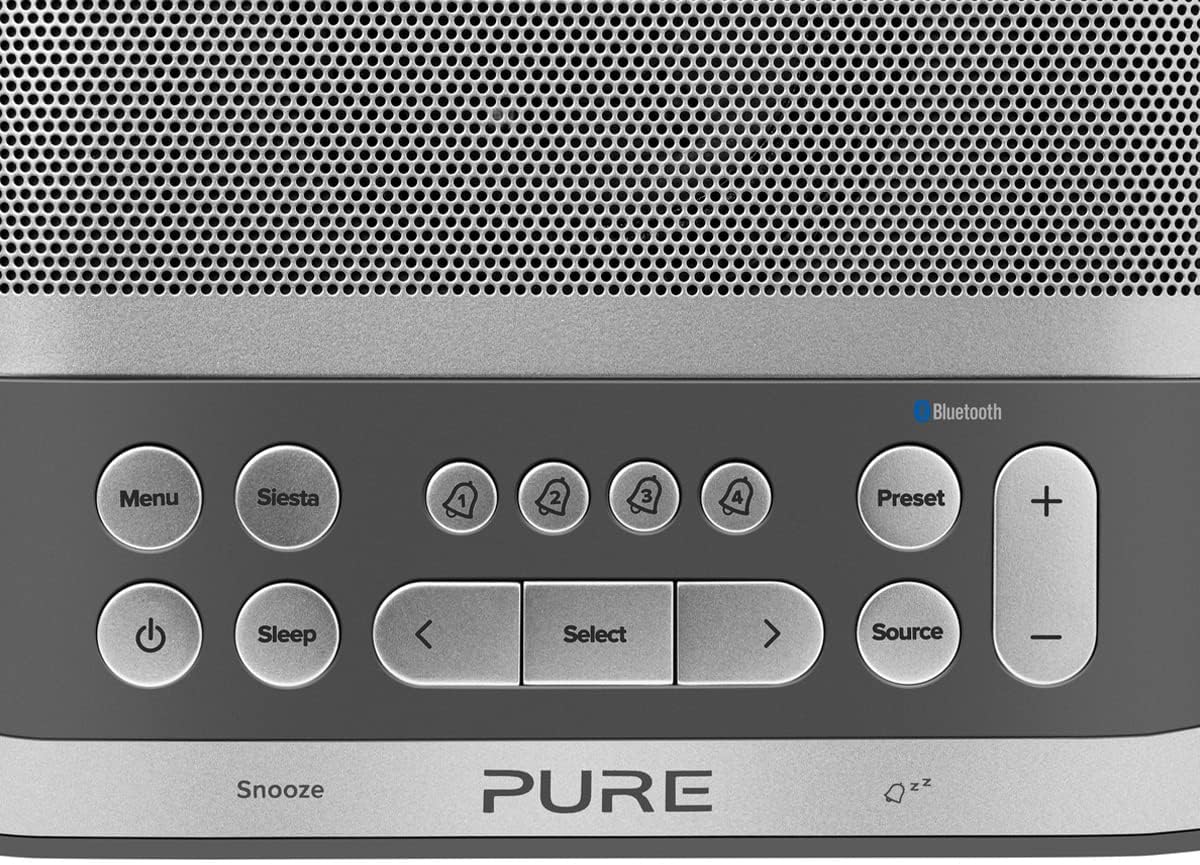
Image: Close-up of the top panel buttons, including Menu, Siesta, Alarm 1-4, Preset, Volume, Power, Sleep, Source, and Navigation buttons.
- Pizteko botoia (●): Sakatu unitatea pizteko edo itzaltzeko.
- Menuko botoia: Sartu sistemaren ezarpenetara eta aukeretara.
- Siesta Button: Activates the Siesta timer for short naps.
- Alarm Buttons (1, 2, 3, 4): Press to activate/deactivate or configure individual alarms.
- Aurrez ezarritako botoia: Save and recall your favorite radio stations.
- Bolumenaren (+/-) botoiak: Doitu audioaren bolumena.
- Lo egiteko botoia: Set a sleep timer for the radio to turn off automatically.
- Iturriaren botoia: Aldatu DAB, FM eta Bluetooth moduen artean.
- Nabigazio botoiak (< Select >): Menuetan nabigatu eta aukerak hautatu.
- Snooze Bar: Press to temporarily silence an active alarm.
Radio Operation (DAB/DAB+ and FM)
- Aukeratu modua: Sakatu Iturria button to cycle between DAB and FM radio modes.
- Sintonizazio estazioak:
- DAB: In DAB mode, use the < eta > buttons to browse available stations. Press Hautatu geltoki bat sintonizatzeko.
- FM: FM moduan, sakatu Hautatu to auto-scan for the next available station. Use < eta > doikuntzarako.
- Gorde aurrezarpenak: Irrati bat gordetzeko, sakatu eta eutsi botoiari Aurrez ezarritakoa botoia. Erabili < eta > to choose a preset number, then press Hautatu baieztatzeko.
- Berreskuratu aurrezarpenak: Sakatu labur Aurrez ezarritakoa botoia. Erabili < eta > to select a preset, then press Hautatu.
Bluetooth Pairing and Streaming
- Sartu Bluetooth moduan: Sakatu Iturria button until "Bluetooth" is displayed. The Siesta S6 will enter pairing mode, indicated by a flashing Bluetooth icon.
- Parekatu zure gailua: On your smartphone, tablet, or computer, enable Bluetooth and search for "Pure Siesta S6" in the list of available devices. Select it to pair.
- Hasi erreprodukzioa: Once paired, you can play audio from your device, and it will stream wirelessly to the Siesta S6.
Alarmak ezartzea

Image: A hand interacting with the top controls of the Siesta S6, demonstrating alarm setting.
- Select Alarm: Sakatu Alarm (1, 2, 3, or 4) buttons to select an alarm to configure.
- Konfiguratu ezarpenak: Erabili < eta > buttons to adjust the time, alarm source (DAB, FM, Tone, Last Station), volume, and days of the week (Everyday, Weekdays, Weekends, Once). Press Hautatu ezarpen bakoitza berresteko.
- Aktibatu/Desaktibatu: Sakatu labur dagokion botoia Alarma button to toggle the alarm on or off. An active alarm will show its indicator on the display.
- Atzeratu: Alarma jotzen duenean, sakatu Atzeratu bar to temporarily silence it. The alarm will sound again after the snooze period.
- Gelditu alarma: To turn off a sounding alarm completely, press the Boterea botoia.
Using the Siesta Timer
The Siesta timer allows you to set a short nap timer.
- Aktibatu: Sakatu Siesta botoia.
- Ezarri iraupena: Erabili < eta > botoiak nahi duzun siesta-iraupena ezartzeko (adibidez, 5, 10, 15 minutu).
- Berretsi: Sakatu Hautatu to start the Siesta timer. The display will show the countdown.
USB kargatzea
The USB port on the back of the Siesta S6 can be used to charge your mobile devices.
- Connect your device's USB charging cable to the USB port on the Siesta S6.
- Ensure the Siesta S6 is powered on and connected to mains electricity.
- Kargatzen hasiko da automatikoki.
Mantentzea
Proper care will ensure the longevity of your Siesta S6.
- Garbiketa: Garbitu unitatea zapi leun, lehor eta lihorik gabeko batekin. Ez erabili garbitzaile urratzailerik, argizaririk edo disolbatzailerik.
- Lekua: Avoid placing the unit in direct sunlight, near heat sources, or in environments with high humidity or dust.
- Aireztapena: Ziurtatu aireztapen egokia dagoela unitatearen inguruan gehiegi berotzea saihesteko. Ez blokeatu aireztapen-irekidurak.
Arazoak konpontzea
If you encounter issues with your Siesta S6, refer to the following common problems and solutions.
| Arazoa | Irtenbidea |
|---|---|
| Botererik ez | Ziurtatu korronte-egokitzailea ondo konektatuta dagoela bai unitatera bai funtzionatzen duen hormako entxufe batera. |
| Irrati-harrera eskasa | Fully extend and reposition the wire antenna. Try moving the unit to a different location, away from other electronic devices that may cause interference. Perform a full scan for DAB stations. |
| Bluetootha ez da konektatzen | Ensure the Siesta S6 is in Bluetooth pairing mode (flashing icon). Make sure Bluetooth is enabled on your device and it is within range. Try unpairing and re-pairing the device. |
| Alarma ez da jotzen | Verify that the alarm is activated (indicator on display). Check the alarm volume setting. Ensure the alarm time is correctly set. |
| Display Too Dim/Bright | Access the Menu settings to adjust the display brightness or toggle the automatic brightness feature. |
Zehaztapenak
| Ezaugarri | Xehetasuna |
|---|---|
| Marka | Hutsa |
| Modelo zenbakia | P149584 |
| Kolorea | Noir (Beltza) |
| Produktu Mota | Iratzargailu digitala |
| Bistaratzeko tamaina | 3.9 hazbete |
| Konektibitatea | Bluetootha |
| Ezaugarri bereziak | Alarm, Siesta Timer, USB Charging Port |
| Gailu bateragarriak | Telefono mugikorra, tableta |
| Energia iturria | Sare elektrikoa |
| Produktuaren neurriak | 14.6L x 7H centimeters |
Bermea eta Laguntza
Pure products are designed and manufactured to the highest standards. For warranty information and technical support, please refer to the warranty card included with your product or visit the official Pure webgunea. Gorde erosketaren egiaztagiria bermearen erreklamazioetarako.
For further assistance, you may also contact Pure customer service through their official channels.