1. Sarrera
This manual provides instructions for the ROCCAT KONE Aimo Gaming Mouse. The KONE Aimo features an Owl-Eye Optical Sensor, customizable RGB AIMO LED illumination, and 23 programmable keys. It is designed for precision and ergonomic comfort during extended use.
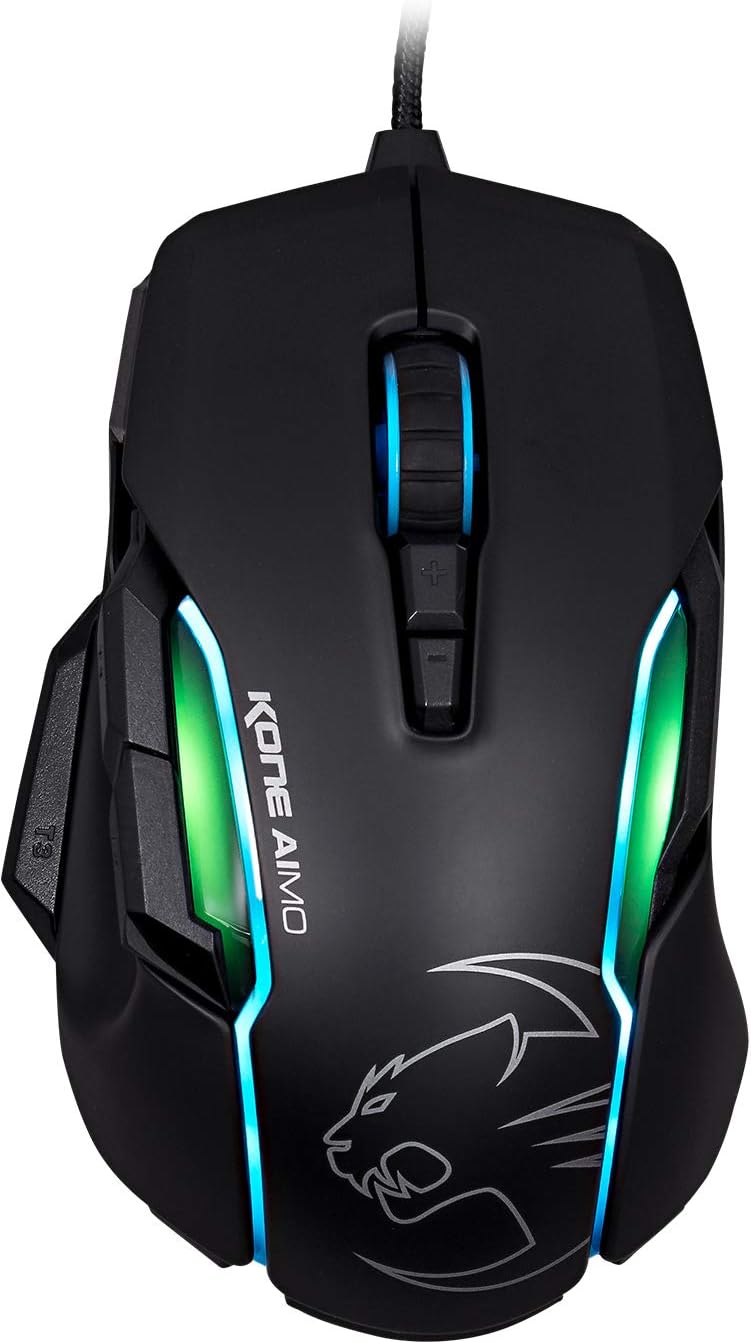
1. irudia: Goikoa view of the ROCCAT KONE Aimo Gaming Mouse, showcasing its ergonomic shape and RGB lighting zones.
2. Paketearen edukia
Egiaztatu elementu guztiak paketean daudela:
- KONE AIMO Mouse with Attached Braided USB Cable
- Gida Azkarra
- ROCCAT eranskailuak

Figure 2: Retail packaging of the ROCCAT KONE Aimo Gaming Mouse.
3. Konfigurazioa
- Konektatu sagua: Plug the USB cable of the ROCCAT KONE Aimo mouse into an available USB port on your computer.
- Gidariaren instalazioa: Your operating system (Windows 7, 8, 8.1, 10) should automatically detect and install the necessary drivers.
- Instalatu ROCCAT Swarm softwarea: For full customization of DPI settings, button assignments, and AIMO lighting, download and install the ROCCAT Swarm software from the official ROCCAT website. This software allows you to create and manage profiles.

Figure 3: The ROCCAT KONE Aimo mouse in use on a mouse pad, connected to a computer.
4. Funtzionamendu-argibideak
4.1. Botoiaren funtzioak
The KONE Aimo features 23 programmable keys, including a tri-button thumb zone and a 4D tilting Titan wheel. These can be customized via the ROCCAT Swarm software.
- Ezkerreko/eskuineko klik: Saguaren funtzio estandarrak.
- Scroll Wheel (4D Titan Wheel): Scrolls vertically and can tilt horizontally for additional functions. Also acts as a clickable button.
- DPI Adjustment Buttons: Located above and below the scroll wheel, these buttons allow for on-the-fly DPI sensitivity changes. Settings are configured in the Swarm software.
- Thumb Buttons (T1, T2, T3): Three buttons located on the left side, easily accessible by the thumb. The bottom-most button (T3) is often defaulted to the Easy-Shift[+] function.
- Maius Erraza[+] botoia: This exclusive ROCCAT feature doubles the number of programmable functions for other buttons when held down, effectively expanding the total programmable keys.

4. irudia: Xehetasuna view of the programmable thumb buttons (T1, T2, T3) on the left side of the mouse.
4.2. AIMO Lighting System
The AIMO lighting system provides intelligent, reactive RGB illumination across four independently configurable LED light zones and the glowing mouse wheel. It can synchronize with other compatible ROCCAT devices and is programmable through the ROCCAT Swarm software.

Figure 5: The KONE Aimo mouse displaying its multi-zone RGB AIMO illumination.
4.3. Owl-Eye Optical Sensor
The mouse is equipped with the ROCCAT Owl-Eye Optical Sensor, a modified PixArt 3361 sensor, offering adjustable DPI from 100 to 12,000. This sensor provides precise tracking and responsiveness. A built-in tracking distance control unit monitors the lift-off distance for enhanced accuracy.

Figure 6: The bottom of the mouse, highlighting the Owl-Eye Optical Sensor.
4.4. Ergonomia
The KONE Aimo features refined ergonomics designed for comfort during extended use. Its shape provides a natural fit for the hand, with a dedicated thumb rest area.

Figure 7: A hand gripping the KONE Aimo mouse, illustrating its ergonomic design.
5. Mantentzea
- Garbiketa: Erabili zapi leun eta lehor bat saguaren gainazala garbitzeko. Zikinkeria egoskorra bada, garbitu zapi pixka bat.amp oihal bat erabil daiteke, barneko osagaietan hezetasunik ez sartzeko ziurtatuz.
- Sentsoreen zainketa: Keep the optical sensor on the underside of the mouse clean and free of dust or debris to ensure optimal tracking performance.
- Kableen kudeaketa: Kalteak ekiditeko, saihestu USB kable txirikordatua gehiegi tolestea edo tiratzea.
6. Arazoak
- Saguak ez du erantzuten:
- Ziurtatu USB kablea ondo konektatuta dagoela funtzionatzen duen USB ataka batera.
- Try a different USB port or another computer to rule out port or system issues.
- Berrabiarazi ordenagailua.
- Tracking Issues / Inaccurate Movement:
- Garbitu saguaren beheko aldean dagoen sentsore optikoa.
- Ziurtatu sagua sagu-alfonbra edo gainazal garbi eta egoki batean erabiltzen ari zarela.
- Check DPI settings in the ROCCAT Swarm software.
- RGB Lighting Not Working / Incorrect:
- Egiaztatu ROCCAT Swarm softwarea martxan eta eguneratuta dagoela.
- Egiaztatu argiztapen ezarpenak Swarm softwarean.
- Ensure no conflicting software is controlling RGB lighting.
- Botoiak ez dute funtzionatzen:
- Egiaztatu botoien esleipenak ROCCAT Swarm softwarean.
- Ensure the software is not experiencing issues (try restarting it).
7. Zehaztapenak
| Ezaugarri | Xehetasuna |
|---|---|
| Marka | ROCCAT |
| Modelo zenbakia | ROC-11-815-BK |
| Sentsore | Owl-Eye Optical Sensor (modified PixArt 3361) |
| DPI tartea | 100 eta 12,000 DPI artean |
| Botoi programagarriak | 23 (Easy-Shift[+]-rekin) |
| Argiztapena | RGBA AIMO LED Illumination (4 independent zones + scroll wheel) |
| Konektibitatea | USB (kablea) |
| Sistema eragileen bateragarritasuna | Windows 7, Windows 8, Windows 8.1, Windows 10 (32-bit and 64-bit versions) |
| Elementuaren pisua | 11.2 ontza (317.5 gramo gutxi gorabehera) |
| Produktuaren neurriak (LxWxH) | 5.12 x 2.95 x 1.57 hazbete (13 x 7.5 x 4 cm gutxi gorabehera) |
8. Bermea eta laguntza
For warranty information, technical support, and additional resources, please visit the official ROCCAT webwebgunera edo jarri harremanetan ROCCAT bezeroarentzako arreta-zerbitzuarekin. Gorde erosketaren frogagiria berme-erreklamazioetarako.
Era berean, bisitatu dezakezu ROCCAT denda Amazonen produktuaren informazio gehiago lortzeko.


