1. Sarrera
Eskerrik asko erosketagatik.asing the Pyle PRJG74 Portable Home Theater LED Projector. This device is designed to provide a versatile and immersive viewing experience, supporting 1080p resolution for movies, video games, and presentations. Its compact and lightweight design makes it suitable for various environments, from home entertainment to small office use. This manual provides detailed instructions for setup, operation, maintenance, and troubleshooting to ensure optimal performance and longevity of your projector.
2. Segurtasun-argibide garrantzitsuak
Please read and follow all safety instructions carefully before using the projector to prevent fire, electric shock, or injury.
- Aireztapena: Ziurtatu proiektorearen inguruan aireztapen egokia dagoela. Ez blokeatu aireztapen-irekidurak.
- Energia iturria: Use only the specified power adapter and connect to a grounded power outlet.
- Hezetasuna: Ez jarri proiektorea euripean, hezetasunean eta ez murgildu uretan.
- Beroa: Saihestu proiektorea bero-iturrietatik gertu edo eguzki-argia zuzenean jartzen.
- Garbiketa: Unplug the projector before cleaning. Use a dry, soft cloth. Do not use liquid or aerosol cleaners.
- Zerbitzua: Ez saiatu produktu hau zuk zeuk ematen. Bidali zerbitzu guztiak zerbitzu kualifikatuko langileengana.
- Begietako babesa: Ez begiratu zuzenean proiektorearen lenteari l dagoenean.amp piztuta dago.
3. Zer dago kutxan
Egiaztatu osagai guztiak daudela paketea desontziratzean:
- Compact Projector (Pyle PRJG74)
- Urruneko Kontrola
- Elikatze kablea
- AV Kable
4. Produktua amaitu daview
Familiarize yourself with the projector's components and ports.
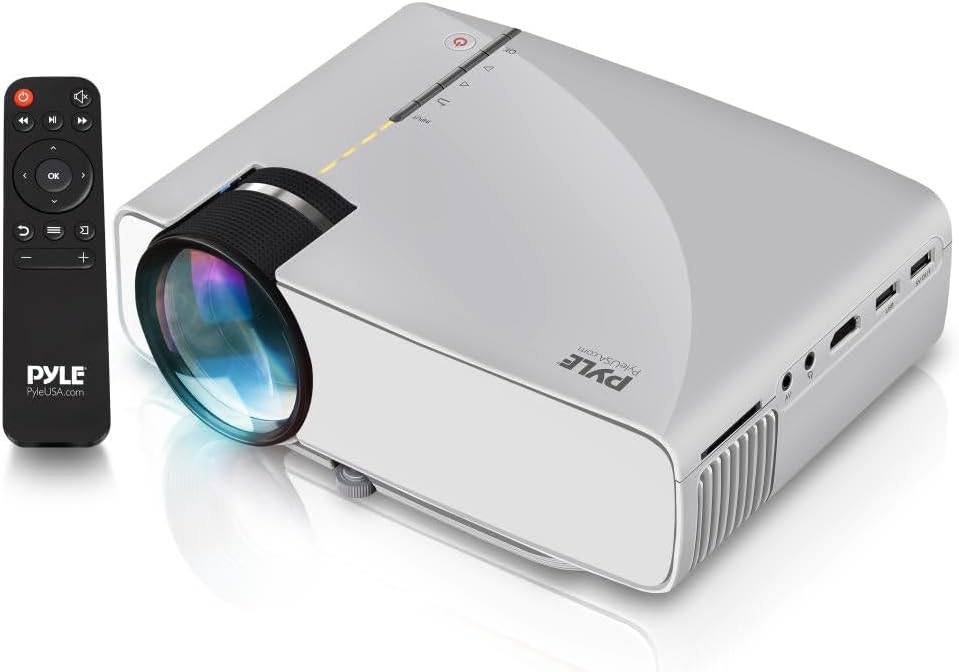
Image: The Pyle PRJG74 projector shown with its included remote control. The projector features a lens on the front, control buttons on top, and various input ports on the side.
4.1 Aurreko panela
- Proiekzio lentea: Irudia igortzen du.
- Fokatzeko eraztuna: Irudiaren argitasuna doitzen du.
4.2 Goiko panela
- Pizteko botoia: Proiektorea pizten edo itzaltzen du.
- Sarrera iturriaren botoia: Sarrera-iturriak hautatzen ditu.
- Nabigazio botoiak (Gora/Behera/Ezkerra/Eskuina/Ados): Menuetan nabigatzeko eta hautatzeko.
4.3 Side/Rear Panels
- HDMI ataka: Connects to HDMI-enabled devices (laptops, gaming consoles, Blu-ray players).
- USB ataka: USB biltegiratze gailuak konektatzen ditu multimedia erreproduzitzeko.
- SD txartelaren zirrikitua: Inserts SD cards for media playback.
- AV ataka: Connects to devices using RCA composite video/audio cables.
- VGA ataka: VGA irteera duten ordenagailuetara konektatzen da.
- Audio irteera (3.5 mm): Kanpoko bozgorailuetara edo entzungailuetara konektatzen da.
- Potentzia sarrera: Elikatze-kablea konektatzen du.
5. Konfigurazioa
5.1 Jartzea
Position the projector on a stable, flat surface or mount it overhead. Ensure the projection path is clear of obstructions. The optimal projection distance and screen size are:
- Pantailaren tamaina: Adjustable from 50 to 130 inches.
- Proiekzio distantzia: Varies based on desired screen size. Refer to the table below for guidance.
| Pantailaren tamaina (hazbete) | Projection Distance (feet) |
|---|---|
| 50 | ~5.5 |
| 80 | ~8.5 |
| 100 | ~10.5 |
| 130 | ~13.5 |
5.2 Energia-konexioa
- Konektatu elikatze-kablea proiektorearen elikatze-sarrera atakara.
- Entxufatu kablearen beste muturra entxufe elektriko estandar batera.
5.3 Sarrerako gailuak konektatzea
The PRJG74 supports multiple input sources:
- HDMI: Connect an HDMI cable from your device (e.g., laptop, game console) to the projector's HDMI port.
- USB/SD: Sartu USB flash unitate bat edo SD txartel bat dagokion atakan/zirrikituan.
- OF: Use the provided AV cable to connect devices with RCA output.
- VGA: Connect a VGA cable from your computer to the projector's VGA port.
5.4 Fokua eta Keystone doikuntza
- Fokua: Rotate the focus ring on the front of the projector until the image appears sharp and clear.
- Giltzarria: If the projected image appears trapezoidal (wider at the top or bottom), use the keystone correction dial (if available, or digital keystone in menu) to adjust it to a rectangular shape.
6. Funtzionamendu-argibideak
6.1 Piztu/Itzaltzea
- Piztu: Press the Power button on the projector or remote control. The indicator light will turn on.
- Itzali: Press the Power button again. Confirm shutdown if prompted.
6.2 Sarrera iturriaren hautaketa
After connecting your input device:
- Press the 'Input' button on the projector or remote control.
- Use the navigation buttons to select the desired input source (HDMI, USB, SD, AV, VGA).
- Press 'OK' to confirm your selection.
6.3 Menu Nabigazioa
Use the 'Menu' button on the remote or projector to access settings. Navigate using the arrow keys and 'OK' to select. Common settings include:
- Irudiaren ezarpenak: Distira, Kontrastea, Kolorea, Aspektu-erlazioa.
- Soinu ezarpenak: Volume, Audio Mode.
- Ordu ezarpenak: Lo egiteko tenporizadorea.
- Aukeren ezarpenak: Language, Factory Reset.
6.4 Media Playback (USB/SD)
When a USB drive or SD card is inserted and selected as the input source, the projector will display a media browser. You can play various file types including:
- Bideoa: MP4, AVI, MKV, etc.
- Audioa: MP3, WMA, AAC, etab.
- Irudia: JPEG, BMP, PNG, etc.
- Testua: TXT.
Nabigatu karpetetan eta files using the remote control and press 'OK' to play or view.
7. Mantentzea
Mantentze-lan erregularrak proiektorearen errendimendu optimoa bermatzen du eta bizitza luzatzen du.
7.1 Lentea garbitzea
Use a soft, lint-free cloth specifically designed for optical lenses. Gently wipe the lens to remove dust or smudges. Avoid using abrasive materials or harsh chemicals.
7.2 Proiektorearen gorputza garbitzea
Garbitu proiektorearen kanpoaldea oihal leun eta lehor batekin. Zikinkeria egoskorra bada, garbitu pixka bat.amp cloth can be used, followed by a dry cloth. Ensure no liquid enters the ventilation openings.
7.3 Aireztapena
Periodically check the ventilation openings for dust accumulation. Use a soft brush or compressed air to gently clear any blockages. Proper airflow is crucial for preventing overheating.
8. Arazoak
Arazoak badituzu, jo ezazu honako arazo eta irtenbide ohikoenei:
| Arazoa | Kausa posiblea | Irtenbidea |
|---|---|---|
| Ez da irudirik bistaratzen | Sarrera-iturri okerra hautatu da; kablearen konexioa askea da; gailua ez dago piztuta. | Select the correct input source. Check all cable connections. Ensure the source device is powered on. |
| Irudia lausoa da | Fokua ez dago doituta; proiektorea pantailatik gertuegi/urrunegi dago. | Adjust the focus ring. Reposition the projector according to recommended distances. |
| Irudia trapezoidala da | Proiektorea ez dago pantailarekiko perpendikularra. | Adjust the keystone correction dial or digital keystone setting. |
| Soinurik ez | Volume too low; audio cable not connected; source device audio settings. | Increase projector volume. Check audio cable connections. Adjust audio output settings on the source device. |
| Urruneko kontrola ez dabil | Batteries dead or incorrectly inserted; obstruction between remote and projector. | Aldatu bateriak. Ziurtatu proiektorearen IR hargailuarekiko ikusmen-lerro garbia dagoela. |
9. Zehaztapenak
Key technical specifications for the Pyle PRJG74 Projector:
- Eredua: PRJG74
- Pantailaren bereizmena: 1920 x 1080 (1080p Support)
- Proiekzio pantailaren tamaina: 50" to 130" inches
- Konektibitate Teknologia: HDMI, USB, VGA, AV, Mini SD
- Argi iturria: LED
- Elementuaren pisua: 2.06 kilo
- Produktuaren neurriak: 7.9 x 5.7 x 3 hazbete
- Ezaugarri bereziak: Lightweight, Portable, Built-in Dual Stereo Speaker
- Erabilera gomendatua: Home Theater, Gaming, Presentations
10. Bermea eta Laguntza
Pyle products are designed and manufactured to the highest quality standards. For warranty information, technical support, or service inquiries, please refer to the warranty card included with your product or visit the official Pyle webgunea. Gorde erosketa-agiria erosketaren frogagiri gisa.
Lineako laguntza: For additional resources, FAQs, and contact information, please visit www.pyleusa.com.


