1. Sarrera
The Nobsound KS16 LED Music Audio Spectrum Analyzer is designed to visually represent audio signals. It combines innovative design with music and art, making it suitable for both music enthusiasts and electronic hobbyists. This device functions as a delightful art decoration while providing accurate sound spectrum analysis.
This manual provides essential information for the safe and effective use of your KS16 spectrum analyzer.
2. Segurtasun informazioa
- Ensure the audio signal input voltage does not exceed 5V to prevent damage to the sound spectrum analyzer.
- Mantendu gailua uretatik eta hezetasun handiko inguruneetatik urrun.
- Saihestu gailua eguzki-argia zuzenean edo muturreko tenperaturen eraginpean jartzea.
- Ez saiatu gailua desmuntatzen edo aldatzen, horrek bermea baliogabetu eta kalteak eragin baititzake.
- Erabili emandako elikatze-kablea eta osagarriak soilik.
3. Produktua amaitu daview
The KS16 features a 16-segment LED display with a golden section ratio design. It utilizes red, yellow, green, blue, orange, and pink 6-color LEDs to create a dynamic visual effect. The device incorporates a 32M crystal and a 1T microcontroller for high-speed signal acquisition and accurate reaction to audio input.

Figure 3.1: Nobsound KS16 LED Music Audio Spectrum Analyzer in vertical orientation, showcasing its multi-color LED segments.
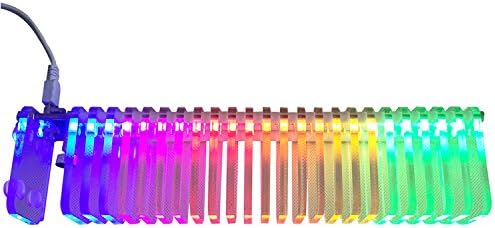
Figure 3.2: Nobsound KS16 LED Music Audio Spectrum Analyzer in horizontal orientation, displaying the LED segments.

3.3. irudia: Aldea view of the Nobsound KS16, highlighting the USB power input and the mode switch button.

3.4. irudia: hurbileko planoa view of the integrated microphone on the Nobsound KS16 for ambient sound detection.
4. Konfigurazioa
Follow these steps to set up your Nobsound KS16 LED Music Audio Spectrum Analyzer:
- Potentzia-konexioa: Connect the provided USB cable to the USB port on the device and to a 5V USB power source (e.g., a computer USB port, USB wall adapter).
- Audio Input (Line-in): If using line-in audio, connect your audio source (e.g., amplifier, music player) to the 3.5mm audio input jack using the included audio splitter cable. Ensure your audio source's output volume is not excessively high.
- Audio Input (Microphone): The device has a built-in microphone for ambient sound detection. No external connection is needed for this mode.
- Lekua: Place the spectrum analyzer on a stable, flat surface. Ensure it is positioned where the LED display is clearly visible and, if using the microphone, where it can pick up sound effectively.

Figure 4.1: The Nobsound KS16 with its accompanying USB power cable and 3.5mm audio splitter for line-in connection.
5. Funtzionamendu-argibideak
The Nobsound KS16 offers various display modes and adjustable settings for a customized visual experience.
5.1 Funtsezko eragiketak
- Prentsa laburra: A short press of the key switches between the eight classic display modes.
- Sakatuta luze (1 segundo): A long press for approximately 1 second adjusts among the 6-level gain settings.
- Sakatu luzea (3 segundo): A long press for approximately 3 seconds switches between left and right audio channels (if applicable).
All settings are saved with power-off memory.
5.2 Bistaratzeko moduak
The device features 8 classic display modes:
- Columnar mode
- Columnar with peak holding mode
- Columnar with peak, peak upward moving out mode
- Mirror mode (from middle to both sides)
- Puntu bakarreko modua
- Peak upward moving out mode
- Single peak mode
- Mute with all lights on mode (available for testing LED functionality)
5.3 Irabaziaren doikuntza
Adjust the input volume from your audio source and the device's gain setting to ensure the display amplitude is within an appropriate range. The default gain value is 3. If the display is too low or too high, adjust the gain accordingly using a 1-second long press of the key.
6. Mantentzea
- Garbiketa: Erabili zapi leun eta lehor bat gailuaren kanpoaldea garbitzeko. Saihestu garbitzaile edo disolbatzaile urratzaileak erabiltzea.
- Biltegiratzea: When not in use for extended periods, store the device in a cool, dry place, away from direct sunlight and dust.
- Manipulazioa: Handle the device with care to avoid dropping or physical impact, which could damage the LED segments or internal components.
7. Arazoak
| Arazoa | Kausa posiblea | Irtenbidea |
|---|---|---|
| Pantailarik ez / Gailua ez da pizten | No power, faulty USB cable, faulty power source. | Check USB cable connection. Try a different USB port or power adapter. Ensure the power source is active. |
| LEDs not reacting to music (Line-in) | Incorrect audio connection, low input volume, incorrect channel setting. | Verify audio cable connection. Increase volume on the audio source. Adjust gain setting on the device. Long press (3s) to switch channels. |
| LEDs not reacting to music (Microphone) | Low ambient sound, microphone obstructed, incorrect mode. | Increase ambient sound volume. Ensure microphone is not covered. Check if the device is in a microphone-responsive mode. Adjust gain. |
| Display too high/low | Gain setting is too high/low, input volume too high/low. | Adjust the gain setting (long press for 1s) or modify the input volume from your audio source. |
8. Zehaztapenak
- Modelo zenbakia: PJ455
- Bistaratzeko mota: 16 segmentuko LED
- LED koloreak: Red, Yellow, Green, Blue, Orange, Pink
- Sarrera boltage: Max 5V (USB powered)
- Kontrola: Single button for mode, gain, and channel selection
- Memoria: Power-off memory for settings
- Neurriak: 12.28 x 3.9 x 2.24 hazbete (gutxi gorabehera)
- Pisua: 1.28 kilo (gutxi gorabehera)
- Fabrikatzailea: Nobsound
9. Bermea eta Laguntza
For warranty information and technical support, please refer to the official Nobsound/Douk Audio webwebgunearekin edo jarri harremanetan zure saltzailearekin. Gorde erosketa-agiria berme-erreklamazioetarako.
Sareko baliabideak:


