Sarrera
Thank you for choosing the Capello Extra Large Display Digital Alarm Clock. This manual provides detailed instructions to help you set up, operate, and maintain your new alarm clock. Designed for clarity and ease of use, this clock features a large digital display and a stylish wood-grain finish, making it a perfect addition to any bedroom or living space.
Produktua amaituview
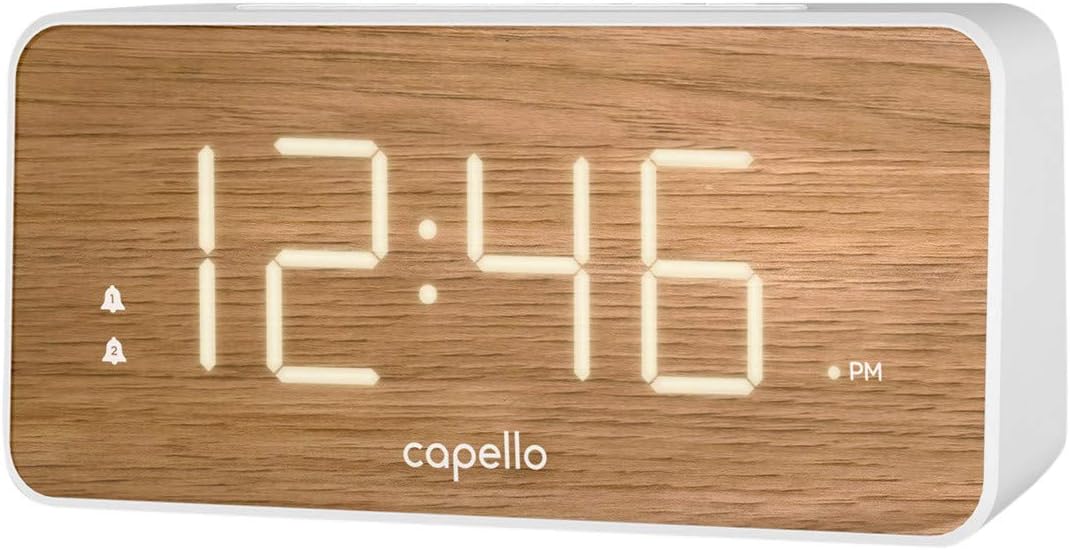
The Capello Digital Alarm Clock (Model: 43213-14795) features an extra-large digital display for easy readability from across the room. Its elegant white and pine D-frame design with a wood-grain finish complements various interior styles. The clock is equipped with intuitive controls for setting time and alarms, ensuring a user-friendly experience.
Konfigurazioa
Potentzia-konexioa
The alarm clock requires a continuous power supply via its included AC adapter for full functionality. Insert the adapter into a standard wall outlet and connect it to the clock's power input port. For backup during power outages, install 2 AAA batteries (not included) into the battery compartment located on the underside of the unit. These batteries will preserve time and alarm settings but will not power the display or alarm functions during an outage.
Ordua ezartzea
- Eduki sakatuta ORDUA button (or similar button, refer to specific button labels on your unit) until the hour digits begin to flash.
- Erabili ORDUA button to adjust the hour. Pay attention to the AM/PM indicator.
- Sakatu ORDUA botoia berriro sakatu minutuko digituetara joateko.
- Erabili MIN botoia minutuak doitzeko.
- Sakatu ORDUA berriro ere baieztatzeko eta ordua ezartzeko modutik irteteko.
Alarma ezartzea
This clock supports dual alarms.
- Eduki sakatuta 1. ALARMA botoia sakatu alarmaren orduko digituak keinuka hasi arte.
- Erabili ORDUA eta MIN botoiak 1. alarmarako nahi duzun alarma ordua ezartzeko.
- Sakatu 1. ALARMA again to confirm. The alarm indicator for Alarm 1 will illuminate.
- Errepikatu 1-3 urratsak honetarako 2. ALARMA if a second alarm is desired.
- To activate/deactivate an alarm, simply press the corresponding 1. ALARMA or 2. ALARMA button. The alarm indicator will show its status.
Funtzionamendu-argibideak
Errepikatzeko funtzioa
Alarma jotzen duenean, sakatu botoi handia SNOOZE button located on the top of the clock. This will temporarily silence the alarm for approximately 9 minutes, allowing for extra rest. The alarm will sound again after the snooze period ends.
Alarma gelditzea
To turn off the alarm completely after it sounds, press the corresponding 1. ALARMA or 2. ALARMA button. The alarm indicator will turn off, signifying that the alarm is deactivated for the next day.
Pantailaren distira
The display brightness can be adjusted to suit your preference. Locate the ARGIA or DIMMER button (often represented by a sun icon) on the top panel. Press this button repeatedly to cycle through different brightness levels (e.g., High, Medium, Low, Off).
Mantentzea
To ensure the longevity and optimal performance of your Capello Digital Alarm Clock, follow these simple maintenance guidelines:
- Garbiketa: Wipe the clock's surface with a soft, dry cloth. Do not use abrasive cleaners, waxes, or solvents as they may damage the finish.
- Lekua: Place the clock on a stable, flat surface away from direct sunlight, heat sources, and excessive moisture.
- Bateria ordezkatzea: Replace backup batteries annually or when the display shows signs of dimming during a power outage. Ensure correct polarity when inserting new batteries.
Arazoak konpontzea
If you encounter any issues with your alarm clock, please refer to the following common problems and solutions:
| Arazoa | Irtenbide posiblea |
|---|---|
| Pantaila hutsik edo ilun dago. | Ensure the AC adapter is securely plugged into both the clock and a working wall outlet. Check the display brightness setting using the LIGHT/DIMMER button. |
| Alarmak ez du jotzen. | Verify that the alarm is activated (alarm indicator is lit). Ensure the alarm time is set correctly (AM/PM). Check if the volume is set to an audible level. |
| Ordua ez da zuzena. | Reset the time following the 'Setting the Time' instructions. If using backup batteries, ensure they are fresh and correctly installed. |
| Botoiek ez dute erantzuten. | Unplug the AC adapter, remove backup batteries, wait for 1 minute, then reconnect power. This performs a soft reset. |
Zehaztapenak
- Marka: Capello
- Modelo zenbakia: 43213-14795
- Kolorea: Zuria
- Bistaratzeko mota: Digitala
- Estiloa: Modernoa
- Ezaugarri berezia: Large Display, Alarm
- Produktuaren neurriak: 8.74"Z x 5.83"A
- Energia iturria: AC Powered (with battery backup for settings)
- Materiala: Plastikoa
- Elementuaren pisua: 1.01 kilo
Produktu Ofizialaren Bideoak
Une honetan ez dago saltzailearen produktuaren bideo ofizialik eskuragarri elementu honetarako.
Bermea eta Laguntza
For warranty information and customer support, please refer to the manufacturer's official documentation included with your product or visit the Capello webgunea. Gorde erosketa-agiria berme-erreklamazioetarako.


