Sarrera
Thank you for choosing the Brookstone Big Blue True Wireless Earbuds. These earbuds are designed to provide a seamless audio experience, allowing you to enjoy music and manage calls wirelessly. This manual provides essential information on setting up, operating, maintaining, and troubleshooting your new earbuds.
Ezaugarri nagusiak:
- True wireless design for freedom of movement.
- Rich, full-range audio with deep bass.
- Integrated microphone with Qualcomm cVc noise-cancelling technology for clear calls.
- Bluetooth connectivity for easy pairing with your smartphone or device.

Image: Brookstone Big Blue True Wireless Earbuds in their black charging case.
Konfigurazioa
Kutxan dagoena
- Brookstone Big Blue True Wireless Earbuds (Left and Right)
- Haririk gabeko kargatzeko kaxa
Entzungailuak eta kasua kargatzen
- Place both earbuds into the charging case. Ensure they are seated correctly.
- Konektatu kargatzeko kaxa USB elikatze-iturri batera emandako kargatzeko kablea erabiliz.
- The indicator lights on the case and earbuds will show charging status. Refer to the specific light patterns in your product packaging for details.
- Lehenengo erabilera baino lehen, utzi denbora nahikoa karga osoa egiteko.
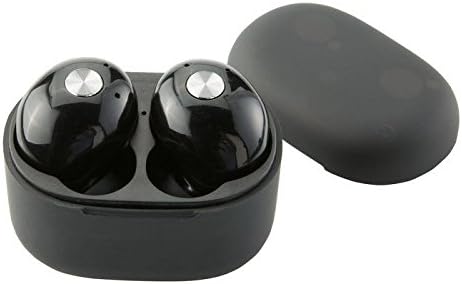
Irudia: Gertuko planoa view of the earbuds within the charging case, illustrating proper placement for charging.
Bluetooth parekatzea
- Ziurtatu entzungailuak kargatuta daudela.
- Remove both earbuds from the charging case. They will automatically enter pairing mode, indicated by flashing LED lights (refer to your product packaging for specific light patterns).
- Zure telefonoan edo Bluetooth gaitutako gailuan, joan Bluetooth ezarpenetara.
- Bilatu new devices and select "BIG BLUE" (or similar name) from the list.
- Once connected, the earbud indicator lights will change, typically turning solid or off.
- Parekatzeak huts egiten badu, jarri entzungailuak berriro zorroan, itxi eta errepikatu urratsak.
Funtzionamendu-argibideak
Piztu/Itzali
- Piztu: Kendu entzungailuak kargatzeko zorrotik. Automatikoki piztuko dira eta azken parekatutako gailura konektatzen saiatuko dira.
- Itzali: Jarri entzungailuak berriro kargatzeko zorroan eta itxi tapa. Automatikoki itzali eta kargatzen hasiko dira.
Musika erreprodukzioa eta deien kudeaketa
The earbuds feature integrated controls for media playback and call handling. Specific functions may vary slightly; refer to your product's quick start guide for exact button presses.
- Erreproduzitu/Pausatu: Typically a single press on either earbud.
- Hurrengo ibilbidea: Often a double press on the right earbud.
- Aurreko pista: Often a double press on the left earbud.
- Deia erantzun/amaitu: A single press on either earbud during an incoming call or active call.
- Deia baztertu: A long press on either earbud during an incoming call.
- Aktibatu Ahots Laguntzailea: A triple press or long press on an earbud (check specific model instructions).

Image: A man wearing a Brookstone Big Blue True Wireless Earbud, demonstrating typical use.
Mantentzea
Garbiketa
- Erabili zapi leun, lehor eta lihorik gabeko bat entzungailuak eta kargatzeko zorroa garbitzeko.
- Ez erabili garbitzaile urratzailerik, disolbatzailerik edo aerosol-sprayrik.
- Gently clean ear tips and speaker grilles with a dry cotton swab to remove earwax or debris.
Biltegiratzea
- Erabiltzen ez dituzunean, gorde beti entzungailuak kargatzeko zorroan, babesteko eta kargatuta mantentzeko.
- Gorde leku fresko eta lehor batean, tenperatura altuetatik eta eguzki-argitik babestuta.
Bateria zaintzea
- To prolong battery life, avoid fully discharging the earbuds and case frequently.
- Charge the device regularly, even if not in frequent use.
Arazoak konpontzea
| Arazoa | Irtenbide posiblea |
|---|---|
| Aurikularrak ez dira gailuarekin parekatzen. |
|
| Sound skipping or cutting out. |
|
| Entzungailu batek ez du soinurik egiten. |
|
| Aurikularrak ez dira kargatzen. |
|
Zehaztapenak
| Ezaugarri | Xehetasuna |
|---|---|
| Modelo zenbakia | BIG BLUE |
| Haririk gabeko Komunikazio Teknologia | Bluetootha |
| Dakarten osagaiak | Haririk gabeko kargatzeko kaxa |
| Materiala | Plastikoa |
| Kontrol mota | Komunikabideen kontrola |
| Kable Ezaugarri | Kablerik gabe |
| Elementuaren pisua | 2.4 ontza (0.15 libra) |
| Produktuaren neurriak | 3.35 x 1.57 x 5.71 hazbete |
| Ezaugarri bereziak | Microphone Included, Noise Cancellation, Wireless |
| Kolorea | Beltza |
| Forma-faktorea | Belarrian |
| UPC / GTIN | 883594061516 |
Bermearen informazioa
Brookstone products are designed with quality and reliability in mind. For specific warranty details regarding your Big Blue True Wireless Earbuds, please refer to the warranty card included in your product packaging or visit the official Brookstone webgunea. Gorde erosketaren egiaztagiria berme-erreklamazioetarako.
Bezeroarentzako Arreta
If you encounter any issues not covered in this manual or require further assistance, please contact Brookstone customer support. Contact information can typically be found on the product packaging or the official Brookstone webgunea.