Sarrera
This manual provides detailed instructions for the setup, operation, and maintenance of your KICKER Bullfrog BF100 Bluetooth Portable Outdoor Speaker. Please read this manual thoroughly to ensure proper use and to maximize the performance of your device. The Bullfrog BF100 is designed for robust outdoor use, featuring 360-degree sound, Bluetooth connectivity, and a durable waterproof and dustproof casing.
Produktua amaituview
The KICKER Bullfrog BF100 delivers a 360-degree sound field through its unique driver design. It features two 1-5/8 inch full-range drivers and two 2-5/8 inch passive bass radiators, powered by a built-in 16-watt amplifier. The speaker is equipped with Bluetooth for wireless audio streaming and includes a built-in speakerphone for calls.
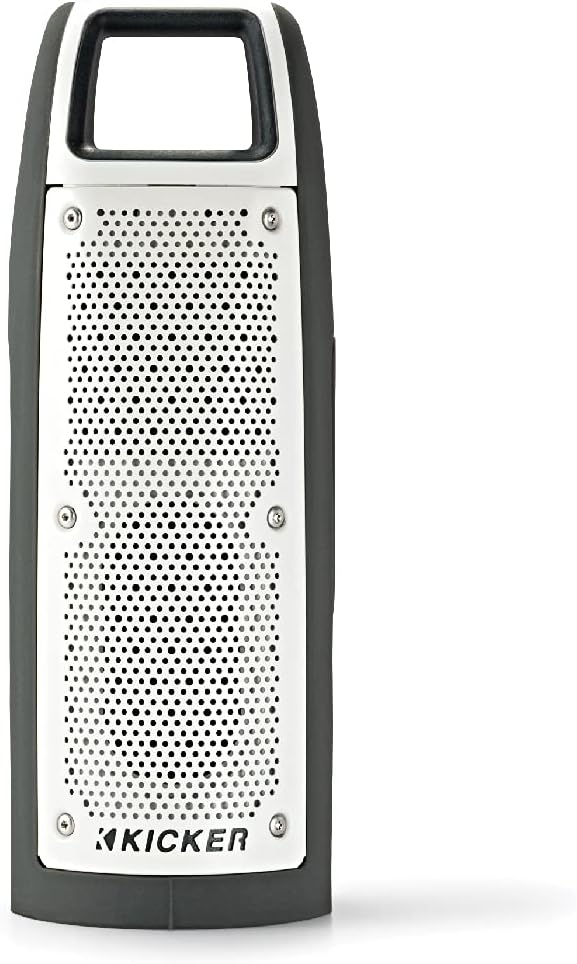
1. irudia: Aurrealdea view of the KICKER Bullfrog BF100 speaker, showcasinbere diseinu trinkoa eta sendoa dela eta.
Ezaugarri nagusiak:
- 360 graduko soinua: Drivers on both sides provide immersive audio.
- Bluetooth konexioa: Stream music wirelessly from compatible devices.
- Iragazgaitza eta hautsaren aurkakoa (IP66 kalifikazioa): Designed for outdoor environments, resistant to dust and water spray.
- Bozgorailu integratua: Answer calls directly from the speaker.
- KICKER Connect App: Customize sound with EQ presets, control volume, and check battery level.
- Estereo parekatzea: Wirelessly connect two BF100 speakers for enhanced stereo sound.
- Bateriaren iraupen luzea: Up to 12 hours of portable operation.
Osagaien identifikazioa:

2. irudia: Aldea view of the Bullfrog BF100, showing the power, volume, and track control buttons.

3. irudia: Itzuli view of the Bullfrog BF100, highlighting the AUX IN, CHARGE OUT, and CHARGE IN ports, along with the Reset button.
- Pizteko botoia: Bozgorailua pizten edo itzaltzen du.
- Bolumena igo / jaitsi botoiak: Adjusts the speaker's output volume.
- Pista Saltatzeko Botoiak: Skips to the next or previous track during playback.
- Erreproduzitu/Pausatu botoia: Controls music playback and answers/ends phone calls.
- Bikoteka botoia: Bluetooth parekatze modua abiarazten du.
- Berrezarri botoia: Resets the speaker to factory settings (located near ports).
- AUX SARTZEKO Ataka: For wired audio connection using a 3.5mm cable.
- CHARGE OUT Port: USB port for charging external devices.
- CHARGE IN Port: Micro-USB port for charging the speaker's internal battery.
Konfigurazioa
Hasierako karga:
Before first use, fully charge your Bullfrog BF100 speaker. Connect the supplied USB charging cable to the CHARGE IN port on the speaker and to a USB power source (e.g., computer USB port or a USB wall adapter). The charging indicator light will show the charging status.
4. irudia: Detail of the charging port on the Bullfrog BF100.
Bluetooth bidezko lotura
- Ensure the Bullfrog BF100 is powered on.
- Eduki sakatuta Bikoteka button on the speaker until the Bluetooth indicator light begins to flash, indicating it is in pairing mode.
- Zure telefonoan, tabletan edo beste Bluetooth gaitutako gailu batean, joan Bluetooth ezarpenetara.
- Select "KICKER Bullfrog BF100" from the list of available devices.
- Behin konektatuta, bozgorailuko Bluetooth adierazle-argia finko piztuta egongo da.
KICKER Connect App Installation:
For enhanced control and customization, download the KICKER Connect App from your device's app store (iOS App Store or Google Play Store). The app allows you to adjust EQ settings, manage FM presets, control volume, and monitor battery life.

5. irudia: The KICKER Connect App provides advanced control over your speaker settings.
Stereo Pairing (Two BF100 Speakers):
To create a two-channel stereo system, you can wirelessly connect two Bullfrog BF100 speakers. Refer to the KICKER Connect App for specific instructions on initiating stereo pairing mode between two units.
Funtzionamendu-argibideak
Piztu/Itzali:
- Eduki sakatuta Boterea button for approximately 2 seconds to turn the speaker on or off.
- An audible tone will confirm the power status change.
Bolumen kontrola:
- Sakatu Bolumena igo (+) bolumena igotzeko botoia.
- Sakatu Bolumena jaitsi (-) bolumena jaisteko botoia.
Musika erreprodukzioa:
- Sakatu Erreproduzitu/Pausatu botoia audioa erreproduzitzeko edo pausatzeko.
- Sakatu Next Track (>) botoia hurrengo abestira joateko.
- Sakatu Previous Track (<) button to go back to the beginning of the current song or to the previous song.
Telefono-deiak:
- Dei bat sartzen denean, musika pausatuko da. Sakatu botoia Erreproduzitu/Pausatu deiari erantzuteko botoia.
- Dei bat amaitzeko, sakatu Erreproduzitu/Pausatu botoia berriro.
- Jasotako dei bat ukatzeko, luze sakatu Erreproduzitu/Pausatu botoia.
Using the KICKER Connect App:
Once connected via Bluetooth, open the KICKER Connect App on your device to access additional features:
- EQ aurrezarpenak: Select from 5 predefined equalizer settings (Kicker / Outdoor / Voice / Treble / Flat) to optimize sound for different environments or preferences.
- FM aurrezarpenak: Create and select your favorite FM radio stations (if FM feature is active).
- Bolumen kontrola: Adjust the speaker volume directly from the app.
- Bateria maila: Monitor the current battery charge level of your speaker.
Karga eta bateria
The Bullfrog BF100 is equipped with a rechargeable lithium polymer battery, providing up to 12 hours of playback on a single charge. To charge the speaker:
- Connect the small end of the supplied USB cable to the CHARGE IN ataka bozgorailuan.
- Connect the large end of the USB cable to a standard USB power source (e.g., computer, USB wall adapter, or power bank).
- The charging indicator lights will illuminate to show the charging progress.
- Bozgorailua kargatzen ari den bitartean erabil daiteke.
The CHARGE OUT port can be used to provide power to other USB-powered devices, effectively turning your Bullfrog BF100 into a portable power bank.
Mantentzea eta zaintzea
Iragazgaitza eta hautsaren aurkako ezaugarriak:
The Bullfrog BF100 has an IP66 rating, meaning it is protected against dust ingress and powerful water jets from any direction. This makes it suitable for use in various outdoor conditions, including near pools, at the beach, or during campbidaiak egitea.

6. irudia: The Bullfrog BF100 is built to withstand outdoor elements.
Garbiketa jarraibideak:
- If the speaker gets dirty, it can be rinsed off with water. Ensure all port covers are securely closed before rinsing.
- Do not use harsh chemicals or abrasive cleaners, as these may damage the speaker's finish or seals.
- Wipe the speaker dry with a soft cloth after cleaning.
Arreta orokorra:
- Avoid exposing the speaker to extreme temperatures for prolonged periods.
- Gorde bozgorailua leku fresko eta lehor batean erabiltzen ez duzunean.
- Ez saiatu bozgorailua zeuk desmuntatzen edo konpontzen, bermea baliogabetuko baitu horrek.
Arazoak konpontzea
| Arazoa | Kausa posiblea | Irtenbidea |
|---|---|---|
| Botererik ez | Bateria agortuta dago. | Charge the speaker using the supplied USB cable. |
| Ezin da Bluetooth bidez parekatu | Bozgorailua ez dago parekatze moduan; gailua urrunegi dago; interferentziak. | Ensure speaker is in pairing mode (flashing light). Move device closer. Turn off other Bluetooth devices. Try resetting the speaker. |
| Soinurik ez | Volume too low; device not connected; audio source issue. | Increase speaker and device volume. Re-establish Bluetooth connection. Check audio source playback. |
| Soinu-kalitate eskasa | Low battery; device too far; audio file kalitatea. | Charge the speaker. Move device closer. Use high-quality audio files. Adjust EQ settings via KICKER Connect App. |
| Speaker unresponsive | Softwarearen akatsa. | Kokatu Berrezarri button (refer to Figure 3) and use a small pointed object (like a paperclip) to press it. This will restart the speaker. |
If you encounter issues not listed here or if the suggested solutions do not resolve the problem, please contact KICKER customer support for further assistance.
Zehaztapenak
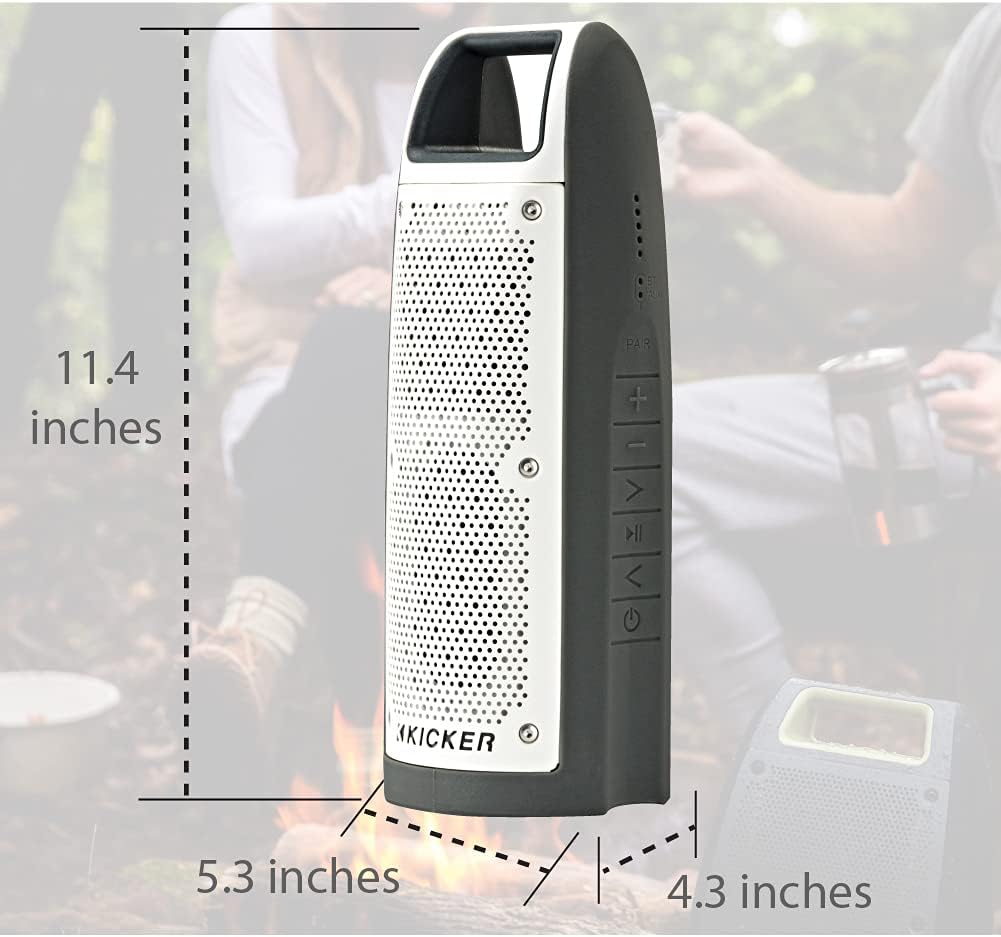
7. irudia: Dimensions of the KICKER Bullfrog BF100 speaker.
| Ezaugarri | Xehetasuna |
|---|---|
| Ereduaren izena | Bullfrog BF100 |
| Elementuaren eredu-zenbakia | 44BF100GY |
| Neurriak (H x W x D) | 11.4 x 5.3 x 4.3 hazbete |
| Elementuaren pisua | 1.81 kilo |
| Hizlari mota | Kanpoko Bluetooth bozgorailu eramangarria |
| Audio irteera modua | Estereoa |
| Bozgorailuaren irteera-potentzia maximoa | 16 Watt |
| Haririk gabeko Komunikazio Teknologia | Bluetootha |
| Bluetooth barrutia | 100 Oin |
| Konektibitate Teknologia | Bluetooth, Auxiliary (3.5mm) |
| Uraren Erresistentzia Maila | IP66 (iragazgaitza eta hautsaren aurkakoa) |
| Energia iturria | Bateriaren funtzionamendua (litio-polimeroko bateria bat barne) |
| Bateriaren iraupena | Gehienez 12 ordu |
| Kontrol-metodoa | Buttons, App (KICKER Connect) |
| Materiala | Plastikoa edo metala |
Bermea eta Laguntza
Bermearen informazioa:
The KICKER Bullfrog BF100 comes with a Limited Warranty. Please refer to the official KICKER website or your purchase documentation for specific terms and conditions regarding warranty coverage, duration, and claims procedures.
Bezeroarentzako laguntza:
For technical assistance, troubleshooting, or warranty inquiries, please contact KICKER customer support. You can find contact information on the official KICKER webgunea: www.kicker.com


