1. Sarrera
This manual provides detailed instructions for the setup, operation, and maintenance of your CAMECHO 10.1-inch Portable HD Monitor (Model K0202UK-Monitor). Please read this manual thoroughly before using the product to ensure proper functionality and safety.
Ezaugarri nagusiak:
- 10.1-inch TFT LCD Widescreen Display with 1024 x 600 HD Resolution.
- Aspect Ratio: 16:9.
- Power Supply: 9 - 30 V.
- Multiple Input Support: VGA, AV, HDMI, BNC.
- Versatile Compatibility: Suitable for PC, DVD, TV, surveillance cameras, and vehicle backup screens.
- Built-in Dual Speakers for audio output.
- Portable design with an adjustable stand for flexible placement.
2. Paketearen edukia
Please check the package contents upon unboxing to ensure all items are present and undamaged. If any items are missing or damaged, please contact customer support.
- 1 x CAMECHO 10.1-inch Portable HD Monitor
- 1 x Energia egokitzailea (EBko entxufea)
- 1 x HDMI kablea
- 1 x VGA kablea
- 1 x AV kablea
- 1 x Urruneko kontrola
- 1 x Adjustable Bracket/Stand
- 1 x Erabiltzailearen eskuliburua
- 1 x Adhesive Sticker (for stand mounting)
- 1 x BNC kablea

Figure 2.1: Contents of the CAMECHO 10.1-inch Portable HD Monitor package.
Video 2.1: Unboxing and initial assembly of the CAMECHO 10.1-inch Portable HD Monitor.
3. Produktua amaitu daview
3.1 Connections and Controls
The monitor features various input ports and control buttons for versatile connectivity and easy operation.
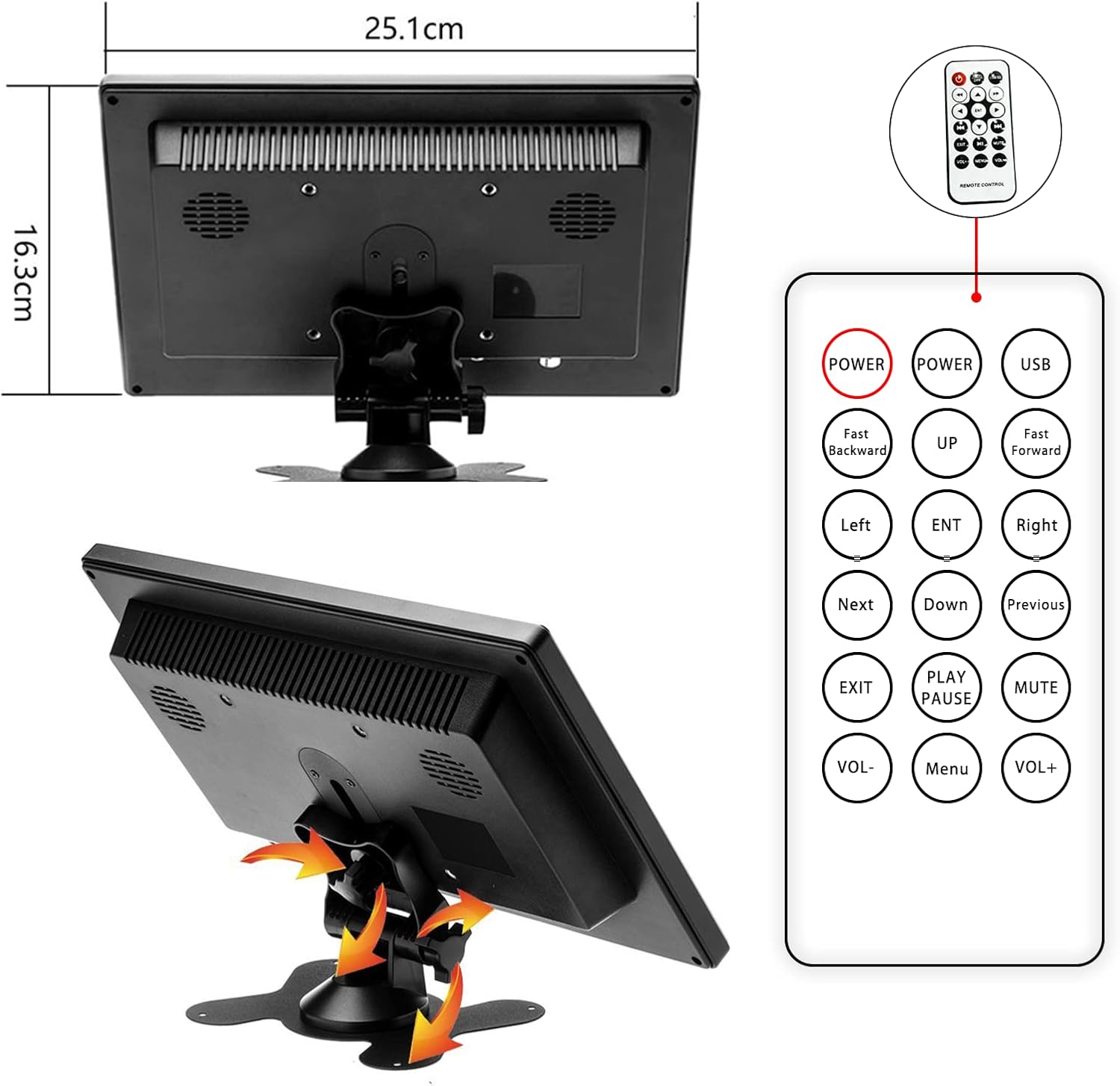
Figure 3.1: Rear panel connections of the monitor.
- Power Input (AC/DC): Konektatu hemen emandako energia-egokigailua.
- VGA ataka: VGA irteera duten ordenagailuetara edo beste gailu batzuetara konektatzeko.
- HDMI ataka: For high-definition digital video and audio input. (Note: HDMI version 1.1)
- AV Ports (RCA): For analog video and audio input (yellow for video, white/red for audio).
- USB ataka: For connecting USB devices (e.g., U disk, card reader).
- BNC ataka: For connecting to surveillance cameras or other BNC-compatible devices.
- Kontrol-botoiak: Located on the front panel (AV1/AV2, MENU, +, -, Power).
3.2 Dimensions and Adjustable Stand
The monitor is designed to be compact and portable, featuring an adjustable stand for optimal viewangeluak.

Figure 3.2: Monitor dimensions and remote control layout.
- Product Dimensions: 25.1 x 16.3 x 3.7 cm (approximately 9.88 x 6.42 x 1.46 inches).
- Weight: Approximately 499 grams (1.1 lbs).
- The adjustable stand allows for tilting the monitor to achieve a comfortable viewangelua.
3.3 Barneko bozgorailuak
The monitor includes built-in dual speakers for audio output, supporting HDMI, AV, and USB signal modes.

Figure 3.3: Location of built-in dual speakers.
4. Konfiguratzeko argibideak
4.1 Standa muntatzea
- Unpack the monitor and the adjustable bracket components.
- Assemble the stand by connecting the base to the adjustable arm. Secure it with the provided screw.
- Attach the assembled stand to the back of the monitor using the designated screw holes. Ensure it is securely fastened.
- Adjust the tilt of the monitor to your preferred viewangelua.
Video 4.1: Step-by-step guide for assembling the monitor stand.
4.2 Gailuetara konektatzea
Connect the monitor to your desired device using the appropriate cable (HDMI, VGA, AV, or BNC).
- Ordenagailu eramangarrirako: Use the HDMI or VGA cable to connect the monitor to your computer's output port.
- For DVD/Gaming Console: Use the HDMI or AV cable.
- For Surveillance Camera (CCTV): Use the BNC cable.
- Potentzia-konexioa: Connect the power adapter to the monitor's AC/DC input and then to a power outlet.
5. Funtzionamendu-argibideak
5.1 Piztu/Itzaltzea
- Sakatu Boterea button on the front panel or the remote control to turn the monitor on or off.
5.2 Changing Input Modes
- Sakatu AV1/AV2 button on the front panel or the remote control to cycle through available input modes (HDMI, VGA, AV1, AV2, BNC).
- Once the desired input mode is highlighted, press the MENUA botoia edo "-" botoia hautapena berresteko.
5.3 Ezarpenak doitzea (OSD menua)
- Sakatu MENUA button to access the On-Screen Display (OSD) menu.
- Erabili + eta - botoiak menuko aukeren artean nabigatzeko.
- Sakatu MENUA berriro edo ENT button on the remote to select an option or confirm a setting.
- Common adjustable settings include: Brightness, Contrast, Color Temperature, Aspect Ratio, and Volume.
- Sakatu EXIT button on the remote or cycle through menu options to exit the OSD.
5.4 Display Modes (for PC/Laptop)
When connected to a computer, the monitor can operate in various display modes:
- Kopiatzeko modua: Duplicates the content of your primary display.
- Hedatzeko modua: Extends your desktop space, allowing you to have different content on each screen.
- Only Mode: Displays content only on the CAMECHO monitor, turning off the primary display.

Figure 5.1: Various display modes when connected to a computer.
5.5 Aplikazioak
The CAMECHO monitor is suitable for a variety of uses:
- Enpresa Topaketak: Use as an auxiliary display for presentations.
- Jokoa: Connect to gaming consoles for an immersive experience.
- Surveillance Monitoring: Display feeds from CCTV cameras.
- Entretenimendua: Watch movies or TV shows.
- Ibilgailuaren erabilera: Function as a backup camera display.
Video 5.1: Demonstrating the monitor's use for gaming and CCTV monitoring.
Video 5.2: Demonstrating camera connection and display on the monitor.
6. Mantentzea
- Garbiketa: Erabili zapi leun eta lehor bat monitorearen pantaila etaasing. Orbain egoskorretarako, apur bat dampGarbitu zapiarekin urarekin. Saihestu produktu kimiko gogorrak edo garbitzaile urratzaileak erabiltzea.
- Film babeslea: It is recommended not to remove the protective film from the screen, as it does not affect product usage and helps protect the display.
- Biltegiratzea: Denbora luzez erabiltzen ez baduzu, gorde monitoreak leku fresko eta lehor batean, eguzki-argitik eta muturreko tenperaturetatik urrun.
- Aireztapena: Ziurtatu monitorearen aireztapen-irekidurak ez daudela blokeatuta gehiegi berotzea saihesteko.
7. Arazoak
If you encounter any issues with your CAMECHO monitor, please refer to the following common problems and solutions:
| Arazoa | Balizko Kausa / Irtenbidea |
|---|---|
| Ez dago irudirik pantailan. |
|
| Screen flickers or turns off intermittently. |
|
| Audiorik ez. |
|
| HDMI connection issues with newer devices. |
|
| Urruneko kontrola ez dabil. |
|
8. Zehaztapenak
Detailed technical specifications for the CAMECHO 10.1-inch Portable HD Monitor (Model K0202UK-Monitor).
| Ezaugarri | Xehetasuna |
|---|---|
| Marka | KAMECHO |
| Ereduaren izena | K0202UK-Monitor |
| Pantailaren tamaina | 10.1 hazbete |
| Bistaratzeko Teknologia | TFT LCD |
| Ebazpena | 1024 x 600 pixels (SVGA Wide) |
| Aspektu-erlazioa | 16:9 |
| Distira | 400 cd/m² |
| Kontraste-erlazioa | 500:1 |
| Erantzun Denbora | 3 milisegundo |
| Freskatze tasa | 60 Hz |
| Viewangelua | 85 gradu |
| Sarrera Interfazeak | HDMI (v1.1), VGA, AV (RCA), BNC, USB |
| Bozgorailu integratuak | Yes (1 Watt output) |
| Potentzia Sarrera | 9 - 30 Voltio |
| Produktuaren neurriak | 25.1 x 16.3 x 3.7 cm |
| Produktuaren pisua | 499 g |
| Instalazio mota | Tabletop (with adjustable stand) |
8.1 Energia-eraginkortasunari buruzko informazioa
The monitor's energy efficiency rating and detailed product data sheet are provided below.


Figure 8.1: Energy Label and Product Data Sheet.
For more details, refer to the official EU EPREL database: https://eprel.ec.europa.eu/qr/1438817
9. Bermea eta Laguntza
CAMECHO products typically come with a standard manufacturer's warranty. Please refer to your purchase documentation for specific warranty terms and conditions.
Bezeroarentzako laguntza:
For technical assistance, warranty claims, or any product-related inquiries, please contact CAMECHO customer support. You can often find contact details on the product packaging, the official CAMECHO webgunea, edo zure dendariaren bidez.
Posta elektronikoa: CAMECHOVIP@126.com


