1. Sarrera
Eskerrik asko erosketagatik.asing the Capello Play it All Bluetooth Wireless Home Stereo Speaker CI302. This device offers versatile audio playback options including Bluetooth wireless streaming, CD player functionality, and FM digital radio. This manual provides detailed instructions for setup, operation, maintenance, and troubleshooting to ensure optimal performance and longevity of your speaker system.
2. Segurtasun informazio garrantzitsua
- Irakurri argibide guztiak gailua erabili aurretik.
- Gorde eskuliburu hau etorkizunean erreferentzia izateko.
- Ez jarri unitatea euri edo hezetasunera sute edo kolpe arriskurik ez izateko.
- Ziurtatu aireztapen egokia dagoela; ez blokeatu aireztapen-irekidurak.
- Jarri unitatea gainazal egonkor eta lau batean.
- Erabili fabrikatzaileak zehaztutako eranskinak/osagarriak soilik.
- Deskonektatu unitatea tximista-ekaitzetan edo denbora luzez erabiltzen ez duzunean.
- Jarri zerbitzu-zerbitzu guztiak zerbitzu-pertsonal kualifikatuari.
3. Paketearen edukia
Mesedez, egiaztatu elementu guztiak bertan daudela:
- Capello Play it All Bluetooth Wireless Home Stereo Speaker CI302
- Urruneko Kontrola
- AC Potentzia Egokitzailea
- Erabiltzailearen eskuliburua (dokumentu hau)
4. Produktua amaitu daview
Familiarize yourself with the main components and controls of your Capello Play it All speaker.
Aurrealdea View

4.1. irudia: Aurrealdea view of the Capello Play it All speaker, showing the speaker grille, digital clock display, and subtle branding.
Goiko paneleko kontrolak

4.2. irudia: Top panel of the Capello Play it All speaker, illustrating the CD compartment, 'capello' logo, and various control buttons including PRESET, MODE, PAIRING, PROGRAM/CLOCK SET, SKIP, PLAY/PAUSE, STOP, REPEAT, and VOLUME.
- PRESET +/-: Navigate through saved FM radio stations.
- JARRAIBIDEAK: Switch between Bluetooth, CD, FM Radio, and Line-In modes.
- PAREKETA: Initiate Bluetooth pairing mode.
- PROGRAM/CLOCK SET: Program CD tracks or set the clock.
- SKIP ◀◀ / ▶▶: Skip tracks on CD or adjust FM frequency.
- PLAY/PAUSE ▶▶: Play or pause CD playback.
- STOP ■: Stop CD playback.
- ERREPIKATU: Repeat current track or all tracks on CD.
- VOL +/-: Doitu bolumen maila.
- IREKI/ITXI: Open or close the CD compartment.
- ITXARON: Power on/off the unit.
Rear Panel (Typical)
The rear panel typically includes the AC power input, FM antenna connection, and Line-In jack.
5. Konfigurazioa
5.1 Energia-konexioa
- Connect the AC power adapter to the DC IN jack on the rear of the speaker.
- Konektatu egokigailuaren beste muturra hormako entxufe estandar batera.
- The unit will enter standby mode, and the digital clock display will illuminate.
5.2 FM Antenna Setup
For optimal FM radio reception, extend the FM wire antenna fully and position it for the best signal. Avoid placing it near other electronic devices that may cause interference.
5.3 Erlojua ezartzea
- Erreserba moduan, luze sakatu PROGRAM/CLOCK SET botoia.
- The hour digits will begin to flash. Use the SKIP ◀◀ / ▶▶ ordua doitzeko botoiak.
- Sakatu PROGRAM/CLOCK SET berriro ordua baieztatzeko.
- Minutuen digituak keinuka hasiko dira. Erabili SKIP ◀◀ / ▶▶ minutuak doitzeko botoiak.
- Sakatu PROGRAM/CLOCK SET one last time to save the setting.
6. Funtzionamendu-argibideak
6.1 Piztea/Itzaltzea eta Moduaren Hautaketa
- Sakatu ITXARON button on the unit or the remote control to turn the speaker on or off.
- Sakatu MODUA button repeatedly to cycle through available modes: Bluetooth, CD, FM Radio, and Line-In.
6.2 Bluetooth haririk gabeko erreprodukzioa
- Turn on the speaker and select Bluetooth mode using the MODUA button. The display will show 'BT' and flash, indicating it's in pairing mode.
- Bluetooth gaitutako gailuan (telefono adimenduna, tableta, ordenagailua), gaitu Bluetooth eta bilatu eskuragarri dauden gailuak.
- Select 'Capello CI302' (or similar) from the list of devices.
- Once paired, the speaker will emit a confirmation tone, and 'BT' on the display will stop flashing.
- You can now play audio from your device through the speaker. Use your device or the speaker's controls for volume and track navigation.
6.3 CD erreprodukzioa
- Sakatu IREKI/ITXI button to open the CD compartment.
- Carefully place an audio CD (CD, CD-R/-RW) with the label side facing up into the compartment.
- Close the CD compartment. The unit will read the disc.
- If not already in CD mode, press the MODUA botoia CD modua hautatzeko.
- Sakatu JOLASTU/PAUSTU botoia erreproduzitzen hasteko.
- Erabili SKIP ◀◀ / ▶▶ to skip tracks, GELDITU ■ to stop, and ERREPIKATU to cycle through repeat options.
6.4 FM Digital Radio
- Sakatu MODUA button to select FM radio mode. The current frequency will be displayed.
- Bilaketa automatikoa: Eduki sakatuta JOLASTU/PAUSTU button to automatically scan and save available FM stations as presets.
- Eskuzko sintonizazioa: Sakatu SKIP ◀◀ / ▶▶ briefly to fine-tune the frequency. Press and hold to scan for the next strong station.
- Aurrezarpenetara sartzea: Erabili AURREZ EZARRI +/- botoiak gordetako irratien artean mugitzeko.
6.5 Line-In Operation
- Connect an audio cable (not included) from the headphone jack or line-out of an external audio device to the LERROA jack on the speaker.
- Sakatu MODUA button to select Line-In mode.
- Play audio from your connected device. Volume can be controlled via the speaker or the external device.
6.6 USB kargatzea
The speaker features a USB port for charging compatible devices (e.g., smartphones, tablets). Connect your device's USB charging cable (not included) to the USB port on the speaker. The speaker does not need to be in a specific mode for USB charging to function.
6.7 Urruneko kontrolaren erabilera
The included remote control provides convenient access to all functions. Ensure the remote has working batteries and is pointed towards the front of the speaker.
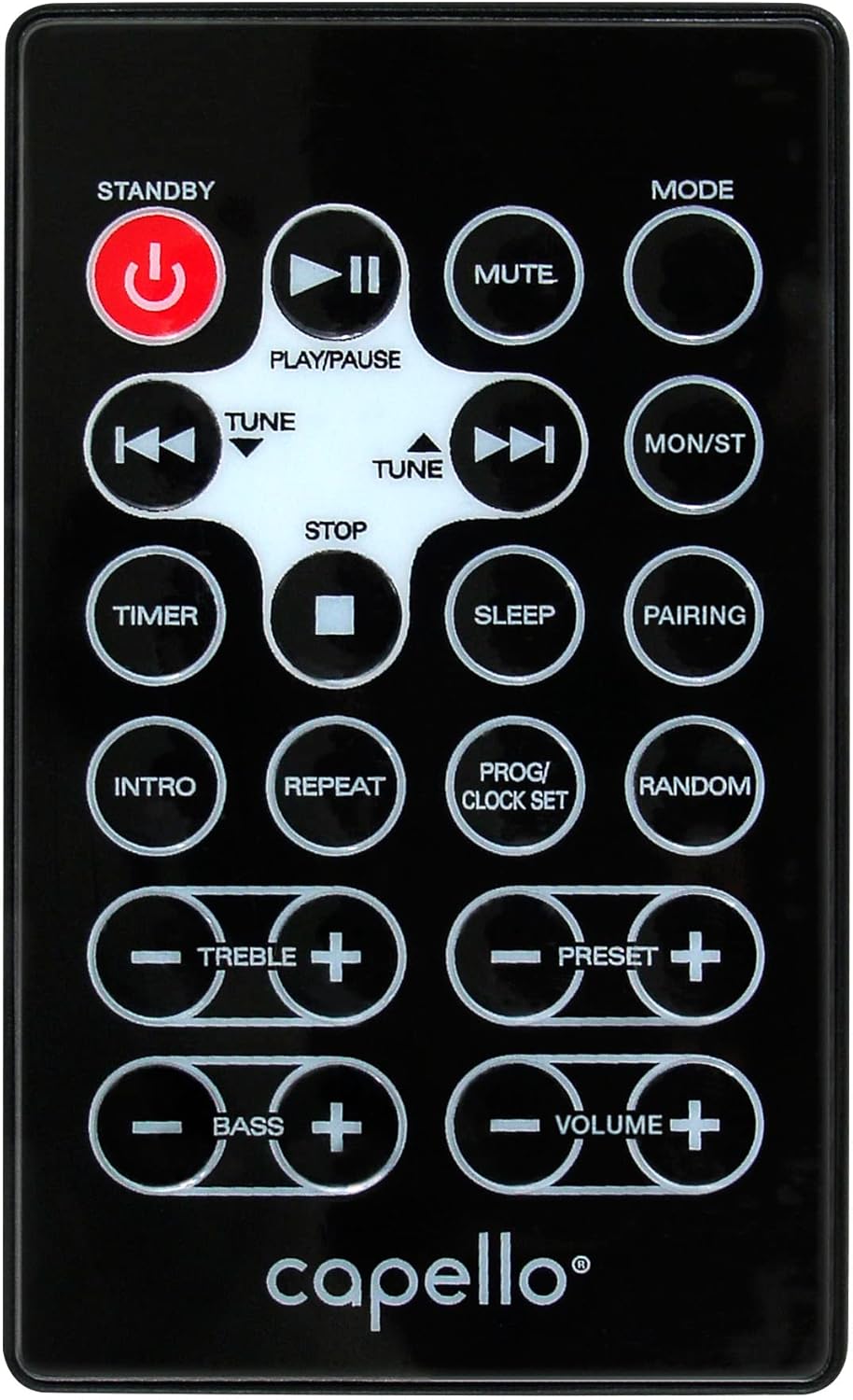
6.1. irudia: Layout of the remote control for the Capello Play it All speaker, showing buttons for Standby, Play/Pause, Mute, Mode, Skip/Tune, Stop, Timer, Sleep, Pairing, Intro, Repeat, Program/Clock Set, Random, Treble, Bass, and Volume controls.
- ITXARON: Piztu / itzali.
- Erreproduzitu/PAUSTU: Erreproduzitu edo pausatu audioa.
- MUTU: Desaktibatu edo aktibatu audioa.
- JARRAIBIDEAK: Cycle through input modes.
- SKIP/TUNE ◀◀ / ▶▶: Skip tracks or tune radio frequency.
- GELDITU: Erreproduzitzeari utzi.
- TEMPORIZATORIA: Ezarri lo egiteko tenporizadorea.
- LO: Activate sleep function.
- PAREKETA: Hasi Bluetooth parekatzea.
- SARRERA: Play the first few seconds of each CD track.
- ERREPIKATU: Repeat current track or all tracks.
- PROG/CLOCK SET: Program CD tracks or set clock.
- AUSAZKOA: Play CD tracks in random order.
- TREBLE +/-: Adjust treble levels.
- BASSO +/-: Adjust bass levels.
- BOLUMENA +/-: Doitu bolumen orokorra.
7. Mantentzea
7.1 Garbiketa
- Deskonektatu beti unitatea korronte-hartunetik garbitu aurretik.
- Erabili zapi leun eta lehor bat kanpoko gainazalak garbitzeko.
- Ez erabili garbitzaile, argizari edo disolbatzaile urratzailerik, akabera kaltetu baitezakete.
- CD lentearentzat, erabili CD lenteak garbitzeko disko espezializatu bat.
7.2 Biltegiratzea
If storing the unit for an extended period, unplug it from the power source and store it in a cool, dry place away from direct sunlight and extreme temperatures.
8. Arazoak
| Arazoa | Kausa posiblea | Irtenbidea |
|---|---|---|
| Botererik ez | Kable elektrikoa ez dago konektatuta; entxufea ez dago aktibo. | Ensure power cord is securely plugged in; try a different outlet. |
| Soinurik ez | Volume too low; incorrect mode selected; external device muted. | Increase volume; select correct input mode; check external device volume/mute. |
| CDak salto egiten du edo ez da erreproduzitzen | Dirty or scratched CD; CD inserted incorrectly; dirty CD lens. | Clean or replace CD; insert CD label-side up; use a CD lens cleaner. |
| Bluetooth parekatzeak huts egin du | Device too far; Bluetooth not enabled on device; speaker not in pairing mode. | Move device closer; enable Bluetooth; ensure speaker is in BT pairing mode. |
| FM harrera eskasa | Antena ez dago luzatuta; interferentzia. | Fully extend and reposition FM antenna; move away from other electronics. |
| Urruneko kontrola ez dabil | Batteries depleted; obstruction; not pointed at sensor. | Replace batteries; remove obstructions; point remote directly at the unit. |
9. Zehaztapenak
| Ezaugarri | Zehaztapena |
|---|---|
| Marka | Capello |
| Modelo zenbakia | CI302 |
| Konektibitate Teknologia | Bluetootha |
| Hizlari mota | Estereoa |
| Audio irteera modua | Estereoa |
| Onartutako audio formatuak | CD, MP3 |
| Bozgorailuen irteera-potentzia nominala | 10 Watt |
| Bozgorailuak Irteera-potentzia maximoa | 10 Watt |
| Bozgorailuen inguruko soinuaren kanalaren konfigurazioa | 2.0 |
| Energia iturri mota | Kable elektrikoa |
| Gailu bateragarriak | Ordenagailu eramangarria, telefono adimenduna, tableta |
| Ezaugarri bereziak | Digital Display, Portable, USB Port |
| Material Mota | Plastikoa |
| Muntatze Mota | Mahaiaren goialdea |
| Elementuaren pisua | 2.57 kilogramo |
| Paketearen neurriak | 38.3 x 24.2 x 18.5 cm |
| Pilak barne | Ez |
| Beharrezko bateriak | Ez |
10. Bermea eta Laguntza
This product is covered by a limited warranty. Please refer to the warranty card included in your package for specific terms and conditions. For technical support or customer service inquiries, please contact Capello customer support through their official webgunea edo erosketa-dokumentazioarekin batera emandako harremanetarako informazioa.