1. Produktua amaitu daview
The MEDca Digital Hearing Amplifier is a personal sound enhancement device designed to amplify speech frequencies, helping users to hear conversations more clearly. This rechargeable, behind-the-ear (BTE) amplifier features advanced digital sound processing with noise reduction technology, offering a compact, lightweight, and discreet solution for improved hearing.
Paketearen edukia
Upon opening your MEDca Digital Hearing Amplifier package, please verify that all components listed below are present:
- 2 x Hearing Amplifiers (Blue)
- 1 x Hard Plastic Storage Case
- 1 x USB Rechargeable Dock
- 1 x Egokigailua
- 1 x Cleaning Set (includes 2 cleaning brushes)
- 1 x Biltegiratzeko poltsa
- 1 x Argibide eskuliburua (dokumentu hau)
- Multiple sizes of Easy Comfort Ear Plugs (10 ear domes)
- 1 x Charging Cable for Device
- 1 x Type-C Charging Cable for Dock

2. Konfigurazio gida
2.1 Hasierako karga
Before first use, fully charge your MEDca Digital Hearing Amplifiers. The devices feature a rechargeable battery designed to last all day on a single charge. A full charge typically takes 2-3 hours and provides 30-45 hours of single use. The charging case can extend battery life by providing 4-5 additional charges on-the-go.

2.2 Kargatzeko metodoak
Zure entzumena amplifiers can be charged using two methods:
- Dual Charging Convenience: Jarri biak amplifiers into the charging dock. The blue light indicates devices are charging, and turns off when charging is complete. The charging dock itself has a blinking green light while charging and a steady green light when fully charged.
- Stand-alone Charging: Bakoitzak amplifier can be charged individually using the provided charging cable. A green light indicates the device is charging, and turns off when charging is complete.

2.3 Sartu eta kendu Ampbiziagoa
- To insert the hearing amplifier, gently pull up on your ear to straighten the ear canal.
- Jarri amplifier over your ear, directing the sound tube toward your ear canal.
- Twist the earplug into place until it is comfortably secure.
- To remove, gently pull the amplifier away from your ear.

3. Funtzionamendu-argibideak
The MEDca Digital Hearing Amplifier is designed for ease of use, featuring a simple one-touch digital frequency control and no complicated programming required.
3.1 Piztu/Itzali
- To power on the device, slide the power button to the "ON" position.
- To shut down the device, slide the power button to the "OFF" position.
3.2 Bolumenaren doikuntza
Use the volume control buttons to adjust the sound level. It is recommended to start with a lower volume and gradually increase it as needed for comfortable listening. The device features six modes for precision amplification, allowing you to modify tone and volume for optimal clarity.
4. Mantentzea eta Zainketa
4.1 Gailua garbitzea
Regular cleaning is essential for maintaining the performance and longevity of your hearing ampbiziagoa.
- Garbitu aldizka gailua zapi leun eta lehor batekin.
- Avoid getting moisture on the device.
- Use the provided cleaning tool or brush to remove any earwax buildup from the sound outlet.
4.2 Biltegiratzea
When not in use, store your hearing amplifier in a cool, dry place. Utilize the provided hard plastic case for safekeeping to protect the device from damage and dust.
5. Arazoak
If you encounter any issues with your MEDca Digital Hearing Amplifier, please refer to the following common troubleshooting tips:
| Arazoa | Kausa posiblea | Irtenbidea |
|---|---|---|
| Soinurik ez edo soinu ahula | Low battery; Earwax buildup in sound outlet; Incorrect volume setting; Device is off. | Ensure device is fully charged; Clean the sound outlet with the provided brush; Adjust volume to a higher setting; Turn the device on. |
| Whistling or feedback noise | Improper fit in ear; Earplug not sealed properly; Volume too high. | Sartu berriro amplifier to ensure a snug fit; Try a different size earplug for a better seal; Reduce the volume. |
| Gehiegizko hondoko zarata | Volume set too high; Environmental factors. | Lower the volume; The device amplifies all sounds, so some background noise is normal. Adjust settings for optimal speech clarity. |
| Gailua ez da kargatzen | Charging cable or dock not properly connected; Faulty power source. | Ensure all connections are secure; Try a different USB port or power adapter. |
If problems persist after attempting these solutions, please contact MEDca customer support for further assistance.
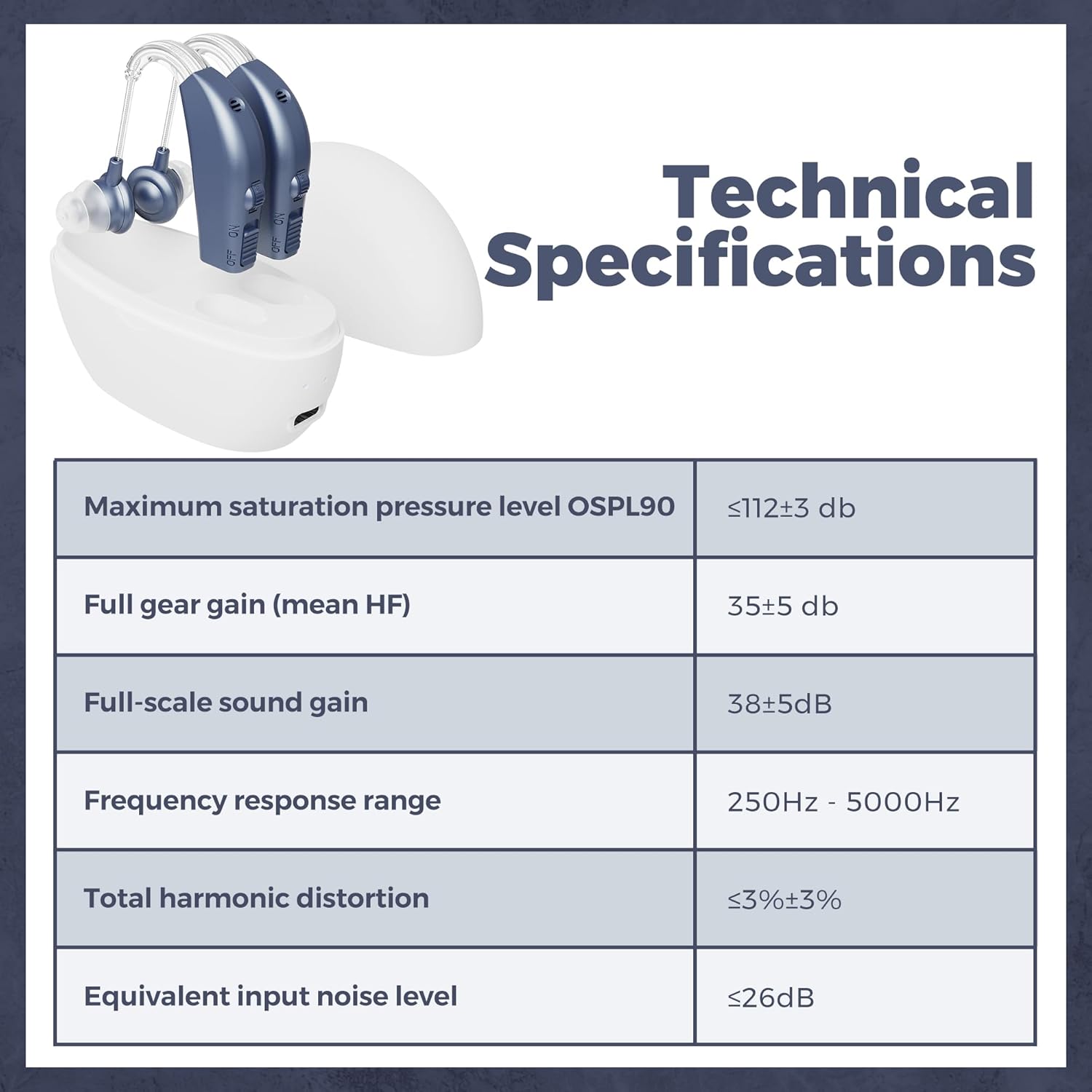
6. Zehaztapen Teknikoak
| Ezaugarri | Zehaztapena |
|---|---|
| Ereduaren izena | LYB44-N2 |
| Maximum Saturation Pressure Level (OSPL90) | ≤112±3 db |
| Full Gear Gain (mean HF) | 35±5 db |
| Full-Scale Sound Gain | 38±5dB |
| Maiztasun-erantzunaren barrutia | 250 Hz - 5000 Hz |
| Distortsio harmoniko osoa | ≤3%±3% |
| Sarrerako zarata maila baliokidea | ≤26dB |
| Energia iturria | Bateriak (kargagarria) |
| Produktuaren neurriak | 1 x 1 x 1 hazbete; 6.7 ontza |
| Materiala | Plastikoa |
| Kolorea | Urdina |

7. Bermea eta Laguntza
7.1 Product Quality and Satisfaction
MEDca stands by the quality of its products. Each digital hearing amplifier undergoes extensive testing to ensure superb quality and optimal performance in clearly amplifying sounds. Your satisfaction is important to us.
7.2 Laguntzarekin harremanetan jartzea
If you are not satisfied with your MEDca Digital Hearing Amplifier set for any reason, or if you require assistance with troubleshooting or general inquiries, please contact MEDca customer support. Refer to the contact information provided on the product packaging or the official MEDca webwebgunean laguntza-xehetasun eguneratuenak lortzeko.
For more information and support, visit the official MEDca Store: MEDca Store on Amazon.


