Segurtasun-argibide garrantzitsuak
Always observe basic safety precautions when using this power tool to reduce the risk of fire, electric shock, and personal injury.
- Lan eremuko segurtasuna: Mantendu zure lan-eremua garbi eta ondo argiztatuta. Gune nahasi edo ilunetan istripuak gerta daitezke. Ez erabili tresna elektrikorik leherketa-atmosferan, hala nola likido, gas edo hauts sukoien aurrean.
- Segurtasun elektrikoa: Saihestu gorputzaren kontaktua lurrarekin edo lurretik loturiko gainazalekin, hala nola hodiak, erradiadoreak, sukaldeak eta hozkailuak. Deskarga elektrikoa jasateko arriskua areagotu egiten da zure gorputza lurrarekin edo lurrarekin lotuta badago.
- Segurtasun pertsonala: Always wear eye protection. Use hearing protection when operating the tool for extended periods. Wear a dust mask if working in dusty conditions. Dress properly. Do not wear loose clothing or jewelry. Keep your hair, clothing, and gloves away from moving parts.
- Tresnaren erabilera eta zaintza: Ez behartu tresna elektrikoa. Erabili zure aplikaziorako tresna elektriko egokia. Tresna elektriko egokiak hobeto eta seguruago egingo du lana diseinatu zen abiaduran. Deskonektatu bateria-paketea tresna elektrikotik doikuntzak egin, osagarriak aldatu edo tresna elektrikoak gorde aurretik.
- Bateriaren erabilera eta zaintza: Kargatu fabrikatzaileak zehaztutako kargagailuarekin soilik. Bateria mota baterako egokia den kargagailu batek sute-arriskua sor dezake beste bateria batekin erabiltzen denean. Erabili tresna elektrikoak berariaz izendatutako bateria-paketeekin soilik.
Produktua amaituview
The STANLEY FMCD900B-XJ is a powerful 18V BRUSHLESS SDS-Plus hammer drill designed for efficient drilling and chiseling in various materials. This section identifies the main components of your tool.

1. irudia: The STANLEY FMCD900B-XJ SDS-Plus 18V BRUSHLESS Hammer Drill. This image shows the overall design of the hammer drill, highlighting its ergonomic handle and compact form factor.
Funtsezko osagaiak:
- SDS-Plus txirrika: Bitak azkar eta seguru aldatzeko.
- Modu hautatzailea: Allows switching between drilling, hammer drilling, and chiseling modes.
- Helduleku laguntzailea: Kontrol eta egonkortasun gehigarria eskaintzen du funtzionamenduan zehar.
- Sakonera-haga: Zulatzeko sakonera zehatz-mehatz kontrolatzeko.
- Aktibatzeko etengailua: Tresna aktibatzen du.
- Bateria ataka: For inserting the 18V STANLEY FATMAX battery (sold separately).
- Laneko LED argia: Lan-eremua argitzen du.
Konfigurazioa
1. Bateria instalatzea eta kentzea
This tool requires an 18V STANLEY FATMAX battery (not included). Ensure the battery is fully charged before use.
- Instalatzeko: Align the battery pack with the battery port on the tool. Slide the battery pack into the tool until it clicks securely into place.
- Kentzeko: Sakatu bateria askatzeko botoia (normalean bateria-paketean dago) eta atera bateria-paketea tresnatik.

2. irudia: Checking the battery charge level. The image shows a finger pressing the battery indicator button, illuminating three green LED bars, indicating a good charge.
2. SDS-Plus Bit Installation and Removal
The SDS-Plus chuck allows for quick and tool-free bit changes.
- Instalatzeko: Pull back the chuck collar and insert the SDS-Plus bit into the chuck. Rotate the bit slightly until it engages with the locking mechanism. Release the chuck collar. Pull on the bit to ensure it is securely locked. Note: SDS-Plus bits have a slight play when correctly installed; this is normal.
- Kentzeko: Pull back the chuck collar firmly and pull the bit out of the chuck.

3. irudia: Installing an SDS-Plus bit. The image shows a hand holding an SDS-Plus chisel bit, ready to be inserted into the tool's chuck, demonstrating the quick-change mechanism.
3. Adjusting the Auxiliary Handle and Depth Rod
- Helduleku laguntzailea: Loosen the auxiliary handle by rotating it counter-clockwise. Adjust it to a comfortable and secure position, then tighten by rotating clockwise.
- Sakonera-haga: Insert the depth rod into the hole on the auxiliary handle. Adjust the rod to the desired drilling depth. The tip of the bit should extend beyond the end of the depth rod by the desired drilling depth.
Funtzionamendu-argibideak
1. Funtzionamendu modua hautatzea
The FMCD900B-XJ offers three operating modes: Rotary Drilling, Hammer Drilling, and Chiseling.

4. irudia: Adjusting the mode selector. The image shows a hand rotating the black mode selector dial on the side of the tool, indicating the selection of an operating mode.
- Zulaketa birakaria (Zulagailuaren ikonoa): For drilling in wood, metal, plastics, and other materials that do not require hammer action.
- Mailu-zulatzailea (Mailu eta zulagailuaren ikonoa): For drilling in concrete, masonry, and stone. This mode combines rotation with hammering action.
- Zizelkatzea (Zizelaren ikonoa): For light chiseling, chipping, or demolition work in masonry. The bit rotates freely for positioning, but locks during operation.
To change modes, rotate the mode selector dial to the desired icon. Ensure the tool is switched off before changing modes.
2. Funtzionamendu Orokorra
- Tresna martxan jartzea: Grip the tool firmly with both hands. Press the trigger switch to start the tool. The LED work light will illuminate the work area.
- Tresna gelditzea: Askatu abiarazle-etengailua tresna gelditzeko.
- Zulaketa: Egin presio etengabe eta uniformea. Ez behartu tresna. Utzi tresnari lana egiten.
- Txistuketa: Position the chisel bit at the desired angle. Apply light pressure and allow the hammer action to break the material.
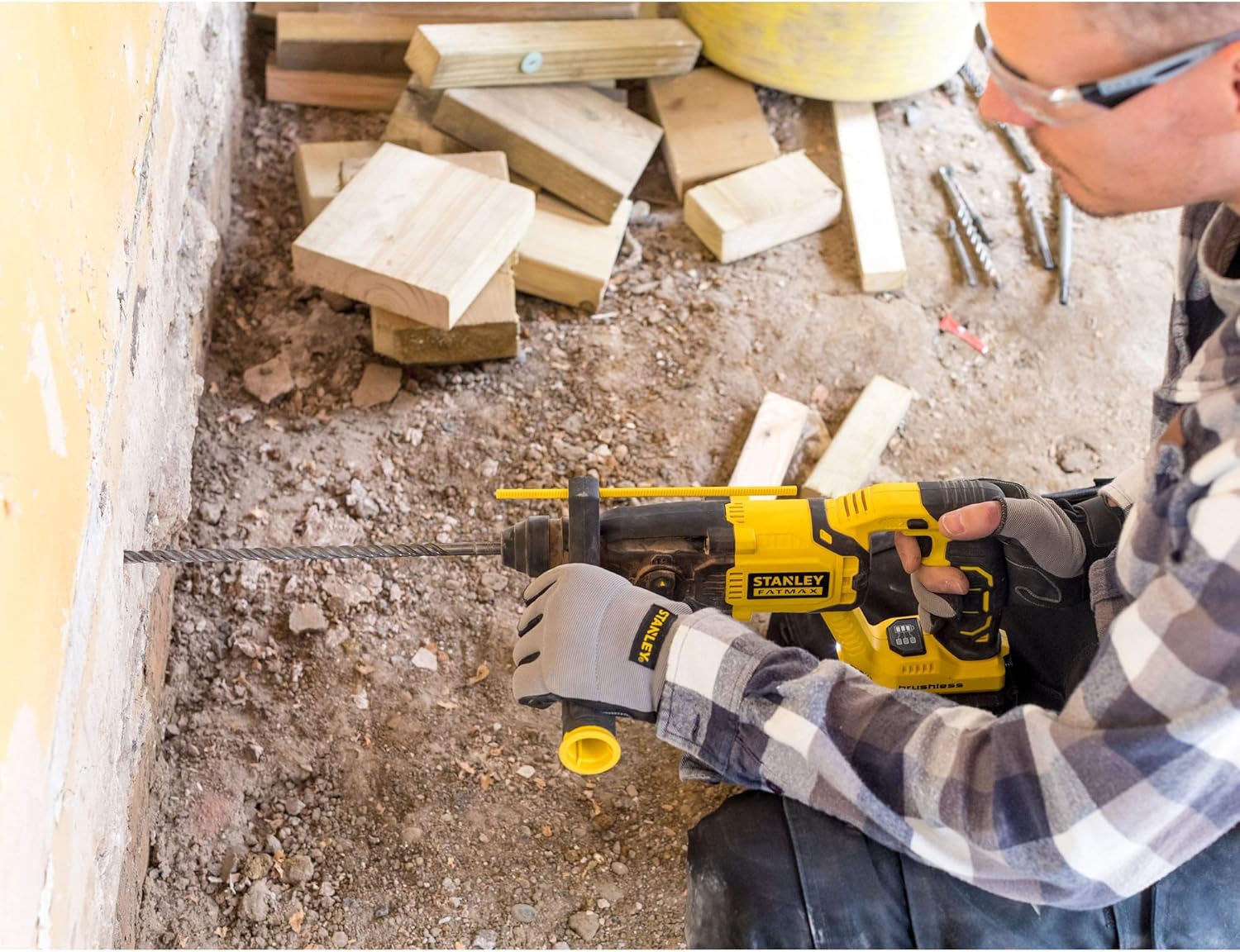
5. irudia: Drilling operation. A user is shown wearing safety glasses and ear protection, operating the hammer drill to create a hole in a brick wall, demonstrating proper handling and safety.

6. irudia: Chiseling operation. A user is shown wearing safety glasses and ear protection, using the hammer drill with a chisel bit to remove material from a brick wall, illustrating the tool's chiseling capability.
Mantentzea
Mantentze-lan erregularrak errendimendu optimoa bermatzen du eta zure tresnaren bizitza luzatzen du.
- Garbiketa: Keep the ventilation slots clean to prevent overheating. Use a soft brush or dry cloth to remove dust and debris. Do not use water or chemical cleaners.
- Lubrifikazioa: The SDS-Plus chuck mechanism benefits from occasional lubrication. Apply a small amount of SDS grease to the shank of the drill bits before insertion to reduce wear.
- Biltegiratzea: Store the tool and battery pack in a cool, dry place, away from direct sunlight and moisture. Ensure the battery is removed from the tool before storage.
- Ikuskapena: Periodically inspect the tool for any damage, loose screws, or worn parts. If any damage is found, have it repaired by an authorized service center before further use.
Arazoak konpontzea
| Arazoa | Kausa posiblea | Irtenbidea |
|---|---|---|
| Tresna ez da abiarazten. | Bateria ez dago behar bezala sartuta edo deskargatuta. | Ziurtatu bateria guztiz sartuta dagoela. Kargatu bateria-paketea. |
| Errendimendu murriztua edo gehiegi berotzea. | Ventilation slots blocked. Tool overloaded. | Clean ventilation slots. Reduce pressure on the tool. Allow tool to cool down. |
| Bit not locking into chuck. | Chuck collar not pulled back sufficiently. Bit shank dirty or damaged. | Pull chuck collar back fully. Clean or replace bit. |
| Gehiegizko bibrazioa. | Worn or damaged bit. Incorrect mode selected. | Replace bit. Ensure correct mode is selected for the application. |
Zehaztapenak
| Ezaugarri | Xehetasuna |
|---|---|
| Modelo zenbakia | FMCD900B-XJ |
| Marka | STANLEY |
| Energia iturria | Bateriaren bidez |
| liburukiatage | 18 Volt |
| Zulagailu mota | Hammer drill |
| Chuck mota | SDS Plus |
| Motor Mota | Eskuilarik gabekoa |
| Elementuaren pisua | 2.2 kilogramo (4.84 libra) |
| Produktuaren neurriak | 15.55 x 3.74 x 4.13 hazbete |
| Pilak barne | Ez (Tresna Bakarrik) |
| Bateria zelula mota | Litioa |
Bermea eta Laguntza
STANLEY provides a warranty for this product against defects in materials and workmanship. For detailed warranty information, please refer to the warranty card included with your purchase or visit the official STANLEY webgunea.
For technical support, service, or to order replacement parts, please contact STANLEY customer service through their official channels. Keep your proof of purchase for warranty claims.


