1. Sarrera
Eskerrik asko erosketagatik.asing the Ematic EMHD130LED HD 16GB Music Player. This compact and portable device allows you to enjoy your favorite music on the go. Featuring a 1.3-inch OLED display and a MicroSD slot for expanded storage, it is designed for ease of use and portability. This manual provides detailed instructions for setting up, operating, and maintaining your music player.
2. Segurtasun informazio garrantzitsua
- Ez jarri gailua tenperatura altuen, eguzki-argiaren eraginpean edo hezetasun handiaren eraginpean.
- Saihestu gailua kolpe gogorrak erortzea edo jasaten.
- Ez saiatu gailua zeuk desmuntatzen edo konpontzen. Mantendu mantentze-lan guztiak langile kualifikatuen esku.
- Mantendu gailua uretatik eta beste likidoetatik urrun.
- Erabili fabrikatzaileak onartutako osagarriak soilik.
- Tokiko araudien arabera bota gailua eta bateria arduraz.
3. Paketearen edukia
Mesedez, egiaztatu paketea elementu hauek dituen:
- Ematic EMHD130LED HD 16GB Music Player
- Erabiltzailearen eskuliburua (dokumentu hau)
- Note: A USB charging/data transfer cable is typically required and may be sold separately.
4. Produktua amaitu daview
Familiarize yourself with the components and controls of your Ematic music player.
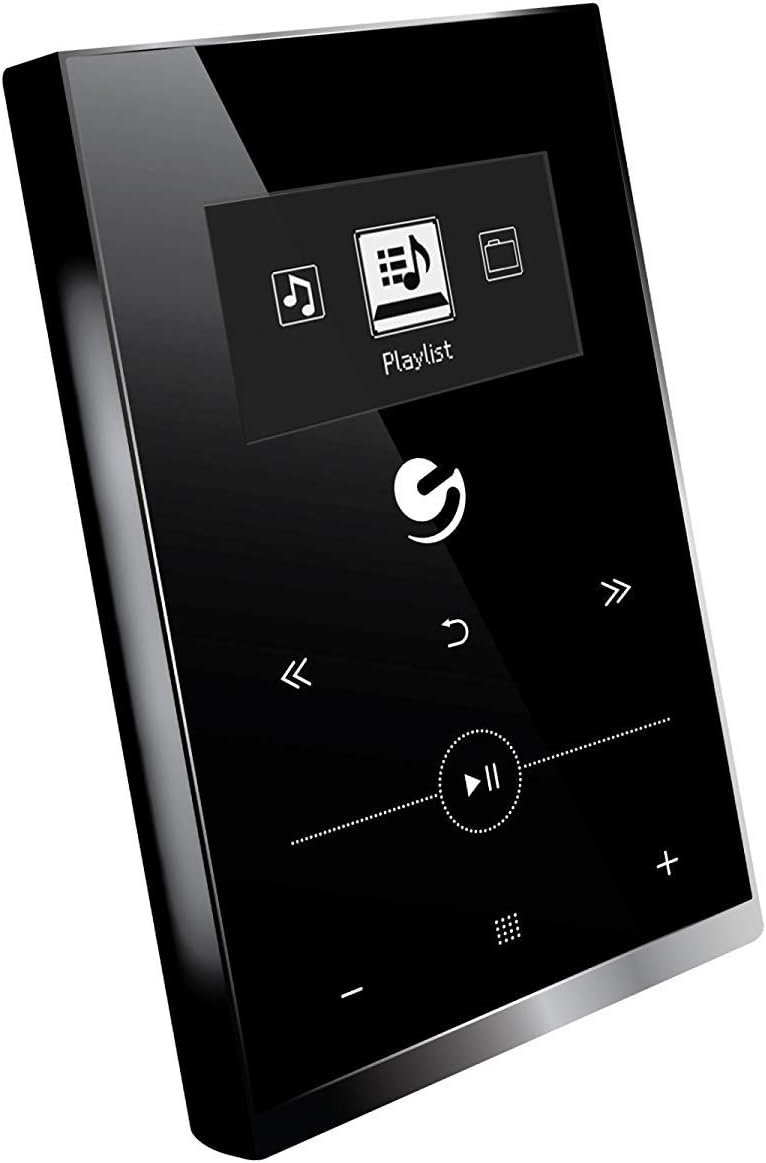
4.1. irudia: Aurrealdea view of the Ematic EMHD130LED Music Player, highlighting its 1.3-inch OLED display and touch-sensitive controls for navigation and playback.

4.2. irudia: The Ematic EMHD130LED Music Player shown in a typical usage scenario, demonstrating its small form factor suitable for connection to a computer for media transfer.
Kontrolak eta Portuak:
- OLED pantaila: 1.3-inch screen for track information and menu navigation.
- Nabigazio botoiak: (Implied from image) Up, Down, Left, Right, Select/Play/Pause.
- Bolumen kontrolak: (Implied from image) Plus (+) and Minus (-) buttons for adjusting audio output.
- MicroSD zirrikitua: For expanding storage capacity beyond the internal 16GB.
- USB ataka: For connecting to a computer for charging and data transfer.
5. Konfigurazioa
5.1 Gailua kargatzea
Before first use, fully charge your music player. Connect the device to a computer's USB port or a compatible USB wall adapter using a USB cable. The OLED display will indicate charging status. A full charge typically takes a few hours.
5.2 Loading Music
The Ematic EMHD130LED has 16GB of internal storage. You can add more music using a MicroSD card (sold separately).
- Ordenagailuaren bidez: Plug your media player directly into your computer using a USB cable. The device will appear as a removable drive. Drag and drop your MP3 audio files into the player's music folder.
- Via MicroSD Card: Insert a MicroSD card into the designated slot on the player. You can transfer music files directly to the MicroSD card via a card reader on your computer, or transfer them to the card once it's in the player and connected to the computer.
6. Funtzionamendu-argibideak
6.1 Piztu/Itzali
Press and hold the Power button (location not specified, typically a side button or integrated with Play/Pause) for a few seconds to turn the device on or off.
6.2 Oinarrizko nabigazioa
Use the navigation buttons (Up, Down, Left, Right) to browse through menus and select options on the 1.3-inch OLED display. Press the central Select button to confirm a selection or play a track.
6.3 Musika erreproduzitzea
- From the main menu, navigate to 'Music' or 'Playlist'.
- Browse through your stored music by artist, album, genre, or all songs.
- Select a track and press the Play/Pause button to begin playback.
- Use the Skip Forward/Backward buttons to change tracks.
- Adjust the volume using the Volume Up (+) and Volume Down (-) buttons.
6.4 Using the MicroSD Card
Once a MicroSD card is inserted and contains music, the player will automatically detect it. You can typically switch between internal storage and MicroSD card content through the music menu settings.
7. Mantentzea
- Garbiketa: Erabili zapi leun, lehor eta lihorik gabeko bat gailua garbitzeko. Ez erabili garbitzaile edo disolbatzaile urratzailerik.
- Biltegiratzea: Denbora luzez erabiltzen ez duzunean, gorde gailua leku fresko eta lehor batean, eguzki-argitik babestuta.
- Bateria zaintzea: Bateriaren iraupena luzatzeko, saihestu bateria maiz erabat deskargatzea. Kargatu gailua aldizka, erabiltzen ez bada ere.
8. Arazoak
| Arazoa | Kausa posiblea | Irtenbidea |
|---|---|---|
| Gailua ez da pizten. | Bateria agortuta dago. | Kargatu gailua gutxienez 30 minutuz. |
| Soinurik ez. | Volume is too low or muted; Headphones not connected properly. | Increase volume; Ensure headphones are fully plugged in. |
| Ezin da transferitu files. | Incorrect USB connection; Driver issue; Corrupted files. | Ensure USB cable is securely connected; Try a different USB port or cable; Restart computer and player; Check file formatua (MP3 formatua bakarrik onartzen da). |
| Pantaila hutsik edo izoztuta dago. | Softwarearen akatsa. | Berrabiarazteko, sakatu eta eutsi pizteko botoia 10-15 segundoz. |
9. Zehaztapenak
| Ezaugarri | Xehetasuna |
|---|---|
| Marka | Ematika |
| Eredua | EMHD130LED |
| Ereduaren izena | 16GB High Definition Music Player with 1.3-inch OLED Display |
| Memoria Biltegiratzeko Ahalmena | 16 GB (Barne) |
| Biltegiratze Digitalaren Ahalmena | 16 GB |
| Gailu bateragarriak | Ordenagailu eramangarria, Ordenagailu pertsonala |
| Bistaratzeko mota | OLEDa |
| Pantailaren tamaina | 1.3 hazbete |
| Konektore mota | USBa |
| bateragarria den euskarri mota | MP3 |
| Media mota | Mikro SD |
| Produktuaren neurriak | 11.99 x 8.48 x 2.84 cm; 312.98 g |
| Bateriaren zelulen konposizioa | Litio ioia |
| Bateria kargagarria | Bai |
| Fabrikatzailea | Shaghai LTD |
| Eskuragarri dagoen lehen data | 26ko martxoaren 2018a |
10. Bermea eta Laguntza
For warranty information and customer support, please refer to the warranty card included with your product or visit the official Ematic website. You may also contact Ematic customer service directly for assistance with product issues or inquiries.
Ematic Official Webgunea: www.ematic.us (Note: This is a general placeholder link for Ematic's website. Please verify the correct support URL zure eskualderako.)


